Fluxos de treball de traducció
L’ús de Weblate augmenta la qualitat, redueix el treball manual i apropa tots els implicats en el procés de localització. Depèn de tu decidir quantes funcions de Weblate vols fer servir.
La següent no és una llista completa de maneres de configurar Weblate. Podeu basar altres fluxos de treball en els exemples enumerats aquí.
Personalització del flux de treball
In addition to configuration at Configuració del projecte and Configuració dels components (as Activa les revisions, Habilita suggerències, Vots als suggeriments, and Accepta automàticament els suggeriments), the translation workflow can be customized per language.
La personalització del flux de treball a tot el lloc es pot fer mentre Canvi de definicions de la llengua.
La personalització per projecte es pot fer a cada pàgina d’idiomes del projecte.
Review and suggestion settings can be overridden, the only limitation is that Activa les revisions needs to be turned on and can only be disabled in the per-language customization.
S’aplica la primera configuració existent:
Project-language customization
Language customization
The project/component settings
Nota
Si us plau, aneu amb compte quan feu servir la substitució a tot el lloc, ja que s’aplica a tots els projectes (tret que tinguin substitucions pròpies per a un idioma determinat).
Custom source language
Select Source language in a project’s language workflow settings to translate from another language in the same project. For example, you can translate a regional language variant from its parent language. Leave the selection empty to use the component’s source language.
The selected language’s translation is displayed as the source in the editor and used for translation checks, automatic translation, and translation memory. The original source strings and file identifiers remain unchanged.
Changing a parent translation marks its translated children as needing editing. Children are read-only while their parent is untranslated or needs editing, including when reviews are disabled. A parent that is translated (waiting for review) or approved permits editing. This restriction also applies through multiple levels of parent languages. Languages cannot depend on themselves or form a cycle.
If a component lacks the selected language or a matching string, its children are read-only until that source becomes available. Weblate preserves their translations and the configured source language; it does not fall back to the component source. Clearing the setting or selecting the component source language restores the canonical source. Moving a component applies the destination project’s workflow settings. Changing workflow settings updates affected strings before returning; on large projects, this can delay translation edits.
Languages selected as custom sources cannot be deleted until these workflow settings are cleared or changed to another language.
This setting can only be configured per project and language. Existing intermediate language configuration continues to control the component source.
Workflow changes affect new translation-memory updates. Previously stored source and target pairs remain subject to the existing translation-memory retention and cleanup settings. A missing source does not create an active memory entry.
Limiting translation languages
Several settings can limit translation languages. They address different stages of the translation lifecycle and can be combined:
- Control requests for languages that do not exist yet
Configure Addició de traduccions noves at workspace, project, category, or component level. Categories and components can inherit this setting; see Settings inheritance. You can let users contact maintainers, point them to translation instructions, create the language file automatically, or disable adding new translations.
Project admins can still add a translation when Weblate can create its file. For components that do not inherit the project setting, change Addició de traduccions noves individually or automate the changes using
PATCH /api/components/(string:project)/(string:component)/.To allow existing project languages while requesting approval for new ones, select Create existing project languages; contact maintainers for new languages. A language qualifies when any non-glossary component in the project has a target translation for it, even with no translated strings. Source-only languages and glossary translations do not qualify. This applies across categories, including shared components and components the contributor cannot access.
Maintainers approve a language by creating its first target translation. Removing the last qualifying translation removes eligibility. Component overrides that allow unrestricted language creation can also introduce an eligible language. Project and category submissions use the languages present at the start of the operation, so component processing order does not affect the result.
Project and category submissions modify only components owned by that project or category. To add a language to a shared component, use its own language creation page; the owning project’s eligibility and permissions apply there.
The REST translation creation endpoint returns HTTP 403 for languages requiring approval; submit these requests through the web interface. The permission to add several languages does not bypass this policy. Maintainers and trusted add-ons retain their existing creation permissions, and repository file discovery is unaffected.
Disabling new translations controls user requests. It does not stop discovery of translation files added to the repository or automatic glossary language synchronization.
- Limit which translation files Weblate discovers or creates
Configure Filtre de llengua on each component. For example,
^(de|en|fr)$limits the component to translation files whose language code isde,en, orfr. The filter applies while scanning the component file mask and when creating a new translation file; it does not change permissions for translations that are already present.Language filters are configured per component, with no project-wide language allowlist. To apply a filter across many components, automate the changes using
PATCH /api/components/(string:project)/(string:component)/.- Grant translation access only for selected languages
Use language-scoped teams when different users should be able to translate different languages. A team can only grant permissions, so remove any broader translation permission that would otherwise apply to the same users.
- Restrict direct editing of an existing language
Open the language settings in the project, enable Customize translation workflow for this language in this project, and turn on Restrict direct editing.
Users with the Edit string when suggestions are enforced permission can continue editing directly. Other users can add suggestions when Turn on suggestions is enabled. Turn off suggestions as well to make the language editable only by privileged users.
The restriction can also be configured site-wide while Canvi de definicions de la llengua. A project-language customization takes precedence over the site-wide language setting.
- Use suggestion voting
Turn on Suggestion voting to let users vote on suggestions. Voting alone does not restrict direct editing. A positive Automatically accept suggestions threshold also requires users without the Edit string when suggestions are enforced permission to submit suggestions. Use Restrict direct editing when this restriction should not depend on automatic acceptance.
Accés a la traducció
El control d’accés no es parla en detall en el conjunt dels fluxos de treball, ja que la majoria de les seves opcions es poden aplicar a qualsevol flux de treball. Consulteu la documentació corresponent sobre com gestionar l’accés a les traduccions.
En els capítols següents, qualsevol usuari significa un usuari que té accés a la traducció. Pot ser qualsevol usuari autenticat si el projecte és públic, o un usuari amb permís Traduir al projecte.
Estats de traducció
Cada cadena traduïda pot estar en un dels estats següents:
- Sense traduir
La traducció és buida, es pot emmagatzemar o no al fitxer, depenent del format del fitxer.
- Cal editar
La traducció necessita edició, això sol ser el resultat d’una concordança difusa o d’una acció del traductor. Depenent del format del fitxer, es pot marcar com a necessitat d’edició (per exemple, ja que obté una bandera
fuzzyal fitxer gettext).- Cal reescriure
La traducció s’ha de reescriure a causa d’un canvi de cadena d’origen.
- Cal revisar
Estat utilitzat per a les cadenes font/plantilla que necessiten una revisió del desenvolupador. Normalment s’estableix per a cadenes d’origen noves importades del VCS quan el complement d’edició d’origen està habilitat o quan s’informa d’una cadena d’origen per comprovar-la.
- Translated / Waiting for review
La traducció es fa. L’estat traduït es mostra com a «En espera de revisió» si les ressenyes estan activades.
- Aprovada
La traducció s’ha aprovat a la revisió. Ja no el poden canviar els traductors, sinó només els revisors. Els traductors només hi poden afegir suggeriments.
Aquest estat només està disponible quan les revisions estan activades.
- Només lectura
La cadena és només de lectura com a resultat de tenir
només de lecturamarca, sent una cadena d’origen no editable, o marcada així al fitxer de traducció.- Suggeriments
Els suggeriments s’emmagatzemen només a Weblate i no al fitxer de traducció.
The states are represented in the translation files when possible.
Suggeriment
Si el format de fitxer que utilitzeu no admet l’emmagatzematge d’estats, és possible que vulgueu utilitzar el complement Flag unchanged translations as «Needs rewriting» per marcar les cadenes sense canvis que necessiten reescriure.
Nota
The Filtre de qualitat de les traduccions determines which translation states are stored in the file.
Traducció directa
La configuració més habitual per a equips més petits, on qualsevol pot traduir directament. Aquesta també és la configuració predeterminada a Weblate.
Qualsevol usuari pot editar les traduccions.
Els suggeriments són maneres opcionals de suggerir canvis, quan els traductors no estan segurs del canvi.
Setting |
Value |
Nota |
|---|---|---|
Activa les revisions |
desactivada |
Configurat a nivell de projecte. |
Habilita suggerències |
activada |
Útil perquè els usuaris puguin suggerir quan no estan segurs. |
Vots als suggeriments |
desactivada |
|
Accepta automàticament els suggeriments |
0 |
|
Grup de traductors |
«Usuaris». |
Or Translate with per-project access control. |
Grup de revisors |
N/A |
No s’utilitza. |
Revisió per parells
Amb aquest flux de treball, qualsevol pot afegir un suggeriment, que necessita l’aprovació de membres addicionals abans que sigui acceptat com a traducció.
Qualsevol usuari pot afegir suggeriments.
Qualsevol usuari pot votar els suggeriments.
Els suggeriments es converteixen en traduccions quan se’ls dóna un nombre predeterminat de vots.
Setting |
Value |
Nota |
|---|---|---|
Activa les revisions |
desactivada |
Configurat a nivell de projecte. |
Habilita suggerències |
activada |
|
Vots als suggeriments |
activada |
|
Accepta automàticament els suggeriments |
2 |
Podeu establir un valor més alt per requerir més revisions per iguals. |
Grup de traductors |
«Usuaris». |
Or Translate with per-project access control. |
Grup de revisors |
N/A |
No s’utilitza, tots els traductors revisen. |
Revisors dedicats
Amb revisors dedicats, teniu dos grups d’usuaris, un pot enviar traduccions i un altre capaç de revisar-les per garantir que les traduccions siguin coherents i que la qualitat sigui bona.
Qualsevol usuari pot editar les traduccions no aprovades.
Reviewer can approve / unapprove strings.
El revisor pot editar totes les traduccions (incloses les aprovades).
Els suggeriments també es poden utilitzar per suggerir canvis per a les cadenes aprovades.
Setting |
Value |
Nota |
|---|---|---|
Activa les revisions |
activada |
Configurat a nivell de projecte. |
Habilita suggerències |
activada |
Útil perquè els usuaris puguin suggerir quan no estan segurs. |
Vots als suggeriments |
desactivada |
|
Accepta automàticament els suggeriments |
0 |
|
Grup de traductors |
«Usuaris». |
Or Translate with per-project access control. |
Grup de revisors |
«Revisors». |
Or Review with per-project access control. |
S’està activant les ressenyes
Les revisions es poden activar a la configuració del projecte, des de la subpàgina Flux de treball de la configuració del projecte (que es pot trobar al menú Operacions → Configuració):
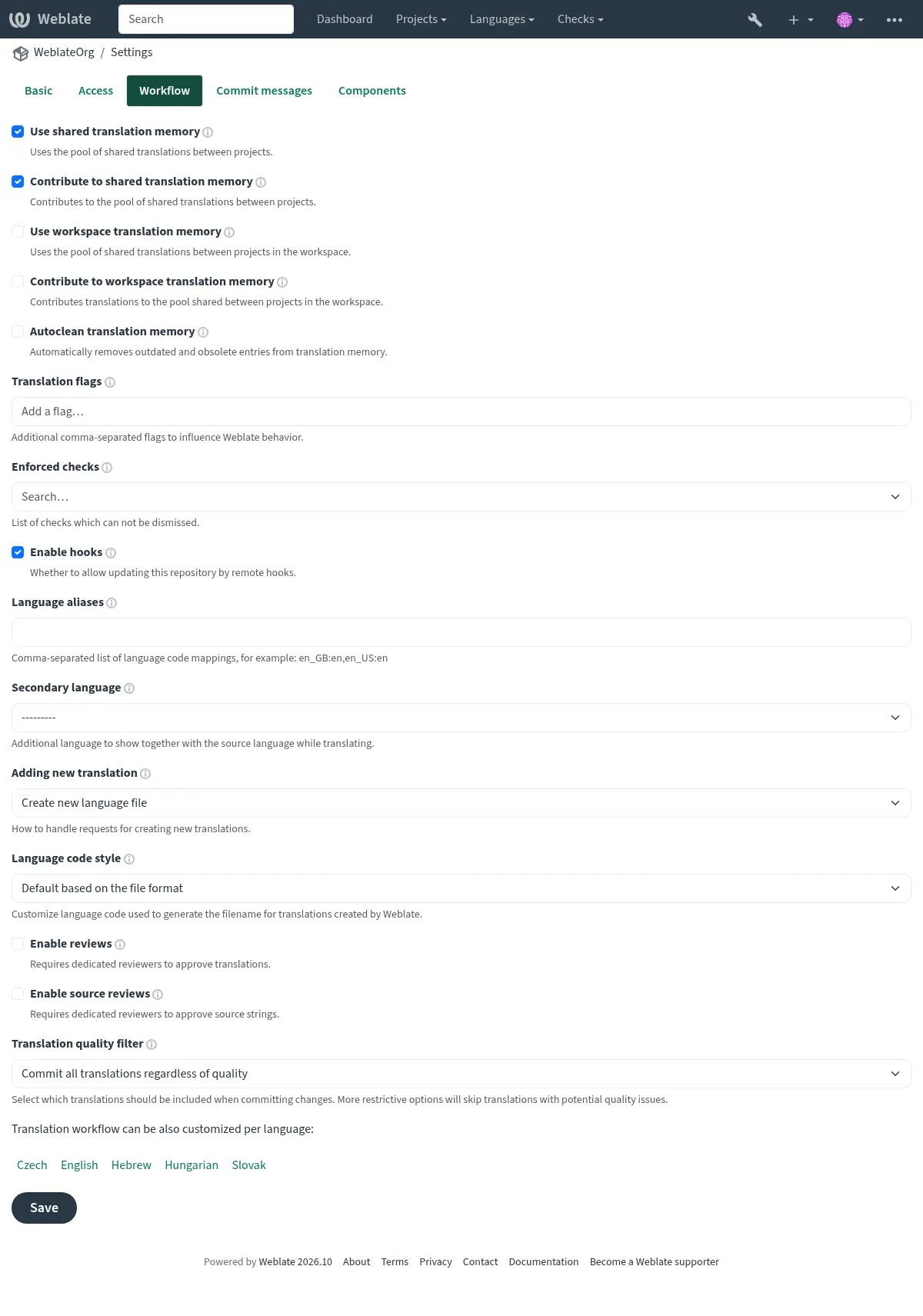
Per-language reviews
To require review only for selected languages, first turn on Activa les revisions for the whole project. Then open each project language page that should use different behavior, enable Customize translation workflow for this language in this project, and turn Enable reviews off for languages that should not require review.
Reviewers also need review access for the same language. Add them to a team whose roles include Review strings, and limit that team or the user membership to the language they should review. See Managing per-project access control and Site-wide access control for language-scoped access setup.
If approval buttons are not visible, check both parts of the setup: reviews have to be enabled for that translation, and the signed-in user has to have review permission for that language.
Machine translation and LLM workflows
Machine translation services, including large language model (LLM) services, can assist human translators or generate translations for them to edit or approve. Choose a workflow based on when humans should check the generated text and when it should reach the repository.
First, configure the services under Automatic suggestions in the project settings or site administration; see Suggeriments automàtics. For LLM services, see LLM translation context for the context and instructions used to guide translation.
To process strings in bulk, run Traducció automatitzada, select
Machine translation as the source, and choose the services to use.
For ongoing automation, configure the
Traducció automatitzada add-on on the component with
the same source and desired mode. Use the query state:empty to fill empty
translations without replacing existing human work; see Searching for strings.
Human translation assisted by services
Use this workflow when translators should choose when to use machine translation for each string.
Translators consult the Suggeriments automàtics tab in the editor, choose a service result, edit it as needed, and save the translation. These service results are distinct from stored suggestions awaiting acceptance: a human decides what to save. This workflow does not require the Automatic translation add-on and can be combined with Revisors dedicats.
Service translation with human editing
Use this workflow to fill translations automatically and let humans improve them directly.
Select Add as translation as the automatic translation mode.
Turn off Activa les revisions and allow translators to edit directly, as in the direct translation workflow.
Set Filtre de qualitat de les traduccions to Commit all translations regardless of quality.
The service output becomes a translation that humans can edit in the usual editor. It can be committed to the repository without human approval.
For machine drafts that should remain visibly unfinished, choose Add as «Needing edit» instead. Humans edit these drafts and clear the Needs editing state when finished. To keep unfinished drafts out of repository commits, set Filtre de qualitat de les traduccions to Skip translations marked as needing editing.
Service suggestions with human acceptance
Use this workflow when humans should check service output before it becomes a translation.
Select Add as suggestion as the automatic translation mode.
Turn on Habilita suggerències, turn off Vots als suggeriments, and set Accepta automàticament els suggeriments to
0.Leave Activa les revisions off for a single acceptance step. Give the people checking suggestions permission to accept them; see Managing per-project access control.
Humans check the stored suggestions and accept suitable ones, or edit the proposed text before saving a translation. Suggestions are stored only in Weblate and do not enter translation files until accepted as translations. Accepting a suggestion is separate from approving a translation in the dedicated review workflow.
Service translation with review and a quality gateway
Use this workflow when humans should edit machine translations in Weblate, but only reviewer-approved translations should reach the repository.
Select Add as translation as the automatic translation mode.
Turn on Activa les revisions and assign translators and reviewers as described in Revisors dedicats.
Set Filtre de qualitat de les traduccions to Only include approved translations.
Generated translations appear as Waiting for review. Translators can edit them, and reviewers check and approve the finished translations. Only after approval are these translations eligible for repository commits. Translators can suggest further changes to approved strings, while reviewers can edit them directly.
Enabling reviews alone does not keep unapproved translations out of commits. The translation quality filter provides that gateway. Keep reviews enabled for every language that should follow this workflow; check any workflow customization overrides.
AI-assisted quality evaluation
Use the AI quality evaluation add-on to check existing human or machine translations for accuracy, fluency, terminology, style, and formatting. It records quality checks without editing translations or approving them.
Configure an LLM service under Automatic suggestions, then install AI quality evaluation and select the Evaluation service. Choose a query to limit the translations evaluated. Run the add-on manually, choose an Evaluation frequency, or enable evaluation after translation changes or repository updates. Installation does not run evaluation. See the add-on documentation for provider costs and the data sent to the service.
Translators and reviewers can inspect the findings in the editor or search for
checks such as check:ai_accuracy. Correct the translation or ignore a finding
when appropriate. Combine this with Revisors dedicats when human approval is
required; AI evaluation does not replace approval or change the translation
quality filter used for repository commits.
The component’s Diagnostics recommends the add-on when an LLM service is configured. If the selected service becomes unavailable, an error diagnostic links maintainers to the installed add-on’s configuration.
Reusing existing translations
Use existing translations to bootstrap a new language or component, then have humans adapt matches and fill the remaining gaps.
Run Traducció automatitzada with Other translation components
as the source, or select the Memòria de traducció service under
Machine translation. Choose whether matches become translations,
drafts needing editing, or suggestions using the modes described above. Use
state:empty to preserve existing translations. The
Traducció automatitzada add-on can apply this reuse
automatically as strings arrive.
For ongoing consistency, Propagació de la traducció can copy edits to matching strings across components in the same project. Propagation happens while translating; it does not copy translations merely loaded from the repository. See Mantenir les traduccions iguals entre els components for its requirements and for checks that help humans resolve differences.
Passarel·la de qualitat per a les cadenes d’origen
Les cadenes de l’idioma font original solen venir dels desenvolupadors, ja que escriuen el codi i proporcionen les cadenes inicials. Tanmateix, sovint els desenvolupadors no són parlants nadius de l’idioma font i no proporcionen la qualitat desitjada de les cadenes d’origen. La traducció intermèdia us pot ajudar a solucionar-ho: hi ha una passarel·la de qualitat addicional per a les cadenes entre desenvolupadors i traductors.
En establir el Fitxer de llengua intermèdia, aquest fitxer s’utilitza per traduir cadenes a l’idioma font pels traductors/editors mentre és propietat dels desenvolupadors (sovint utilitzant llenguatges arbitraris com en_devel). Un cop finalitzada aquesta etapa, les cadenes estan disponibles per a les traduccions als idiomes de destinació, basant-se en el que ara és un idioma font polit emmagatzemat a la Fitxer de llengua base monolingüe.
String consolidation using secondary language
Quan Fitxer de llengua intermèdia no es pot utilitzar per consolidar les cadenes, podeu triar una de les traduccions perquè actuï com a idioma secundari. L’idioma es pot configurar en un projecte (Llengua secundària) o en un component (Llengua secundària). A continuació, es mostra als traductors mentre tradueixen (vegeu Llengües secundàries) i es pot utilitzar opcionalment com a font per a traduccions automàtices (vegeu Source strings for the machine translation).
Aquesta configuració pot ser útil amb cadenes d’origen mixtes i consolidar-les en una única traducció, que després s’utilitza com a línia de base per a altres treballs.
Ressenyes de cadenes d’origen
Amb Activa les revisions d’origen activat, el procés de revisió es pot aplicar a les cadenes d’origen. Un cop habilitat, els usuaris poden informar de problemes amb les cadenes d’origen. El procés real depèn de si s’utilitzen formats bilingües o monolingües.
For monolingual formats, source string review functions similarly to Revisors dedicats — once an issue with a source string is reported, the source string is marked as Needs editing.
Els formats bilingües no permeten l’edició directa de les cadenes font (normalment s’extreuen directament del codi font). En aquest cas, s’adjunta una etiqueta La font necessita una revisió a les cadenes informades pels traductors. Hauríeu de revisar aquestes cadenes i editar-les al codi font o eliminar l’etiqueta.