Suggestions automatiques
Modifié dans la version 4.13: Prior to Weblate 4.13, the services were configured in the Configuration.
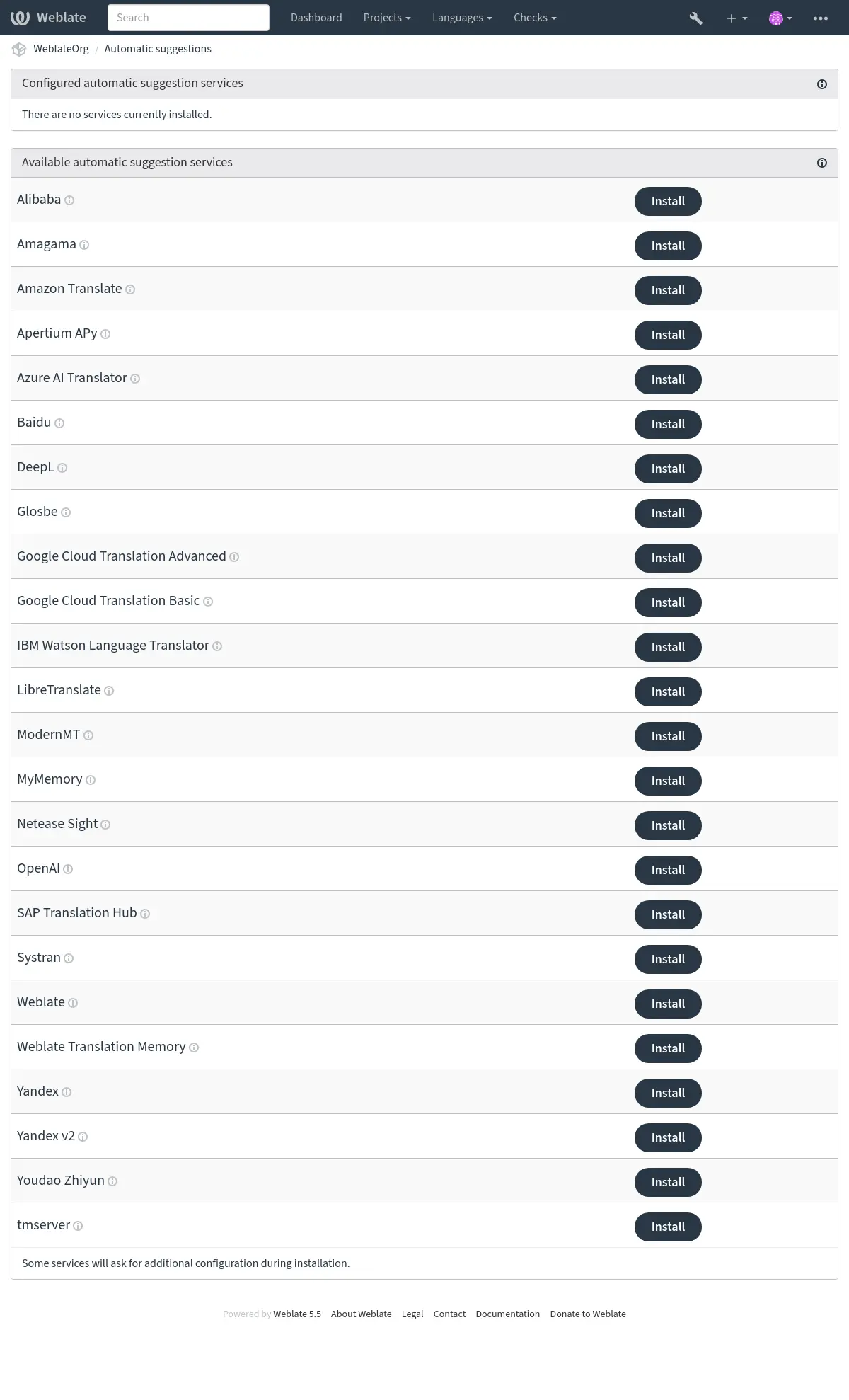
The support for several machine translation and translation memory services is built-in. Each service can be turned on by the administrator for whole site (under Automatic suggestions in Interface de gestion) or at the project settings:
Note
They come subject to their terms of use, so ensure you are allowed to use them how you want. Third-party services can receive source strings, translations, and related context from Weblate.
The services translate from the source language as configured at Configuration des composants, see Langue source.
Per-project automatic suggestion can also be configured via the API REST de Weblate.
Voir aussi
Priority of machine translation and translation memory services
Mémoire de traduction Weblate matches with 100% score take priority over machine translation services. If 100% match in translation memory is found, no machine translation is performed. If several 100% matches occur, the first one returned by the database is used.
Each machine translation service has a predefined maximum score it can produce. The use of installed translation services is ordered according to their maximum score. For each string with translation score lower than the service’s maximum, the service is asked to produce a translation. Translations with a score exceeding the current one are accepted.
Source strings for the machine translation
Ajouté dans la version 5.11.
The origin of source strings for all third-party services can be configured. This can be used to tweak the service to get the best results. Following choices are available:
- Automatic selection
Chooses the best source language automatically.
This is the default behavior.
- Component source language
Uses the component source language.
This was the behavior before the 5.11 release.
- Secondary language defined in project or component
Use project Langue secondaire or component Langue secondaire.
Falls back to the automatic selection of the source language if the secondary language not configured.
LLM translation context
LLM-based automatic suggestion services receive additional context about each translated string, when available. This includes the string context or monolingual key, additional explanation, configured secondary-language translation, plural information, failing quality checks, and placeholder contents. Matching glossary entries are passed with their explanations and selected flags, so duplicate glossary terms can be disambiguated.
You can add target-language-specific instructions in Language-specific instructions using a JSON object mapping language codes to text. Language codes have to exist in Weblate and are matched exactly; whitespace is not ignored. Each instruction can contain up to 1000 characters. Weblate first looks for the exact target language code and then falls back to the base language code.
The added metadata is used only to guide the generated suggestion; the returned translation still has to preserve the source placeholders and markup. Weblate also sends a short previous chat exchange to LLM services to demonstrate the expected JSON response format. The exchange uses bundled translated examples when available for the source and target language pair, or language-neutral formatting examples otherwise. Existing translations for the same target language can be appended as additional examples.
Alibaba
Ajouté dans la version 5.3.
- Service ID:
alibaba- Maximum score:
80
- Configuration:
source_languageSélection de la langue source
Choix disponibles :
auto– Automatic selectionsource– Component source languagesecondary– Secondary language defined in project or componentkeyID de la clé d’accès
secretSecret de la clé d’accès
regionID de la région
Alibaba Translate is a neural machine translation service for translating text and it supports up to 214 language pairs.
Voir aussi
Anthropic
Ajouté dans la version 5.16.
- Service ID:
anthropic- Maximum score:
90
- Advanced features:
- Configuration:
source_languageSélection de la langue source
Choix disponibles :
auto– Automatic selectionsource– Component source languagesecondary– Secondary language defined in project or componentbase_urlURL de l’API Anthropic
URL de base de l’API Anthropic. Laissez ce champ vide pour utiliser l’URL par défaut.
modelModèle anthropique
Choix disponibles :
claude-haiku-4-5– Claude Haiku 4.5claude-sonnet-5– Claude Sonnet 5claude-opus-5– Claude Opus 5claude-fable-5-1– Claude Fable 5.1claude-opus-4-8– Claude Opus 4.8claude-fable-5– Claude Fable 5custom– Custom modelpersonaPersonnalité du traducteur
Décrivez la personnalité du traducteur pour améliorer l’exactitude de la traduction. Par exemple : « Vous êtes éleveur d’écureuils. »
styleStyle de traducteur
Décrivez le style de la traduction. Par exemple : « Utiliser un language informel. »
language_instructionsInstructions spécifiques à la langue
JSON object mapping existing target language codes to extra instructions, up to 1000 characters each.
keyClé d’API
custom_modelNom de modèle personnalisé
Requis uniquement pour « Modèle personnalisé »
max_tokensJetons maximum
Nombre maximal de jetons à générer dans la réponse.
Performs translation using Anthropic’s Claude models.
The Anthropic API provides access to the Claude family of models, which are known for their strong reasoning and language capabilities. You need an API key from Anthropic to use this service.
The model choices favor current generally available Claude models. Previously offered models remain selectable while Anthropic continues to support them.
Use persona and style fields to further fine-tune translations. These will be used in a prompt for Claude and allow you to change the style of the translations.
The service automatically uses Glossaire, see Glossaires dans la suggestion automatiques.
Voir aussi
Apertium APy
- Service ID:
apertium-apy- Maximum score:
88
- Configuration:
source_languageSélection de la langue source
Choix disponibles :
auto– Automatic selectionsource– Component source languagesecondary– Secondary language defined in project or componenturlURL de l’API
Une plateforme de traduction automatique de logiciels libres fournissant des traductions dans un nombre limité de langues.
La méthode recommandée pour utiliser Apertium consiste à exécuter votre propre serveur Apertium-APy.
Voir aussi
Amazon Translate
- Service ID:
aws- Maximum score:
88
- Advanced features:
- Configuration:
source_languageSélection de la langue source
Choix disponibles :
auto– Automatic selectionsource– Component source languagesecondary– Secondary language defined in project or componentkeyID de la clé d’accès
secretClé secrète d’API
regionNom de la région
formalityFormalité
Choix disponibles :
empty value – Default
FORMAL– FormalINFORMAL– InformalbrevityConcision
Privilégiez les traductions plus courtes lorsque cela est possible.
Choix disponibles :
empty value – Default
ON– EnabledprofanityLangage grossier
Masquer les mots grossiers dans le texte traduit.
Choix disponibles :
empty value – Default
MASK– Mask profanity
Amazon Translate is a neural machine translation service for translating text to and from English across a breadth of supported languages. The service requires the TranslateFullAccess Managed Policy.
The service automatically uses Glossaire, see Glossaires dans la suggestion automatiques.
Azure OpenAI
Ajouté dans la version 5.8.
- Service ID:
azure-openai- Maximum score:
90
- Advanced features:
- Configuration:
source_languageSélection de la langue source
Choix disponibles :
auto– Automatic selectionsource– Component source languagesecondary– Secondary language defined in project or componentbase_urlURL de l’API
modelModèle LLM
personaPersonnalité du traducteur
Décrivez la personnalité du traducteur pour améliorer l’exactitude de la traduction. Par exemple : « Vous êtes éleveur d’écureuils. »
styleStyle de traducteur
Décrivez le style de la traduction. Par exemple : « Utiliser un language informel. »
language_instructionsInstructions spécifiques à la langue
JSON object mapping existing target language codes to extra instructions, up to 1000 characters each.
keyClé d’API
azure_endpointURL du point d’accès Azure OpenAI
URL du point d’accès de l’instance, par exemple : https://my-instance.openai.azure.com.
deploymentDéploiement de Azure OpenAI
Nom unique de déploiement du modèle.
Performs translation using OpenAI hosted on Azure.
Voir aussi
Baidu
- Service ID:
baidu- Maximum score:
90
- Configuration:
source_languageSélection de la langue source
Choix disponibles :
auto– Automatic selectionsource– Component source languagesecondary– Secondary language defined in project or componentkeyID client
secretSecret client
Service de traduction automatique fourni par Baidu.
Ce service utilise une API et vous devez obtenir un identifiant et une clé API auprès de Baidu pour l’utiliser.
Voir aussi
CyrTranslit
Ajouté dans la version 5.7.
- Service ID:
cyrtranslit- Maximum score:
100
- Configuration:
source_languageSélection de la langue source
Choix disponibles :
auto– Automatic selectionsource– Component source languagesecondary– Secondary language defined in project or component
Machine translation service using the Cyrtranslit library.
This service converts text between Cyrillic and Latin scripts for languages that have both scripts.
Voir aussi
DeepL
- Service ID:
deepl- Maximum score:
91
- Advanced features:
- Configuration:
source_languageSélection de la langue source
Choix disponibles :
auto– Automatic selectionsource– Component source languagesecondary– Secondary language defined in project or componenturlURL de l’API
keyClé d’API
formalityFormalité
Utilise la formalité spécifiée si la langue n’est pas spécifiée comme (in)formelle
contextContexte de traduction
Décrire le contexte de la traduction afin d’améliorer la précision de la traduction.
next_genUtiliser un modèle de nouvelle génération
Préférer next-gen LLM par rapport au modèle de traduction automatique classique.
DeepL is a paid service providing good machine translation for a few languages. You need to purchase DeepL API subscription.
API URL to use with the DeepL service. Configure the base endpoint without an API
version; Weblate selects the appropriate DeepL API version for each request.
For a legacy subscription requiring API v1, configure
https://api.deepl.com/v1/ instead.
Modifié dans la version 2026.9.1: Support for explicitly configured DeepL API v1 endpoints has been restored.
https://api.deepl.com/(default in Weblate)Is meant for API usage on the paid plan, and the subscription is usage-based.
https://api-free.deepl.com/Is meant for API usage on the free plan, and the subscription is usage-based.
Weblate supports DeepL formality, it will choose matching one based on the
language (for example, there is de@formal and de@informal).
The translation context can optionally be specified to improve translations quality. Read more on that in DeepL translation context documentation.
The service automatically uses Glossaire, see Glossaires dans la suggestion automatiques. Glossary integration is not available with API v1.
Voir aussi
Glosbe
- Service ID:
glosbe- Maximum score:
90
- Configuration:
source_languageSélection de la langue source
Choix disponibles :
auto– Automatic selectionsource– Component source languagesecondary– Secondary language defined in project or component
Dictionnaire gratuit et mémoire de traduction pour presque toutes les langues vivantes.
The API is gratis to use, but usage of the translations is subject to the license of the used data source. There is a limit of calls that may be done from one IP in a set period of time, to prevent abuse.
Voir aussi
Google Cloud Translation Basic
- Service ID:
google-translate- Maximum score:
90
- Configuration:
source_languageSélection de la langue source
Choix disponibles :
auto– Automatic selectionsource– Component source languagesecondary– Secondary language defined in project or componentkeyClé d’API
Machine translation service provided by the Google Cloud services.
This service uses the Google Translation API v2, and you need to obtain an API key and turn on billing in the Google API console.
Voir aussi
Google Cloud Translation Advanced
- Service ID:
google-translate-api-v3- Maximum score:
90
- Advanced features:
- Configuration:
source_languageSélection de la langue source
Choix disponibles :
auto– Automatic selectionsource– Component source languagesecondary– Secondary language defined in project or componentcredentialsInformations du compte pour le service Google Translate
Saisissez une clé JSON pour le compte de service.
projectProjet Google Translate
Saisissez l’identifiant numérique ou alphanumérique de votre projet Google Cloud.
locationEmplacement de Google Traduction
Choisissez une région Google Cloud Translation utilisée pour le projet Google Cloud ou la plus proche de chez vous.
bucket_nameNom du Google Storage bucket
Saisir le nom du Google Storage bucket utilisé pour enregistrer les fichiers du glossaire.
Machine translation service provided by the Google Cloud services.
This service uses the Google Translation API v3 and you need credentials in JSON format to access it.
In order to use this service, you first need to go through the following steps:
Optionally, you can configure the service to use Glossaire by setting up a Bucket:
Traducteur linguistique IBM Watson
Supprimé dans la version 5.13.1: This service was withdrawn by vendor as of 10 December 2024.
LibreTranslate
Ajouté dans la version 4.7.1.
- Service ID:
libretranslate- Maximum score:
89
- Configuration:
source_languageSélection de la langue source
Choix disponibles :
auto– Automatic selectionsource– Component source languagesecondary– Secondary language defined in project or componenturlURL de l’API
keyClé d’API
LibreTranslate is a free and open-source service for machine translations. The public instance requires an API key, but LibreTranslate can be self-hosted and there are several mirrors available to use the API for free.
https://libretranslate.com/(official public instance)Requires an API key to use outside of the website.
LTEngine
Ajouté dans la version 5.17.1.
- Service ID:
ltengine- Maximum score:
89
- Configuration:
source_languageSélection de la langue source
Choix disponibles :
auto– Automatic selectionsource– Component source languagesecondary– Secondary language defined in project or componenturlURL de l’API
keyClé d’API
LTEngine provides a local LibreTranslate-compatible API backed by large language models. For many Weblate installations, native LLM services such as Ollama can be a better fit because Weblate can send translation context directly to the model. Use LTEngine when you specifically want its local translation engine or future LTEngine translation improvements.
Azure AI Translator
- Service ID:
microsoft-translator- Maximum score:
90
- Advanced features:
- Configuration:
source_languageSélection de la langue source
Choix disponibles :
auto– Automatic selectionsource– Component source languagesecondary– Secondary language defined in project or componentkeyClé d’API
base_urlURL racine de l’application
Choix disponibles :
api.cognitive.microsofttranslator.com– Global (non-regional)api-apc.cognitive.microsofttranslator.com– Asia Pacificapi-eur.cognitive.microsofttranslator.com– Europeapi-nam.cognitive.microsofttranslator.com– North Americaapi.translator.azure.cn– Chinaapi.cognitive.microsofttranslator.us– Azure US Government cloudendpoint_urlURL du service d’authentification
La région ou le multi-services peuvent être définis en utilisant le champ Région ci-dessous.
Choix disponibles :
api.cognitive.microsoft.com– Globalapi.cognitive.azure.cn– Chinaapi.cognitive.microsoft.us– Azure US Government cloudregionRégion du service d’authentification
categoryCatégorie
Spécifiez un ID de catégorie système personnalisé pour l’utiliser à la place de l’identifiant général.
Machine translation service provided by Microsoft in Azure portal as one of Cognitive Services.
Weblate implémente Translator API V3.
The service automatically uses Glossaire via dynamic dictionary, see Glossaires dans la suggestion automatiques.
Translator Text API V2
La clé que vous utilisez avec Translator API V2 peut être utilisée avec l’API 3.
Translator Text API V3
You need to register at Azure portal and use the key you obtain there.
With new Azure keys, you also need to set region to locale of your service.
You can also specify a custom category to use custom translator.
Indication
For Azure China, please use your endpoint from the Azure Portal.
Mistral
Ajouté dans la version 2026.7.
- Service ID:
mistral- Maximum score:
90
- Advanced features:
- Configuration:
source_languageSélection de la langue source
Choix disponibles :
auto– Automatic selectionsource– Component source languagesecondary– Secondary language defined in project or componentbase_urlURL de base de l’API Mistral
URL de base de l’API Mistral, si elle diffère de l’URL par défaut de Mistral
modelModèle Mistral
Choix disponibles :
auto– Automatic selectionmistral-small-latest– Mistral Small 4ministral-14b-latest– Ministral 3 14Bministral-8b-latest– Ministral 3 8Bministral-3b-latest– Ministral 3 3Bmistral-large-latest– Mistral Large 3mistral-medium-latest– Mistral Medium 3.5custom– Custom modelpersonaPersonnalité du traducteur
Décrivez la personnalité du traducteur pour améliorer l’exactitude de la traduction. Par exemple : « Vous êtes éleveur d’écureuils. »
styleStyle de traducteur
Décrivez le style de la traduction. Par exemple : « Utiliser un language informel. »
language_instructionsInstructions spécifiques à la langue
JSON object mapping existing target language codes to extra instructions, up to 1000 characters each.
keyClé d’API
custom_modelNom de modèle personnalisé
Requis uniquement pour « Modèle personnalisé »
Automatic and predefined model selection queries the service model-listing endpoint. Automatic selection prefers general-purpose models that balance translation quality, response time, and price, trying other available models in the displayed order. Choose Custom model when using a compatible gateway that does not provide model discovery; Weblate sends the configured model identifier directly to the chat endpoint.
ModernMT
Ajouté dans la version 4.2.
- Service ID:
modernmt- Maximum score:
90
- Advanced features:
- Configuration:
source_languageSélection de la langue source
Choix disponibles :
auto– Automatic selectionsource– Component source languagesecondary– Secondary language defined in project or componenturlURL de l’API
keyClé d’API
context_vectorVecteur de contexte
Liste de IDs:poids mémoire séparés par des virgules. Par exemple :1234:0.123,4567:0.456
The service automatically uses Glossaire, see Glossaires dans la suggestion automatiques.
Voir aussi
MyMemory
- Service ID:
mymemory- Maximum score:
100
- Configuration:
source_languageSélection de la langue source
Choix disponibles :
auto– Automatic selectionsource– Component source languagesecondary– Secondary language defined in project or componentemailCourriel de contact
usernameNom d’utilisateur
keyClé d’API
Vaste mémoire de traduction dotée d’une traduction automatique.
Free, anonymous usage is currently limited to 100 requests/day, or to 1000
requests/day when you provide a contact e-mail address in email.
You can also ask them for more.
Voir aussi
Netease Sight
- Service ID:
netease-sight- Maximum score:
90
- Configuration:
source_languageSélection de la langue source
Choix disponibles :
auto– Automatic selectionsource– Component source languagesecondary– Secondary language defined in project or componentkeyID client
secretSecret client
Service de traduction automatique fourni par NetEase.
Ce service utilise une API, et vous devez obtenir une clé et un secret auprès de NetEase.
Voir aussi
Ollama
Ajouté dans la version 5.15.
- Service ID:
ollama- Maximum score:
90
- Advanced features:
- Configuration:
source_languageSélection de la langue source
Choix disponibles :
auto– Automatic selectionsource– Component source languagesecondary– Secondary language defined in project or componentbase_urlURL de l’API
URL de base de l’API Ollama, localhost et port 11434 par défaut.
modelModèle Ollama
Nom du modèle décrit dans le catalogue Ollama.
personaPersonnalité du traducteur
Décrivez la personnalité du traducteur pour améliorer l’exactitude de la traduction. Par exemple : « Vous êtes éleveur d’écureuils. »
styleStyle de traducteur
Décrivez le style de la traduction. Par exemple : « Utiliser un language informel. »
language_instructionsInstructions spécifiques à la langue
JSON object mapping existing target language codes to extra instructions, up to 1000 characters each.
Performs translation using Ollama models.
The Ollama API allows for the use of open source models for translations either locally installed or remotely accessed via the Ollama service. Note that before configuring your models, you should have Ollama installed and downloaded the models you wish to use.
Use persona and style fields to further fine-tune translations. These will be used in a prompt for Ollama and allow you to change the style of the translations.
The service automatically uses Glossaire, see Glossaires dans la suggestion automatiques.
Voir aussi
OpenAI
Ajouté dans la version 5.3.
- Service ID:
openai- Maximum score:
90
- Advanced features:
- Configuration:
source_languageSélection de la langue source
Choix disponibles :
auto– Automatic selectionsource– Component source languagesecondary– Secondary language defined in project or componentbase_urlURL de base de l’API OpenAI
URL de base de l’API OpenAI, si elle est différente de l’URL OpenAI par défaut
modelModèle OpenAI
Choix disponibles :
auto– Automatic selectiongpt-5.6-luna– GPT-5.6 Lunagpt-5.4-mini– GPT-5.4 minigpt-5-mini– GPT-5 minigpt-5.4-nano– GPT-5.4 nanogpt-5-nano– GPT-5 nanogpt-5.6-terra– GPT-5.6 Terragpt-5.4– GPT-5.4gpt-5– GPT-5gpt-5.6– GPT-5.6 Solgpt-5.5– GPT-5.5gpt-4.1-mini– GPT-4.1 minigpt-4o-mini– GPT-4o minigpt-4.1-nano– GPT-4.1 nanogpt-4.1– GPT-4.1gpt-4o– GPT-4ogpt-4-turbo– GPT-4 Turbogpt-4– GPT-4gpt-3.5-turbo– GPT-3.5 Turbocustom– Custom modelpersonaPersonnalité du traducteur
Décrivez la personnalité du traducteur pour améliorer l’exactitude de la traduction. Par exemple : « Vous êtes éleveur d’écureuils. »
styleStyle de traducteur
Décrivez le style de la traduction. Par exemple : « Utiliser un language informel. »
language_instructionsInstructions spécifiques à la langue
JSON object mapping existing target language codes to extra instructions, up to 1000 characters each.
keyClé d’API
custom_modelNom de modèle personnalisé
Requis uniquement pour « Modèle personnalisé »
Réalise la traduction en utilisant OpenAI.
The OpenAI API is powered by a diverse set of models with different capabilities and price points. Automatic selection chooses the best model available, but you might want to choose a specific model that matches your needs.
Automatic and predefined model selection queries the service model-listing endpoint. Automatic selection prefers current general-purpose models that balance translation quality, response time, and price, using older GPT models only as compatibility fallbacks. Choose Custom model when using an OpenAI-compatible gateway that does not provide model discovery; Weblate sends the configured model identifier directly to the chat completions endpoint.
Use persona and style fields to further fine-tune translations. These will be used in a prompt for OpenAI and allow you to change the style of the translations.
The service automatically uses Glossaire, see Glossaires dans la suggestion automatiques.
Modifié dans la version 5.7: Support for custom model and base URL was added.
Voir aussi
SAP Translation Hub
- Service ID:
sap-translation-hub- Maximum score:
100
- Configuration:
source_languageSélection de la langue source
Choix disponibles :
auto– Automatic selectionsource– Component source languagesecondary– Secondary language defined in project or componenturlURL de l’API
keyClé d’API
usernameNom d’utilisateur SAP
passwordMot de passe SAP
enable_mtActiver la traduction automatisée
domainDomaine de la traduction
L’ID d’un domaine de traduction, par exemple : BC. Si vous n’indiquez pas de domaine, la méthode recherche les traductions dans tous les domaines disponibles.
Service de traduction automatique fourni par SAP.
You need to have a SAP account (and the SAP Translation Hub enabled in the SAP Cloud Platform) to use this service.
You can also configure whether to also use machine translation services, in addition to the term database.
Note
To access the Sandbox API, you need to set url
and key.
To access the productive API, you need to set url, username and password.
Systran
- Service ID:
systran- Maximum score:
90
- Configuration:
source_languageSélection de la langue source
Choix disponibles :
auto– Automatic selectionsource– Component source languagesecondary– Secondary language defined in project or componentkeyClé d’API
Machine translation service provided by Systran.
This service uses an API, and you need to obtain API key at <https://translate.systran.net/en/account>.
tmserver
- Service ID:
tmserver- Maximum score:
100
- Configuration:
source_languageSélection de la langue source
Choix disponibles :
auto– Automatic selectionsource– Component source languagesecondary– Secondary language defined in project or componenturlURL de l’API
You can run your own translation memory server by using a tmserver protocol.
The original tmserver was bundled with the translate-toolkit.
amaGama server is an enhanced version of tmserver.
Note
There currently does not seem to be a maintained server for this.
Weblate
- Service ID:
weblate- Maximum score:
100
- Configuration:
This service has no configuration.
Weblate machine translation service can provide translations based on the exact matches of a string in the currently existing strings in a Translated, Approved, or Read-only states inside Weblate.
Mémoire de traduction Weblate
- Service ID:
weblate-translation-memory- Maximum score:
100
- Configuration:
This service has no configuration.
Use Mémoire de traduction as a machine translation service. Any string that has been translated before (or uploaded to the translation memory) can be translated in this way. This suggestion source works with fuzzy matching.
Note
Recreating Mémoire de traduction reduces capabilities of this TM source.
Yandex
- Service ID:
yandex- Maximum score:
90
- Configuration:
source_languageSélection de la langue source
Choix disponibles :
auto– Automatic selectionsource– Component source languagesecondary– Secondary language defined in project or componentkeyClé d’API
Service de traduction automatique fourni par Yandex.
Ce service utilise une API de traduction, et vous devez obtenir une clé API auprès de Yandex.
Voir aussi
Yandex v2
Ajouté dans la version 5.1.
- Service ID:
yandex-v2- Maximum score:
90
- Configuration:
source_languageSélection de la langue source
Choix disponibles :
auto– Automatic selectionsource– Component source languagesecondary– Secondary language defined in project or componentkeyClé d’API
Service de traduction automatique fourni par Yandex.
This service uses a Translation API, and you need to obtain an API key from Yandex Cloud.
Voir aussi
Youdao Zhiyun
- Service ID:
youdao-zhiyun- Maximum score:
90
- Configuration:
source_languageSélection de la langue source
Choix disponibles :
auto– Automatic selectionsource– Component source languagesecondary– Secondary language defined in project or componentkeyID client
secretSecret client
Service de traduction automatique fourni par Youdao.
Ce service utilise une API, et vous devez obtenir un identifiant et une clé API auprès de Youdao.
Traduction automatique personnalisée
You can also implement your own machine translation services using a few lines
of Python code. Place the code in a module Weblate can import (see
Création d’un module Python or Customizing code) and add fully qualified
class name to WEBLATE_MACHINERY.
"""
Machine translation example.

This example uses fictional http://example.com/ service to translate the
strings.
"""

from __future__ import annotations

from typing import TYPE_CHECKING

from weblate.machinery.base import MACHINERY_DEFAULT_THRESHOLD, MachineTranslation

if TYPE_CHECKING:
    from weblate.auth.models import User
    from weblate.machinery.base import DownloadTranslations
    from weblate.trans.models import Unit


class SampleTranslation(MachineTranslation):
    """Sample machine translation interface."""

    name = "Sample"

    def download_languages(self) -> list[str]:
        """Return list of languages your machine translation supports."""
        response = self.request("get", "http://example.com/languages")
        return response.json()["languages"]

    def download_translations(
        self,
        source_language: str,
        target_language: str,
        text: str,
        unit: Unit | None,
        user: User | None,
        threshold: int = MACHINERY_DEFAULT_THRESHOLD,
    ) -> DownloadTranslations:
        """Return tuple with translations."""
        response = self.request(
            "get",
            "http://example.com/translate",
            params={
                "source_language": source_language,
                "target_language": target_language,
                "text": text,
            },
        )

        for translation in response.json()["translations"]:
            yield {
                "text": translation,
                "quality": 100,
                "service": self.name,
                "source": text,
            }