Projets de traduction
Organisation de traduction
Weblate organizes translatable VCS content of project/components into a tree-like structure. You can additionally organize components within a project using categories.
L’objet du niveau inférieur est Configuration du projet, qui doit contenir toutes les traductions appartenant au même ensemble (par exemple la traduction d’une application dans plusieurs versions et/ou la documentation correspondante).
The middle level is optionally created by Catégorie. The categories can be nested to achieve more complex structure.
Au niveau supérieur, dans Configuration des composants, qui est le composant à traduire, vous définissez le dépôt du système de contrôle des versions à utiliser ainsi que le masque des fichiers à traduire.
Above Configuration des composants there are individual translations, handled automatically by Weblate as translation files (which match Masque de fichier defined in Configuration des composants) appear in the VCS repository.
Weblate prend en charge un large éventail de formats de traduction (bilingues et monolingues) pris en charge par Translate Toolkit ; voir Localization file formats.
Note
Vous pouvez partager des dépôts clonés du système de contrôle des versions à l’aide de URLs internes de Weblate. L’utilisation de cette fonctionnalité est vivement recommandée lorsque plusieurs composants partagent le même système de contrôle des versions. Elle améliore les performances et réduit l’espace disque nécessaire.
Ajouter des projets et des composant de traduction
Based on your permissions, new translation projects and components can be created. It is always permitted for users with the Add new projects permission, and if your instance uses billing (e.g. like https://hosted.weblate.org/ see Facturation), you can also create those based on your plans allowance from the user account that manages billing. Projects can also be created in a workspace by users who have the Add projects to workspace permission in that workspace. Creating a project without selecting a workspace requires the site-wide Add new projects permission. See Project creation and moves for details.
Indication
To grant every user permission to create new projects create new Affectation automatique des groupes for the Project creators team.
Vous pouvez consulter votre plan de facturation actuel sur une page distincte :
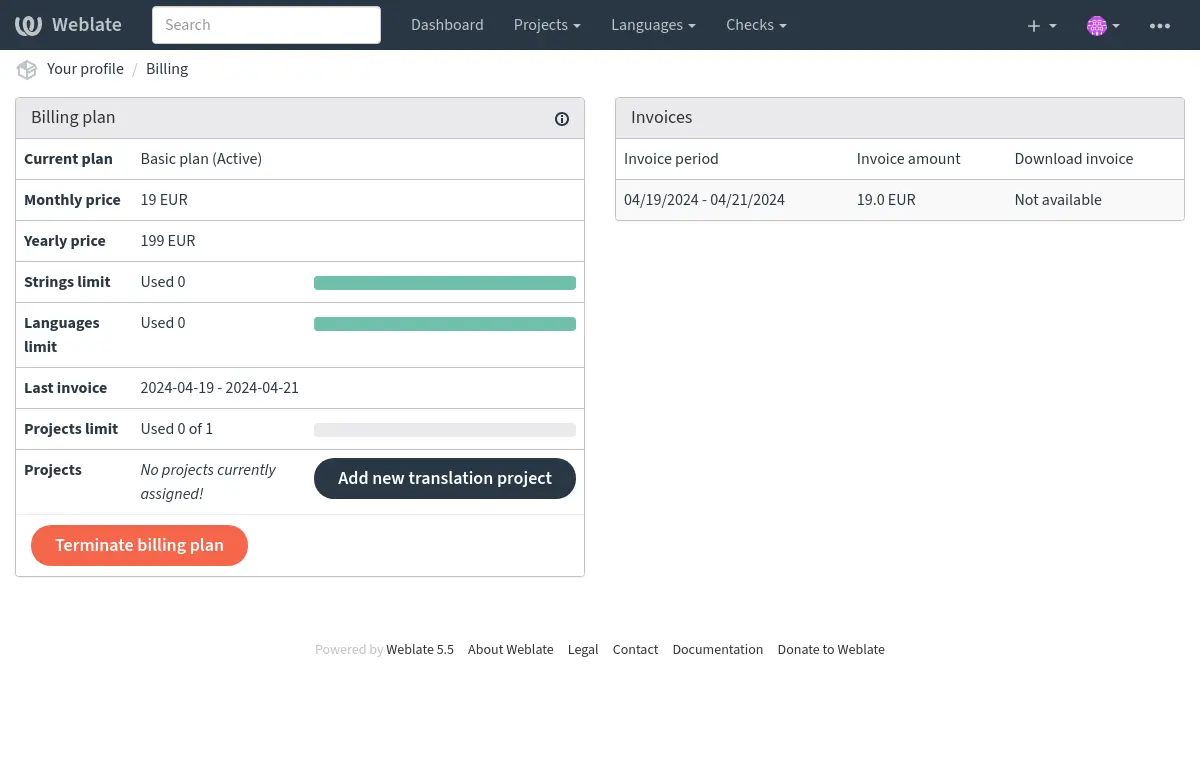
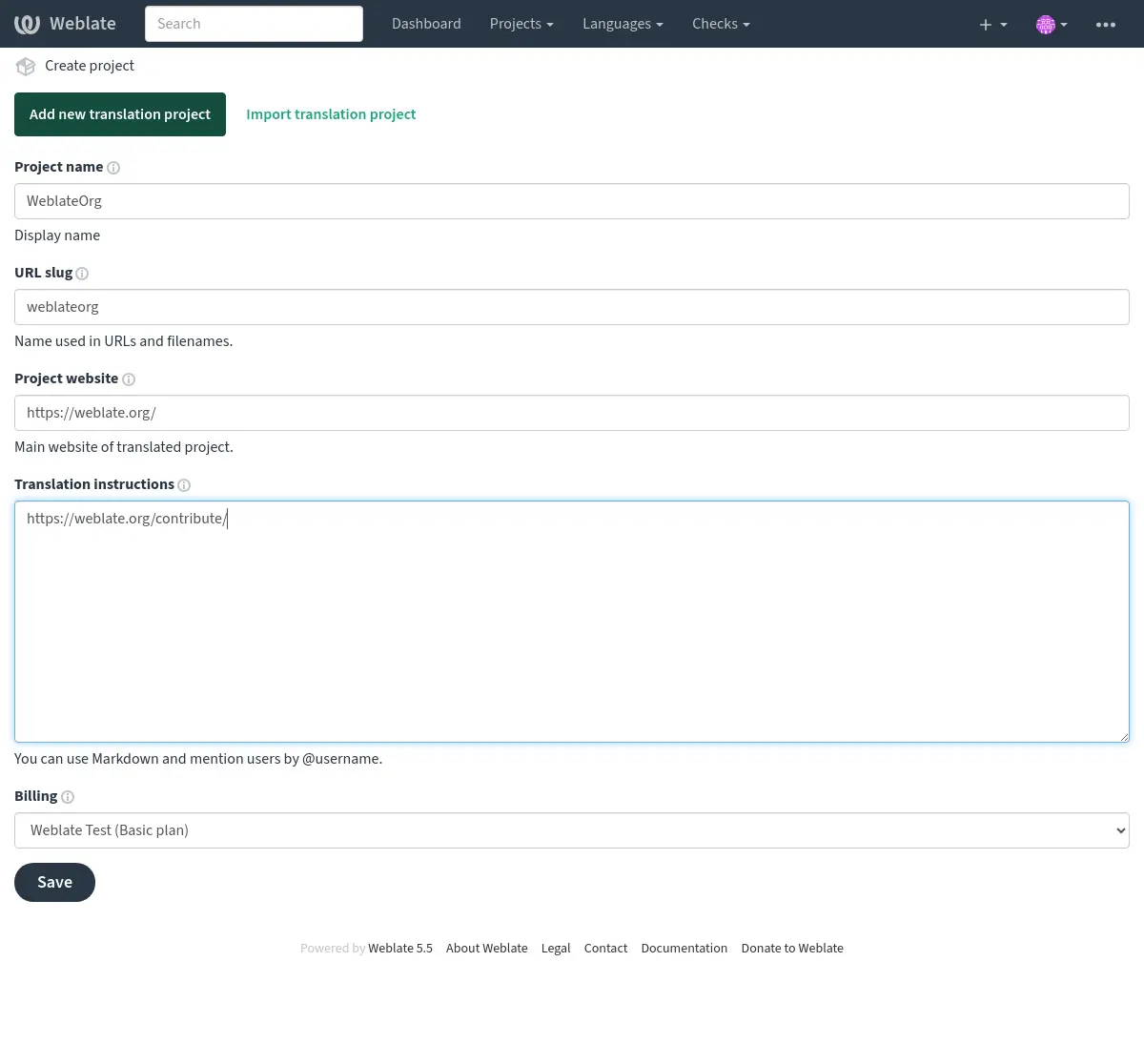
La création du projet peut être lancée depuis cette page ou à l’aide du menu de la barre de navigation, en renseignant les informations de base sur le projet de traduction pour terminer son ajout :
Après avoir créé le projet, vous êtes directement redirigé vers sa page :
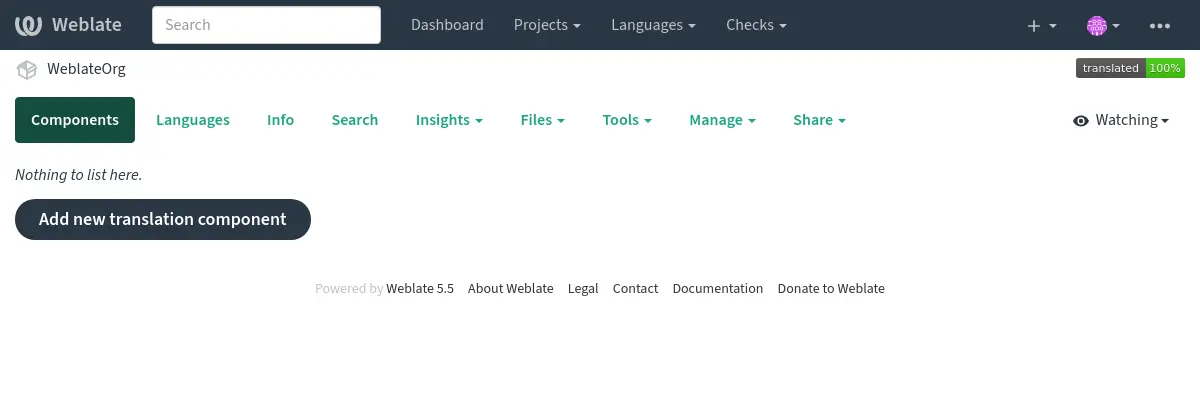
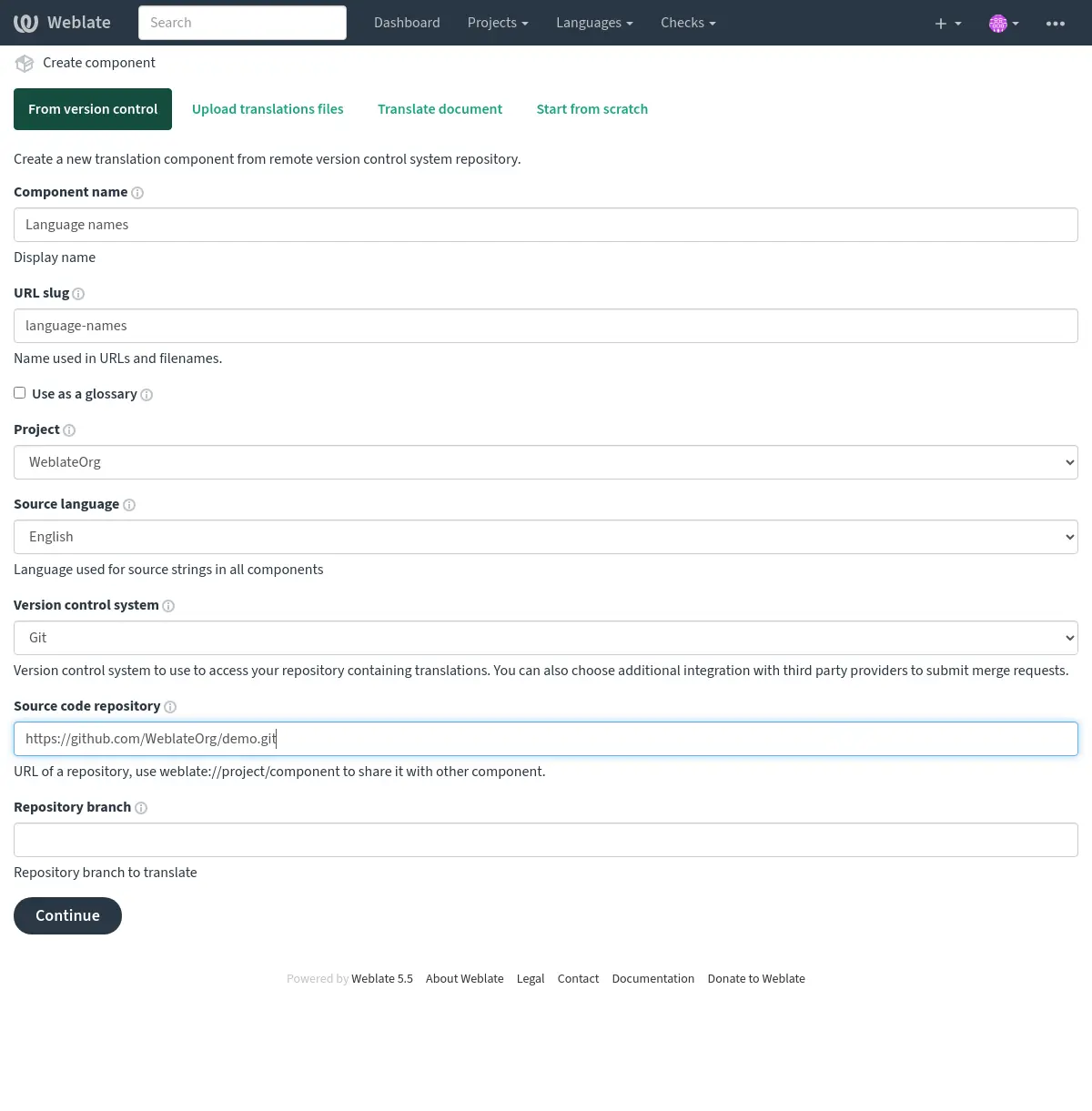
La création d’un nouveau composant de traduction peut être lancée en un seul clic depuis cette page. Le processus de création d’un composant se déroule en plusieurs étapes et détecte automatiquement la plupart des paramètres de traduction. Il existe plusieurs méthodes pour créer un composant :
- Depuis le contrôle de version
Crée le composant à partir du dépôt distant de contrôle de version.
- Depuis un composant existant
Crée un composant supplémentaire à partir d’un composant existant en choisissant des fichiers différents.
- Branche supplémentaire
Creates additional component to existing one, just for different branch. Select a component to load its available remote branches. If loading fails, use Retry to try again.
- Téléverser les fichiers de traduction
Upload translation files to Weblate in case you do not have version control or do not want to integrate it with Weblate. You can later update the content using the web interface or API REST de Weblate.
- Traduire le document
Téléverser un document ou un fichier de traduction unique et le traduire.
- Démarrer de zéro
Créer un projet de traduction vide et ajouter les chaînes manuellement.
Une fois que vous disposez de composants de traduction existants, vous pouvez également en ajouter facilement de nouveaux pour des fichiers ou des branches supplémentaires en utilisant le même dépôt.
D’abord vous devez saisir le nom et l’emplacement du dépôt :
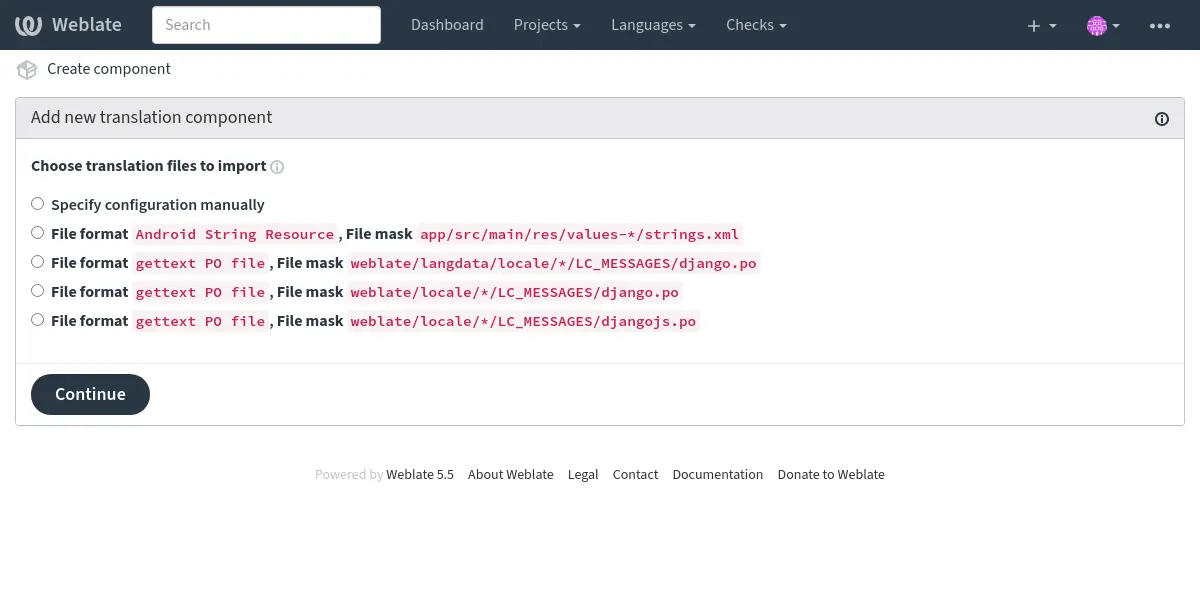
Sur la page suivante, une liste des ressources traduisibles découvertes vous est présentée :
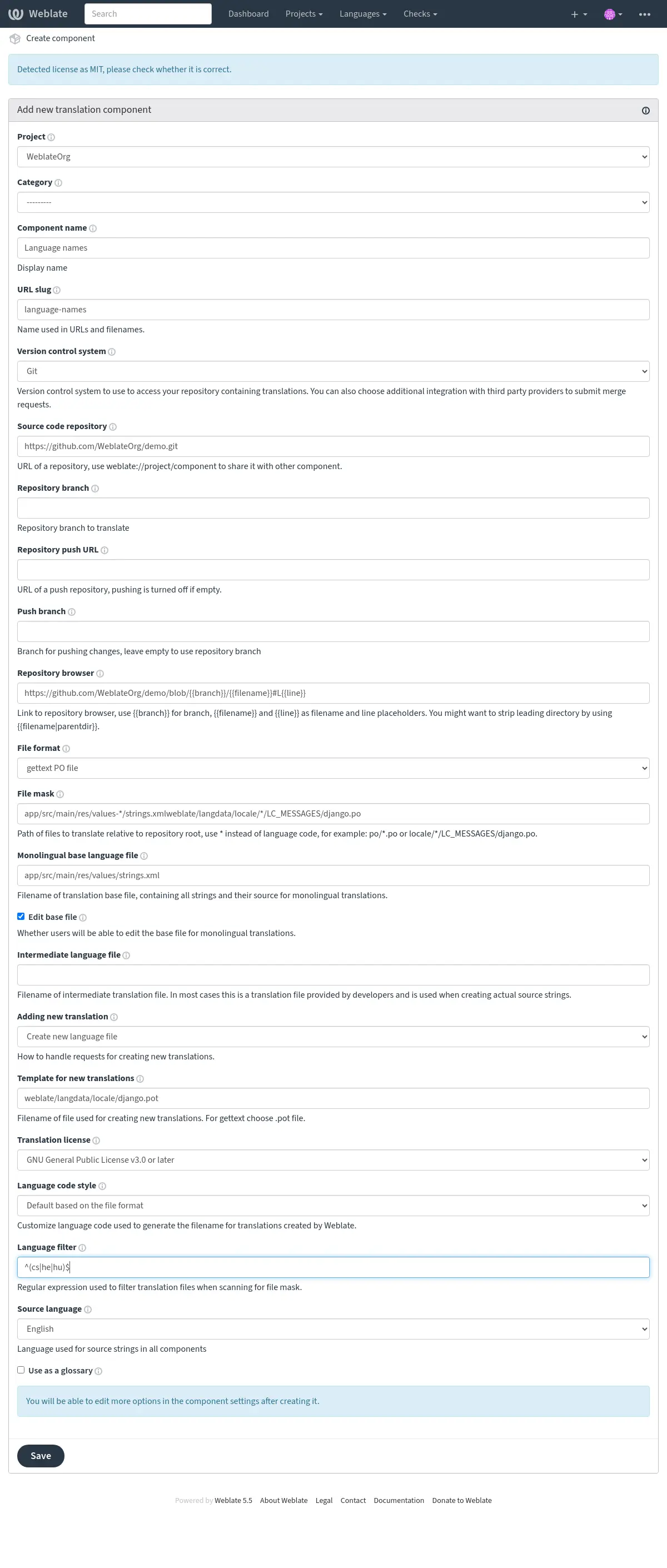
En dernière étape, vous vérifiez les informations du composant de traduction et renseignez les détails facultatifs :
Configuration du projet
Créez un projet de traduction, puis ajoutez-y un nouveau composant à traduire. Le projet est comme une étagère sur laquelle sont empilées les traductions proprement dites. Tous les composants d’un même projet partagent les suggestions et leur dictionnaire ; les traductions sont également propagées automatiquement dans tous les composants d’un même projet (sauf si cette fonction est désactivée dans la configuration du composant), voir Mémoire de traduction.
Voir aussi
Ces attributs de base définissent et informent les traducteurs d’un projet :
Nom du projet
Nom détaillé du projet, utilisé pour afficher le nom du projet.
Voir aussi
Abrégé de l’URL
Nom de projet utilisable dans les URL.
Site Web du projet
URL où les traducteurs peuvent trouver des informations complémentaires sur le projet.
Ce paramètre est obligatoire sauf s’il est désactivé par WEBSITE_REQUIRED.
Directives de traduction
Text describing localization process in the project, and any other information useful for translators. Markdown can be used for text formatting or inserting links.
Good translation instructions explain how contributors should submit translations, what review they should expect, how they can report problems with source strings, and where translations can be tested or when they are released.
Licence associée à cette traduction
Default translation license for components in this project.
Accord de licence du contributeur
Default contributor license agreement for components in this project. Markdown can be used for text formatting or inserting links.
Utiliser la mémoire de traduction de l’espace de travail
Whether to use translation memory shared by projects in the same workspace, see Translation-memory scopes for more details. The workspace has to allow workspace translation memory as well.
Contribuer à la mémoire de traduction de l’espace de travail
Whether to contribute translations to the translation memory shared by projects in the same workspace. The workspace has to allow contribution as well.
Note
This option is unavailable on Hosted Weblate, it is toggled together with Utiliser la mémoire de traduction de l’espace de travail.
Auto-nettoyage du mémoire de traduction
Ajouté dans la version 5.13.
Whether to replace older automatically created translation memory entries when a translation becomes active.
Matching is based on the same source string, component, context, and source/target language pair. Uploaded translation memory files are not affected.
Contrôle d’accès
Configurer le contrôle d’accès par projet, voir Contrôle d’accès au projet pour d’autres détails.
La valeur par défaut peut être modifiée avec DEFAULT_ACCESS_CONTROL.
Public sharing
Allow anonymous access to the project’s engage pages and rendered status widgets. This setting applies to Private and Custom projects; Public and Protected projects are always publicly shareable.
Public sharing exposes project and component names, including restricted components, together with translation statistics, languages, and progress. It does not grant access to project pages, translations, repositories, or the API.
Changing this setting has no immediate effect while the project is Public or Protected, but the stored value is retained and applies if the project is later changed to Private or Custom. Sitemaps for project, component, and translation pages only include pages that are directly accessible anonymously. Engage sitemaps follow the public sharing setting.
Changing this setting requires the Manage project access permission. The status widget configuration page continues to use normal project access control.
When REQUIRE_LOGIN is enabled, PUBLIC_ENGAGE must also be
enabled for anonymous access to engage pages and sitemaps.
Authentification à deux facteurs obligatoire
Ajouté dans la version 5.7.
Appliquer Authentification à deux facteurs à tous les contributeurs. Les Utilisateurs ne seront pas autorisés à effectuer des opérations au sein du projet sans l’avoir configuré.
Activer les révisions
Activer le flux de travail de révision pour les traductions, voir Relecteurs dédiés.
Activer la révision des chaînes sources
Activez le flux de travail de relecture pour les chaînes sources, voir Relecture des chaînes sources.
Filtre sur la qualité de traduction
Ajouté dans la version 5.13.
The commit policy determines which translations are included when committing changes to the version control system. This setting is available at the project level and supports the following options:
Commit all translations regardless of quality: All translations will be committed, including those marked as needing editing or not reviewed.
Skip translations marked as needing editing: Only translations that don’t have the « needs editing », « needs rewriting » or « needs checking » state will be committed.
Only include approved translations: Only translations that have been approved by a reviewer will be committed. This option requires Activer les révisions to be enabled.
The approved-only policy applies only to translations with reviews enabled. Languages with reviews disabled through Personnalisation du flux commit all translations, including those marked as needing editing. Source strings follow the same rule using Activer la révision des chaînes sources.
Components linked to a repository in another project follow their own project’s commit policy.
If the editor shows “Only approved translations are written to the translation file.” or “Approval is required before this translation can be written to the translation file.”, the quality filter prevents writing the translation to the file until it is approved. This notice does not confirm that your current edit was saved; resolve any validation errors before leaving the editor. The project policy description qualifies this as “For languages with reviews enabled, only approved translations are written to the translation file.” Having permission to approve translations does not automatically approve your edits.
For a language that does not use reviews, open its page in the project and choose Settings. Enable Customize translation workflow for this language in this project, then turn Enable reviews off. This requires permission to edit project settings. See Personnalisation du flux. With the approved-only policy, this makes all translation states eligible for writing to files for that language, including those needing editing.
If reviews are needed, users with both review and bulk-edit permissions can use Modification en masse to approve existing translations they have reviewed. Eligibility for writing to a translation file does not mean the change is immediately committed or pushed; see Archivages lazy and Pousser lors du commit.
Activer les points d’ancrage
Indique si des Déclencheurs de notification non authentifiés doivent être utilisés pour ce dépôt.
Alias de langue
Define language codes mapping when importing translations into Weblate. Use this when language codes are inconsistent in your repositories and you want to get a consistent view in Weblate or in case you want to use non-standard naming of your translation files.
The typical use case might be mapping American English to English: en_US:en
Multiple mappings to be separated by comma: en_GB:en,en_US:en
Using non standard code: ia_FOO:ia
Indication
The language codes are mapped when matching the translation files and the matches are case sensitive, so ensure you use the source language codes in same form as used in the filenames.
Ajouter une nouvelle traduction
Default behavior for requests to create new translations in components in this project.
Style de code-langue
Default language code style for translations created by Weblate in components in this project.
Voir aussi
Langue secondaire
Ajouté dans la version 5.11.
Langue supplémentaire à afficher avec la langue source lors de la traduction.
Optionnellement, elle peut également être utilisée comme source pour la traduction automatique.
Drapeaux de traduction
Ajouté dans la version 5.11.
Customization of quality checks and other Weblate behavior, see Personnaliser le comportement en utilisant des drapeaux.
Workspace, project, component, and translation flags are merged.
Voir aussi
Commit, add, delete, merge, add-on, and merge request messages
Default commit and merge request message templates for components in this project.
The default values can be changed by DEFAULT_ADD_MESSAGE,
DEFAULT_ADDON_MESSAGE, DEFAULT_COMMIT_MESSAGE,
DEFAULT_DELETE_MESSAGE, DEFAULT_MERGE_MESSAGE,
DEFAULT_PULL_MESSAGE.
The built-in defaults follow Conventional Commits and include Weblate links where available. Use Restore site default next to a message editor to restore the current installation default for that message; for inherited values, this also disables inheritance for that message.
Voir aussi
Configuration des composants
Un composant est un regroupement d’éléments à traduire. Vous saisissez l’emplacement d’un dépôt du système de contrôle des versions ainsi que le masque des fichiers que vous souhaitez traduire ; Weblate récupère automatiquement les données depuis ce système de contrôle des versions et trouve tous les fichiers traduisibles correspondants.
Voir aussi
Vous trouverez quelques exemples de configurations typiques dans Localization file formats.
Note
It is recommended to keep translation components to a reasonable size - split the translation by anything that makes sense in your case (individual apps or add-ons, book chapters or websites).
Weblate gère facilement des dizaines de milliers de chaînes, mais il est plus difficile de répartir le travail et de coordonner les traducteurs avec des composants de traduction aussi volumineux.
Si la définition de langue d’une traduction est manquante, une définition vide nommée « cs_CZ (generated) » est créée. Vous devriez ajuster cette définition et le signaler aux auteurs de Weblate, afin que les langues manquantes puissent être incluses dans la prochaine version.
Le composant contient tous les paramètres importants pour travailler avec le système de contrôle des versions et en extraire les traductions :
Nom du composant
Nom détaillé du composant, utilisé pour afficher le nom du composant.
Identifiant du composant
Nom du composant adapté aux URL.
Projet du composant
Configuration du projet auquel appartient le composant.
Système de contrôle de version
Système de contrôle des versions à utiliser, voir Intégration avec le système de contrôle de versions pour plus de détails.
Voir aussi
Version control parameters
Parameters tuning how Weblate interacts with the repository, for example whether to force push or to open pull requests. Only parameters applicable to the selected Système de contrôle de version are shown, see also Version control parameters.
Note
The settings form silently drops parameters which do not apply to the
selected version control system, but the REST API rejects them. When
changing Système de contrôle de version over the API, clear or replace vcs_params
in the same request. The same applies to
Paramètres du format de fichier and Format de fichier.
Dépôt du code source
Dépôt du système de contrôle des versions utilisé pour récupérer les modifications.
Voir aussi
Voir Accès aux dépôts pour plus de détails sur la spécification des URL.
Indication
Il peut s’agir d’une véritable URL du système de contrôle des versions ou de weblate://project/component, indiquant que le dépôt doit être partagé avec un autre composant. Voir URLs internes de Weblate pour plus de détails.
URL pour l’envoi du dépôt
Repository URL used for pushing. The behavior of this depends on Système de contrôle de version, and this is in more detail covered in Envoi des modifications depuis Weblate.
For linked repositories, this is not used and setting from linked component applies.
Voir aussi
See Accès aux dépôts for more details on how to specify a repository URL and Envoi des modifications depuis Weblate for more details on pushing changes from Weblate.
Explorateur de dépôt
URL du navigateur de dépôt utilisé pour afficher les fichiers sources (emplacement des messages utilisés). Lorsqu’elle est vide, aucun lien de ce type ne sera généré. Vous pouvez utiliser Balisage de modèle.
Par exemple, sur GitHub, utilisez quelque chose comme : https://github.com/WeblateOrg/hello/blob/{{branch}}/{{filename}}#L{{line}}
In case your paths are relative to different folder (path contains ..), you
might want to strip leading directory by parentdir filter (see
Balisage de modèle):
https://github.com/WeblateOrg/hello/blob/{{branch}}/{{filename|parentdir}}#L{{line}}
Voir aussi
Repository browser for translations
URL of repository browser used to display translation files. When empty, the Explorateur de dépôt URL will be used as a fallback. This is useful when source-code files and translation files are hosted in different repositories. It applies to all translation files, including source-language, intermediate, template, and target files. You can use Balisage de modèle.
For example on GitHub, use something like:
https://github.com/WeblateOrg/translations/blob/{{branch}}/{{filename}}#L{{line}}
Voir aussi
URL de dépôt exportée
URL where changes made by Weblate are exported. This is important when Traduction en continu is not used, or when there is a need to manually merge changes. You can use Exportateur Git to automate this for Git repositories.
Branche du dépôt
Which branch to checkout from the VCS, and where to look for translations.
For linked repositories using URLs internes de Weblate, this setting is controlled by the linked component that owns the repository. Linked child components use the value from that component.
Pousser la branche
Branch for pushing changes, leave empty to use Branche du dépôt.
For linked repositories using URLs internes de Weblate, this setting is controlled by the linked component that owns the repository. Linked child components use the value from that component.
Note
This setting is ignored for Mercurial and Subversion.
For Gerrit, this selects the target branch for the review request. Leave it
empty to review against Branche du dépôt. Use the short branch name,
not refs/heads/<branch> or refs/for/<branch>. Gerrit push options
can be appended after % in either setting, for example
main%topic=l10n; Gerrit interprets them as the configured Weblate Gerrit
account.
Voir aussi
Masque de fichier
Mask of files to translate, including path. It should include one « * » replacing language code (see Définitions de langue for info on how this is processed). In case your repository contains more than one translation file (e.g. more gettext domains), you need to create a component for each of them.
For example po/*.po or locale/*/LC_MESSAGES/django.po.
In case your filename contains special characters such as [, ], these need
to be escaped as [[] or []].
Motif du fichier de capture d’écran
This feature allows the discovery and updating of screenshots through screenshot file masks, using paths from the VCS repository. This operates at the component level and necessitates the use of an asterisk « * » to replace the screenshot file name.
Allowed formats are WebP, JPEG, PNG, APNG and GIF.
Note :
The file mask and screenshot file mask are not related. Configure them separately.
It is a manual job to link a discovered screenshot in a component to a specific translation key.
Par exemple :
Let’s assume your VCS repository has a structure like this:
component_A
└── docs
    ├── image1.png
    └── image2.jpg
For component_A, you want to allow discovery and updates of PNG screenshots.
You’d set the screenshot file mask for component_A as component_A/docs/*.png.
This means any PNG images under docs in component_A can be discovered and updated.
So, if you want to update image1.png, the new screenshot you provide should be named image1.png,
matching the existing filename, and stored under component_A/docs/.
For Android projects using Fastlane metadata, a source-language screenshot mask
can point to the metadata screenshot folder, for example
fastlane/metadata/android/en-US/images/phoneScreenshots/*.png. Weblate will
discover matching screenshots on repository update. The discovered screenshots
still need to be associated with source strings in the screenshot management
interface; use OCR or source string search there to assign them in bulk.
Fichier de langue de base mono-langue
Base file containing string definitions for Project and component creation.
Modifier le fichier de base
Whether to allow editing strings in the Fichier de langue de base mono-langue.
Fichier de langue intermédiaire
Intermediate language file for Project and component creation. In most cases this is a translation file provided by developers and is used when creating actual source strings.
When set, the source strings are based on this file, but all other languages are based on Fichier de langue de base mono-langue. In case the string is not translated into the source language, translating to other languages is prohibited. This provides Passerelle pour la qualité des chaînes sources.
The intermediate file can match an existing language file. While it is configured as intermediate, Weblate does not list it as a regular language in the component language list. Clearing this setting makes the file appear as a regular language again on the next component scan.
Target strings can become read-only while the intermediate file is configured. This happens for strings where the matching source string in the Fichier de langue de base mono-langue is not translated yet.
Modèle pour les nouvelles traductions
Base file used to generate new translations.
Keep this field empty for most of the monoligual formats. Those are typically able to start from an empty file.
Choisir le fichier
.potavec les fichiers PO GNU gettext.Choose blank file without translations, if you have one.
Choose Fichier de langue de base mono-langue for monolingual formats that need a full set of keys present.
Choisir Fichier de langue de base mono-langue pour les traductions de documents.
Sélectionnez tout fichier de traduction pour les autres.
Template file can be the same as the base file in most cases.
Indication
In many monolingual formats Weblate starts with empty file by default. Use this in case you want to have all strings present with empty value when creating new translation.
Format de fichier
Translation file format, see also Localization file formats.
Paramètres du format de fichier
Parameters used to configure how translation files are processed, see also Paramètres du format de fichier.
Adresse pour signaler une anomalie de chaîne source
Email address used for reporting upstream bugs. This address will also receive notification about any source string comments made in Weblate.
With the GNU gettext PO (Portable Object) format, this address is also saved by Weblate in the Report-Msgid-Bugs-To header of the file.
Ne pas afficher les correspondances du glossaire
Hides the glossary panel and its matches in the translation editor for this component. When enabled, glossary suggestions for this component are not computed, and the Glossary panel (including its “Add term to glossary” action) is hidden in the editor.
Note
Glossary self-references are always excluded from matches even when this option is disabled.
Voir aussi
Contribuer au mémoire de traduction du projet
Controls whether translations from this component are added to the project translation memory.
Voir aussi
Permettre la propagation de la traduction
You can turn off propagation of translations to this component from other components within same project. This really depends on what you are translating, sometimes it’s desirable to have make use of a translation more than once.
It’s usually a good idea to turn this off for monolingual translations, unless you are using the same IDs across the whole project.
The default value can be changed by DEFAULT_TRANSLATION_PROPAGATION.
Autoriser les suggestions
Whether translation suggestions are accepted for this component.
Voir aussi
Vote pour la suggestion
Turns on vote casting for suggestions, see Vote pour la suggestion.
Voir aussi
Accepter automatiquement les suggestions
Automatically accept voted suggestions, see Vote pour la suggestion.
Voir aussi
Drapeaux de traduction
Customization of quality checks and other Weblate behavior, see Personnaliser le comportement en utilisant des drapeaux.
Workspace, project, component, and translation flags are merged.
Voir aussi
Vérifications forcées
Liste des vérifications qui ne peuvent pas être évitées.
This setting can be inherited from the workspace, project, or category (see Settings inheritance). When a new enforced check is inherited, existing failing translations are reverted to the Needs editing state in the background.
Voir aussi
Licence associée à cette traduction
License of the translation (does not need to be the same as the source code license).
Voir aussi
Accord de licence du contributeur
Accord de licence du contributeur devant être approuvé avant que l’utilisateur puisse traduire ce composant.
Markdown can be used for text formatting or inserting links.
Voir aussi
Ajouter une nouvelle traduction
How to handle requests for creation of new languages. Available options:
- Contacter les mainteneurs
User can select desired language and the project maintainers will receive a notification about this. It is up to them to add (or not) the language to the repository.
- Pointer vers l’URL des directives de traduction
User is presented a link to page which describes process of starting new translations. Use this in case more formal process is desired (for example forming a team of people before starting actual translation).
- Créer un fichier de nouvelle langue
User can select language and Weblate automatically creates the file for it and translation can begin.
- Create existing project languages; contact maintainers for new languages
Users can create translations for languages already used as target languages in another non-glossary component in the project. Other languages are requested from maintainers, who approve them by creating the first target translation. See Limiting translation languages for eligibility and API behavior.
- Désactiver l’ajout de nouvelles traductions
There will be no option for user to start new translation.
Indication
The project admins can add new translations even if it is disabled here when it is possible (either Modèle pour les nouvelles traductions or the file format supports starting from an empty file).
Gérer les chaînes
Ajouté dans la version 4.5.
Configures whether users in Weblate will be allowed to add new strings and remove existing ones. It also enables editing source strings and keys in supported formats. Adjust this to match your localization workflow — how strings are introduced and maintained.
For bilingual formats, the strings are typically extracted from the source code (for example by using xgettext) and adding new strings in Weblate should be disabled (they would be discarded next time you update the translation files). In Weblate you can manage strings for every translation and it does not enforce the strings in all translations to be consistent.
For monolingual formats, the strings are managed only on source language and are automatically added or removed in the translations. The strings appear in the translation files once they are translated.
Indication
You might want to turn on Modifier le fichier de base together with Manage strings for monolingual formats.
Style de code-langue
Personnaliser le code de langue utilisé pour générer le nom de fichier des traductions créées par Weblate.
Note
Weblate recognizes any of the language codes when parsing translation files, following settings only influences how new files are created.
- Par défaut, basé sur le format de fichier
Dépend du format de fichier, la plupart utilisent POSIX.
- Style POSIX utilisant le caractère de soulignement comme séparateur
Typically used by gettext and related tools, produces language codes like
pt_BR.- Style POSIX utilisant le tiret bas comme séparateur, en minuscules
Typically used by gettext and related tools, produces language codes like
pt_BR.- Style POSIX utilisant le tiret du bas comme séparateur et incluant le code pays
Code de langue au format POSIX comprenant le code du pays même s’il est inutile (par exemple
cs_CZ).- Style POSIX utilisant le tiret bas comme séparateur, incluant le code pays, en minuscules
POSIX style language code including the country code even when not necessary (lowercase) (for example
cs_cz).- Style BCP utilisant un trait d’union comme séparateur
Typically used on web platforms, produces language codes like
pt-BR.- Style BCP utilisant un trait d’union comme séparateur et incluant le code pays
BCP style language code including the country code even when not necessary (for example
cs-CZ).- Style BCP utilisant un trait d’union comme séparateur, anciens codes de langue
Uses legacy codes for Chinese and BCP style notation.
- Style BCP utilisant un trait d’union comme séparateur et en minuscules
BCP style notation, all in lower case (for example
cs-cz).- Style des métadonnées App Store de Apple
Style suitable for uploading metadata to Apple App Store.
- Style des métadonnées Google Play
Style suitable for uploading metadata to Google Play Store.
- Style Android
Only used in Android apps, produces language codes like
pt-rBR.- Style Linux
Locales as used by Linux, uses legacy codes for Chinese and POSIX style notation.
- Style Linux, en minuscules
Locales as used by Linux, uses legacy codes for Chinese and POSIX style notation. Lower cased.
Style de fusion
You can configure how updates from the upstream repository are handled. The actual implementation depends on VCS, see Intégration avec le système de contrôle de versions.
- Refonder
Rebases Weblate commits on top of upstream repository on update. This provides clean history without extra merge commits.
Le rebasage peut vous causer des problèmes en cas de merges complexes, alors réfléchissez bien avant de l’activer.
You might need to turn on force pushing in Version control parameters, especially when pushing to a different branch.
- Fusionner
Upstream repository changes are merged into Weblate one. This setting utilizes fast-forward when possible. This is the safest way, but might produce a lot of merge commits.
- Fusionner sans « fast-forward »
Upstream repository changes are merged into Weblate one with doing a merge commit every time (even when fast-forward would be possible). Every Weblate change will appear as a merge commit in Weblate repository.
The default value can be changed by DEFAULT_MERGE_STYLE.
Commit, add, delete, merge, add-on, and merge request messages
Message used when committing a translation, see Balisage de modèle.
The default value can be changed by DEFAULT_ADD_MESSAGE,
DEFAULT_ADDON_MESSAGE, DEFAULT_COMMIT_MESSAGE,
DEFAULT_DELETE_MESSAGE, DEFAULT_MERGE_MESSAGE,
DEFAULT_PULL_MESSAGE.
The built-in defaults follow Conventional Commits and include Weblate links where available. Use Restore site default next to a message editor to restore the current installation default for that message; for inherited values, this also disables inheritance for that message.
Voir aussi
Pousser lors du commit
Whether committed changes should be automatically pushed to the upstream repository. When enabled, the push is initiated once Weblate commits changes to its underlying repository (see Archivages lazy). To actually enable pushing Repository push URL has to be configured as well.
For linked repositories using URLs internes de Weblate, this setting is controlled by the linked component that owns the repository. Linked child components use the value from that component.
Push on update
Ajouté dans la version 2026.10.
Whether Weblate pushes after updating the repository from upstream, even when the update did not commit any translations. This applies only when Pousser lors du commit is enabled.
Turn this off to avoid pushes, and the CI runs they trigger, caused only by upstream changes. This is useful when Weblate’s pull requests are squash-merged, so its commits never appear upstream. Translations committed during the update are still pushed.
Commits made by the update, such as merge commits with the
Style de fusion set to merge, are then pushed with the next
translation commit. On quiet projects they can accumulate and trigger the
alert about unpushed changes, see REPOSITORY_ALERT_THRESHOLD.
Using rebase avoids most of them.
For linked repositories using URLs internes de Weblate, this setting is controlled by the linked component that owns the repository. Linked child components use the value from that component.
Âge des modifications à commiter
Sets how old (in hours) changes have to be before they are committed by
background task or the commit_pending management command. All
changes in a component are committed once there is at least one change
older than this period.
For linked repositories using URLs internes de Weblate, this setting is controlled by the linked component that owns the repository. Linked child components use the value from that component.
The default value can be changed by COMMIT_PENDING_HOURS.
Indication
There are other situations where pending changes might be committed, see Archivages lazy.
Verrouiller en cas d’erreur
Locks the component (and linked components, see URLs internes de Weblate) upon the first failed push or merge into its upstream repository, or pull from it. This avoids adding another conflicts, which would have to be resolved manually.
The component will be automatically unlocked once there are no repository errors left.
For linked repositories using URLs internes de Weblate, this setting is controlled by the linked component that owns the repository. Linked child components use the value from that component.
Langue source
Language used for source strings. Change this if you are translating from something else than English.
Indication
In case you are translating bilingual files from English, but want to be able to do fixes in the English translation as well, choose English (Developer) as a source language to avoid conflict between the name of the source language and the existing translation.
Pour les traductions monolingues, vous pouvez utiliser une traduction intermédiaire dans ce cas, voir Fichier de langue intermédiaire.
Filtre sur la langue
Regular expression used to filter the translation when scanning for file mask. It can be used to limit the list of languages managed by Weblate.
The filter also applies when creating a new translation file. In this case, it checks the language code generated according to Style de code-langue.
Note
You need to list language codes as they appear in the filename.
Some examples of filtering:
Description du filtre |
Expression rationnelle |
|---|---|
Selected languages only |
|
Exclure des langues |
|
Filter two letter codes only |
|
Exclude non language files |
|
Include all files (default) |
|
Voir aussi
Filtre clé
Ajouté dans la version 5.8.
A regular expression that is used to filter units by their keys. It displays only those units whose keys match the regular expression that was set as the value of this field.
Some examples of filtering:
Description du filtre |
Expression rationnelle |
|---|---|
Selected keys only |
|
Exclude app store changelogs |
|
Filter prefixed strings |
|
Note
This filter is only available for components with monolingual file formats.
Expression rationnelle des variantes
Regular expression used to determine the variants of a string, see Variantes de chaînes.
Note
Most of the fields can be edited by project owners or administrators, in the Weblate interface.
Langue secondaire
Ajouté dans la version 5.11.
Langue supplémentaire à afficher avec la langue source lors de la traduction.
Optionnellement, elle peut également être utilisée comme source pour la traduction automatique.
Note
This setting can be inherited from the project.
Priorité
Les composants prioritaires sont proposés en premier à la traduction.
Modifié dans la version 4.15: This now also affects ordering of matched glossary terms.
Accès restreint
Note
On Hosted Weblate, this requires a billing plan which permits private projects.
By default the component is visible to anybody who has access to the project, even if the person can not perform any changes in the component. This makes it easier to keep translation consistency within the project.
Restricting access at a component, or component-list level takes over access permission to a component, regardless of project-level permissions. You will have to grant access to it explicitly. This can be done through granting access to a new user group and putting users in it, or using the default custom or private access control groups.
The default value can be changed in DEFAULT_RESTRICTED_COMPONENT.
Restricted access controls direct access to component pages, translations, files, APIs, and translation memory. It is not an isolation boundary for administrative capabilities whose documented scope includes the component. For example, project backups contain all project components, and project- or category-level add-ons process restricted components in their configured scope. Component add-ons can also use cross-component inputs documented by the add-on. Grant the corresponding management permissions only to users trusted with these effects. See Portée des équipes and Extensions.
Indication
This applies to project admins as well — please ensure you will not lose access to the component after toggling the status.
Restricted components do not contribute new entries to Mémoire de traduction partagé. Project and workspace translation memory entries attributed to an existing restricted component follow the component restriction. Unattributed legacy entries follow the access rules of their translation memory scope. On Hosted Weblate, shared translation memory and restricted components can not be enabled in the same project.
Utiliser comme glossaire
Ajouté dans la version 4.5.
Allows using this component as a glossary. Use when you want to manage terminology separately from normal translations.
Glossaries are best for:
Ensuring consistent use of terms (e.g., UI labels, product names).
Sharing preferred translations across multiple components or projects.
Supporting translators with definitions and context.
Note
Glossaries are not for regular translations—they are for managing terms only.
Weblate automatically adds missing glossary languages for languages used in the project. See Language files and synchronization for details.
You can configure how it will be listed using Couleur du glossaire.
The glossary will be accessible in all projects defined by Partager dans les projets.
It is recommended to enable Gérer les chaînes on glossaries in order to allow adding new words to them.
Voir aussi
Couleur du glossaire
Color used when displaying terms from this glossary. Useful to distinguish glossaries when using more of them.
Voir aussi
Catégorie
Categories are there to give structure to components within a project. You can nest them to achieve a more complex structure.
Category settings
Categories can override the same inherited settings as projects and components, including translation license, contributor agreement, adding new translations, secondary language, translation flags, and commit messages.
Nested categories inherit from their parent category by default. Top-level categories inherit from the project. Components in a category inherit from that category by default.
Balisage de modèle
Weblate uses simple markup language in several places where text rendering is needed. It is based on Le langage de gabarit de Django, so it can be quite powerful.
Currently it is used in:
Commit message formatting, see Configuration des composants
The following variables are available in the component templates:
{{ language_code }}Code langue
{{ language_name }}Nom de la langue
{{ component_name }}Nom du composant
{{ component_slug }}Identifiant du composant
{{ project_name }}Nom du projet
{{ project_slug }}Identifiant du projet
{{ url }}URL de traduction
{{ filename }}Nom du fichier de traduction
{{ stats }}Translation stats, this has further attributes, examples below.
{{ stats.all }}Nombre de total de chaînes comptées
{{ stats.fuzzy }}Nombre de chaînes devant être relues
{{ stats.fuzzy_percent }}Pourcentage de chaînes devant être relues
{{ stats.translated }}Nombre de chaînes traduites
{{ stats.translated_percent }}Pourcentage des chaînes traduites
{{ stats.allchecks }}Nombre de chaînes avec des vérifications en échec
{{ stats.allchecks_percent }}Pourcentage de chaînes avec des vérifications en échec
{{ author }}Author of current commit, available only in the commit scope.
{{ addon_name }}Name of currently executed add-on, available only in the add-on commit message.
The Statistics generator additionally
supports a collection of languages and their statistics in component mode.
Use the json or python filter to serialize template values into JSON or
Python literals, including the necessary quoting and escaping.
The following variables are available in the repository browser or editor templates:
{{branch}}branche actuelle
{{line}}ligne du fichier
{{filename}}filename, you can also strip leading parts using the
parentdirfilter, for example{{filename|parentdir}}
Indication
A certains endroits des variables supplémentaires peuvent être disponibles, voir Découverte du composant.
Vous pouvez les combiner avec des filtres :
{{ component|title }}
Vous pouvez utiliser des conditions :
{% if stats.translated_percent > 80 %}Well translated!{% endif %}
There is additional tag available for replacing characters:
{% replace component "-" " " %}
You can combine it with filters:
{% replace component|capfirst "-" " " %}
There are also additional filter to manipulate with filenames:
Directory of a file: {{ filename|dirname }}
File without extension: {{ filename|stripext }}
File in parent dir: {{ filename|parentdir }}
It can be used multiple times: {{ filename|parentdir|parentdir }}
…and other Django template features.
Vitesse d’importation
Fetching VCS repository and importing translations to Weblate can be a lengthy process, depending on size of your translations. Here are some tips:
Optimiser la configuration
The default configuration is useful for testing and debugging Weblate, while for a production setup, you should do some adjustments. Many of them have quite a big impact on performance. Please check Configuration de production for more details, especially:
Configure Celery for executing background tasks (see Tâches en arrière-plan utilisant Celery)
Vérifier les limites des ressources
If you are importing huge translations or repositories, you might be hit by resource limitations of your server.
Check the amount of free memory, having translation files cached by the operating system will greatly improve performance.
Disk operations might be bottleneck if there is a lot of strings to process—the disk is pushed by both Weblate and the database.
Additional CPU cores might help improve performance of background tasks (see Tâches en arrière-plan utilisant Celery).
Disable unneeded checks
Some quality checks can be quite expensive, and if not needed,
can save you some time during import if omitted. See CHECK_LIST for
info on configuration.
Création automatique de composants
In case your project has dozen of translation files (e.g. for different
gettext domains, or parts of Android apps), you might want to import them
automatically. This can either be achieved from the command-line by using
import_project or import_json, or by installing the
Découverte du composant add-on.
To use the add-on, you first need to create a component for one translation file (choose the one that is the least likely to be renamed or removed in future), and install the add-on on this component.
For the management commands, you need to create a project which will contain all
components and then run import_project or
import_json.
Voir aussi