Traduction en continu
L’infrastructure en place permet à votre traduction de suivre de près le développement du projet. Ainsi, les traducteurs peuvent travailler sur les traductions en continu, au lieu de devoir traiter une quantité importante de nouveaux textes juste avant la publication.
Voir aussi
Integrating with Weblate describes basic ways to integrate your development with Weblate. Code-hosting integrations lists provider-specific setup steps for common code-hosting sites.
Voici le processus :
Les développeurs apportent des modifications et les envoient au dépôt VCS.
Optionally the translation files are updated, see Introducing new strings.
Weblate pulls changes from the VCS repository, parses translation files and updates its database, see Mise à jour des dépôts.
Les traducteurs soumettent leurs traductions via l’interface web Weblate ou téléchargent des modifications hors ligne.
Once the translators are finished, Weblate commits the changes to the local repository (see Archivages lazy).
Changes are pushed back to the upstream repository (see Envoi des modifications depuis Weblate).
Indication
Upstream code-hosting site is not necessary, you can use Weblate with Fichiers locaux where there is only the repository inside Weblate.
Mise à jour des dépôts
Vous devriez mettre en place un système permettant de mettre à jour les dépôts backend à partir de leur source.
Use Déclencheurs de notification to integrate with the majority of common code-hosting services, see Code-hosting integrations. You must also Activer les points d’ancrage for this to work. Hook deliveries update components whose repository URL matches the payload; see Matching webhook targets.
Déclenchez manuellement la mise à jour soit dans la gestion du dépôt, soit en utilisant API REST de Weblate ou Client Weblate
Activez
AUTO_UPDATEpour mettre à jour automatiquement tous les composants de votre instance WeblateExecute
updategit(with selection of project or--allto update all)
Whenever Weblate updates the repository, the post-update addons will be triggered, see Extensions.
Matching webhook targets
Forge webhooks update components whose Dépôt du code source exactly matches a repository URL from the payload (HTTPS or SSH as reported by the forge, plus common variants such as a trailing slash).
Generic forge webhook endpoints are compatibility interfaces, and ordinary
repository deliveries are not cryptographically authenticated. Legacy GitHub
App deliveries containing installation data are an exception: the generic
GitHub endpoint verifies their signature using
GITHUB_LEGACY_APP_WEBHOOK_SECRET. Repository matching does not apply
project or component access control because webhooks also need to update private
projects and
restricted components. Their JSON responses
include diagnostic counts for repository, branch, and enabled-hook matches.
Successful responses also include the full project/component slugs and absolute
API URLs of updated components. Supplying a matching repository URL can
therefore confirm that a repository is registered and reveal these identifiers.
Components managed through an authenticated integration are excluded from generic webhook matching and its diagnostic counts. Currently this applies to the GitHub (via Weblate GitHub app) VCS backend. These components receive notifications only through their dedicated tokenized and signed GitHub App webhook URL. Future authenticated integrations are expected to use the same separation.
The returned API URLs do not grant access to the components. The web interface and API continue to enforce normal access control, and webhook responses do not include repository content, translations, or credentials. Where available, prefer an authenticated integration such as App webhook URL.
Modifié dans la version 2026.9: Host and path suffix fallback matching was removed. If updates stop, align Dépôt du code source with a URL from the forge webhook payload.
Éviter les conflits de fusion
The merge conflicts from Weblate arise when same file was changed both in Weblate and outside it. Depending on the situation, there are several approaches that might help here:
Avoiding merge conflicts by changing translation files in Weblate only
Avoiding merge conflicts by locking Weblate while doing outside changes
Avoiding merge conflicts by changing translation files in Weblate only
Avoiding edits outside Weblate is easy with monolingual files — you can add new strings within Weblate and leave whole editing of the files there. For bilingual files, there is usually some kind of message extraction process to generate translatable files from the source code. In some cases, this can be split into two parts:
The extraction generates template (for example gettext POT is generated using xgettext).
Further process merges it into actual translations (the gettext PO files are updated using msgmerge).
You can perform the second step within Weblate and it will ensure that all pending changes are included before this operation.
Avoiding merge conflicts by locking Weblate while doing outside changes
Integrating Weblate into your updating process so that it flushes changes before updating the files outside Weblate can be achieved by using API REST de Weblate to force Weblate to push all pending changes and lock the translation while you are doing changes on your side.
Le script permettant d’effectuer les mises à jour peut ressembler à ceci :
# Lock Weblate translation
wlc lock
# Push changes from Weblate to upstream repository
wlc push
# Pull changes from upstream repository to your local copy
git pull
# Update translation files, this example is for Django
./manage.py makemessages --keep-pot -a
git commit -m 'Locale updates' -- locale
# Push changes to upstream repository
git push
# Tell Weblate to pull changes (not needed if Weblate follows your repo
# automatically)
wlc pull
# Unlock translations
wlc unlock
If you have multiple components sharing the same repository, you need to lock them all separately:
wlc lock foo/bar
wlc lock foo/baz
wlc lock foo/baj
Note
The example uses Client Weblate, which needs configuration (API keys) to be able to control Weblate remotely. You can also achieve this using any HTTP client instead of Client Weblate, for example curl, see API REST de Weblate.
Maintenance du dépôt
The Repository maintenance view shows repository status for a project, component, or translation and lets privileged users run maintenance operations from the user interface.
The same actions can also be triggered using API REST de Weblate or, for the supported subset, Client Weblate.
Availability of individual actions depends on permissions, the configured version control system, whether pushing is configured, and whether the selected object can be locked.
Repository actions started from this view are queued for background processing. For a project, Weblate processes the affected repositories sequentially in one task and shows its progress. Repeating the same action opens the existing task; a different action cannot be started for the same repository until that task finishes.
The Synchronize and Rescan repository operations are queued for background processing as described above. The separate File management actions are available only for an individual translation. They rewrite that translation file and commit the result during the web request; they are not project-wide or component-wide operations.
Operations that read repository content, such as updating, resetting, or rescanning, also reconcile translation files in Weblate. Added or removed translation files are reflected after this processing finishes. Glossary language synchronization and cleanup are described in Language files and synchronization.
Action |
What it does |
Typical use |
|---|---|---|
Commit |
Commits pending changes stored in Weblate to the local repository. |
Flush pending Weblate changes before doing repository work elsewhere. |
Push |
Pushes committed local repository changes to the configured upstream. |
Send committed translations upstream when automatic push is disabled or delayed. |
Update |
Fetches upstream changes, integrates them using the component’s configured Style de fusion, and reconciles translation files. |
Bring Weblate in sync with upstream using the default integration strategy. |
Update with merge |
Fetches upstream changes and integrates them with an explicit merge. |
Override the default merge style for a single update. |
Update with rebase |
Fetches upstream changes and rebases local Weblate commits on top of upstream. |
Keep history linear when that matches your workflow. |
Update with merge without fast-forward |
Fetches upstream changes and creates an explicit merge commit even when a fast-forward would be possible. |
Preserve merge commits for auditing or branch-management reasons. |
Lock / Unlock |
Prevents or allows translators to make further changes in Weblate. |
Freeze translation changes while doing repository maintenance outside Weblate. |
Reset and discard |
Resets Weblate’s local repository to upstream, discards pending Weblate changes, and reconciles translation files. |
Use when upstream should overwrite the local Weblate repository state. |
Reset and reapply |
Resets Weblate’s local repository to upstream, reconciles translation files, and reapplies pending translations. See Reset and reapply recovery behavior. |
Recover from diverged history while keeping pending Weblate translations. |
Cleanup |
Removes untracked files and stale branches from the local repository checkout. |
Clean up leftover files or stale repository state in Weblate’s checkout. |
Synchronize |
Forces Weblate to write all known translations back to the repository files. |
Repair cases where repository files became out of sync with the database state. |
Rescan |
Re-reads translation files from the local repository into Weblate and removes translations whose files no longer match the component configuration. |
Import file changes after manual repository work or file creation. |
Remove duplicates |
Removes repeated strings with the same identifier from one translation file. |
Repair duplicate strings reported by Weblate when the file contains repeated units. |
Cleanup unused |
Removes strings no longer present in the base file from one translation file. The Nettoyer les fichiers de traduction add-on can perform this automatically. |
Run a one-time cleanup without installing the add-on. |
Remove obsolete |
Removes obsolete strings from one PO translation file. |
Run a one-time PO cleanup without enabling automatic obsolete string removal. |
Reset and reapply recovery behavior
The Reset and reapply operation keeps pending translations from Weblate while resetting the local repository state to match upstream.
The operation can restore pending translations only when the target language files still exist after the reset or when Weblate can create them for the component, for example using a valid Modèle pour les nouvelles traductions.
If neither of these conditions is met, Weblate keeps the pending changes in its database and reports a recovery error instead of failing later with a generic parse error.
Avoiding merge conflicts by focusing on Git operations
Even when Weblate is the single source of the changes in the translation files, conflicts can appear when using Squasher les commits Git add-on, Style de fusion is configured to Rebase, or you are squashing commits outside of Weblate (for example, when merging a pull request).
The reason for merge conflicts is different in this case. Weblate can have new local commits after you merge earlier Weblate commits upstream. This typically happens if merging is not automated and changes wait for days or weeks for a human review. Git is then sometimes no longer able to identify upstream changes as matching the Weblate ones and refuses to perform a rebase.
Squash merging Weblate changes makes this harder to recover from. A squash merge creates a new commit instead of preserving the individual Weblate commits in the upstream history. Weblate still has the original commits in its local repository, and Git can no longer prove that upstream already contains them. If the conflict was also resolved manually, the file contents can differ from both repositories, so Weblate can keep failing to update even after the pull request was merged upstream.
If upstream no longer contains Weblate commits because they were squash merged, updating the repository might not be enough. Use Reset and reapply from Repository maintenance to reset Weblate to upstream while keeping pending translations; see Reset and reapply recovery behavior. Use Reset and discard only when upstream should fully replace Weblate’s local changes.
To approach this, you either need to minimize the amount of pending changes in Weblate when you merge a pull request, or avoid the conflicts completely by not squashing changes.
Here are few options how to avoid that:
Do not use Squasher les commits Git or squash merging for Weblate changes. Squashing is why Git might no longer recognize the changes after merging.
When resolving conflicts outside Weblate, merge the Weblate commits with a regular merge commit and push that result upstream. Do not squash merge the conflict-resolution pull request.
Let Weblate commit pending changes before merging. This will update the pull request with all its changes, and both repositories will be in sync.
Use the review features in Weblate (see Flux de travail de traduction) so that you can automatically merge GitHub pull requests after CI passes.
Use locking in Weblate to avoid changes while GitHub pull request is in review.
Voir aussi
Code-hosting notifications
Provider-specific app and webhook instructions for GitHub, GitLab, Bitbucket, Pagure, Azure Repos, Gitea, Forgejo, and Gitee are covered in Code-hosting integrations.
Provider-specific notifications
These legacy anchors are kept for compatibility. Current provider-specific app and webhook setup is documented in Code-hosting integrations.
Mise à jour automatique des dépôts chaque nuit
Weblate récupère automatiquement les dépôts distants chaque nuit afin d’améliorer les performances lors des fusions ultérieures. Vous pouvez également activer les fusions nocturnes en activant AUTO_UPDATE.
Envoi des modifications depuis Weblate
Each translation component can have a push URL set up (see URL pour l’envoi du dépôt), and in that case Weblate will be able to push changes to the remote repository. Weblate can also be configured to automatically push changes on every commit, see Pousser lors du commit.
For the push options table and provider-specific pull, merge, and review request workflows, see Envoi des modifications depuis Weblate.
Voir aussi
Voir Accès aux dépôts pour configurer les clés SSH et Archivages lazy pour plus d’informations sur le moment où Weblate décide de commit les modifications.
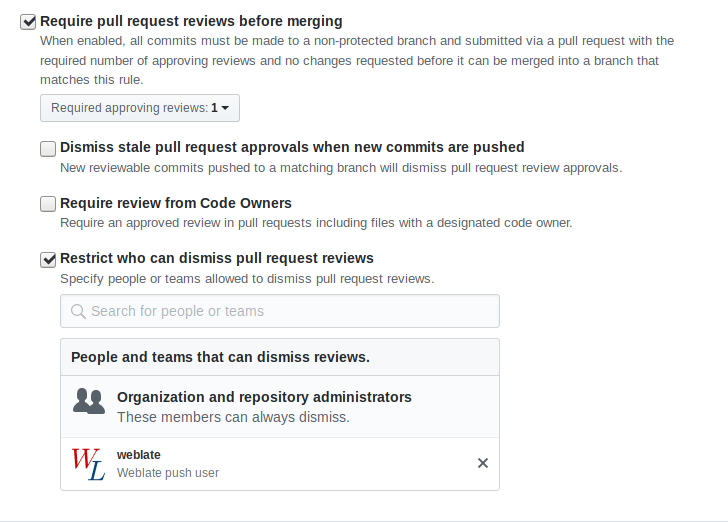
Branches protégées
If you are using Weblate on protected branch, you can configure it to use pull requests and perform actual review on the translations (what might be problematic for languages you do not know). An alternative approach is to waive this limitation for the Weblate push user.
Par exemple, sur GitHub, cela peut se faire dans la configuration du dépôt :
Interagir avec les autres
Weblate facilite les interactions avec les autres grâce à son API.
Voir aussi
Archivages lazy
The behaviour of Weblate is to group commits from the same author into one commit if possible. This greatly reduces the number of commits, however you might need to explicitly tell it to do the commits in case you want to get the VCS repository in sync, e.g. for merge (this is by default allowed for the Managers group, see Liste des autorisations).
Les modifications effectuées dans ce mode sont validées dès que l’une des conditions suivantes est remplie :
Quelqu’un d’autre modifie une chaîne de caractères déjà modifiée.
Une fusion en amont a lieu.
Un commit explicite est requis.
A file download is requested.
Change is older than period defined as Âge des modifications à commiter on Configuration des composants.
Indication
Commits are created for every component. So in case you have many components you will still see lot of commits. You might utilize Squasher les commits Git add-on in that case.
If you want to commit changes more frequently and without checking of age, you
can schedule a regular task to perform a commit. This can be done using
Periodic Tasks in L’interface d’administration Django. First create desired
Interval (for example 120 seconds). Then add new periodic task and
choose weblate.trans.tasks.commit_pending as Task with
{"hours": 0} as Keyword Arguments and desired interval.
Dépôt de traitement avec des scripts
The way to customize how Weblate interacts with the repository is Extensions. Consult Exécution de scripts à partir du greffon for info on how to execute external scripts through add-ons.
Assurer la cohérence des traductions entre les composants
Une fois que vous disposez de plusieurs composants de traduction, vous voudrez peut-être vous assurer que les mêmes chaînes de caractères ont la même traduction. Cela peut être réalisé à plusieurs niveaux.
Propagation des traductions
With Permettre la propagation de la traduction enabled (what is the default, see Configuration des composants), all new translations are automatically done in all components with matching strings. Such translations are properly credited to currently translating user in all components.
Propagation preconditions:
All components have to reside in a single project (linking component is not enough).
Enable Permettre la propagation de la traduction to automatically reuse translations for matching strings.
La propagation des traductions exige que la clé corresponde aux formats de traduction monolingues ; gardez cela à l’esprit lors de la création des clés de traduction.
The strings are propagated while translating, strings loaded from the repository are not propagated.
Astuce
This feature currently has limitations, and we want to make it more universal. Please share your feedback at https://github.com/WeblateOrg/weblate/issues/3166.
Contrôle de cohérence
La vérification Incohérence est déclenchée dès que les chaînes de caractères diffèrent. Vous pouvez l’utiliser pour examiner manuellement ces différences et choisir la traduction appropriée.
Traduction automatique
Automatic translation based on different components can be way to synchronize the translations across components. You can either trigger it manually (see Traduction automatique) or make it run automatically on repository update using add-on (see Traduction automatique).