애드온
애드온은 번역 워크플로를 사용자 지정하고 자동화하는 방법을 제공합니다. 관리자는 각 번역 프로젝트 또는 구성요소의 작업 ↓ 애드온 메뉴에서 애드온을 추가하고 관리할 수 있습니다. 애드온은 관리 인터페이스 에서 사이트 전체에 설치할 수도 있습니다.
힌트
API, DEFAULT_ADDONS 또는 install_addon 을 사용하여 애드온을 구성할 수도 있습니다.
수동 실행을 지원하는 애드온은 애드온 관리 또는 API 를 사용하여 실행할 수 있습니다. 결과는 애드온 활동 로그에 기록됩니다.
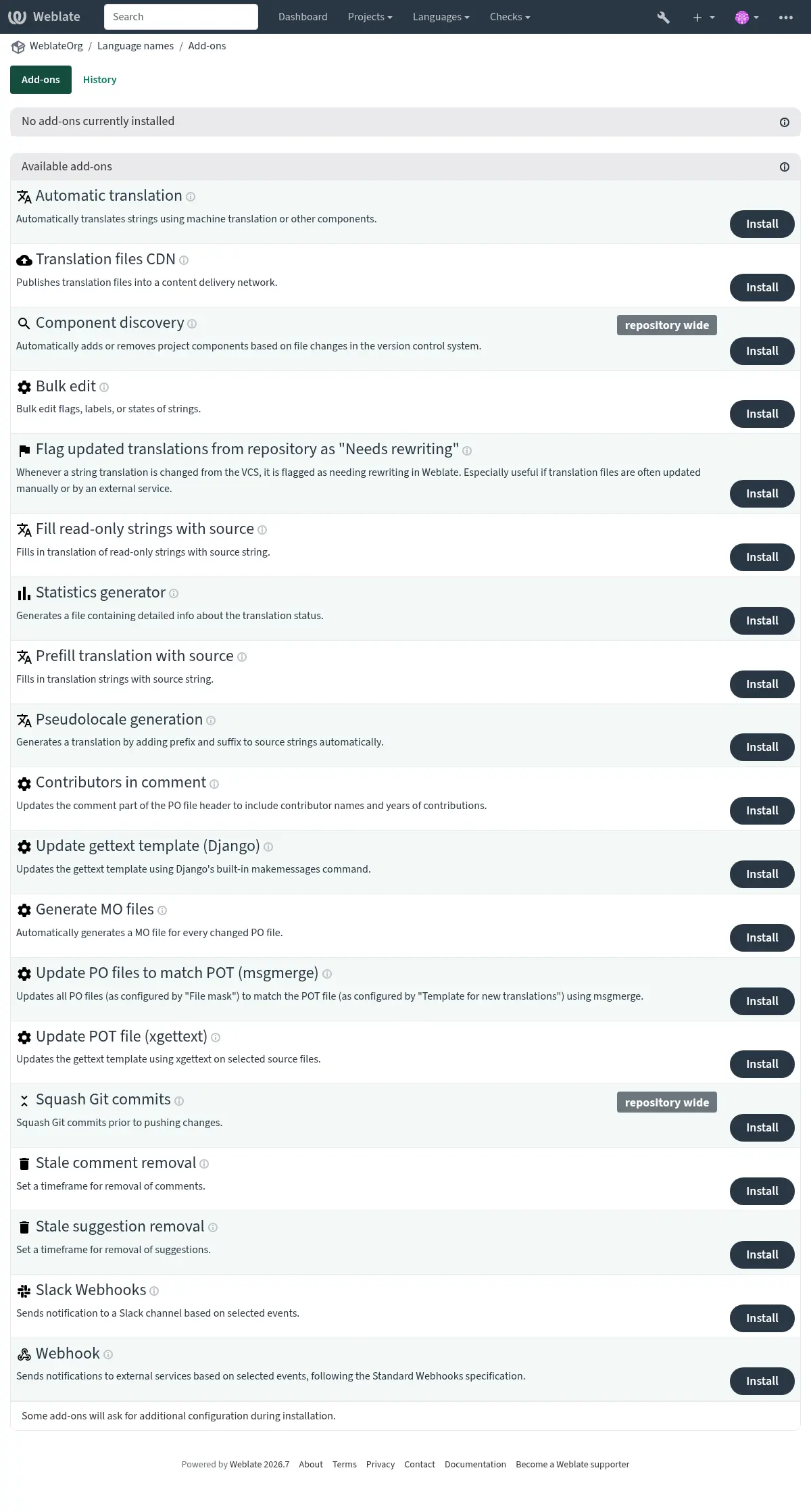
애드온을 트리거하는 이벤트
애드온 설치
애드온이 설치될 때 트리거됩니다.
구성요소 업데이트
구성요소에 다음과 같은 변경이 발생할 때마다 트리거됩니다:
저장소에서 문자열이 변경됨.
문자열이 추가됨.
새 번역이 추가됨.
매일
매일 트리거되지만, 애드온은 일반적으로 BACKGROUND_TASKS 에 따라 일일 부하를 구성요소 간에 분산합니다.
이벤트 변경
변경 이벤트가 생성된 후 트리거됩니다.
수동 트리거
애드온 관리 또는 API에서 애드온을 수동으로 실행할 때 트리거됩니다.
저장소 추가 후
새 번역이 추가되고 커밋된 직후 트리거됩니다.
저장소 커밋 후
변경사항이 커밋된 직후 트리거됩니다.
저장소 푸시 후
저장소가 업스트림에 푸시된 직후 트리거됩니다.
저장소 삭제 후
번역이 삭제된 직후 트리거됩니다.
저장소 업데이트 후
업스트림 저장소에서 새 변경사항이 가져올 때마다 트리거됩니다.
저장소 커밋 전
변경사항이 커밋되기 직전에 트리거됩니다.
저장소 푸시 전
저장소가 업스트림에 푸시되기 직전에 트리거됩니다.
저장소 업데이트 전
저장소 업데이트가 시도되기 직전에 트리거됩니다.
단위 저장 후
문자열이 저장된 직후 트리거됩니다.
단위 동기화 후
문자열이 VCS와 동기화된 후 트리거됩니다.
단위 생성 전
새로 생성된 문자열이 저장된 직후 트리거됩니다.
내장 애드온
자동 번역
- 애드온 ID:
weblate.autotranslate.autotranslate- 설정:
- 트리거:
기계 번역이나 다른 구성요소를 사용하여 문자열을 자동으로 번역합니다.
자바스크립트 현지화 CDN
Added in version 4.2.
- 애드온 ID:
weblate.cdn.cdnjs- 설정:
threshold번역 임계값
번역에 포함되기 위해 반드시 존재해야 하는 번역된 문자열의 비율입니다.
css_selectorCSS 선택자
현지화 가능한 요소를 감지하는 CSS 선택자입니다.
cookie_name언어 쿠키 이름
언어 설정을 저장하는 쿠키의 이름입니다.
filesHTML 파일에서 문자열 추출
번역 가능한 문자열을 구문 분석할 현재 저장소 또는 원격 URL의 파일 이름 목록입니다.
- 트리거:
자바스크립트 또는 HTML 현지화에 사용하기 위해 번역을 콘텐츠 전달 네트워크에 게시합니다.
정적 HTML 페이지를 현지화하거나 자바스크립트 코드에서 현지화를 로드하는 데 사용할 수 있습니다.
구성요소의 고유 URL을 생성하여 HTML 페이지에 포함시켜 현지화할 수 있습니다. 자세한 내용은 Weblate CDN을 사용한 HTML 및 JavaScript 번역 을 참조하세요.
참고
이 애드온은 Weblate 서버에서 추가 구성이 필요합니다. LOCALIZE_CDN_PATH 는 생성된 파일이 기록될 위치(파일 시스템)를 구성하고, LOCALIZE_CDN_URL 은 파일이 제공될 위치(URL)를 정의합니다. 파일 제공은 Weblate에서 수행하지 않으므로 외부에서 설정해야 합니다(일반적으로 CDN 서비스를 사용).
이 애드온은 Hosted Weblate 에서 구성되며 https://weblate-cdn.com/ 을 통해 파일을 제공합니다.
번역 파일 CDN
Added in version 2026.5.
- 애드온 ID:
weblate.cdn.files- 설정:
` 이 애드온에는 구성이 없습니다.`
- 트리거:
번역 파일을 콘텐츠 전달 네트워크에 게시합니다.
번역 파일을 다른 형식으로 변환하지 않고 게시합니다. 파일은 애드온별 CDN 디렉터리 아래에 작성되고 LOCALIZE_CDN_URL/<add-on UUID>/ 에서 제공됩니다. 단일 파일 번역은 언어 코드와 원래 파일 확장자를 사용합니다. 예: cs.json 또는 de.po. 다중 파일 번역은 번역 디렉터리를 기준으로 한 상대 경로를 사용해 언어 코드 아래에서 제공됩니다. 단일 언어 구성요소는 원문 언어 파일을 포함하고, 이중 언어 구성요소는 대상 언어 파일만 게시합니다. 안전한 제공 지침은 현지화 CDN 를 참조하세요.
빈 문자열 제거
Added in version 4.4.
- 애드온 ID:
weblate.cleanup.blank- 설정:
` 이 애드온에는 구성이 없습니다.`
- 트리거:
번역 파일에서 번역이 없는 문자열을 제거합니다.
번역 파일에 빈 문자열이 없도록 하려면 이 옵션을 사용하세요(예: 현지화 라이브러리가 원문 문자열로 대체하지 않고 누락으로 표시하는 경우).
번역 파일 정리
- 애드온 ID:
weblate.cleanup.generic- 설정:
` 이 애드온에는 구성이 없습니다.`
- 트리거:
모든 번역 파일을 단일 언어 기본 파일에 맞게 업데이트합니다. 대부분의 파일 형식에서는 기본 파일에 더 이상 존재하지 않는 오래된 번역 키를 제거하는 것을 의미합니다.
번역 문자열 외에 추가 콘텐츠가 포함된 형식(예: HTML 파일, Windows RC 파일, OpenDocument 형식)의 경우, 이 애드온은 번역 파일을 기본 파일과 동기화합니다.
For a one-time cleanup of a single translation file, use Cleanup unused in 저장소 유지보수 on that translation instead of installing the add-on.
누락된 언어 추가
프로젝트 내의 모든 구성요소에 일관된 언어 집합이 사용되도록 합니다.
참고
다른 프로젝트에서 공유된 구성요소는 이 검사에서 제외됩니다.
누락된 언어는 24시간마다 한 번, 그리고 Weblate에 새 언어가 추가될 때 확인됩니다.
대부분의 다른 애드온과 달리 이 애드온은 프로젝트 전체에 영향을 미칩니다.
힌트
자동 번역 로 새롭게 추가된 문자열을 자동 번역할 수 있습니다.
구성요소 발견
- 애드온 ID:
weblate.discovery.discovery- 설정:
match번역 파일과 일치시킬 정규 표현식
정규식은 구성요소와 언어에 대한 명명된 그룹을 정의해야 합니다.
file_format파일 형식
name_template구성요소 이름 사용자 정의
Django 템플릿 구문을 사용하세요. 이 템플릿에 {{ component }}가 포함되어야 합니다.
base_file_template단일 언어 기본 파일명 정의
이중 언어 번역 파일의 경우 비워 두세요. 설정하면 이 템플릿에 {{ component }}가 포함되어야 합니다.
new_base_template새 번역을 위한 기본 파일 정의
새 번역을 만드는 데 사용되는 파일 이름입니다. gettext에서는 .pot 파일을 선택하세요. 이 템플릿에 {{ component }}가 포함되어야 합니다.
intermediate_template중간 언어 파일
중간 번역 파일의 파일 이름입니다. 대부분의 경우 개발자가 제공하는 번역 파일이며, 실제 원문 문자열을 생성할 때 사용됩니다. 이 템플릿에 {{ component }}가 포함되어야 합니다.
language_regex언어 필터
파일 마스크를 검사할 때 번역 파일을 골라내는 데 사용되는 정규식입니다.
copy_addons기본 구성요소에서 새로 생성된 구성요소로 애드온 복제
remove존재하지 않는 파일의 구성요소 제거
- 트리거:
버전 제어 시스템에서 파일 변경을 기반으로 하여 프로젝트 구성요소를 자동으로 추가하거나 제거합니다.
일치 검사는 복잡한 구성을 가능하게 하는 정규식으로 수행되므로, 이에 대한 지식이 필요합니다. 번역 파일과 일치하는 정규식에는 구성요소와 언어에 해당하는 두 개의 명명된 그룹이 포함되어야 합니다. 정규식의 모든 명명된 그룹은 템플릿 필드에서 변수로 사용할 수 있습니다.
발견 요구사항
구성요소를 성공적으로 발견하려면, 구성이 다음을 모두 충족해야 합니다:
정규식에
component와language명명된 그룹이 정의되어야 합니다.구성요소별 파일의 이름을 지정하거나 찾는 데 사용되는 템플릿 필드에는
{{ component }}가 포함되어야 하며, 이렇게 해야 발견된 각 구성요소에 대해 렌더링된 값이 실제로 변경됩니다.단일 언어 형식의 경우, 구성요소에
base_file_template과 일치하는 파일과match와 일치하는 번역 파일이 하나 이상 포함되어야 합니다.
실습 예시: news_<lang>.md
일반적인 파일 이름 기반 언어 변형 배치입니다:
docs/news_en.mddocs/news_cs.mddocs/guide_en.md
시작점으로 파일 이름 기반 언어 변형 프리셋을 사용한 다음, 일치하는 파일 형식을 선택하고 채워진 값을 검토하세요.
- 정규 표현식:
(?:(?P<path>.*/))?(?P<component>.+?)_(?P<language>[A-Za-z]{2,3}(?:[_-][A-Za-z0-9]+)*)\.(?P<extension>[^/.]+)- 구성요소 이름:
{{ component }}- 발견된 파일 마스크:
docs/news_*.mddocs/guide_*.md
이 예시에서 {{ component }} 는 언어 접미사 앞의 기본 이름으로 해석되므로, docs/news_en.md, docs/news_pt_BR.md, docs/news_pt-BR.md 는 모두 news 구성요소가 됩니다.
모든 파일 이름 필드에서 Django 템플릿 마크업을 사용할 수 있습니다. 예를 들어:
{{ component }}component일치 그룹에서 구문 분석된 구성요소 이름{{ component|title }}첫 글자가 대문자인 구성요소 파일 이름
{{ path }}: {{ component }}정규 표현식의 사용자 정의 일치 그룹
저장 을 누르면 일치하는 구성요소의 미리보기가 표시되며, 여기서 구성이 요구사항에 실제로 부합하는지 확인할 수 있습니다:
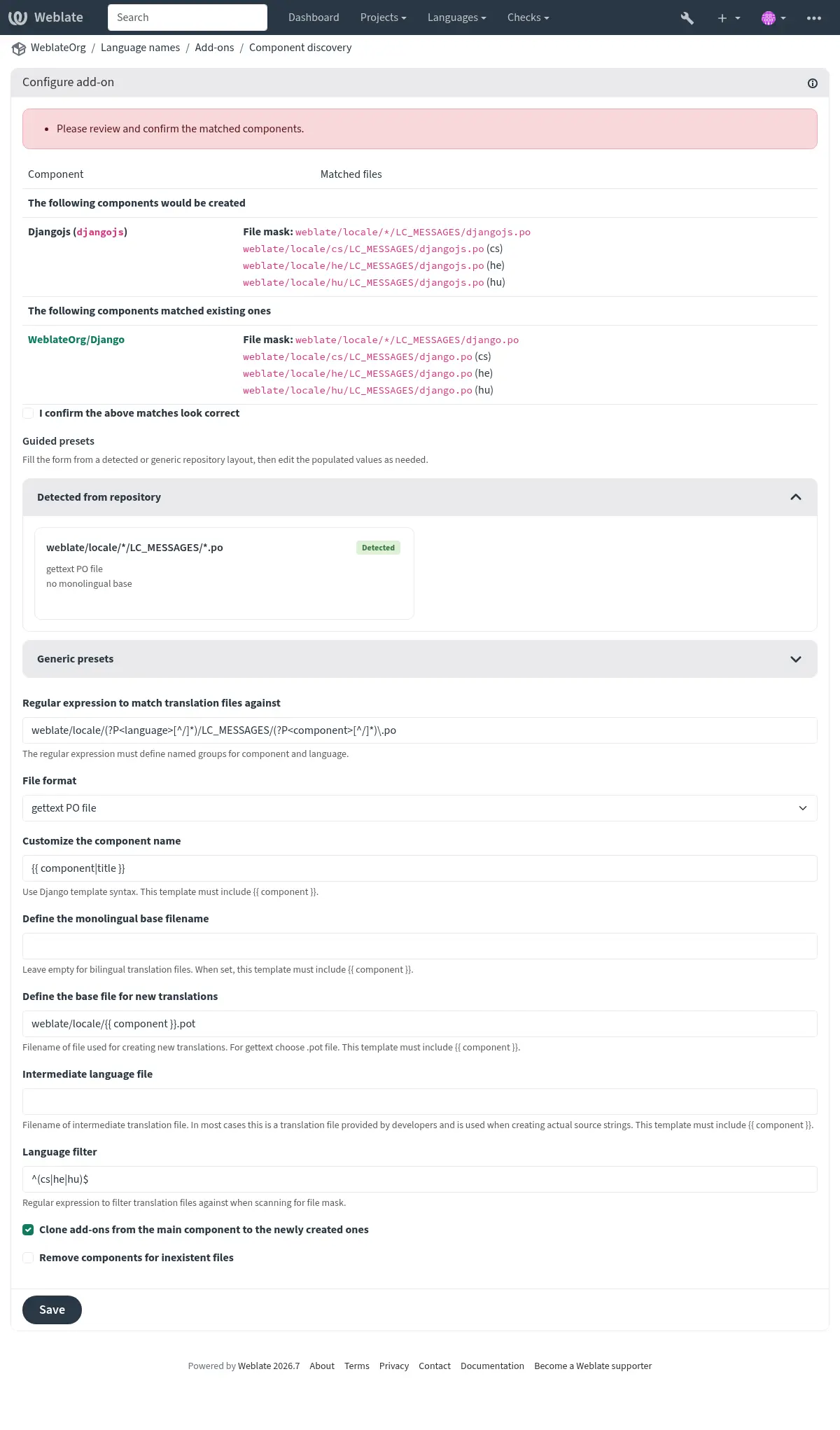
구성요소 발견 예시
위의 실습 예시는 가장 일반적인 파일 이름 기반 변형 배치를 다룹니다. 다음 예시에서는 일치시킬 수 있는 다른 저장소 구조를 보여줍니다.
언어당 하나의 폴더
구성요소에 대한 번역 파일이 포함된 언어당 하나의 폴더입니다.
- 정규 표현식:
(?P<language>[^/.]*)/(?P<component>[^/]*)\.po- 일치하는 파일:
cs/application.pocs/website.pode/application.pode/website.po
gettext 로케일 배치
gettext PO 파일을 저장하기 위한 일반적인 구조입니다.
- 정규 표현식:
locale/(?P<language>[^/.]*)/LC_MESSAGES/(?P<component>[^/]*)\.po- 일치하는 파일:
locale/cs/LC_MESSAGES/application.polocale/cs/LC_MESSAGES/website.polocale/de/LC_MESSAGES/application.polocale/de/LC_MESSAGES/website.po
복잡한 파일 이름
파일 이름 안에 구성요소와 언어 이름을 모두 사용합니다.
- 정규 표현식:
src/locale/(?P<component>[^/]*)\.(?P<language>[^/.]*)\.po- 일치하는 파일:
src/locale/application.cs.posrc/locale/website.cs.posrc/locale/application.de.posrc/locale/website.de.po
반복되는 언어 코드
경로와 파일 이름 모두에 언어를 사용합니다.
- 정규 표현식:
locale/(?P<language>[^/.]*)/(?P<component>[^/]*)/(?P=language)\.po- 일치하는 파일:
locale/cs/application/cs.polocale/cs/website/cs.polocale/de/application/de.polocale/de/website/de.po
Android 문자열 분할
Android 리소스 문자열로, 여러 파일로 나뉩니다.
- 정규 표현식:
res/values-(?P<language>[^/.]*)/strings-(?P<component>[^/]*)\.xml- 일치하는 파일:
res/values-cs/strings-about.xmlres/values-cs/strings-help.xmlres/values-de/strings-about.xmlres/values-de/strings-help.xml
복수 경로 일치
Java 속성 번역이 포함된 다중 모듈 Maven 프로젝트입니다.
- 정규 표현식:
(?P<originalHierarchy>.+/)(?P<component>[^/]*)/src/main/resources/ApplicationResources_(?P<language>[^/.]*)\.properties- 구성요소 이름:
{{ originalHierarchy }}: {{ component }}- 일치하는 파일:
parent/module1/submodule/src/main/resources/ApplicationResources_fr.propertiesparent/module1/submodule/src/main/resources/ApplicationResource_es.propertiesparent/module2/src/main/resources/ApplicationResource_de.propertiesparent/module2/src/main/resources/ApplicationResource_ro.properties
힌트
구성요소 발견 애드온은 Weblate 내부 URL 를 사용합니다. 이는 여러 구성요소 간에 VCS 설정을 공유하는 편리한 방법입니다. 연결된 구성요소는 각 구성요소의 소스 코드 저장소 필드(작업 ↓ 설정 ↓ 버전 제어 시스템)에 weblate://project/main-component 를 입력하여 설정한 기본 구성요소의 로컬 저장소를 사용합니다. 이렇게 하면 구성 시간과 시스템 리소스도 절약됩니다.
힌트
누락된 언어 추가 를 사용하여 새 구성요소에 번역 가능한 언어 전체 집합이 포함되도록 하세요.
더 보기
Fedora 메시징
Added in version 5.15.
- 애드온 ID:
weblate.fedora_messaging.publish- 설정:
amqp_urlAMQP broker URL
The AMQP broker URL to connect to.
topic_prefixTopic prefix
Optional prefix to prepend to generated message topics.
publish_timeoutPublish timeout
How many seconds to wait for the broker delivery acknowledgement.
connection_attemptsConnection attempts
How many times to try connecting to the broker.
retry_delayRetry delay
How many seconds to wait between connection attempts.
ca_certCA certificate bundle (PEM)
Paste only PEM certificate blocks, each starting with “—–BEGIN CERTIFICATE—–” and ending with “—–END CERTIFICATE—–“.
client_keyClient private key (PEM)
Paste a single unencrypted PEM private key block. Encrypted private keys are not supported.
client_certClient certificate (PEM)
Paste only the PEM certificate block starting with “—–BEGIN CERTIFICATE—–”; do not paste the output from “openssl x509 -text”.
event_filterChange events to trigger
Choose which change events should trigger this add-on. Change events to trigger
eventsSelected change events
- 트리거:
Fedora Messaging과 호환되는 AMQP 익스체인지로 알림을 전송합니다.
Fedora Messaging는 Weblate에서 발생하는 모든 변경 사항에 대한 AMQP 기반 발행자입니다. 이를 사용하여 Weblate에서 발생하는 변경 사항에 추가 서비스를 연결할 수 있습니다.
메시지 주제
All messages have topic
weblate.<action>.<project>.<category...>.<component>.<translation>.
When configured, topic_prefix is prepended to this topic using a single dot
separator, for example org.fedoraproject.weblate.project_backed_up.website.
The action is lowercase textual representation of action with underscores
instead of space, for example resource_updated; see Selected change events
for all action identifiers. The remaining parts match Weblate object path
segments.
For example, a project backup event for the website project uses
weblate.project_backed_up.website. A translation change in the website
project, frontend component, and Czech translation uses
weblate.translation_changed.website.frontend.cs. The same change in the
frontend component inside the parent and child categories uses
weblate.translation_changed.website.parent.child.frontend.cs.
메시지 본문
본문은 다음 필드로 구성됩니다(해당 이벤트에서 사용 가능한 경우):
change_id변경사항의 숫자 ID
action변경사항의 자세한 이름입니다.
timestampISO 형식 타임스탬프
target변경사항의 새로운 값(예: 문자열의 새로운 번역)
old변경사항의 이전 값(예: 문자열의 이전 번역)
source원문 문자열입니다.
url관련 객체를 볼 수 있는 절대 URL입니다.
author작성자 사용자 이름(예: 제안을 승인할 때 실제 사용자와 다를 수 있음)
user작업 수행 사용자 이름
project프로젝트 슬러그
component구성요소 슬러그
translation번역 언어 코드
메시지 헤더
라우팅에 활용할 수 있는 추가 헤더도 있습니다:
action변경사항의 자세한 이름입니다.
project프로젝트 슬러그
component구성요소 슬러그
예시 메시지
저장소 병합 이벤트:
{
  "id": 1,
  "action": "Merged repository",
  "timestamp": "2017-06-15T11:30:47.325000+00:00",
  "url": "http://example.com/projects/test/test/",
  "component": "test"
}
새로운 원문 문자열 이벤트:
{
  "id": 2,
  "action": "New source string",
  "timestamp": "2017-06-15T11:30:47.372000+00:00",
  "url": "http://example.com/translate/test/test/cs/?checksum=6412684aaf018e8e",
  "component": "test",
  "translation": "cs",
  "source": ["Hello, world!\n"]
}
리소스 업데이트 이벤트:
{
  "id": 6,
  "action": "Resource update",
  "timestamp": "2017-06-15T11:30:47.410000+00:00",
  "url": "http://example.com/projects/test/test/cs/",
  "project": "test",
  "component": "test",
  "translation": "cs"
}
{
  "id": 7,
  "action": "Resource update",
  "timestamp": "2017-06-15T11:30:47.510000+00:00",
  "url": "http://example.com/projects/test/test/de/",
  "project": "test",
  "component": "test",
  "translation": "de"
}
{
  "id": 8,
  "action": "Resource update",
  "timestamp": "2017-06-15T11:30:47.595000+00:00",
  "url": "http://example.com/projects/test/test/it/",
  "project": "test",
  "component": "test",
  "translation": "it"
}
프로젝트 제거 이벤트:
{
  "id": 9,
  "action": "Removed project",
  "timestamp": "2019-10-17T15:57:08.559420+00:00",
  "target": "test",
  "user": "testuser"
}
새로운 기여자 이벤트:
{
  "id": 11,
  "action": "New contributor",
  "timestamp": "2019-10-17T15:57:08.759960+00:00",
  "url": "http://example.com/translate/test/test/cs/?checksum=6412684aaf018e8e",
  "author": "testuser",
  "user": "testuser",
  "project": "test",
  "component": "test",
  "translation": "cs",
  "source": ["Hello, world!\n"]
}
새로운 번역 이벤트:
{
  "id": 12,
  "action": "New translation",
  "timestamp": "2019-10-17T15:57:08.772591+00:00",
  "url": "http://example.com/translate/test/test/cs/?checksum=6412684aaf018e8e",
  "target": ["Ahoj svete!\n"],
  "author": "testuser",
  "user": "testuser",
  "project": "test",
  "component": "test",
  "translation": "cs",
  "source": ["Hello, world!\n"]
}
일괄 편집
- 애드온 ID:
weblate.flags.bulk- 설정:
q쿼리
state지정할 상태
사용 가능한 선택:¶ -1변경하지 않음
10편집 필요
11편집 필요 (재작성 필요)
12편집 필요 (확인 필요)
20번역됨
30승인됨
add_flags추가할 번역 플래그
remove_flags제거할 번역 플래그
add_labels추가할 레이블
remove_labels제거할 레이블
- 트리거:
플래그, 레이블 또는 문자열의 상태를 일괄 편집합니다.
예시:
검색어 |
|
|---|---|
추가할 레이블 |
최근 |
검색어 |
|
|---|---|
추가할 번역 플래그 |
|
검색어 |
|
|---|---|
추가할 번역 플래그 |
|
변경되지 않은 번역을 “재작성 필요”로 표시
- 애드온 ID:
weblate.flags.same_edit- 설정:
` 이 애드온에는 구성이 없습니다.`
- 트리거:
VCS에서 새로운 번역 가능 문자열을 가져올 때 원문 문자열과 일치하면 Weblate에서 재작성 필요로 표시됩니다. 특히 번역되지 않은 문자열에 원문 문자열이 포함된 파일 형식에 유용합니다.
힌트
번역 플래그 에 strict-same 플래그를 추가하여 변경되지 않은 번역 검사를 강화할 수도 있습니다.
더 보기
새로운 원문 문자열을 “확인 필요”로 표시
- 애드온 ID:
weblate.flags.source_edit- 설정:
` 이 애드온에는 구성이 없습니다.`
- 트리거:
VCS에서 새로운 원문 문자열을 가져올 때마다 Weblate에서 확인 필요로 표시됩니다. 이를 통해 개발자가 작성한 원문 문자열을 쉽게 필터링하고 편집할 수 있습니다.
더 보기
새 번역을 “재작성 필요”로 표시
- 애드온 ID:
weblate.flags.target_edit- 설정:
` 이 애드온에는 구성이 없습니다.`
- 트리거:
VCS에서 새 번역 가능 문자열을 가져올 때마다 Weblate에서 재작성 필요로 표시됩니다. 이렇게 하면 개발자가 만든 번역을 쉽게 필터링하고 편집할 수 있습니다.
더 보기
저장소에서 업데이트된 번역을 “재작성 필요”로 표시
- 애드온 ID:
weblate.flags.target_repo_update- 설정:
` 이 애드온에는 구성이 없습니다.`
- 트리거:
VCS에서 문자열 번역이 변경될 때마다 Weblate에서 재작성 필요로 표시됩니다. 번역 파일이 수동으로 또는 외부 서비스에 의해 자주 업데이트되는 경우 특히 유용합니다.
더 보기
읽기 전용 문자열을 원문으로 채우기
Added in version 4.18.
읽기 전용 문자열의 번역을 원문 문자열로 채웁니다.
통계 생성기
번역 상태에 관한 자세한 정보를 포함한 파일을 생성합니다.
파일 이름과 내용 모두에서 Django 템플릿을 사용할 수 있습니다. 자세한 마크업 설명은 템플릿 마크업 을 참조하세요.
예를 들어 각 번역에 대한 요약 파일을 생성합니다:
- 생성된 파일의 이름
locale/{{ language_code }}.json- 내용
{
   "language": "{{ language_code }}",
   "strings": "{{ stats.all }}",
   "translated": "{{ stats.translated }}",
   "last_changed": "{{ stats.last_changed }}",
   "last_author": "{{ stats.last_author }}",
}
더 보기
원문으로 번역 미리 채우기
Added in version 4.11.
번역 문자열을 원문 문자열로 채웁니다.
구성요소의 모든 미번역 문자열이 원문 문자열로 채워지고 편집 필요로 표시됩니다. 번역 파일에 빈 문자열이 있을 수 없을 때 이 옵션을 사용하세요. .. AUTOGENERATED START: weblate.generate.pseudolocale .. 이 섹션은 ./manage.py list_addons 에 의해 자동으로 생성됩니다. 수동으로 편집하지 마세요.
유사언어 생성
Added in version 4.5.
- 애드온 ID:
weblate.generate.pseudolocale- 설정:
source원문 문자열
target대상 번역
이 번역의 모든 문자열이 덮어쓰기됩니다
prefix앞에 추가되는 고정 텍스트
var_prefix앞에 추가되는 변수 텍스트
suffix뒤에 추가되는 고정 텍스트
var_suffix뒤에 추가되는 변수 텍스트
var_multiplier변수 텍스트 배수
원문 문자열의 길이에 따라 변수 텍스트를 몇 번 반복할지 지정합니다.
include_readonly읽기 전용 문자열 포함
- 트리거:
원문 문자열에 접두사와 접미사를 자동으로 추가하여 번역을 생성합니다.
유사언어는 현지화할 준비가 되지 않은 문자열을 찾는 데 유용합니다. 이 작업은 유사언어로 응용 프로그램을 실행할 때 변경되지 않은 문자열을 쉽게 찾을 수 있으도록 번역 가능한 모든 원문 문자열을 변경하여 수행됩니다.
현지화된 문자열이 레이아웃에 맞지 않을 가능성이 있는 문자열을 찾는 것도 가능합니다.
변수 부분을 사용하면 현지화 후 사용자 인터페이스에 맞지 않는 문자열을 찾을 수 있습니다. 즉, 원문 문자열 길이를 기준으로 텍스트를 확장합니다. 변수 텍스트는 텍스트 길이에 배수를 곱한 값만큼 반복됩니다. 예를 들어, Hello world 에 변수 텍스트 _ 를 지정하고 변수 배수를 1로 지정하면 Hello world___________ 가 됩니다. 즉, 텍스트는 원문 문자열의 각 문자에 대해 한 번씩 반복됩니다.
문자열은 다음 패턴을 사용하여 생성됩니다:
앞에 추가되는 고정 텍스트 앞에 추가되는 변수 텍스트 원문 문자열 뒤에 추가되는 변수 텍스트 뒤에 추가되는 고정 텍스트
힌트
테스트에는 실제 언어를 사용할 수 있지만, Weblate에는 전용 유사언어인 en_XA 및 ar_XB 가 있습니다.
힌트
이 애드온을 사용하여 기존 언어 또는 유사 언어의 새 로케일에 대한 번역을 시작할 수 있습니다. 구성요소에 번역을 추가한 후 애드온을 따르세요. 예: fr 이 있고 fr_CA 번역을 시작하려면, 소스를 fr 로, 대상을 fr_CA 로 설정하고 접두사와 접미사를 비워 두세요.
복사 후에 이루어진 번역이 Weblate에 의해 변경되는 것을 방지하려면 새 번역이 채워지면 애드온을 제거하세요.
주석에 기여자 표시
- 애드온 ID:
weblate.gettext.authors- 설정:
` 이 애드온에는 구성이 없습니다.`
- 트리거:
PO 파일 헤더의 주석 부분을 업데이트하여 기여자 이름과 기여 연도를 포함하도록 합니다.
PO 파일 헤더는 다음과 같이 표시됩니다:
# Michal Čihař <michal@weblate.org>, 2012, 2018, 2019, 2020.
# Pavel Borecki <pavel@example.com>, 2018, 2019.
# Filip Hron <filip@example.com>, 2018, 2019.
# anonymous <noreply@weblate.org>, 2019.
“configure” 파일에서 ALL_LINGUAS 변수 업데이트
번역이 추가되거나 제거될 때 “configure”, “configure.in” 또는 “configure.ac” 파일의 ALL_LINGUAS 변수를 업데이트합니다.
번역이 추가되거나 제거될 때 configure, configure.in 또는 configure.ac 파일의 ALL_LINGUAS 변수를 업데이트합니다.
gettext 출력 사용자 정의
Removed in version 5.13: 파일 형식 매개변수 (으)로 대체됨.
gettext 템플릿 업데이트 (Django)
Added in version 5.17.
- 애드온 ID:
weblate.gettext.django- 설정:
interval업데이트 주기
구성요소가 새로 고쳐질 때 애드온이 POT 파일을 업데이트하는 주기입니다.
사용 가능한 선택:¶ daily매일
weekly매주
monthly매월
normalize_headerPOT 헤더 정규화
gettext 헤더를 업데이트하고 POT 자리 표시자 주석을 바꿉니다.
location_modeSource locations
Choose how extraction writes source locations to the POT file. Use this to keep locations in the template while omitting them from translated PO files.
사용 가능한 선택:¶ fileUse file format settings
keepExtract locations to the POT file
omitDo not extract locations
- 트리거:
Django의 내장 makemessages 명령을 사용하여 gettext 템플릿을 업데이트합니다.
This add-on updates the template configured in 신규 번역의 템플릿. It is available for gettext PO components, and the component must define a template for new translations.
The selected update frequency applies to automatic runs after repository refreshes. Installing or reconfiguring the add-on runs it immediately, and manual runs from add-on management or the API also bypass the frequency schedule. After a successful update, Weblate commits the changed template and reloads source strings.
The template update does not update translation PO files by itself. Keep PO 파일을 POT에 맞게 업데이트 (msgmerge) installed when translation files should follow template changes automatically. The install form for this add-on can install that add-on, but existing add-on settings do not show that installation option again.
Django requirements
This add-on requires xgettext and msguniq. It runs Weblate’s internal extraction wrapper for Django messages instead of invoking a project’s manage.py makemessages, so it does not load project Django settings or applications.
The template for new translations must use the django or djangojs
domain. Supported template names are django.pot, djangojs.pot,
django.po, and djangojs.po. Weblate infers the source directory
from the template path and skips repository locale directories while extracting.
LINGUAS 파일 업데이트
번역이 추가되거나 제거될 때 LINGUAS 파일을 업데이트합니다.
POT 파일 업데이트 (Meson)
Added in version 5.17.
- 애드온 ID:
weblate.gettext.meson- 설정:
interval업데이트 주기
구성요소가 새로 고쳐질 때 애드온이 POT 파일을 업데이트하는 주기입니다.
사용 가능한 선택:¶ daily매일
weekly매주
monthly매월
normalize_headerPOT 헤더 정규화
gettext 헤더를 업데이트하고 POT 자리 표시자 주석을 바꿉니다.
location_modeSource locations
Choose how extraction writes source locations to the POT file. Use this to keep locations in the template while omitting them from translated PO files.
사용 가능한 선택:¶ fileUse file format settings
keepExtract locations to the POT file
omitDo not extract locations
comment_mode코드 주석
xgettext가 주석을 추출하지 않을지, 모든 주석을 추출할지, 특정 태그로 표시된 주석만 추출할지 선택하세요.
사용 가능한 선택:¶ off주석을 추출하지 않음
all모든 주석 추출
tagged태그가 있는 주석 추출
comment_tag주석 태그
태그 지정 주석 모드 사용 시 주석 추출을 위해 xgettext에 전달되는 태그입니다.
checksxgettext 검사
추출된 메시지에 대해 활성화할 추가 xgettext 검증 검사입니다.
사용 가능한 선택:¶ ellipsis-unicodeellipsis-unicode
space-ellipsisspace-ellipsis
quote-unicodequote-unicode
bullet-unicodebullet-unicode
keyword추가 키워드
–keyword를 사용하여 xgettext에 전달하는 선택적 추가 키워드입니다.
keyword_exclusiveUse keywords exclusively
When enabled, passes
--keywordwithout a value to xgettext before the additional keyword, disabling all default keywords so that only the keyword specified above is recognized.presetMeson 프리셋
Meson gettext 통합에 맞는 내장 xgettext 인수 프리셋입니다. GLib 프리셋은 Meson의 gettext 도우미가 사용하는 키워드 및 형식 플래그 옵션을 추가합니다.
사용 가능한 선택:¶ glibGLib
- 트리거:
Meson gettext 규칙을 사용하여 gettext 템플릿을 업데이트합니다.
This add-on updates the template configured in 신규 번역의 템플릿. It is available for gettext PO components, and the component must define a template for new translations.
The selected update frequency applies to automatic runs after repository refreshes. Installing or reconfiguring the add-on runs it immediately, and manual runs from add-on management or the API also bypass the frequency schedule. After a successful update, Weblate commits the changed template and reloads source strings.
The template update does not update translation PO files by itself. Keep PO 파일을 POT에 맞게 업데이트 (msgmerge) installed when translation files should follow template changes automatically. The install form for this add-on can install that add-on, but existing add-on settings do not show that installation option again.
Meson requirements
This add-on requires xgettext; it does not invoke Meson. It follows
Meson gettext conventions by reading POTFILES or POTFILES.in
from the gettext directory and passing the GLib keyword and format-flag preset
to xgettext.
The gettext directory is the directory containing the template configured in
신규 번역의 템플릿. It must contain meson.build and
POTFILES or POTFILES.in. A Meson project meson.build
must be present in that directory or one of its parent directories. If both
POTFILES and POTFILES.in exist, POTFILES is used.
An adjacent POTFILES.skip excludes listed source files from extraction.
Configure this add-on from the existing Meson gettext setup. In most Meson
projects, the gettext directory is po/, the template is named after the
gettext domain, and po/meson.build calls Meson’s gettext helper. Use the
same template path in 신규 번역의 템플릿, for example
po/example.pot, and keep POTFILES or POTFILES.in next to
that meson.build file.
Weblate does not read the source file list from meson.build. It uses
POTFILES or POTFILES.in, matching Meson’s gettext convention.
When the Meson project uses a non-default gettext directory or domain, mirror
that layout in the component template path.
MO 파일 생성
- 애드온 ID:
weblate.gettext.mo- 설정:
path생성된 MO 파일의 경로
지정하지 않으면 PO 파일의 위치가 사용됩니다.
fuzzy편집이 필요한 문자열 포함
편집이 필요한 문자열(fuzzy)은 일반적으로 번역으로 사용할 준비가 되지 않았습니다.
- 트리거:
변경된 모든 PO 파일에 대해 MO 파일을 자동으로 생성합니다.
생성된 MO 파일의 위치는 사용자 정의할 수 있으며, 해당 필드는 템플릿 마크업 을 사용합니다.
참고
번역이 제거되면 해당 PO 파일은 저장소에서 삭제되지만, 이 애드온이 생성한 MO 파일은 삭제되지 않습니다. MO 파일은 업스트림에서 수동으로 제거해야 합니다.
PO 파일을 POT에 맞게 업데이트 (msgmerge)
버전 5.13에서 변경: 설정 구성은 파일 형식 매개변수 로 이동되었습니다.
- 애드온 ID:
weblate.gettext.msgmerge- 설정:
` 이 애드온에는 구성이 없습니다.`
- 트리거:
“파일 마스크”로 설정된 모든 PO 파일을 “새 번역을 위한 템플릿”으로 설정된 POT 파일과 일치하도록 msgmerge를 사용하여 업데이트합니다.
이 애드온은 POT(템플릿) 파일이 새 문자열이나 기존 문자열의 변경으로 업데이트되는 gettext PO 파일을 다룰 때 필수적입니다. 저장소에서 POT 파일이 업데이트되면 이 애드온은 해당 변경 사항을 모든 언어 PO 파일에 자동으로 병합하여 다음을 바랍니다:
새로운 번역 가능한 문자열이 모든 언어에 나타남
제거된 문자열은 사용 중지로 표시됨
수정된 문자열은 검토 필요(fuzzy)로 표시됨
Most msgmerge command-line options can be set up through file format parameters
configuration. Enable the po_remove_obsolete parameter to remove obsolete
#~ entries when PO files are saved.
더 보기
POT 파일 업데이트 (Sphinx)
Added in version 5.17.
- 애드온 ID:
weblate.gettext.sphinx- 설정:
interval업데이트 주기
구성요소가 새로 고쳐질 때 애드온이 POT 파일을 업데이트하는 주기입니다.
사용 가능한 선택:¶ daily매일
weekly매주
monthly매월
normalize_headerPOT 헤더 정규화
gettext 헤더를 업데이트하고 POT 자리 표시자 주석을 바꿉니다.
location_modeSource locations
Choose how extraction writes source locations to the POT file. Use this to keep locations in the template while omitting them from translated PO files.
사용 가능한 선택:¶ fileUse file format settings
keepExtract locations to the POT file
omitDo not extract locations
filter_mode필터링
Sphinx 추출 후 번역할 필요가 없는 문자열을 선택적으로 제거합니다.
사용 가능한 선택:¶ none없음
weblate_docsWeblate 문서
- 트리거:
프로젝트 구성을 로드하지 않고 Sphinx의 gettext 빌더를 사용하여 gettext 템플릿을 업데이트합니다.
This add-on updates the template configured in 신규 번역의 템플릿. It is available for gettext PO components, and the component must define a template for new translations.
The selected update frequency applies to automatic runs after repository refreshes. Installing or reconfiguring the add-on runs it immediately, and manual runs from add-on management or the API also bypass the frequency schedule. After a successful update, Weblate commits the changed template and reloads source strings.
The template update does not update translation PO files by itself. Keep PO 파일을 POT에 맞게 업데이트 (msgmerge) installed when translation files should follow template changes automatically. The install form for this add-on can install that add-on, but existing add-on settings do not show that installation option again.
Sphinx requirements
This add-on requires sphinx-build, provided by the sphinx
installation extra. The template for new translations must be a .pot
file below a locales directory. The directory before locales is
used as the Sphinx source directory and must contain conf.py.
Extraction uses Weblate’s bundled Sphinx configuration and does not load the project configuration. Weblate runs the Sphinx gettext builder, normalizes source references to paths relative to the source directory, and copies the generated template back to the configured template path.
POT 파일 업데이트 (xgettext)
Added in version 5.17.
- 애드온 ID:
weblate.gettext.xgettext- 설정:
interval업데이트 주기
구성요소가 새로 고쳐질 때 애드온이 POT 파일을 업데이트하는 주기입니다.
사용 가능한 선택:¶ daily매일
weekly매주
monthly매월
normalize_headerPOT 헤더 정규화
gettext 헤더를 업데이트하고 POT 자리 표시자 주석을 바꿉니다.
location_modeSource locations
Choose how extraction writes source locations to the POT file. Use this to keep locations in the template while omitting them from translated PO files.
사용 가능한 선택:¶ fileUse file format settings
keepExtract locations to the POT file
omitDo not extract locations
comment_mode코드 주석
xgettext가 주석을 추출하지 않을지, 모든 주석을 추출할지, 특정 태그로 표시된 주석만 추출할지 선택하세요.
사용 가능한 선택:¶ off주석을 추출하지 않음
all모든 주석 추출
tagged태그가 있는 주석 추출
comment_tag주석 태그
태그 지정 주석 모드 사용 시 주석 추출을 위해 xgettext에 전달되는 태그입니다.
checksxgettext 검사
추출된 메시지에 대해 활성화할 추가 xgettext 검증 검사입니다.
사용 가능한 선택:¶ ellipsis-unicodeellipsis-unicode
space-ellipsisspace-ellipsis
quote-unicodequote-unicode
bullet-unicodebullet-unicode
keyword추가 키워드
–keyword를 사용하여 xgettext에 전달하는 선택적 추가 키워드입니다.
keyword_exclusiveUse keywords exclusively
When enabled, passes
--keywordwithout a value to xgettext before the additional keyword, disabling all default keywords so that only the keyword specified above is recognized.input_mode입력 소스
xgettext가 글롭 패턴 또는 POTFILES/POTFILES.in 매니페스트에서 소스 파일을 읽을지 선택하세요.
사용 가능한 선택:¶ patterns소스 파일 패턴
potfilesPOTFILES 매니페스트
languagexgettext 언어
xgettext에 전달되는 프로그래밍 언어입니다. 예: Python 또는 C. xgettext가 확장자로 언어를 추정하도록 하려면 비워 두세요.
source_patterns소스 파일 패턴
xgettext로 추출할 파일에 대한 줄바꿈으로 구분된 저장소 상대 글롭 패턴입니다.
potfiles_pathPOTFILES 경로
POTFILES 또는 POTFILES.in의 저장소 상대 경로입니다. 항목은 저장소 루트를 기준으로 해석됩니다. 매니페스트 옆에 POTFILES.skip이 있으면 나열된 파일이 추출에서 제외됩니다.
- 트리거:
선택한 소스 파일에 xgettext를 사용하여 gettext 템플릿을 업데이트합니다.
This add-on updates the template configured in 신규 번역의 템플릿. It is available for gettext PO components, and the component must define a template for new translations.
The selected update frequency applies to automatic runs after repository refreshes. Installing or reconfiguring the add-on runs it immediately, and manual runs from add-on management or the API also bypass the frequency schedule. After a successful update, Weblate commits the changed template and reloads source strings.
The template update does not update translation PO files by itself. Keep PO 파일을 POT에 맞게 업데이트 (msgmerge) installed when translation files should follow template changes automatically. The install form for this add-on can install that add-on, but existing add-on settings do not show that installation option again.
xgettext requirements
This add-on requires xgettext. Configure either source file patterns
or a POTFILES / POTFILES.in manifest. Source file patterns are
repository-relative glob patterns and only matching repository files are passed
to xgettext.
Entries in POTFILES or POTFILES.in are resolved relative to the
repository root. They must be relative paths, stay inside the repository, and
point to existing files. Blank lines and lines starting with # are ignored.
If a POTFILES.skip file exists next to the manifest, its entries are
excluded from extraction.
Automatic repository refresh runs are skipped unless the changed files match the configured source patterns, match files listed in the manifest, change a watched manifest, or change the add-on configuration.
Start from the build-system extraction setup when configuring this add-on.
Autotools projects usually keep gettext inputs in po/POTFILES.in and
options such as the gettext domain and xgettext flags in
po/Makevars or related Makefile.am files. Use manifest mode
with the same POTFILES.in when its entries are plain repository-relative
source paths, and copy relevant extraction behavior into the add-on settings,
for example the language, comment extraction, checks, and additional keyword.
For other build systems, use the source list or extraction command they already
run as the source of truth. CMake, custom Makefiles, npm scripts, or project
specific extraction scripts often call xgettext directly or generate
an intermediate file list. Configure source patterns for simple layouts, or use
manifest mode when the project maintains a plain file list. If a build-system
manifest contains transformations or prefixes that are not file paths, convert
it to plain repository-relative paths before using it as POTFILES.
Git 커밋 스쿼시
- 애드온 ID:
weblate.git.squash- 설정:
squash커밋 스쿼시
사용 가능한 선택:¶ all모든 커밋을 하나로
language언어별
file파일별
author작성자별
append_trailers스쿼시된 커밋 메시지에 트레일러 추가
트레일러 라인은 커밋 메시지의 자유 형식 부분 끝에 ‘Co-authored-by: …’와 같이 RFC 822 이메일 헤더와 유사하게 보이는 줄입니다.
commit_message커밋 메시지
이 커밋 메시지는 스쿼시된 커밋의 결합된 커밋 메시지 대신 사용됩니다.
- 트리거:
변경 사항을 푸시하기 전에 Git 커밋을 스쿼시합니다.
힌트
불필요한 충돌을 방지하려면 웹훅이나 API를 통해 업스트림 변경 사항의 자동 수신을 구성하는 것이 좋습니다. 저장소 업데이트 를 참조하세요.
Git 커밋은 변경 사항을 푸시하기 전에 다음 모드 중 하나로 스쿼시할 수 있습니다:
모든 커밋을 하나로
언어별
파일별
작성자별
원본 커밋 메시지는 유지되지만, 작성자별 을 선택하거나 커밋 메시지를 사용자 지정하여 작성자 정보를 포함하지 않으면 작성자 정보가 손실됩니다.
원본 커밋 메시지는 선택적으로 사용자 정의 커밋 메시지로 대체할 수 있습니다.
트레일러(Co-authored-by: … 와 같은 커밋 줄)는 원본 커밋 메시지에서 선택적으로 제거하여 스쿼시된 커밋 메시지 끝에 추가할 수 있습니다. 이는 모든 번역자에 대해 적절한 Co-authored-by: 표기도 생성합니다.
JSON 출력 사용자 정의
버전 5.12에서 변경: 구분자 뒤 공백 방지 옵션이 추가되었습니다.
Removed in version 5.13: 파일 형식 매개변수 (으)로 대체됨.
저장소를 업스트림으로 초기화
Added in version 5.17.
매일 밤 Weblate 저장소의 모든 변경 사항을 폐기합니다.
Java 속성 파일 형식 지정
- 애드온 ID:
weblate.properties.sort- 설정:
case_sensitive대소문자 구분 키 정렬 활성화
- 트리거:
Java 속성 파일을 형식화하고 정렬합니다.
줄바꿈을 Unix 형식으로 통합합니다.
유니코드 이스케이프 시퀀스가 있는 경우 대문자 형식으로 변환합니다.
빈 줄과 주석을 제거합니다.
키에 따라 문자열을 정렬합니다.
중복 문자열을 제거합니다.
오래된 의견 제거
의견 삭제 기간을 설정합니다.
오래되어 더 이상 유효하지 않은 의견을 제거하는 데 유용합니다. 의견이 오래되었다고 해서 중요성이 떨어지는 것은 아니므로 주의하여 사용하세요.
오래된 제안 제거
- 애드온 ID:
weblate.removal.suggestions- 설정:
age보관할 일수
votes투표 임계치
제거 임계값입니다. 투표 수와 관계없이 제안을 제거하려면 비워 두세요. 투표가 꺼져 있으면 이 필드는 효과가 없습니다.
- 트리거:
제안 삭제 기간을 설정합니다.
제안 투표(동료 검토 참조)와 함께 사용하면 주어진 기간 내에 충분한 긍정 투표를 받지 못한 제안을 제거하는 데 매우 유용합니다.
RESX 파일 업데이트
- 애드온 ID:
weblate.resx.update- 설정:
` 이 애드온에는 구성이 없습니다.`
- 트리거:
단일 언어 업스트림 기본 파일과 일치하도록 모든 번역 파일을 업데이트합니다. 사용되지 않는 문자열은 제거되고, 새 문자열은 원문 문자열의 복사본으로 추가됩니다.
힌트
오래된 번역 키만 제거하려면 번역 파일 정리 을 사용하세요.
Slack 웹훅
Added in version 5.12.
- 애드온 ID:
weblate.webhook.slack- 설정:
webhook_url웹훅 URL
event_filterChange events to trigger
Choose which change events should trigger this add-on. Change events to trigger
eventsSelected change events
- 트리거:
선택한 이벤트에 따라 Slack 채널로 알림을 전송합니다.
경고
알림 내용에 HTML 태그가 표시될 수 있습니다. 이는 곧 해결될 예정인 알려진 문제입니다. https://github.com/WeblateOrg/weblate/issues/15056을 참조하세요.
웹훅
Added in version 5.11.
버전 5.15에서 변경: 이제 비밀 키 길이가 사양을 준수하는지 검증됩니다.
- 애드온 ID:
weblate.webhook.webhook- 설정:
webhook_url웹훅 URL
secret웹훅 비밀 키
표준 웹훅 비밀 키는 Base64로 인코딩된 문자열입니다.
event_filterChange events to trigger
Choose which change events should trigger this add-on. Change events to trigger
eventsSelected change events
- 트리거:
선택한 이벤트에 따라 표준 웹훅 사양을 준수하여 외부 서비스로 알림을 전송합니다.
The request payload complies with the Weblate Messaging schema. The
action field uses the action name listed in Selected change events.
The OpenAPI description can also be found at /api/docs/.
Sample request body:
{
   "change_id": 99,
   "action": "Translation changed",
   "timestamp": "2019-08-24T14:15:22Z",
   "target": "Nazdar svete!",
   "old": "Nazdar!",
   "source": "Hello, world",
   "url": "/translate/project-slug/component-slug/cs/?checksum=46add148a53cab6f",
   "author": "author-username",
   "user": "user-username",
   "project": "project-slug",
   "component": "component-slug",
   "translation": "cs"
}
카테고리가 포함된 요청 본문 예시:
{
   "change_id": 8910,
   "action": "Component renamed",
   "timestamp": "2025-06-11T07:15:09Z",
   "target": ["new-name"],
   "old": ["component-slug"],
   "url": "/projects/project-slug/parent-category/child-category/sub-category/component-slug/",
   "user": "testuser",
   "project": "project-slug",
   "component": "component-slug",
   "category": [
      "sub-category",
      "child-category",
      "parent-category"
   ]
}
요청 헤더 예시:
{
   "webhook-id": "7f1c5477f6275a69af7b83236c20cb1a",
   "webhook-timestamp": "1748505623.044281",
   "webhook-signature": "v1,Ceo5qEr07ixe2NLpvHk3FH9bwy/WavXrAFQ/9tdO6mc="
}
webhook-signature 는 secret 문자열, 요청 페이로드, webhook-timestamp, webhook-id 를 사용하여 생성된 HMAC 서명의 공백 구분 목록입니다. 이를 통해 웹훅 요청의 진위성과 무결성이 보장됩니다.
제공된 secret 은 24바이트(192비트)에서 64바이트(512비트) 사이의 Base64 인코딩 문자열입니다. 쉽게 식별할 수 있도록 whsec_ 접두사를 붙일 수 있습니다.
요청을 검증하려면 standardwebhooks 라이브러리의 Webhook.verify 메서드 또는 “표준 웹훅 사양” 구현을 사용할 수 있습니다.
사용되지 않는 애드온
XML 출력 사용자 정의
Added in version 4.15.
Removed in version 5.13: 파일 형식 매개변수 (으)로 대체됨.
YAML 출력 사용자 정의
Removed in version 5.13: 파일 형식 매개변수 (으)로 대체됨.
일반 애드온 매개변수
기계 번역 엔진
|
Alibaba |
|
Amazon 번역 |
|
Anthropic |
|
Apertium APy |
|
Azure AI 번역기 |
|
Azure OpenAI |
|
Baidu |
|
CyrTranslit |
|
DeepL |
|
Glosbe |
|
Google Cloud Translation Advanced |
|
Google Cloud Translation Basic |
|
LTEngine |
|
LibreTranslate |
|
Mistral |
|
ModernMT |
|
MyMemory |
|
Netease Sight |
|
Ollama |
|
OpenAI |
|
SAP Translation Hub |
|
Systran |
|
Weblate |
|
Weblate 번역 메모리 |
|
Yandex |
|
Yandex v2 |
|
Youdao Zhiyun |
|
tmserver |
파일 형식
|
Apple 확장이 포함된 XLIFF 1.2 |
|
앱 스토어 메타데이터 파일 |
|
ARB 파일 |
|
Android String Resource |
|
AsciiDoc 파일 |
|
Advanced SubStation Alpha 자막 파일 |
|
Haiku catkeys |
|
Compose Multiplatform 리소스 |
|
CSV 파일 |
|
다중값 CSV 파일 |
|
Simple CSV 파일 |
|
DokuWiki 텍스트 파일 |
|
DTD 파일 |
|
Flat XML 파일 |
|
Fluent 파일 |
|
Format.JS JSON 파일 |
|
go-i18n v1 JSON 파일 |
|
go-i18n v2 JSON 파일 |
|
go-i18n TOML 파일 |
|
gotext JSON 파일 |
|
GWT 속성 |
|
HTML 파일 |
|
i18next JSON 파일 v3 |
|
i18next JSON 파일 v4 |
|
IDML 파일 |
|
INI 파일 |
|
Inno Setup INI 파일 |
|
Joomla 언어 파일 |
|
JSON 파일 |
|
JSON 중첩 구조 파일 |
|
Laravel PHP 문자열 |
|
Markdown 파일 |
|
MDX 파일 |
|
MediaWiki 텍스트 파일 |
|
@draggable/i18n 언어 파일 |
|
Mobile Kotlin 리소스 |
|
Nextcloud JSON 파일 |
|
OpenDocument 파일 |
|
PHP 문자열 |
|
XLIFF 1.2 번역 파일 |
|
gettext PO 파일 |
|
gettext PO 파일 (단일 언어) |
|
gettext 확장이 포함된 XLIFF 1.2 |
|
Java 속성 |
|
RC 파일 |
|
RESJSON 파일 |
|
ResourceDictionary 파일 |
|
.NET 리소스 파일 |
|
Ruby YAML 파일 |
|
SubRip 자막 파일 |
|
SubStation Alpha 자막 파일 |
|
iOS 문자열 |
|
Stringsdict 파일 |
|
MicroDVD 자막 파일 |
|
TermBase eXchange 파일 |
|
TOML 파일 |
|
Qt Linguist translation file (version 2) |
|
Qt Linguist translation file (version 1) |
|
일반 텍스트 파일 |
|
WebExtension JSON 파일 |
|
WixLocalization 파일 |
|
배치 가능 항목을 지원하는 XLIFF 1.2 |
|
XLIFF 2.0 번역 파일 |
|
배치 가능 항목을 지원하는 XLIFF 2.0 번역 파일 |
|
Excel Open XML |
|
XWiki 전체 페이지 |
|
XWiki Java 속성 |
|
XWiki 페이지 속성 |
|
YAML 파일 |
Change events to trigger
|
Translation content events |
|
All change events |
|
Selected change events |
Selected change events
The following change actions can appear in notification payloads. Fedora Messaging uses the identifier column in message topics, while webhook payloads use the name column in the action field.
ID |
Identifier |
이름 |
설명 |
|---|---|---|---|
|
|
리소스 업데이트됨 |
A translation file was synchronized with its repository. |
|
|
번역 완료됨 |
A language translation became fully translated after an individual edit. Automatic translation, uploads, and bulk edits do not emit this event. |
|
|
번역 변경됨 |
An existing translation was edited by a user. |
|
|
의견 추가됨 |
A comment was added to a string. |
|
|
제안 추가됨 |
A translation suggestion was added. |
|
|
번역 추가됨 |
A previously untranslated string was translated by a user. |
|
|
자동으로 번역됨 |
A translation was added or changed by automatic translation. This is emitted instead of Translation added or Translation changed. |
|
|
제안 승인됨 |
A translation suggestion was accepted as the translation. |
|
|
번역 되돌려짐 |
A translation was restored to an earlier value. |
|
|
번역 업로드됨 |
A translation was added or changed by a translation file upload. This is emitted instead of Translation added or Translation changed. |
|
|
원문 문자열 추가됨 |
A source string was added outside repository or upload updates. |
|
|
구성요소 잠김 |
A component was locked for translation. |
|
|
구성요소 잠금 해제됨 |
A component was unlocked for translation. |
|
|
변경사항 커밋됨 |
Pending component changes were committed. |
|
|
변경사항 푸시됨 |
Repository changes were pushed upstream. |
|
|
저장소 초기화됨 |
A repository was reset to its upstream state. |
|
|
저장소 병합됨 |
Upstream repository changes were merged. |
|
|
저장소 리베이스됨 |
Repository changes were rebased on upstream. |
|
|
저장소 병합 실패함 |
Merging upstream repository changes failed. |
|
|
저장소 리베이스 실패함 |
Rebasing repository changes failed. |
|
|
구문분석 실패함 |
Weblate could not parse a translation file. |
|
|
번역 삭제됨 |
A language translation was removed. |
|
|
제안 삭제됨 |
A translation suggestion was removed. |
|
|
번역 대체됨 |
A translation was changed by a search-and-replace operation. This is emitted instead of Translation changed. |
|
|
저장소 푸시 실패함 |
Pushing repository changes upstream failed. |
|
|
정리 도중 제안 제거됨 |
An obsolete translation suggestion was removed during cleanup. |
|
|
원문 문자열 변경됨 |
A source string was edited in Weblate. |
|
|
문자열 추가됨 |
A new string was added in Weblate. |
|
|
일괄 상태 변경됨 |
The translation state of one or more strings was changed in bulk. |
|
|
공개 범위 변경됨 |
Project or component visibility was changed. |
|
|
사용자 추가됨 |
A user was granted access. |
|
|
사용자 제거됨 |
A user’s access was removed. |
|
|
번역 승인됨 |
A translation was approved during review. |
|
|
편집 필요로 표시됨 |
A translation was marked as needing editing. |
|
|
구성요소 제거됨 |
A translation component was removed. |
|
|
프로젝트 제거됨 |
A translation project was removed. |
|
|
프로젝트 이름 변경됨 |
A translation project was renamed. |
|
|
구성요소 이름 변경됨 |
A translation component was renamed. |
|
|
구성요소 이동됨 |
A component was moved within a project. |
|
|
기여자 참여함 |
A user made their first contribution to a translation. |
|
|
공지사항 게시됨 |
An announcement was posted. |
|
|
경고 발생 |
A component alert was triggered. |
|
|
언어 추가됨 |
A language translation was added. |
|
|
언어 추가 요청됨 |
A user requested a new language. |
|
|
프로젝트 생성됨 |
A translation project was created. |
|
|
구성요소 생성됨 |
A translation component was created. |
|
|
사용자 초대됨 |
A user was invited to a project. |
|
|
저장소 알림 수신됨 |
Weblate received a repository notification from a code host. |
|
|
업로드한 파일로 번역 대체됨 |
A translation file was replaced by an uploaded file. |
|
|
라이선스 변경됨 |
Project or component license information changed. |
|
|
기여자 약관(CLA) 변경됨 |
The contributor license agreement was changed. |
|
|
스크린샷 추가됨 |
A screenshot was associated with a string. |
|
|
스크린샷 업로드됨 |
A screenshot image was uploaded. |
|
|
저장소에 문자열 업데이트됨 |
A string was changed while synchronizing from the repository. |
|
|
애드온 설치됨 |
An add-on was installed. |
|
|
애드온 구성 변경됨 |
An add-on’s configuration was changed. |
|
|
애드온 제거됨 |
An add-on was uninstalled. |
|
|
문자열 제거됨 |
A string was removed from a translation. |
|
|
의견 삭제됨 |
A string comment was removed. |
|
|
의견 해결됨 |
A string comment was marked as resolved. |
|
|
설명 업데이트됨 |
The explanation for a source string was updated. |
|
|
카테고리 삭제됨 |
A component category was removed. |
|
|
카테고리 이름 변경됨 |
A component category was renamed. |
|
|
카테고리 이동됨 |
A component category was moved. |
|
|
문자열 저장 실패 |
Weblate could not save a changed string. |
|
|
저장소에 문자열 추가됨 |
A new string was found while synchronizing from the repository. |
|
|
업로드로 문자열 업데이트됨 |
A string was changed while processing an uploaded file. |
|
|
업로드로 문자열 추가됨 |
A new string was found while processing an uploaded file. |
|
|
원문 업로드로 번역 업데이트됨 |
A translation was synchronized after uploading a source file. |
|
|
구성요소 번역 완료 |
All language translations in a component became fully translated after an individual edit. Automatic translation, uploads, and bulk edits do not emit this event. |
|
|
검사 강제 적용 |
A translation was marked as needing editing by an enforced check. |
|
|
변경 사항 전파됨 |
A translation edit was propagated to another matching string. |
|
|
파일 업로드됨 |
A file was uploaded to a translation. |
|
|
추가 플래그 업데이트됨 |
Additional source-string flags were updated. |
|
|
글꼴 업로드됨 |
A font was uploaded. |
|
|
글꼴 변경됨 |
An uploaded font was changed. |
|
|
글꼴 삭제됨 |
An uploaded font was removed. |
|
|
번역 강제 동기화 |
Translation files were forcibly synchronized with the repository. |
|
|
번역 강제 재검사 |
Translation files were forcibly rescanned for changes. |
|
|
스크린샷 제거됨 |
A screenshot was removed. |
|
|
레이블 추가됨 |
A label was added to a string. |
|
|
레이블 제거됨 |
A label was removed from a string. |
|
|
저장소 정리 |
The repository working tree was cleaned up. |
|
|
업로드로 원문 문자열 추가됨 |
A source string was added while processing an uploaded file. |
|
|
저장소에 원문 문자열 추가됨 |
A source string was added while synchronizing from the repository. |
|
|
프로젝트 백업됨 |
A project backup was created. |
|
|
프로젝트 복원됨 |
A project was restored from a backup. |
|
|
구성요소 복원됨 |
A component was restored from a backup. |
|
|
사용자 편집 되돌림 |
All selected edits by a user were reverted. |
|
|
프로젝트 설정 변경됨 |
A project setting was changed. |
|
|
구성요소 설정 변경됨 |
A component setting was changed. |
|
|
사용자 접근 변경됨 |
A user’s access permissions were changed. |
|
|
작업공간 생성됨 |
A workspace was created. |
|
|
작업공간 설정 변경됨 |
A workspace setting was changed. |
|
|
프로젝트 이동됨 |
A project was moved into or out of a workspace. |
|
|
Remote repository updated |
A remote repository update was completed. |
|
|
Remote repository update failed |
Updating a remote repository failed. |
|
|
Alert dismissed |
A component alert was dismissed. |
|
|
Alert reopened |
A component alert was reopened after its context changed. |
애드온 목록 사용자 정의
애드온 목록은 WEBLATE_ADDONS 로 구성됩니다. 다른 애드온을 추가하려면 이 설정에 절대 클래스 이름을 포함시키기만 하면 됩니다.
애드온 작성
직접 애드온을 작성할 수도 있습니다. weblate.addons.base.BaseAddon 의 하위 클래스를 만들어 애드온 메타데이터를 정의한 후 콜백을 구현하여 처리를 수행합니다.
더 보기
애드온에서 스크립트 실행
애드온을 사용하여 외부 스크립트를 실행할 수도 있습니다. 이전에는 Weblate에 통합되어 있었지만, 이제는 애드온으로 스크립트를 감싸는 코드를 작성해야 합니다.
# Copyright © Michal Čihař <michal@weblate.org>
#
# SPDX-License-Identifier: GPL-3.0-or-later

"""Example pre commit script."""

from __future__ import annotations

from typing import ClassVar

from django.utils.translation import gettext_lazy

from weblate.addons.events import AddonEvent
from weblate.addons.scripts import BaseScriptAddon


class ExamplePreAddon(BaseScriptAddon):
    # Event used to trigger the script
    events: ClassVar[set[AddonEvent]] = {
        AddonEvent.EVENT_PRE_COMMIT,
    }
    # Name of the addon, has to be unique
    name = "weblate.example.pre"
    # Verbose name and long description
    verbose = gettext_lazy("Execute script before commit")
    description = gettext_lazy("This add-on executes a script.")

    # Script to execute
    script = "/bin/true"
    # File to add in commit (for pre commit event)
    # does not have to be set
    add_file = "po/{{ language_code }}.po"
설치 지침은 사용자 정의 품질 검사, 애드온, 자동 제안 및 자동 수정 를 참조하세요.
스크립트는 지정된 구성요소의 VCS 저장소 루트를 현재 디렉터리로 설정한 상태에서 실행됩니다.
추가로 다음 환경 변수를 사용할 수 있:
- WL_VCS
사용된 버전 관리 시스템.
- WL_REPO
업스트림 저장소 URL.
- WL_PATH
VCS 저장소의 절대 경로.
- WL_BRANCH
현재 구성요소에 설정된 저장소 브랜치.
- WL_FILEMASK
현재 구성요소의 파일 마스크.
- WL_TEMPLATE
단일 언어 번역의 템플릿 파일 이름 (비어 있을 수 있음).
- WL_NEW_BASE
새 번역 생성에 사용되는 파일의 이름 (비어 있을 수 있음).
- WL_FILE_FORMAT
현재 구성요소에서 사용되는 파일 형식.
- WL_LANGUAGE
현재 처리 중인 번역의 언어 (구성요소 수준 훅에서는 사용할 수 없음).
- WL_PREVIOUS_HEAD
업데이트 후 이전 HEAD (업데이트 후 훅 실행 후에만 사용 가능).
- WL_COMPONENT_SLUG
URL 구성에 사용되는 구성요소 슬러그.
- WL_PROJECT_SLUG
URL 구성에 사용되는 프로젝트 슬러그.
- WL_COMPONENT_NAME
구성요소 이름.
- WL_PROJECT_NAME
프로젝트 이름.
- WL_COMPONENT_URL
구성요소 URL.
- WL_ENGAGE_URL
프로젝트 참여 URL.
더 보기
업데이트 후 저장소 처리
VCS 업스트림 소스가 변경될 때 번역 파일을 업데이트하는 데 사용할 수 있습니다. 이를 위해 Weblate는 VCS에 커밋된 파일만 인식하므로, 스크립트의 일부로 변경 사항을 커밋해야 합니다.
예를 들어 Gulp에서는 다음 코드를 사용할 수 있음:
#! /bin/sh
gulp --gulpfile gulp-i18n-extract.js
git commit -m 'Update source strings' src/languages/en.lang.json
번역의 커밋 전 처리
커밋 스크립트를 사용하여 저장소에 커밋되기 전에 번역을 자동으로 변경합니다.
현재 번역의 파일 이름을 포함하는 단일 매개변수로 전달됩니다.
애드온 활동 로깅
애드온 활동 로그는 애드온 실행을 추적하며 애드온 활동을 모니터링하는 데 사용할 수 있습니다.
Each entry records whether processing is pending, successful, failed, or skipped. Skipped entries include the reason the add-on did not run, such as an incompatible component, no relevant changes, or a configured schedule that is not due yet. A successful entry can still mean that the add-on checked its inputs but found nothing to change.
For scope-wide add-ons that process components independently, the activity log contains a separate entry for each component.
ADDON_ACTIVITY_LOG_EXPIRY 를 설정하여 특정 시간 간격 후 로그를 정리할 수 있습니다.