Weblate 지원 받기
Weblate 는 커뮤니티 지원이 있는 카피레프트 자유 소프트웨어입니다. 호스팅 구독자는 추가 비용 없이 우선 지원을 받습니다. 자체 호스팅 사용자를 포함한 모든 사람에게 선불 지원 패키지를 이용할 수 있습니다. 현재 지원 offerings에 대한 정보는 https://weblate.org/support에서 확인하세요.
지원 통합
구매한 지원 패키지는 선택적으로 Weblate 구독 관리 인터페이스에 통합할 수 있으며, 여기에서 링크를 찾을 수 있습니다. 설치에 대한 기본 인스턴스 세부 정보도 이 방법으로 Weblate에 보고됩니다.

Weblate에 전송되는 정보
Weblate 인스턴스 URL
사이트 제목
실행 중인 버전
프로젝트, 구성요소, 언어, 원문 문자열 및 사용자 수
인스턴스의 공개 SSH 키
추가적으로 Weblate 둘러보기 를 켜면:
List of public and protected projects (name, URL, and website).
힌트
Discover 가 Weblate 둘러보기 설명에서 공개적으로 보여줍니다.
다른 데이터는 제출되지 않습니다.
통합 서비스
지원 패키지가 여전히 유효한지 확인
힌트
구매한 지원 패키지는 구매 시 이미 활성화되어 통합하지 않아도 사용할 수 있습니다.
고객 지원팀에 문의하기
힌트
아직 지원 패키지가 없는 경우 사용 가능한 커뮤니티 리소스에 대해 Weblate에서 문제 보고하기 섹션을 참조하세요.
구독자는 다음 채널을 통해 Weblate Care에 직접 연락할 수 있음:
care@weblate.org로 이메일 지원.
지원 양식은 지원 통합 후 Weblate 관리 인터페이스에서 사용할 수 있습니다.
구독을 통해 설정, 유지보수 및 문제 해결에 대한 시기적절하고 안정적인 도움을 받을 수 있습니다.
참고
암호화된 콘텐츠 전송
암호화된 콘텐츠를 보내려면 ID 0961 62CE 141D 7FE4 B15D A9FA 73D9 298A CB26 03F0 의 care@weblate.org 공개 키를 사용하세요.
이 공개 키는 가장 많이 사용되는 키 서버에서 WKD를 사용하거나 weblate.org에서 직접 확인할 수 있습니다.
Weblate 둘러보기
Added in version 4.5.2.
Discover 는 번역자가 다른 Weblate 인스턴스와 커뮤니티를更容易 찾을 수 있도록 하는 선택적 서비스입니다. 사용자는 https://weblate.org/discover/에서 등록된 사이트를 탐색하고 기여할 프로젝트를 찾을 수 있습니다.
목록에 등록하기
버전 2026.7.1에서 변경: Discover Weblate registration can be started directly from the management interface without manually copying the activation token.
참고
Make sure you are OK with publishing your instance name, URL, tally of projects, components, and users, together with names of public and protected projects for use on Discover.
Use the Discover Weblate panel in the management interface to manage the listing. If you have an activated support package, list your server by clicking Enable discovery. If the instance is not connected to weblate.org yet, start the registration by clicking Enable Discover Weblate:
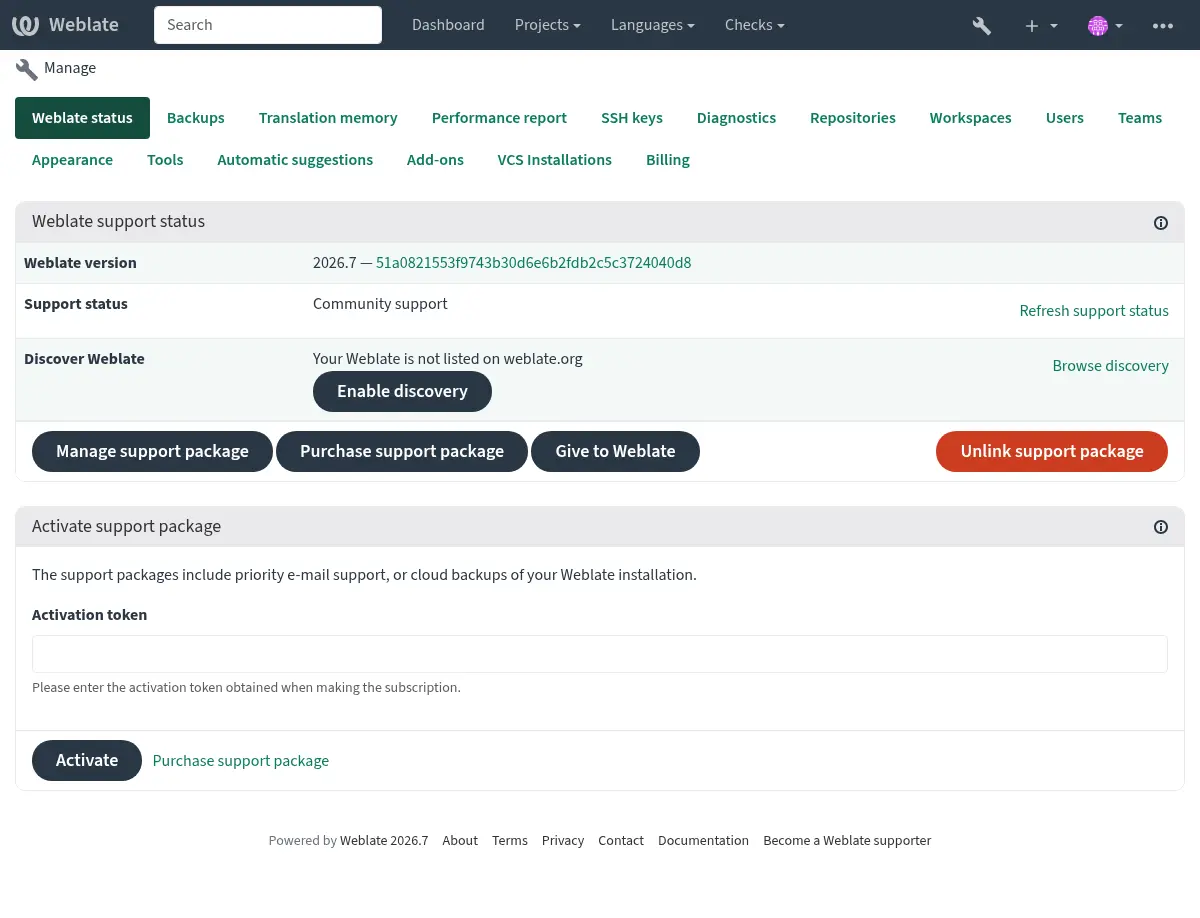
This opens the registration form on weblate.org and returns to your Weblate management interface to complete activation with discovery already enabled. The registration flow can be used from an account that has a support subscription, but it registers the Discover Weblate listing; activating a purchased support package is handled by 지원 통합. Unlinking the support package disables the Discover Weblate listing.
All steps for listing a server manually, for example from older Weblate versions:
https://weblate.org/user/에서 등록하세요
https://weblate.org/subscription/discovery/에서 Weblate 사이트를 등록하세요
Copy the activation token into your Weblate management interface.
Confirm you want your Weblate listed by clicking Enable discovery from the Discover Weblate panel:
목록 사용자 정의
https://weblate.org/user/ 에서 Weblate 사이트 이미지(570 x 260 픽셀)와 설명을 제공해 주시면 목록에서 사이트가 더 잘 보이게 됩니다.