Tradução contínua
Há infraestrutura em vigor para que sua tradução acompanhe de perto o desenvolvimento. Desta forma, os tradutores podem trabalhar em traduções o tempo todo, em vez de trabalhar através de uma enorme quantidade de texto novo pouco antes do lançamento.
Ver também
Integrando com Weblate describes basic ways to integrate your development with Weblate. Code-hosting integrations lists provider-specific setup steps for common code-hosting sites.
Este é o processo:
Developers make changes and push them to the VCS repository.
Opcionalmente, os arquivos de tradução são atualizados, consulte Introduzindo novos textos.
O Weblate extrai as alterações do repositório VCS, analisa os arquivos de tradução e atualiza o banco de dados, consulte Atualizando repositórios.
Os tradutores enviam traduções usando a interface web do Weblate ou enviam alterações feitas offline.
Quando os tradutores terminam, o Weblate faz o commit das alterações no repositório local (consulte Commits adiados).
Changes are pushed back to the upstream repository (see Fazendo push das alterações do Weblate).
Dica
Upstream code-hosting site is not necessary, you can use Weblate with Arquivos locais where there is only the repository inside Weblate.
Atualizando repositórios
Você deve configurar alguma maneira de atualizar repositórios de backend a partir de sua fonte.
Use Ganchos de notificação to integrate with the majority of common code-hosting services, see Code-hosting integrations. You must also Habilitar ganchos for this to work.
Acione manualmente a atualização no gerenciamento do repositório ou usando API REST do Weblate ou Weblate Client
Habilite
AUTO_UPDATEpara atualizar automaticamente todos os componentes na sua instância do WeblateExecute
updategit(com a seleção de um projeto ou--allpara atualizar tudo)
Sempre que o Weblate atualizar o repositório, os complementos de pós-atualização serão acionadas, consulte Complementos.
Evitando conflitos de mesclagem
Os conflitos de mesclagem do Weblate surgem quando o mesmo arquivo foi alterado tanto no Weblate quanto fora dele. Dependendo da situação, há várias abordagens que podem ajudar aqui:
Evitando conflitos de mesclagem alterando arquivos de tradução somente no Weblate
Evitando conflitos de mesclagem bloqueando o Weblate ao fazer alterações externas
Evitando conflitos de mesclagem concentrando operações no Git
Evitando conflitos de mesclagem alterando arquivos de tradução somente no Weblate
Evitar edições fora do Weblate é fácil com arquivos monolíngues — você pode adicionar novos textos no Weblate e deixar a edição completa dos arquivos lá. Para arquivos bilíngues, geralmente há algum tipo de processo de extração de mensagens para gerar arquivos traduzíveis a partir do código fonte. Em alguns casos, isso pode ser dividido em duas partes:
A extração gera modelo (por exemplo, o Gettext POT é gerado usando xgettext).
Em seguida, o processo mais mescla-o em traduções reais (os arquivos Gettext PO são atualizados usando msgmerge).
Você pode executar o segundo passo dentro do Weblate e ele garantirá que todas as alterações pendentes sejam incluídas antes desta operação.
Evitando conflitos de mesclagem bloqueando o Weblate ao fazer alterações externas
A integração do Weblate no seu processo de atualização para que ele libere as alterações antes de atualizar os arquivos fora do Weblate pode ser alcançada usando API REST do Weblate para forçar o Weblate a fazer push de todas as alterações pendentes e bloquear a tradução enquanto você está fazendo alterações do seu lado.
O script para fazer atualizações pode ser assim:
# Lock Weblate translation
wlc lock
# Push changes from Weblate to upstream repository
wlc push
# Pull changes from upstream repository to your local copy
git pull
# Update translation files, this example is for Django
./manage.py makemessages --keep-pot -a
git commit -m 'Locale updates' -- locale
# Push changes to upstream repository
git push
# Tell Weblate to pull changes (not needed if Weblate follows your repo
# automatically)
wlc pull
# Unlock translations
wlc unlock
Se você tiver vários componentes compartilhando o mesmo repositório, você precisa bloqueá-los todos separadamente:
wlc lock foo/bar
wlc lock foo/baz
wlc lock foo/baj
Nota
O exemplo usa Weblate Client, que precisa de configuração (chaves de API) para ser capaz de controlar o Weblate remotamente. Você também pode conseguir isso usando qualquer cliente HTTP em vez de Weblate Client, por exemplo, curl, ver API REST do Weblate.
Manutenção do repositório
The Repository maintenance view shows repository status for a project, component, or translation and lets privileged users run maintenance operations from the user interface.
The same actions can also be triggered using API REST do Weblate or, for the supported subset, Weblate Client.
Availability of individual actions depends on permissions, the configured version control system, whether pushing is configured, and whether the selected object can be locked.
The File management actions are available only from Repository maintenance for an individual translation. These actions rewrite that translation file and commit the result; they are not project-wide or component-wide operations.
Operations that read repository content, such as updating, resetting, or rescanning, also reconcile translation files in Weblate. Added or removed translation files are reflected after this processing finishes. Glossary language synchronization and cleanup are described in Language files and synchronization.
Ação |
What it does |
Typical use |
|---|---|---|
Commit |
Commits pending changes stored in Weblate to the local repository. |
Flush pending Weblate changes before doing repository work elsewhere. |
Push |
Pushes committed local repository changes to the configured upstream. |
Send committed translations upstream when automatic push is disabled or delayed. |
Update |
Fetches upstream changes, integrates them using the component’s configured Estilo de mesclagem, and reconciles translation files. |
Bring Weblate in sync with upstream using the default integration strategy. |
Update with merge |
Fetches upstream changes and integrates them with an explicit merge. |
Override the default merge style for a single update. |
Update with rebase |
Fetches upstream changes and rebases local Weblate commits on top of upstream. |
Keep history linear when that matches your workflow. |
Update with merge without fast-forward |
Fetches upstream changes and creates an explicit merge commit even when a fast-forward would be possible. |
Preserve merge commits for auditing or branch-management reasons. |
Lock / Unlock |
Prevents or allows translators to make further changes in Weblate. |
Freeze translation changes while doing repository maintenance outside Weblate. |
Reset and discard |
Resets Weblate’s local repository to upstream, discards pending Weblate changes, and reconciles translation files. |
Use when upstream should overwrite the local Weblate repository state. |
Reset and reapply |
Resets Weblate’s local repository to upstream, reconciles translation files, and reapplies pending translations. See Reset and reapply recovery behavior. |
Recover from diverged history while keeping pending Weblate translations. |
Cleanup |
Removes untracked files and stale branches from the local repository checkout. |
Clean up leftover files or stale repository state in Weblate’s checkout. |
Synchronize |
Forces Weblate to write all known translations back to the repository files. |
Repair cases where repository files became out of sync with the database state. |
Rescan |
Re-reads translation files from the local repository into Weblate and removes translations whose files no longer match the component configuration. |
Import file changes after manual repository work or file creation. |
Remove duplicates |
Removes repeated strings with the same identifier from one translation file. |
Repair duplicate strings reported by Weblate when the file contains repeated units. |
Cleanup unused |
Removes strings no longer present in the base file from one translation file. The Limpar arquivos de tradução add-on can perform this automatically. |
Run a one-time cleanup without installing the add-on. |
Remove obsolete |
Removes obsolete strings from one PO translation file. |
Run a one-time PO cleanup without enabling automatic obsolete string removal. |
Reset and reapply recovery behavior
The Reset and reapply operation keeps pending translations from Weblate while resetting the local repository state to match upstream.
The operation can restore pending translations only when the target language files still exist after the reset or when Weblate can create them for the component, for example using a valid Modelo para novas traduções.
If neither of these conditions is met, Weblate keeps the pending changes in its database and reports a recovery error instead of failing later with a generic parse error.
Evitando conflitos de mesclagem concentrando operações no Git
Mesmo quando o Weblate é a única fonte das alterações nos arquivos de tradução, podem surgir conflitos quando se usa o complemento Squash de commits git, Estilo de mesclagem está configurado para Rebase ou você está esmagando commits fora do Weblate (por exemplo, ao mesclar um pull request).
The reason for merge conflicts is different in this case. Weblate can have new local commits after you merge earlier Weblate commits upstream. This typically happens if merging is not automated and changes wait for days or weeks for a human review. Git is then sometimes no longer able to identify upstream changes as matching the Weblate ones and refuses to perform a rebase.
Squash merging Weblate changes makes this harder to recover from. A squash merge creates a new commit instead of preserving the individual Weblate commits in the upstream history. Weblate still has the original commits in its local repository, and Git can no longer prove that upstream already contains them. If the conflict was also resolved manually, the file contents can differ from both repositories, so Weblate can keep failing to update even after the pull request was merged upstream.
If upstream no longer contains Weblate commits because they were squash merged, updating the repository might not be enough. Use Reset and reapply from Repository maintenance to reset Weblate to upstream while keeping pending translations; see Reset and reapply recovery behavior. Use Reset and discard only when upstream should fully replace Weblate’s local changes.
Para abordar isso, você precisa minimizar a quantidade de alterações pendentes no Weblate ao mesclar um pull request, ou evitar os conflitos completamente ao não mesclar as alterações.
Aqui estão algumas opções de como evitar isso:
Do not use Squash de commits git or squash merging for Weblate changes. Squashing is why Git might no longer recognize the changes after merging.
When resolving conflicts outside Weblate, merge the Weblate commits with a regular merge commit and push that result upstream. Do not squash merge the conflict-resolution pull request.
Permita que o Weblate commit as alterações pendentes antes de mesclar. Isso atualizará o pull request com todas as suas alterações e ambos os repositórios estarão sincronizados.
Use os recursos de revisão no Weblate (consulte Fluxos de tradução) para que você possa mesclar automaticamente os pull requests do GitHub após a aprovação do CI.
Use o bloqueio no Weblate para evitar alterações enquanto o pull request do GitHub estiver sendo revisado.
Ver também
Code-hosting notifications
Provider-specific app and webhook instructions for GitHub, GitLab, Bitbucket, Pagure, Azure Repos, Gitea, Forgejo, and Gitee are covered in Code-hosting integrations.
Provider-specific notifications
These legacy anchors are kept for compatibility. Current provider-specific app and webhook setup is documented in Code-hosting integrations.
Automatically updating repositories nightly
Weblate automatically fetches remote repositories nightly to improve
performance when merging changes later. You can optionally turn this into doing
nightly merges as well, by enabling AUTO_UPDATE.
Fazendo push das alterações do Weblate
Each translation component can have a push URL set up (see URL de envio do repositório), and in that case Weblate will be able to push changes to the remote repository. Weblate can also be configured to automatically push changes on every commit, see Enviar ao fazer commit.
For the push options table and provider-specific pull, merge, and review request workflows, see Fazendo push das alterações do Weblate.
Ver também
Consulte Acessando repositórios para configurar chaves SSH e Commits adiados para obter informações sobre quando o Weblate decide fazer commit de alterações.
Ramos protegidos
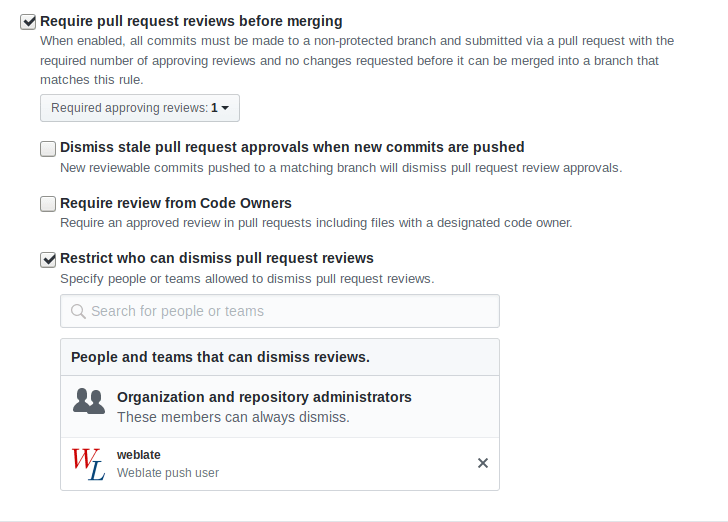
Se você estiver usando o Weblate em ramo protegido, você pode configurá-lo para usar pull requests e executar revisão real sobre as traduções (o que pode ser problemático para idiomas que você não conhece). Uma abordagem alternativa é abrir mão desta limitação em favor do usuário de push no Weblate.
Por exemplo, no GitHub, isso pode ser feito na configuração do repositório:
Interagindo com os outros
O Weblate facilita a interação com outras pessoas usando sua API.
Ver também
Commits adiados
O comportamento do Weblate é agrupar commits do mesmo autor em um só commit, se possível. Isso reduz consideravelmente o número de commits, no entanto, você pode precisar dizer explicitamente para ele fazer os commits no caso de você querer deixar o repositório VCS em sincronia, por exemplo, para mesclagem (isso é por padrão permitido para o grupo Gerenciadores, consulte Lista de privilégios).
As alterações neste modo têm seu commit feito assim que qualquer uma das seguintes condições são cumpridas:
Outra pessoa altera um texto já alterado.
Um merge do upstream é feito.
Um commit explícito é solicitado.
É solicitado o download de um arquivo.
A alteração é mais antiga do que o período definido como Idade das alterações para fazer commit em Configuração de componente.
Dica
Os commits são criados para cada componente. Então, caso você tenha muitos componentes, você verá muitos commits. Você pode utilizar o complemento Squash de commits git neste caso.
Se quiser confirmar as alterações com mais frequência e sem verificações de idade, você pode agendar uma tarefa regular para realizar um commit. Isso pode ser feito usando Tarefas Periódicas em A interface administrativa do Django. Primeiro, crie o Intervalo desejado (por exemplo, 120 segundos). Em seguida, adicione uma nova tarefa periódica e escolha weblate.trans.tasks.commit_pending como Tarefa com {"hours": 0} como Argumentos de Palavra-chave e o intervalo desejado.
Processando repositório com scripts
A maneira de personalizar como o Weblate interage com o repositório é com Complementos. Consulte Escrevendo scripts para complementos para obter informações sobre como executar scripts externos através de complementos.
Mantendo traduções iguais entre componentes
Uma vez que você tenha vários componentes de tradução, você pode querer garantir que os mesmos textos tenham a mesma tradução. Isso pode ser alcançado em vários níveis.
Propagação de tradução
Com Permitir propagação de tradução habilitada (que é o padrão, consulte Configuração de componente), todas as novas traduções são feitas automaticamente em todos os componentes com textos correspondentes. Estas traduções são devidamente creditadas ao usuário que traduz atualmente em todos os componentes.
Pré-condições para propagação:
Todos os componentes devem residir em um único projeto (vincular componente não é suficiente).
Habilitar Permitir propagação de tradução para reusar automaticamente traduções para textos correspondentes.
A propagação de tradução requer a chave para ser compatível com formatos de tradução monolíngue, por isso tenha isso em mente ao criar chaves de tradução.
Os textos são propagados enquanto traduzir, textos carregados a partir do repositório não são propagados.
Dica
Esta funcionalidade tem limitações no momento, e queremos torná-la mais universal. Por favor compartilhe seu feedback em https://github.com/WeblateOrg/weblate/issues/3166.
Verificação de consistência
A verificação Inconsistente é acionada sempre que os textos são diferentes. Você pode usar isso para revisar tais diferenças manualmente e escolher a tradução certa.
Tradução automática
A tradução automática com base em diferentes componentes pode ser uma maneira de sincronizar as traduções entre os componentes. Você pode acioná-la manualmente (consulte Tradução automática) ou fazê-la ser executada automaticamente na atualização do repositório usando um complemento (consulte Tradução automática).