Módulos opcionais do Weblate
Vários módulos opcionais estão disponíveis para sua configuração.
Exportador git
Fornece acesso somente leitura ao repositório Git subjacente usando HTTP(S).
Instalação
Adicione
weblate.gitexportaos aplicativos instalados emsettings.py:INSTALLED_APPS += ("weblate.gitexport",)
Exporte repositórios existentes migrando seu banco de dados após a instalação:
weblate migrate
Dica
Git exporter is turned on in our official Docker image. To turn it off, use:
WEBLATE_REMOVE_APPS=weblate.gitexport
Uso
O módulo conecta-se automaticamente ao Weblate e define a URL do repositório exportado na Configuração de componente. Os repositórios são acessíveis na parte /git/ da URL do Weblate, por exemplo, https://example.org/git/weblate/main/.
Repositórios para projetos disponíveis publicamente podem ser clonados sem autenticação:
git clone 'https://example.org/git/weblate/main/'
Access to browse the repositories with restricted access (with Private
access control or when REQUIRE_LOGIN is enabled)
requires an API token which can be obtained in your
user profile:
git clone 'https://user:KEY@example.org/git/weblate/main/'
Nota
Weblate serves the Git repository itself, but it does not serve Git LFS
objects. For repositories using Git LFS, clone from the upstream repository
and add Weblate as another remote. If you only need Git-tracked files, you
can clone from Weblate with GIT_LFS_SKIP_SMUDGE=1 to skip downloading
Git LFS objects.
Dica
By default members of Users group and anonymous user have access to the repositories for public projects via Access repository and Power user roles.
Cobrança
Isso é usado no Hosted Weblate para definir planos de cobrança, rastrear faturas e limites de uso.
Instalação
1. Add weblate.billing to installed apps in
settings.py:
INSTALLED_APPS += ("weblate.billing",)
Execute a migração do banco de dados para instalar opcionalmente estruturas de banco de dados adicionais para o módulo:
weblate migrate
Criação e atribuição de plano de cobrança
Você primeiro precisa criar um plano de cobrança para ativar a cobrança. Navegue até a seção Administration (representada pelo ícone de chave inglesa) e abra a tela Tools. Em seguida, acesse a Django admin interface.
Na interface administrativa do Django, localize a seção BILLING e adicione um plano de cobrança. Por exemplo, você pode adicionar um plano Free sem custo.
Se desejar atribuir um plano de cobrança a um projeto existente, isso também pode ser feito na Django admin interface usando a opção Customer billings.
Por fim, a Django admin interface fornece uma opção Invoice para registrar os pagamentos dos clientes.
Uso
Após a instalação, você pode controlar a cobrança na interface de administração. Os usuários com cobrança habilitada obterão a nova aba Cobrança em seu Perfil do usuário.
The billing module additionally allows users to create new projects and components without being superusers (see Adicionando projetos e componentes de tradução). This is possible when following conditions are met:
A cobrança está em seus limites configurados (qualquer uso excessivo resulta no bloqueio da criação do projeto/componente) e pago (se seu preço for diferente de zero)
The user has Add projects to workspace permission for the workspace covered by the billing plan.
Upon project creation user is able to choose which workspace should contain the project. Projects created in a workspace with billing count against the billing plan assigned to that workspace. Users with the Edit workspace settings permission can view and pay the billing plan; billing notification e-mails are sent to these users. See Cobrança for details.
Legal module
Isso é usado em Weblate hospedado para fornecer documentos legais necessários. Ele vem fornecido com documentos em branco, e espera-se que você preencha os seguintes modelos nos documentos:
legal/documents/tos.htmlDocumentação sobre Termos de Serviço
legal/documents/privacy.htmlDocumentação sobre Política de Privacidade
legal/documents/summary.htmlVisão geral breve dos termos de serviço e política de privacidade
legal/documents/contracts.htmlSubcontractor information
The legal module embeds these templates inside Weblate and uses
legal/documents/tos.html for terms of service confirmation. This is
separate from LEGAL_URL and PRIVACY_URL, which are meant
for linking to externally hosted legal documents from the footer when the
legal module is not enabled. When the legal module is enabled, Weblate links to
the internal legal pages by default.
Ao alterar os documentos dos termos de serviço, ajuste LEGAL_TOS_DATE para que os usuários sejam forçados a concordar com os documentos atualizados.
Nota
Legal documents for the Hosted Weblate service operated by Weblate s.r.o. are available in this Git repository: <https://github.com/WeblateOrg/wllegal/tree/main/wllegal/templates/legal/documents>.
The bundled terms of service and related legal documents are specific to services operated by Weblate s.r.o. They can serve as an implementation example, but should not be used as a basis for legal documents of other services.
Instalação
1. Add weblate.legal to installed apps in
settings.py:
INSTALLED_APPS += ("weblate.legal",)

# Optional:

# Social auth pipeline to confirm TOS upon registration/subsequent sign in
SOCIAL_AUTH_PIPELINE += ("weblate.legal.pipeline.tos_confirm",)

# Middleware to enforce TOS confirmation of signed in users
MIDDLEWARE += [
    "weblate.legal.middleware.RequireTOSMiddleware",
]
Execute a migração do banco de dados para instalar opcionalmente estruturas de banco de dados adicionais para o módulo:
weblate migrate
Provide legal document templates matching your service, as described in Customizing legal documents and styles.
Dica
In Docker deployments, enable the legal module using
WEBLATE_LEGAL_INTEGRATION instead of editing
settings.py. Use tos-confirm to enable the legal module and
terms of service confirmation enforcement, or wllegal to additionally
load the hosted legal document templates used by services operated by
Weblate s.r.o. These templates are not intended for general use. To provide
your own templates in Docker, place them in
/app/data/python/customize/templates/legal/documents, see
Substituindo o logotipo e outros arquivos estáticos.
Recreate the Docker container after changing environment variables, for example using docker compose up -d. Restarting an existing container does not apply changed environment values.
Uso
After installation and customization, the legal documents are shown in the Weblate UI.
The legal document templates are regular Django templates. Text is translated
only when you use Django translation tags such as {% translate %} or
{% blocktranslate %}; plain HTML text is shown as written.
Legal pages and the sign-in and registration overview provide terms_url and
privacy_url variables for linking to the terms of service and privacy
policy documents.
Customizing legal documents and styles
Provide your own legal documents by overriding these templates in a Criando um módulo Python:
templates/legal/documents/tos.htmltemplates/legal/documents/privacy.htmltemplates/legal/documents/summary.htmltemplates/legal/documents/contracts.htmltemplates/legal/styles.htmlstatic/weblate_customization/legal.css
Place the customization app before weblate.legal and any other app
providing legal template overrides in INSTALLED_APPS so that
Django selects its templates. Only templates you provide are overridden; the
remaining legal templates continue to use the defaults from later apps.
The legal/styles.html template is included in the HTML head of every
legal page. Use it to load a stylesheet from your customization app:
{% load static %}

<link rel="stylesheet" href="{% static 'weblate_customization/legal.css' %}" />
Run weblate collectstatic --noinput after adding or changing the static
file.
In Docker deployments, place document templates in
/app/data/python/customize/templates/legal/documents,
styles.html in
/app/data/python/customize/templates/legal/styles.html, and the
stylesheet in /app/data/python/customize/static/legal.css. The
stylesheet template then uses {% static 'legal.css' %}. Restart the
container to apply the changes, see Substituindo o logotipo e outros arquivos estáticos.
By default, legal document wrappers use the tos CSS class. Weblate does not
attach any styling to this class; target it from your custom stylesheet, or set
LEGAL_DOCUMENT_CSS_CLASS to another class matching your document
markup. Set the setting to an empty string if no wrapper class is needed.
Use LEGAL_HIDDEN_DOCUMENTS to hide optional legal pages such as
subcontractors from the legal menu. Hidden pages return a 404 response when
requested directly. If terms or privacy is hidden, links using
terms_url or privacy_url fall back to LEGAL_URL or
PRIVACY_URL when configured, otherwise the link is omitted.
To use externally hosted legal documents with terms confirmation, configure
LEGAL_HIDDEN_DOCUMENTS to hide terms and privacy and set
LEGAL_URL and PRIVACY_URL. The confirmation page then
links to those external documents without requiring a
legal/documents/tos.html template override.
Avatares
Os avatares são baixados e armazenados em cache no lado do servidor para reduzir o vazamento de informações para os sites que os servem por padrão. O suporte embutido para buscar avatares de endereços de e-mail configurados para isso pode ser desligado usando ENABLE_AVATARS.
Atualmente, o Weblate oferece suporte a:
Ver também
CDN de localização
The CDN de localização do JavaScript and CDN de arquivos de tradução add-ons
write files to LOCALIZE_CDN_PATH; Weblate does not serve them.
Configure the web server or CDN serving LOCALIZE_CDN_URL as a
public, read-only static file host.
Treat every published CDN file as public. The add-on specific UUID in the URL is not an access-control mechanism. Do not enable CDN add-ons for components that contain private strings, unreleased product text, customer data, internal URLs, API examples, repository paths, translator comments, or file-format metadata that should not be exposed.
The CDN de arquivos de tradução add-on publishes raw translation files in formats supported by Weblate. Some formats can be interpreted by browsers or other clients as HTML, SVG, XML, JavaScript, YAML, or application-specific configuration. Serve the CDN from a dedicated domain that is separate from Weblate and from the application consuming the translations. Do not share authentication cookies with the CDN domain.
Recommended server configuration:
Serve only the directory configured by
LOCALIZE_CDN_PATH; do not expose Weblate repositories, backups, media, configuration, or the whole data directory.Disable directory listing.
Use HTTPS and make the CDN host read-only from the web server.
Send X-Content-Type-Options with
nosniff.Configure conservative MIME types. Serve unknown translation formats as text/plain or application/octet-stream; only serve
weblate.jsas JavaScript.For raw translation formats that are not intended to be rendered in a browser, consider adding Content-Disposition with
attachment.Configure
Access-Control-Allow-Originonly for sites that need browser access to the files.Set cache lifetimes that match your update expectations, and purge CDN caches when stale translations must disappear quickly.
The following nginx snippet serves only the configured CDN directory and applies conservative defaults for raw translation files:
#
# nginx configuration for the Weblate localization CDN
#
# You will want to change:
#
# - server_name to match the host configured in LOCALIZE_CDN_URL
# - root to match LOCALIZE_CDN_PATH
# - Access-Control-Allow-Origin to the sites that need browser access
# - TLS configuration if HTTPS is not terminated before nginx
#
server {
    listen 80;
    server_name cdn.example.com;

    # LOCALIZE_CDN_PATH
    root /home/weblate/data/l10n-cdn;

    autoindex off;
    disable_symlinks on;

    location = / {
        return 404;
    }

    # The JavaScript localization add-on publishes this loader.
    location ~ "^/[0-9a-f]{32}/weblate\.js$" {
        try_files $uri =404;

        types {
            application/javascript js;
        }
        default_type application/javascript;

        add_header X-Content-Type-Options nosniff always;
        # add_header Access-Control-Allow-Origin "https://www.example.com" always;

        expires 1h;
    }

    # Other CDN files are translation files. Serve them conservatively so raw
    # formats are not interpreted as active browser content.
    location / {
        try_files $uri =404;

        types {
        }
        default_type text/plain;

        add_header X-Content-Type-Options nosniff always;
        add_header Content-Disposition "attachment" always;
        # add_header Access-Control-Allow-Origin "https://www.example.com" always;

        expires 1h;
    }
}
Assinando commits do Git com GnuPG
Todos os commits podem ser assinados pela chave GnuPG da instância Weblate.
Ative
WEBLATE_GPG_IDENTITY. (Weblate irá gerar uma chave GnuPG quando necessário e irá usá-la para assinar todos os commits de tradução.)Este recurso precisa do GnuPG 2.1 ou mais recente instalado.
Você pode encontrar a chave em
DATA_DIRe a chave pública é mostrada na página “Sobre”: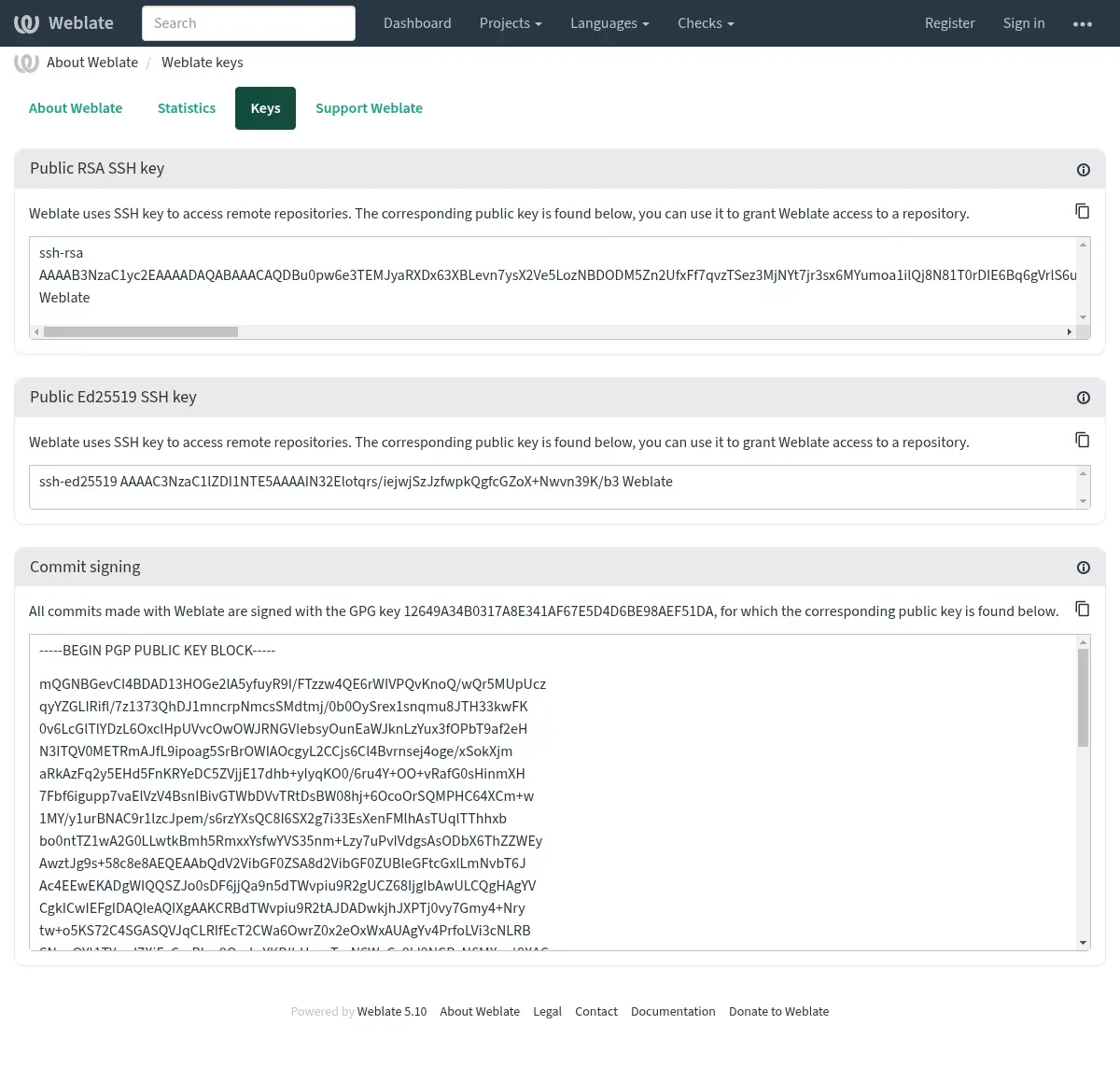
Alternativamente, você também pode importar as chaves existentes para o Weblate, apenas defina
HOME=$DATA_DIR/homeao invocar gpg.
Dica
O material da chave é armazenado em cache pelo Weblate por um longo período. Caso você permita que o Weblate gere uma chave com WEBLATE_GPG_IDENTITY e, em seguida, importe uma chave com a mesma identidade para usar uma chave existente, é recomendável limpar o cache do Redis para ver o efeito dessa alteração.
Nota
Ao compartilhar DATA_DIR entre vários hosts, siga as instruções em https://wiki.gnupg.org/NFS para garantir que a assinatura do GnuPG funcione de forma confiável.
Ver também
Limitação de taxa
Alterado na versão 4.6: A limitação de taxa não se aplica mais a superusuários logados.
Several operations in Weblate are rate limited. Rate limits are evaluated
independently for each scope. At most RATELIMIT_ATTEMPTS attempts are
allowed within RATELIMIT_WINDOW seconds in one scope. That scope is
then blocked for RATELIMIT_LOCKOUT; Weblate does not turn this into a
sitewide temporary IP ban. Exceeding one scope, such as TRANSLATE or
SEARCH, does not by itself block unrelated scopes such as LOGIN or
SECOND_FACTOR. There are also settings specific to scopes, for example
RATELIMIT_CONTACT_ATTEMPTS or RATELIMIT_TRANSLATE_ATTEMPTS. The table
below is a full list of available scopes.
As seguintes operações estão sujeitas a limitação de taxa:
Nome |
Escopo |
Tentativas permitidas |
Janela de limite de tempo |
Período de bloqueio |
|---|---|---|---|---|
Cadastro |
|
5 |
300 |
600 |
Enviando mensagem para administradores |
|
2 |
300 |
600 |
Autenticação de senha ao entrar |
|
5 |
300 |
600 |
Autenticação de segundo fator |
|
5 |
300 |
600 |
Busca em todo o site |
|
6 |
60 |
60 |
Traduzindo |
|
30 |
60 |
600 |
Adicionando ao glossário |
|
30 |
60 |
600 |
Iniciando a tradução para um novo idioma |
|
2 |
300 |
600 |
Criando um novo projeto |
|
5 |
600 |
600 |
Connecting a GitHub account |
|
100 |
3600 |
600 |
Within each scope, the rate limiting is based on sessions when user is signed in and on IP address if not.
Se um usuário falhar ao fazer o login AUTH_LOCK_ATTEMPTS vezes, a autenticação da senha será desativada na conta até ter passado pelo processo de redefinição da senha.
As configurações também podem ser aplicadas no contêiner do Docker adicionando o prefixo WEBLATE_ ao nome da configuração, por exemplo RATELIMIT_ATTEMPTS torna-se WEBLATE_RATELIMIT_ATTEMPTS.
A API possui configurações separadas de limitação de taxa, consulte Limitação de taxa da API.