மொழிபெயர்ப்பு நினைவகம்
வலைபெயர்ப்பு ஒரு உள்ளமைக்கப்பட்ட மொழிபெயர்ப்பு நினைவகத்துடன் வருகிறது:
கைமுறையாக இறக்குமதி செய்யப்பட்ட மொழிபெயர்ப்பு நினைவகம் (பார்க்க பயனர் இடைமுகம்).
தானாகவே சேமிக்கப்பட்ட மொழிபெயர்ப்புகள் வலைபெயர்ப்பு இல் நிகழ்த்தப்படுகின்றன ( மொழிபெயர்ப்பு-நினைவக நோக்கங்கள் ஐப் பொறுத்து).
கடந்த கால மொழிபெயர்ப்புகளை தானாக இறக்குமதி செய்யவும்.
மொழிபெயர்ப்பு நினைவகத்தில் உள்ள உள்ளடக்கம் பல வழிகளில் சரங்களுக்குப் பயன்படுத்தப்படலாம்:
சரத்தைத் திருத்தும்போது பயனர் தானியங்கி பரிந்துரைகள் தாவலில் இருந்து பரிந்துரைகளை ஏற்கலாம்.
தேர்ந்தெடுக்கப்பட்ட சரங்களை Operations மெனுவிலிருந்து தானியங்கி மொழிபெயர்ப்பு ஐப் பயன்படுத்தி செயலாக்கலாம்.
தானியங்கி மொழிபெயர்ப்பு கூடுதல் can automatically இடு changes பெறுநர் புதிய and existing strings.
நிறுவல் உதவிக்குறிப்புகளுக்கு, இயல்புநிலையாக இயக்கப்பட்ட வலைபெயர்ப்பு மொழிபெயர்ப்பு நினைவகம் ஐப் பார்க்கவும்.
மொழிபெயர்ப்பு-நினைவக நோக்கங்கள்
மொழிபெயர்ப்பு-நினைவக நோக்கங்கள் வெவ்வேறு திட்டங்கள் மற்றும் பயனர்களுக்கான தனியுரிமையை உறுதி செய்கின்றன. மொழிபெயர்ப்புகளைப் பகிர்வதும் கிடைக்கிறது.
Note
When upgrading from older Weblate releases, existing translation-memory entries are converted to scopes by a periodic Celery background task. Until this backfill finishes, existing entries can be temporarily unavailable in suggestions and memory management views. Keep Celery running after the upgrade so the periodic task can start or resume the migration. Site administrators can monitor the backfill and duplicate-entry consolidation in Administration > Performance report.
இறக்குமதி செய்யப்பட்ட மொழிபெயர்ப்பு நினைவகம்
import_memory கட்டளையைப் பயன்படுத்தி தன்னிச்சையான மொழிபெயர்ப்பு நினைவகத் தரவை இறக்குமதி செய்வது நினைவக உள்ளடக்கத்தை அனைத்து பயனர்களுக்கும் திட்டங்களுக்கும் கிடைக்கும்.
பயனர் மொழிபெயர்ப்பு நினைவகம்
ஒவ்வொரு பயனரின் தனிப்பட்ட மொழிபெயர்ப்பு நினைவகத்தில் அனைத்து பயனர் மொழிபெயர்ப்புகளையும் தானாகவே சேமிக்கிறது.
புதிய பயனர்களுக்கான இயல்புநிலை மதிப்பு தானியங்கி மொழிபெயர்ப்பு நினைவகம் உள்ளமைவின் அடிப்படையில் தானாகவே சரிசெய்யப்படும். தானியங்கி சுத்திகரிப்பு இயக்கப்பட்டால், சீரற்ற மொழிபெயர்ப்புகளை மீண்டும் அறிமுகப்படுத்துவதைத் தடுக்க இது இயல்பாகவே முடக்கப்படும்.
திட்ட மொழிபெயர்ப்பு நினைவகம்
ஒரு திட்டத்தில் உள்ள அனைத்து மொழிபெயர்ப்புகளும் தானாகவே இந்த திட்டத்திற்கு மட்டுமே கிடைக்கும் திட்ட மொழிபெயர்ப்பு நினைவகத்தில் சேமிக்கப்படும்.
Workspace translation memory
Projects in the same workspace can share translation memory without enabling the global shared translation memory. Workspace translation memory has to be enabled both in the workspace settings and in the individual project workflow settings.
மொழிபெயர்ப்பு நினைவக நிலை
Added in version 5.13.
Translation memory entries can have two different statuses: active and pending. Pending entries are included in suggestions, but with a quality penalty applied. Depending on the configured score threshold, the penalty can exclude even exact matches from suggestions and automatic translation. Entries imported from translation memory files are stored as active. If தானியங்கி மொழிபெயர்ப்பு நினைவகம் is enabled, matching pending entries are removed when a translation becomes active.
தானியங்கி மொழிபெயர்ப்பு நினைவகம்
Added in version 5.13.
ஒரு திட்டப்பணிக்கு இயக்கப்படும் போது, ஒரு மொழிபெயர்ப்பு செயலில் இருக்கும் போது வலைபெயர்ப்பு பழைய தானாக உருவாக்கப்பட்ட மொழிபெயர்ப்பு நினைவக உள்ளீடுகளை மாற்றுகிறது:
மதிப்புரைகளை இயக்கவும் செயல்படுத்தப்பட்டால், மொழிபெயர்ப்பு அங்கீகரிக்கப்படும்போது தூய்மை செய்யப்படுகிறது.
மறுஆய்வு இல்லாமல், மொழிபெயர்ப்பு மொழிபெயர்க்கப்பட்ட நிலையை அடைந்தவுடன் தூய்மை செய்யப்படுகிறது.
ஒரே மூல சரம், கூறு, சூழல் மற்றும் மூல/இலக்கு மொழி சோடிக்கு, வலைபெயர்ப்பு வெவ்வேறு இலக்கு உரையுடன் உள்ளீடுகள் உட்பட, மொழிபெயர்ப்பு நினைவகத்திலிருந்து பொருந்தக்கூடிய கோப்பு அல்லாத உள்ளீடுகளை நீக்குகிறது. இது தனிப்பட்ட, திட்டப்பணி மற்றும் பகிரப்பட்ட மொழிபெயர்ப்பு நினைவக நோக்கங்கள் முழுவதும் பொருந்தும். தற்போதைய மொழிபெயர்ப்பு, அந்த மாற்றத்திற்காக இயக்கப்பட்ட ச்கோப்களில் செயலில் உள்ள நுழைவாக மீண்டும் சேமிக்கப்படும்.
வெளிப்புற மொழிபெயர்ப்பு நினைவக கோப்புகளிலிருந்து இறக்குமதி செய்யப்பட்ட உள்ளீடுகள் தானாக தூய்மை செய்யப்படாது. வெவ்வேறு சூழலுடன் உள்ளீடுகள் வைக்கப்படுகின்றன.
கப்பல்துறை கொள்கலனில் இதை WEBLATE_DEFAULT_AUTOCLEAN_TM ஐப் பயன்படுத்தி கட்டமைக்க முடியும்.
Note
தானியங்கு தூய்மை செய்வதை இயக்குவது, புதிய பயனர் சுயவிவரங்கள் தனிப்பட்ட மொழிபெயர்ப்பு நினைவகத்திற்கு பங்களிக்காதபடி இயல்புநிலையை மாற்றுகிறது. இது தூய்மை செய்யப்பட வேண்டிய சீரற்ற மொழிபெயர்ப்புகளை மீண்டும் அறிமுகப்படுத்துவதைத் தடுக்கிறது.
See also
மொழிபெயர்ப்பு நினைவகத்தை நிர்வகித்தல்
பயனர் இடைமுகம்
Weblate UI இல் பல இடங்களிலிருந்து மொழிபெயர்ப்பு நினைவகத்தை நிர்வகிக்கலாம்:
உங்கள் தனிப்பட்ட மொழிபெயர்ப்பு நினைவகத்தை நிர்வகிக்க பயனர் மெனுவைத் திறந்து மொழிபெயர்ப்பு நினைவகம் என்பதைத் தேர்ந்தெடுக்கவும்.
ஒரு திட்டத்தைத் திறந்து, அந்தத் திட்டத்திற்கான மொழிபெயர்ப்பு நினைவகத்தை நிர்வகிக்க, திட்ட மெனுவிலிருந்து Translation memory என்பதைத் தேர்ந்தெடுக்கவும்.
திற Administration and choose Translation memory பெறுநர் manage uploaded translation memory க்கு the whole வலைபெயர்ப்பு instance.
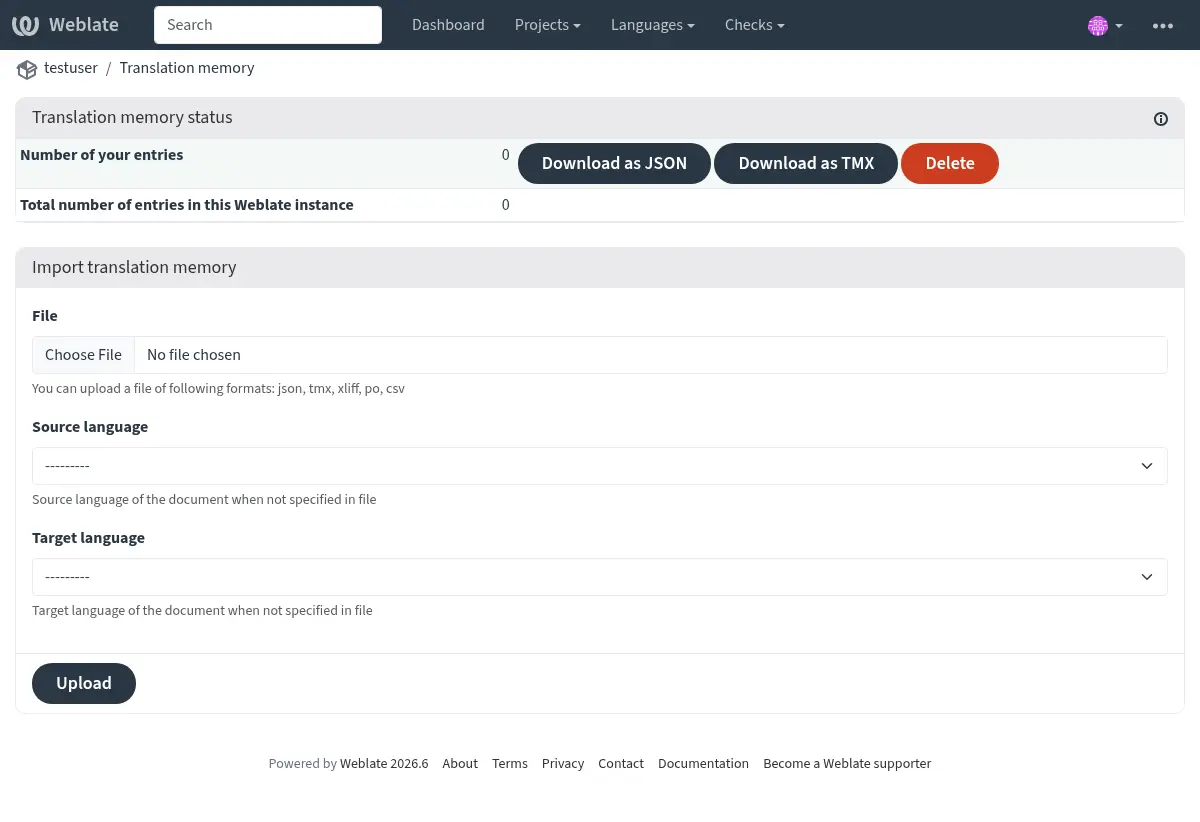
மொழிபெயர்ப்பு நினைவகப் பக்கம் தேர்ந்தெடுக்கப்பட்ட நோக்கத்திற்கான நுழைவு எண்ணிக்கையைக் காட்டுகிறது. நோக்கத்தைப் பொறுத்து, இது தோற்றம், கூறு அல்லது மொழி சோடியின் படி உள்ளீடுகளையும் பட்டியலிடுகிறது. பட்டியலிடப்பட்ட உள்ளீடுகளை சாதொபொகு அல்லது TMX ஆக பதிவிறக்கம் செய்யலாம். தேவையான அனுமதிகளைக் கொண்ட பயனர்கள் உள்ளீடுகளை நீக்கலாம், மேலும் திட்டக் காட்சியானது முழுத் திட்டத்திற்கான மொழிபெயர்ப்பு நினைவகத்தை அல்லது தற்போதைய மொழிபெயர்ப்பிலிருந்து தனிப்பட்ட கூறுகளுக்கு மீண்டும் உருவாக்க முடியும்.
The திட்டம் பார்வை also shows whether shared மொழிபெயர்ப்பு memory and autoclean மொழிபெயர்ப்பு memory are இயக்கப்பட்டது க்கு the project, with a இணைப்பு பெறுநர் the திட்டம் workflow அமைப்புகள் when the பயனர் can தொகு the project.
Translation memory files can be imported on the same page. Uploaded files are processed during the request, stored as active, and added to the selected scope:
உங்கள் தனிப்பட்ட மொழிபெயர்ப்பு நினைவகத்தில் தனிப்பட்ட பதிவேற்றங்கள் கிடைக்கின்றன.
தேர்ந்தெடுக்கப்பட்ட திட்டத்தின் மொழிபெயர்ப்பு நினைவகத்தில் திட்டப் பதிவேற்றங்கள் கிடைக்கின்றன.
முழு வலைபெயர்ப்பு நிகழ்விற்கும் பதிவேற்றப்பட்ட பகிரப்பட்ட உள்ளீடுகளாக நிர்வாகப் பதிவேற்றங்கள் கிடைக்கின்றன.
Hint
பல்வேறு வடிவங்களில் உள்ள மொழிபெயர்ப்பு நினைவுகளை வலைபெயர்ப்பு இல் இறக்குமதி செய்யலாம். TMX வடிவம் மற்ற கருவிகளுடன் இயங்கும் தன்மைக்காக வழங்கப்படுகிறது. ஆதரிக்கப்படும் அனைத்து வடிவங்களும் TMX, JSON, XLIFF, PO மற்றும் காபிம ஆகும்.
XLIFF, PO அல்லது காபிம கோப்புகளைப் பதிவேற்றும் போது, மொழித் செய்தி கோப்பினால் வழங்கப்படாவிட்டால், மூல மற்றும் இலக்கு மொழிகள் தேர்ந்தெடுக்கப்பட வேண்டும்.
See also
தானியங்கி பரிந்துரைகள் தாவலில் இருந்து சரங்களைத் திருத்தும்போது மொழிபெயர்ப்பு நினைவகத்தைத் தேடலாம்.
நிர்வாக இடைமுகம்
நிர்வாக பயனர்களுக்கு கூடுதல் மொழிபெயர்ப்பு நினைவக மேலாண்மை கட்டுப்பாடுகள் உள்ளன. நிர்வாகம் > மொழிபெயர்ப்பு நினைவகம் இல், பக்கமானது பதிவேற்றப்பட்ட பகிரப்பட்ட உள்ளீடுகள், பகிரப்பட்ட உள்ளீடுகள் மற்றும் வலைபெயர்ப்பு நிகழ்விற்கான மொத்த உள்ளீடுகளை பட்டியலிடுகிறது. அனுமதிகளைப் பொறுத்து, பதிவேற்றப்பட்ட பகிர்ந்த நினைவகத்தை இறக்குமதி செய்யலாம், பதிவேற்றிய உள்ளீடுகளை நீக்கலாம் மற்றும் பதிவேற்றிய, பகிரப்பட்ட அல்லது அனைத்து உள்ளீடுகளையும் சாதொபொகு அல்லது TMX ஆகப் பதிவிறக்கலாம்.
Added in version 4.12.
The project translation memory view also allows rebuilding parts of or the entire project translation memory. Automatically generated entries for the selected component or project are deleted, and the memory is populated again from the current translations in the background. Entries imported from files are preserved.
மேலாண்மை இடைமுகம்
பல மேலாண்மை கட்டளைகள் மொழிபெயர்ப்பு நினைவக உள்ளடக்கத்தை கையாளலாம். இவை ஒட்டுமொத்த மொழிபெயர்ப்பு நினைவகத்தில் இயங்குகின்றன, ச்கோப்புகளால் வடிகட்டப்படவில்லை (அளவுருக்களால் கோரப்படாவிட்டால்):
dump_memoryநினைவகத்தை சாதொபொகு இல் ஏற்றுமதி செய்கிறது
import_memoryமொழிபெயர்ப்பு நினைவகத்தில் tmx அல்லது சாதொபொகு கோப்புகளை இறக்குமதி செய்கிறது
cleanup_memoryமொழிபெயர்ப்பு நினைவகத்திலிருந்து நிலுவையில் உள்ள அனைத்து உள்ளீடுகளையும் நீக்குகிறது
Added in version 4.14.
வலைபெயர்ப்பு பநிஇ மொழிபெயர்ப்பு நினைவகத்தை உள்ளடக்கியது. இது வெவ்வேறு நோக்கங்களுக்காக அல்லது மொழிபெயர்ப்பு சுழற்சியில் நிகழ்வுகளின் அடிப்படையில் தானியங்கி கையாளுதலை அனுமதிக்கிறது.