மொழிபெயர்ப்பு பணிப்பாய்வு

வலைபெயர்ப்பைப் பயன்படுத்துவது தரத்தை உயர்த்துகிறது, கைமுறை வேலைகளைக் குறைக்கிறது மற்றும் உள்ளூர்மயமாக்கல் செயல்பாட்டில் ஈடுபட்டுள்ள அனைவரையும் ஒருவருக்கொருவர் நெருக்கமாகக் கொண்டுவருகிறது. நீங்கள் எத்தனை வலைபெயர்ப்பு நற்பொருத்தங்களைப் பயன்படுத்த விரும்புகிறீர்கள் என்பதை நீங்கள் தீர்மானிக்க வேண்டும்.

பின்வருவது வலைபெயர்ப்பு கட்டமைப்பதற்கான வழிகளின் முழுமையான பட்டியல் அல்ல. இங்கே பட்டியலிடப்பட்டுள்ள எடுத்துக்காட்டுகளில் மற்ற பணிப்பாய்வுகளை நீங்கள் அடிப்படையாகக் கொள்ளலாம்.

பணிப்பாய்வு தனிப்பயனாக்கம்

கட்டமைப்புக்கு கூடுதலாக திட்ட உள்ளமைவு மற்றும் கூறு உள்ளமைவு ( மதிப்புரைகளை இயக்கவும், பரிந்துரைகளை இயக்கவும், பரிந்துரை வாக்களிப்பு, மற்றும் தானாகப் பரிந்துரைகளை ஏற்றுகொள் மொழி ஒன்றுக்கு தனிப்பயனாக்கப்பட்ட மொழிப் பணிப்பாய்வு.

தளம் முழுவதும் பணிப்பாய்வு தனிப்பயனாக்கம் செய்யும்போது மொழி வரையறைகளை மாற்றுதல்.

திட்டத்தின் ஒவ்வொரு மொழி பக்கத்திலும் ஒரு திட்ட தனிப்பயனாக்கம் செய்யப்படலாம்.

Review and suggestion settings can be overridden, the only limitation is that மதிப்புரைகளை இயக்கவும் needs to be turned on and can only be disabled in the per-language customization.

தற்போதுள்ள முதல் அமைப்பு பொருந்தும்:

  1. திட்ட மொழி தனிப்பயனாக்கம்

  2. மொழி தனிபயனாக்கல்

  3. திட்டம்/கூறு அமைப்புகள்

Note

எல்லா திட்டங்களுக்கும் பொருந்தும் வகையில் தள அளவிலான மேலெழுதலைப் பயன்படுத்தும்போது கவனமாக இருங்கள் (கொடுக்கப்பட்ட மொழிக்கு அவை மேலெழுதல்கள் இல்லாவிட்டால்).

Custom source language

Select Source language in a project's language workflow settings to translate from another language in the same project. For example, you can translate a regional language variant from its parent language. Leave the selection empty to use the component's source language.

The selected language's translation is displayed as the source in the editor and used for translation checks, automatic translation, and translation memory. The original source strings and file identifiers remain unchanged.

Changing a parent translation marks its translated children as needing editing. Children are read-only while their parent is untranslated or needs editing, including when reviews are disabled. A parent that is translated (waiting for review) or approved permits editing. This restriction also applies through multiple levels of parent languages. Languages cannot depend on themselves or form a cycle.

If a component lacks the selected language or a matching string, its children are read-only until that source becomes available. Weblate preserves their translations and the configured source language; it does not fall back to the component source. Clearing the setting or selecting the component source language restores the canonical source. Moving a component applies the destination project's workflow settings. Changing workflow settings updates affected strings before returning; on large projects, this can delay translation edits.

Languages selected as custom sources cannot be deleted until these workflow settings are cleared or changed to another language.

This setting can only be configured per project and language. Existing intermediate language configuration continues to control the component source.

Workflow changes affect new translation-memory updates. Previously stored source and target pairs remain subject to the existing translation-memory retention and cleanup settings. A missing source does not create an active memory entry.

Limiting translation languages

Several settings can limit translation languages. They address different stages of the translation lifecycle and can be combined:

Control requests for languages that do not exist yet

Configure புதிய மொழிபெயர்ப்பைச் சேர்ப்பது at workspace, project, category, or component level. Categories and components can inherit this setting; see பரம்பரை அமைப்புகள். You can let users contact maintainers, point them to translation instructions, create the language file automatically, or disable adding new translations.

Project admins can still add a translation when Weblate can create its file. For components that do not inherit the project setting, change புதிய மொழிபெயர்ப்பைச் சேர்ப்பது individually or automate the changes using PATCH /api/components/(string:project)/(string:component)/.

To allow existing project languages while requesting approval for new ones, select Create existing project languages; contact maintainers for new languages. A language qualifies when any non-glossary component in the project has a target translation for it, even with no translated strings. Source-only languages and glossary translations do not qualify. This applies across categories, including shared components and components the contributor cannot access.

Maintainers approve a language by creating its first target translation. Removing the last qualifying translation removes eligibility. Component overrides that allow unrestricted language creation can also introduce an eligible language. Project and category submissions use the languages present at the start of the operation, so component processing order does not affect the result.

Project and category submissions modify only components owned by that project or category. To add a language to a shared component, use its own language creation page; the owning project's eligibility and permissions apply there.

The REST translation creation endpoint returns HTTP 403 for languages requiring approval; submit these requests through the web interface. The permission to add several languages does not bypass this policy. Maintainers and trusted add-ons retain their existing creation permissions, and repository file discovery is unaffected.

Disabling new translations controls user requests. It does not stop discovery of translation files added to the repository or automatic glossary language synchronization.

Limit which translation files Weblate discovers or creates

Configure மொழி வடிகட்டி on each component. For example, ^(de|en|fr)$ limits the component to translation files whose language code is de, en, or fr. The filter applies while scanning the component file mask and when creating a new translation file; it does not change permissions for translations that are already present.

Language filters are configured per component, with no project-wide language allowlist. To apply a filter across many components, automate the changes using PATCH /api/components/(string:project)/(string:component)/.

Grant translation access only for selected languages

Use language-scoped teams when different users should be able to translate different languages. A team can only grant permissions, so remove any broader translation permission that would otherwise apply to the same users.

Restrict direct editing of an existing language

Open the language settings in the project, enable Customize translation workflow for this language in this project, and turn on Restrict direct editing.

Users with the Edit string when suggestions are enforced permission can continue editing directly. Other users can add suggestions when Turn on suggestions is enabled. Turn off suggestions as well to make the language editable only by privileged users.

The restriction can also be configured site-wide while மொழி வரையறைகளை மாற்றுதல். A project-language customization takes precedence over the site-wide language setting.

Use suggestion voting

Turn on Suggestion voting to let users vote on suggestions. Voting alone does not restrict direct editing. A positive Automatically accept suggestions threshold also requires users without the Edit string when suggestions are enforced permission to submit suggestions. Use Restrict direct editing when this restriction should not depend on automatic acceptance.

மொழிபெயர்ப்பு அணுகல்

access control என்பது பணிப்பாய்வுகளில் விரிவாக விவாதிக்கப்படவில்லை, ஏனெனில் அதன் பெரும்பாலான விருப்பங்கள் எந்த பணிப்பாய்வுக்கும் பயன்படுத்தப்படலாம். மொழிபெயர்ப்புகளுக்கான அணுகலை எவ்வாறு நிர்வகிப்பது என்பது குறித்த தொடர்புடைய ஆவணங்களைப் பார்க்கவும்.

பின்வரும் அத்தியாயங்களில், எந்தப் பயனரும் என்பது மொழிபெயர்ப்பிற்கான அணுகலைக் கொண்ட பயனர் என்று பொருள்படும். திட்டம் பொதுவில் இருந்தால் அது அங்கீகரிக்கப்பட்ட பயனராக இருக்கலாம் அல்லது திட்டத்திற்கு Translate இசைவு உள்ள பயனராக இருக்கலாம்.

மொழிபெயர்ப்பு நிலைகள்

மொழிபெயர்க்கப்பட்ட ஒவ்வொரு சரமும் பின்வரும் மாநிலங்களில் ஒன்றில் இருக்கலாம்:

மொழிபெயர்க்கப்படாதது

மொழிபெயர்ப்பு காலியாக உள்ளது, கோப்பு வடிவமைப்பைப் பொறுத்து இது கோப்பில் சேமிக்கப்படலாம் அல்லது சேமிக்கப்படாது.

திருத்துதல் தேவை

மொழிபெயர்ப்பிற்கு திருத்துதல் தேவை, இது பொதுவாக தெளிவற்ற பொருத்தம் அல்லது மொழிபெயர்ப்பாளர் செயலின் விளைவாகும். கோப்பு வடிவத்தைப் பொறுத்து, அதைத் திருத்த வேண்டும் எனக் குறிக்கலாம் (உதாரணமாக, உரைபெறு கோப்பில் fuzzy கொடியைப் பெறுவதால்).

மீண்டும் எழுத வேண்டும்

மூலச் சரம் மாறியதால் மொழிபெயர்ப்பு மீண்டும் எழுதப்பட வேண்டும்.

சரிபார்க்க வேண்டும்

உருவாக்குபவர் மதிப்பாய்வு தேவைப்படும் மூல/டெம்ப்ளேட் சரங்களுக்குப் பயன்படுத்தப்படும் நிலை. மூலத் திருத்தச் செருகு நிரல் இயக்கப்பட்டிருக்கும்போது அல்லது சோர்ச் ச்டிரிங் சரிபார்க்கப்படும்போது பகஅ இலிருந்து இறக்குமதி செய்யப்படும் புதிய மூலச் சரங்களுக்கு இது பொதுவாக அமைக்கப்படும்.

மொழிபெயர்க்கப்பட்டது / மதிப்பாய்வுக்காக காத்திருக்கிறது

மொழிபெயர்ப்பு செய்யப்படுகிறது. மதிப்புரைகள் இயக்கப்பட்டிருந்தால், மொழிபெயர்க்கப்பட்ட நிலை "மதிப்பாய்வுக்காகக் காத்திருக்கிறது" எனக் காட்டப்படும்.

அங்கீகரிக்கப்பட்டது

மதிப்பாய்வில் மொழிபெயர்ப்பு அங்கீகரிக்கப்பட்டுள்ளது. இதை இனி மொழிபெயர்ப்பாளர்களால் மாற்ற முடியாது, ஆனால் விமர்சகர்களால் மட்டுமே. மொழிபெயர்ப்பாளர்கள் அதற்கு பரிந்துரைகளை மட்டுமே சேர்க்க முடியும்.

மதிப்புரைகள் இயக்கப்பட்டால் மட்டுமே இந்த நிலை கிடைக்கும்.

படிக்க மட்டும்

படிக்க மட்டும் flag, திருத்த முடியாத மூலச் சரம் அல்லது மொழிபெயர்ப்புக் கோப்பில் அவ்வாறு குறிக்கப்பட்டதன் விளைவாக, சரம் படிக்க மட்டுமே.

பரிந்துரைகள்

பரிந்துரைகள் வலைபெயர்ப்பில் மட்டுமே சேமிக்கப்படுகின்றன, மொழிபெயர்ப்பு கோப்பில் அல்ல.

The states are represented in the translation files when possible. A state change only rewrites the file when the format can represent the change or when it makes pending content eligible for commit under the மொழிபெயர்ப்பு தர வடிகட்டி.

Hint

நீங்கள் பயன்படுத்தும் கோப்பு வடிவம், நிலைகளை சேமிப்பதை ஆதரிக்கவில்லை என்றால், நீங்கள் மாறாத மொழிபெயர்ப்புகளை "மீண்டும் எழுத வேண்டும்" எனக் கொடியிடவும் செருகு நிரலை மாற்றியமைக்காத சரங்களை மீண்டும் எழுத வேண்டும் எனப் பயன்படுத்த விரும்பலாம்.

Note

கோப்பில் எந்த மொழிபெயர்ப்பு நிலைகள் சேமிக்கப்படுகின்றன என்பதை மொழிபெயர்ப்பு தர வடிகட்டி தீர்மானிக்கிறது.

நேரடி மொழிபெயர்ப்பு

சிறிய குழுக்களுக்கான மிகவும் பொதுவான அமைப்பு, இதில் யார் வேண்டுமானாலும் நேரடியாக மொழிபெயர்க்கலாம். இது வலைபெயர்ப்பில் உள்ள இயல்புநிலை அமைப்பாகும்.

  • எந்தவொரு பயனரும் மொழிபெயர்ப்புகளைத் திருத்தலாம்.

  • மாற்றத்தைப் பற்றி மொழிபெயர்ப்பாளர்களுக்கு தெரியாதபோது, மாற்றங்களை பரிந்துரைக்க பரிந்துரைகள் விருப்ப வழிகள்.

அமைத்தல்

மதிப்பு

குறிப்பு

மதிப்புரைகளை இயக்கவும்

அணை

திட்ட மட்டத்தில் கட்டமைக்கப்பட்டுள்ளது.

பரிந்துரைகளை இயக்கவும்

இயக்கு

பயனர்கள் உறுதியாகத் தெரியாதபோது பரிந்துரைக்க முடியும்.

பரிந்துரை வாக்களிப்பு

அணை

தானாகப் பரிந்துரைகளை ஏற்றுகொள்

0

மொழிபெயர்ப்பாளர்கள் குழு

பயனர்கள்

அல்லது per-project அணுகல் கட்டுப்பாடு உடன் Translate.

விமர்சகர்கள் குழு

இதற்கில்லை

பயன்படுத்துவதில்லை.

தம மதிப்பாய்வு

இந்த பணிப்பாய்வு மூலம், எவரும் ஒரு ஆலோசனையைச் சேர்க்கலாம், இது ஒரு மொழிபெயர்ப்பாக ஏற்றுக்கொள்ளப்படுவதற்கு முன்பு கூடுதல் உறுப்பினர்களிடமிருந்து ஒப்புதல் தேவை.

  • எந்தவொரு பயனரும் பரிந்துரைகளைச் சேர்க்கலாம்.

  • எந்தவொரு பயனரும் பரிந்துரைகளுக்கு வாக்களிக்கலாம்.

  • முன்னரே தீர்மானிக்கப்பட்ட எண்ணிக்கையிலான வாக்குகள் வழங்கப்படும்போது பரிந்துரைகள் மொழிபெயர்ப்புகளாக மாறும்.

அமைத்தல்

மதிப்பு

குறிப்பு

மதிப்புரைகளை இயக்கவும்

அணை

திட்ட மட்டத்தில் கட்டமைக்கப்பட்டுள்ளது.

பரிந்துரைகளை இயக்கவும்

இயக்கு

பரிந்துரை வாக்களிப்பு

இயக்கு

தானாகப் பரிந்துரைகளை ஏற்றுகொள்

2

அதிக தம மதிப்புரைகள் தேவைப்படுவதற்கு நீங்கள் அதிக மதிப்பை அமைக்கலாம்.

மொழிபெயர்ப்பாளர்கள் குழு

பயனர்கள்

அல்லது per-project அணுகல் கட்டுப்பாடு உடன் Translate.

விமர்சகர்கள் குழு

இதற்கில்லை

பயன்படுத்தப்படவில்லை, அனைத்து மொழிபெயர்ப்பாளர்களும் மதிப்பாய்வு செய்கிறார்கள்.

அர்ப்பணிக்கப்பட்ட விமர்சகர்கள்

அர்ப்பணிப்புள்ள விமர்சகர்களுடன் நீங்கள் பயனர்களின் இரண்டு குழுக்கள், மொழிபெயர்ப்புகளைச் சமர்ப்பிக்க முடியும், மேலும் மொழிபெயர்ப்புகள் சீரானவை என்பதையும், தகுதி நல்லது என்பதையும் உறுதிப்படுத்த அவற்றை மதிப்பாய்வு செய்ய முடியும்.

  • எந்தவொரு பயனரும் அங்கீகரிக்கப்படாத மொழிபெயர்ப்புகளைத் திருத்தலாம்.

  • விமர்சகர் சரங்களை அங்கீகரிக்க / ஒப்புக் கொள்ளலாம்.

  • விமர்சகர் எல்லா மொழிபெயர்ப்புகளையும் (அங்கீகரிக்கப்பட்டவை உட்பட) திருத்த முடியும்.

  • அங்கீகரிக்கப்பட்ட சரங்களுக்கான மாற்றங்களை பரிந்துரைக்க பரிந்துரைகள் பயன்படுத்தப்படலாம்.

அமைத்தல்

மதிப்பு

குறிப்பு

மதிப்புரைகளை இயக்கவும்

இயக்கு

திட்ட மட்டத்தில் கட்டமைக்கப்பட்டுள்ளது.

பரிந்துரைகளை இயக்கவும்

இயக்கு

பயனர்கள் உறுதியாகத் தெரியாதபோது பரிந்துரைக்க முடியும்.

பரிந்துரை வாக்களிப்பு

அணை

தானாகப் பரிந்துரைகளை ஏற்றுகொள்

0

மொழிபெயர்ப்பாளர்கள் குழு

பயனர்கள்

அல்லது per-project அணுகல் கட்டுப்பாடு உடன் Translate.

விமர்சகர்கள் குழு

விமர்சகர்கள்

அல்லது Review உடன் per-project அணுகல் கட்டுப்பாடு.

மதிப்புரைகளை இயக்குதல்

திட்ட அமைப்புகளின் Workflow துணைப் பக்கத்திலிருந்து திட்ட கட்டமைப்பில் மதிப்பாய்வுகளை இயக்கலாம் (Operations → Settings பட்டியலில் காணலாம்):
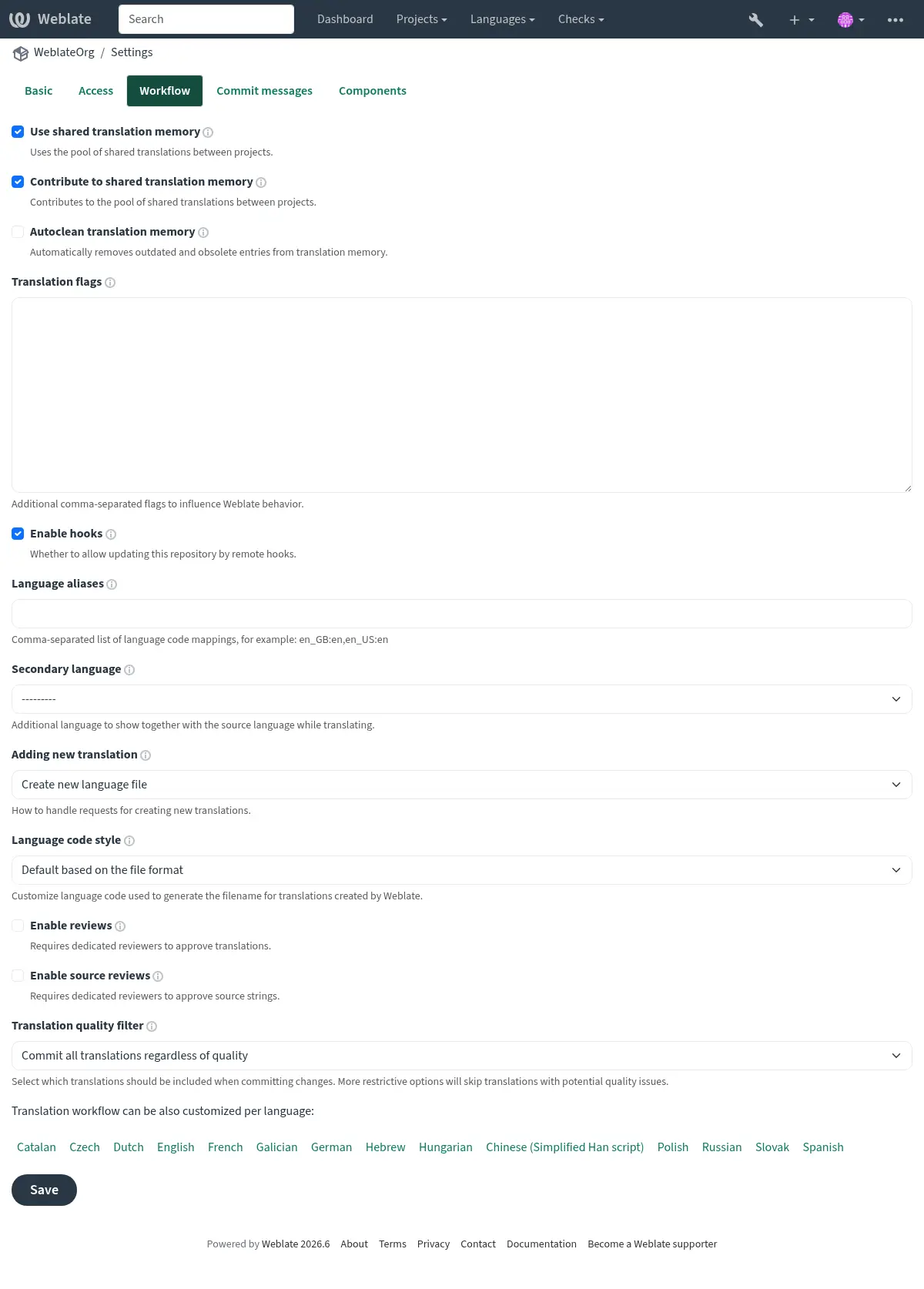
_images/project-workflow.webp

Per-language reviews

To require review only for selected languages, first turn on மதிப்புரைகளை இயக்கவும் for the whole project. Then open each project language page that should use different behavior, enable Customize translation workflow for this language in this project, and turn Enable reviews off for languages that should not require review.

Reviewers also need review access for the same language. Add them to a team whose roles include Review strings, and limit that team or the user membership to the language they should review. See ஒரு திட்டத்திற்கான அணுகல் கட்டுப்பாட்டை நிர்வகித்தல் and வலைதளம்-முழுதும் அணுகல் கட்டுப்பாடு for language-scoped access setup.

If approval buttons are not visible, check both parts of the setup: reviews have to be enabled for that translation, and the signed-in user has to have review permission for that language.

Machine translation and LLM workflows

Machine translation services, including large language model (LLM) services, can assist human translators or generate translations for them to edit or approve. Choose a workflow based on when humans should check the generated text and when it should reach the repository.

First, configure the services under Automatic suggestions in the project settings or site administration; see தானியங்கி பரிந்துரைகள். For LLM services, see LLM மொழிபெயர்ப்பு சூழல் for the context and instructions used to guide translation.

To process strings in bulk, run தானியங்கி மொழிபெயர்ப்பு, select Machine translation as the source, and choose the services to use. For ongoing automation, configure the தானியங்கி மொழிபெயர்ப்பு add-on on the component with the same source and desired mode. Use the query state:empty to fill empty translations without replacing existing human work; see சரங்களைத் தேடுகிறது.

Human translation assisted by services

Use this workflow when translators should choose when to use machine translation for each string.

Translators consult the தானியங்கி பரிந்துரைகள் tab in the editor, choose a service result, edit it as needed, and save the translation. These service results are distinct from stored suggestions awaiting acceptance: a human decides what to save. This workflow does not require the Automatic translation add-on and can be combined with அர்ப்பணிக்கப்பட்ட விமர்சகர்கள்.

Service translation with human editing

Use this workflow to fill translations automatically and let humans improve them directly.

The service output becomes a translation that humans can edit in the usual editor. It can be committed to the repository without human approval.

For machine drafts that should remain visibly unfinished, choose Add as "Needing edit" instead. Humans edit these drafts and clear the Needs editing state when finished. To keep unfinished drafts out of repository commits, set மொழிபெயர்ப்பு தர வடிகட்டி to Skip translations marked as needing editing.

Service suggestions with human acceptance

Use this workflow when humans should check service output before it becomes a translation.

Humans check the stored suggestions and accept suitable ones, or edit the proposed text before saving a translation. Suggestions are stored only in Weblate and do not enter translation files until accepted as translations. Accepting a suggestion is separate from approving a translation in the dedicated review workflow.

Service translation with review and a quality gateway

Use this workflow when humans should edit machine translations in Weblate, but only reviewer-approved translations should reach the repository.

Generated translations appear as Waiting for review. Translators can edit them, and reviewers check and approve the finished translations. Only after approval are these translations eligible for repository commits. Translators can suggest further changes to approved strings, while reviewers can edit them directly.

Enabling reviews alone does not keep unapproved translations out of commits. The translation quality filter provides that gateway. Keep reviews enabled for every language that should follow this workflow; check any workflow customization overrides.

AI-assisted quality evaluation

Use the AI quality evaluation add-on to check existing human or machine translations for accuracy, fluency, terminology, style, and formatting. It records quality checks without editing translations or approving them.

Configure an LLM service under Automatic suggestions, then install AI quality evaluation and select the Evaluation service. Choose a query to limit the translations evaluated. Run the add-on manually, choose an Evaluation frequency, or enable evaluation after translation changes or repository updates. Installation does not run evaluation. See the add-on documentation for provider costs and the data sent to the service.

Translators and reviewers can inspect the findings in the editor or search for checks such as check:ai_accuracy. Correct the translation or ignore a finding when appropriate. Combine this with அர்ப்பணிக்கப்பட்ட விமர்சகர்கள் when human approval is required; AI evaluation does not replace approval or change the translation quality filter used for repository commits.

The component's Diagnostics recommends the add-on when an LLM service is configured. If the selected service becomes unavailable, an error diagnostic links maintainers to the installed add-on's configuration.

Reusing existing translations

Use existing translations to bootstrap a new language or component, then have humans adapt matches and fill the remaining gaps.

Run தானியங்கி மொழிபெயர்ப்பு with Other translation components as the source, or select the மொழிபெயர்ப்பு நினைவகம் service under Machine translation. Choose whether matches become translations, drafts needing editing, or suggestions using the modes described above. Use state:empty to preserve existing translations. The தானியங்கி மொழிபெயர்ப்பு add-on can apply this reuse automatically as strings arrive.

For ongoing consistency, மொழிபெயர்ப்பு பரப்புதல் can copy edits to matching strings across components in the same project. Propagation happens while translating; it does not copy translations merely loaded from the repository. See கூறுகள் முழுவதும் மொழிபெயர்ப்புகளை ஒரே மாதிரியாக வைத்திருத்தல் for its requirements and for checks that help humans resolve differences.

மூல சரங்களுக்கான தரமான நுழைவாயில்

அசல் மூல மொழி சரங்கள் வழக்கமாக டெவலப்பர்களிடமிருந்து வருகின்றன, ஏனெனில் அவர்கள் குறியீட்டை எழுதி ஆரம்ப சரங்களை வழங்குகிறார்கள். இருப்பினும், உருவாக்குபவர்கள் பெரும்பாலும் மூல மொழியின் சொந்த மொழி பேசுபவர்களாக இல்லை மற்றும் மூல சரங்களின் விரும்பிய தரத்தை வழங்குவதில்லை. இதைத் தீர்க்க இடைநிலை மொழிபெயர்ப்பு உங்களுக்கு உதவும் - உருவாக்குபவர்கள் மற்றும் மொழிபெயர்ப்பாளர்களுக்கு இடையே உள்ள சரங்களுக்கு கூடுதல் தரமான நுழைவாயில் உள்ளது.

இடைநிலை மொழி கோப்பு ஐ அமைப்பதன் மூலம், இந்தக் கோப்பு டெவலப்பர்களுக்குச் சொந்தமானதாக இருக்கும் போது (பெரும்பாலும் en_devel போன்ற தன்னிச்சையான மொழிகளைப் பயன்படுத்துகிறது) மொழிபெயர்ப்பாளர்கள்/எடிட்டர்களால் மூல மொழிக்கு சரங்களை மொழிபெயர்க்கப் பயன்படுகிறது. இந்த நிலை முடிந்ததும், மொழிகளை இலக்காகக் கொள்வதற்கான மொழிபெயர்ப்புகளுக்கான சரங்கள் கிடைக்கின்றன, இப்போது ஒருமொழி அடிப்படை மொழி கோப்பு இல் சேமிக்கப்பட்டுள்ள மெருகூட்டப்பட்ட மூல மொழியின் அடிப்படையில்.

digraph translations { graph [fontname = "sans-serif", fontsize=10]; node [fontname = "sans-serif", fontsize=10, margin=0.1, height=0, style=filled, fillcolor=white, shape=note]; edge [fontname = "sans-serif", fontsize=10]; subgraph cluster_dev { style=filled; color=lightgrey; label = "Development process"; "Developers" [shape=box, fillcolor="#144d3f", fontcolor=white]; "Developers" -> "Intermediate file"; } subgraph cluster_l10n { style=filled; color=lightgrey; label = "Localization process"; "Translators" [shape=box, fillcolor="#144d3f", fontcolor=white]; "Editors" [shape=box, fillcolor="#144d3f", fontcolor=white]; "Editors" -> "Monolingual base language file"; "Translators" -> "Translation language file"; } "Intermediate file" -> "Monolingual base language file" [constraint=false]; "Monolingual base language file" -> "Translation language file" [constraint=false]; }

இரண்டாம் நிலை மொழியைப் பயன்படுத்தி சரம் ஒருங்கிணைப்பு

சரங்களை ஒருங்கிணைக்க இடைநிலை மொழி கோப்பு ஐப் பயன்படுத்த முடியாதபோது, இரண்டாம் மொழியாகச் செயல்பட மொழிபெயர்ப்புகளில் ஒன்றைத் தேர்ந்தெடுக்கலாம். மொழி ஒரு திட்டத்தில் (இரண்டாம் நிலை மொழி) அல்லது ஒரு கூறு (இரண்டாம் நிலை மொழி) இல் கட்டமைக்கப்படலாம். மொழிபெயர்ப்பின் போது அது மொழிபெயர்ப்பாளர்களுக்குக் காண்பிக்கப்படும் (பார்க்க இரண்டாம் நிலை மொழிகள்) மேலும் இயந்திர மொழிபெயர்ப்புகளுக்கான ஆதாரமாக விருப்பமாகப் பயன்படுத்தலாம் (பார்க்க இயந்திர மொழிபெயர்ப்பிற்கான மூல சரங்கள்).

இந்த அமைப்பு கலப்பு மொழி மூல சரங்களுடன் பயனுள்ளதாக இருக்கும் மற்றும் அவற்றை ஒற்றை மொழிபெயர்ப்பாக ஒருங்கிணைக்கிறது, பின்னர் இது மற்ற வேலைகளுக்கு ஒரு அடிப்படையாக பயன்படுத்தப்படுகிறது.

மூல சரங்கள் மதிப்புரைகள்

மூல மதிப்புரைகளை இயக்கவும் செயல்படுத்தப்பட்டால், மூல சரங்களுக்கு மதிப்பாய்வு செயல்முறையைப் பயன்படுத்தலாம். இயக்கப்பட்டதும், பயனர்கள் மூல சரங்களில் உள்ள சிக்கல்களைப் புகாரளிக்கலாம். உண்மையான செயல்முறை இருமொழி அல்லது ஒருமொழி வடிவங்கள் பயன்பாட்டில் உள்ளதா என்பதைப் பொறுத்தது.

ஒருமொழி வடிவங்களுக்கு, மூல சரம் மறுஆய்வு என்பது அர்ப்பணிக்கப்பட்ட விமர்சகர்கள் போலவே செயல்படுகிறது — ஒரு மூல சரத்தில் ஒரு சிக்கல் புகாரளிக்கப்பட்டால், மூல சரமானது எடிட்டிங் தேவை எனக் குறிக்கப்படும்.

இருமொழி வடிவங்கள் மூல சரங்களை நேரடியாகத் திருத்த அனுமதிக்காது (இவை பொதுவாக மூலக் குறியீட்டிலிருந்து நேரடியாகப் பிரித்தெடுக்கப்படுகின்றன). இந்த நிலையில், மொழிபெயர்ப்பாளர்களால் புகாரளிக்கப்பட்ட சரங்களில் மூலத்திற்கு மதிப்பாய்வு தேவை என்ற சிட்டை இணைக்கப்பட்டுள்ளது. நீங்கள் அத்தகைய சரங்களை மதிப்பாய்வு செய்து அவற்றை மூலக் குறியீட்டில் திருத்த வேண்டும் அல்லது லேபிளை அகற்ற வேண்டும்.