விருப்ப வலைபெயர்ப்பு தொகுதிகள்
உங்கள் அமைப்பிற்கு பல விருப்ப தொகுதிகள் கிடைக்கின்றன.
அறிவிலி ஏற்றுமதியாளர்
http (கள்) ஐப் பயன்படுத்தி அடிப்படை அறிவிலி களஞ்சியத்தை படிக்க மட்டும் அணுகலை வழங்குகிறது.
நிறுவல்
settings.pyஇல் நிறுவப்பட்ட பயன்பாடுகளில்weblate.gitexportஐச் சேர்க்கவும்:INSTALLED_APPS += ("weblate.gitexport",)
நிறுவிய பின் உங்கள் தரவுத்தளத்தை இடம்பெயர்வதன் மூலம் ஏற்கனவே இருக்கும் களஞ்சியங்களை ஏற்றுமதி செய்யுங்கள்:
weblate migrate
Hint
Git exporter is turned on in our official Docker image. To turn it off, use:
WEBLATE_REMOVE_APPS=weblate.gitexport
பயன்பாடு
தொகுதி தானாகவே வலைபெயர்ப்பு இல் இணைக்கப்பட்டு, ஏற்றுமதி செய்யப்பட்ட களஞ்சிய முகவரி ஐ கூறு உள்ளமைவு இல் அமைக்கிறது. வலைபெயர்ப்பு முகவரி இன் /git/ பகுதியின் கீழ் களஞ்சியங்களை அணுகலாம், எடுத்துக்காட்டாக https://example.org/git/weblate/main/.
பொதுவில் கிடைக்கக்கூடிய திட்டங்களுக்கான களஞ்சியங்கள் ஏற்பு இல்லாமல் நகலி செய்யப்படலாம்:
git clone 'https://example.org/git/weblate/main/'
Access to browse the repositories with restricted access (with Private
access control or when REQUIRE_LOGIN is enabled)
requires an API token which can be obtained in your
user profile:
git clone 'https://user:KEY@example.org/git/weblate/main/'
Note
வலைபெயர்ப்பு Git களஞ்சியத்திற்கு பணி செய்கிறது, ஆனால் அது Git LFS பொருள்களுக்கு பணி செய்யாது. Git LFS ஐப் பயன்படுத்தும் களஞ்சியங்களுக்கு, மேலோடை களஞ்சியத்திலிருந்து நகலி செய்து, மற்றொரு ரிமோட்டாக வலைபெயர்ப்பு ஐச் சேர்க்கவும். Git-டிராக் செய்யப்பட்ட கோப்புகள் மட்டுமே உங்களுக்குத் தேவைப்பட்டால், Git LFS ஆப்செக்ட்களைப் பதிவிறக்குவதைத் தவிர்க்க GIT_LFS_SKIP_SMUDGE=1 உடன் Weblate இலிருந்து நகலி செய்யலாம்.
Hint
By default members of Users group and anonymous user have access to the repositories for public projects via Access repository and Power user roles.
பட்டியலிடல்
இது ஓச்ட் செய்யப்பட்ட வலைபெயர்ப்பு பட்டியலிடல் திட்டங்களை வரையறுக்க, விலைப்பட்டியல் மற்றும் பயன்பாட்டு வரம்புகளைக் கண்காணிக்க பயன்படுத்தப்படுகிறது.
நிறுவல்
1. Add weblate.billing to installed apps in
settings.py:
INSTALLED_APPS += ("weblate.billing",)
தொகுதிக்கு கூடுதல் தரவுத்தள கட்டமைப்புகளை விருப்பமாக நிறுவ தரவுத்தள இடம்பெயர்வை இயக்கவும்:
weblate migrate
பட்டியலிடல் திட்ட உருவாக்கம் மற்றும் பணி
பில்லிங்கை செயல்படுத்த நீங்கள் முதலில் ஒரு பட்டியலிடல் திட்டத்தை உருவாக்க வேண்டும். நிர்வாகம் பிரிவுக்கு (குறடு ஐகானால் குறிப்பிடப்படுகிறது) செல்லவும் மற்றும்` கருவிகள்` திரையைத் திறக்கவும். அங்கிருந்து, சாங்கோ நிர்வாக இடைமுகத்திற்கு தொடரவும்.
சாங்கோ நிர்வாக இடைமுகத்தில், பில்லிங் பிரிவைக் கண்டுபிடித்து பட்டியலிடல் திட்டத்தைச் சேர்க்கவும். உதாரணமாக, நீங்கள் எந்த செலவும் இல்லாமல் இலவச திட்டத்தை சேர்க்கலாம்.
ஏற்கனவே உள்ள திட்டத்திற்கு ஒரு பட்டியலிடல் திட்டத்தை ஒதுக்க விரும்பினால், வாடிக்கையாளர் பில்லிங்ச் விருப்பத்தைப் பயன்படுத்தி` சாங்கோ நிர்வாக இடைமுகம்` க்குள் இதைச் செய்யலாம்.
கடைசியாக, உங்கள் வாடிக்கையாளர் கொடுப்பனவுகளை பதிவு செய்வதற்கான சாங்கோ நிர்வாக இடைமுகம் ஒரு` விலைப்பட்டியல்` விருப்பத்தை வழங்குகிறது.
பயன்பாடு
நிறுவிய பின், நிர்வாக இடைமுகத்தில் பில்லிங்கைக் கட்டுப்படுத்தலாம். பட்டியலிடல் இயக்கப்பட்ட பயனர்கள் அவர்களின் பயனர் சுயவிவரம் இல் புதிய Billing தாவலைப் பெறுவார்கள்.
பட்டியலிடல் தொகுதி கூடுதல் பயனர்களாக இல்லாமல் புதிய திட்டங்கள் மற்றும் கூறுகளை உருவாக்க அனுமதிக்கிறது (பார்க்க மொழிபெயர்ப்பு திட்டங்கள் மற்றும் கூறுகளைச் சேர்ப்பது). பின்வரும் நிபந்தனைகளை நிறைவு செய்யும் போது இது சாத்தியமாகும்:
பட்டியலிடல் அதன் கட்டமைக்கப்பட்ட வரம்புகளில் உள்ளது (திட்ட/கூறு உருவாக்கத்தைத் தடுப்பதில் எந்தவொரு அதிகப்படியான பயன்பாடுகளும்) மற்றும் செலுத்தப்பட்டவை (அதன் விலை பூச்சியமற்றதாக இருந்தால்)
பட்டியலிடல் திட்டத்தில் உள்ள பணியிடத்திற்கு பயனருக்கு பணியிடங்களைச் சேர் இசைவு உள்ளது.
ப்ராசெக்ட் உருவாக்கும் போது, எந்தப் பணியிடத்தில் திட்டம் இருக்க வேண்டும் என்பதை பயனர் தேர்வு செய்ய முடியும். பணியிடத்திற்கு ஒதுக்கப்பட்ட பட்டியலிடல் திட்டத்திற்கு எதிராக பட்டியலிடல் எண்ணிக்கையுடன் பணியிடத்தில் உருவாக்கப்பட்ட திட்டங்கள். பணியிட அமைப்புகளைத் திருத்து இசைவு உள்ள பயனர்கள் பட்டியலிடல் திட்டத்தைப் பார்க்கலாம் மற்றும் செலுத்தலாம்; இந்த பயனர்களுக்கு பட்டியலிடல் அறிவிப்பு மின்னஞ்சல்கள் அனுப்பப்படுகின்றன. விவரங்களுக்கு பட்டியலிடல் ஐப் பார்க்கவும்.
சட்ட தொகுதி
தேவையான சட்ட ஆவணங்களை வழங்க, ஓச்ட் செய்யப்பட்ட வலைபெயர்ப்பு இல் இது பயன்படுத்தப்படுகிறது. இது வெற்று ஆவணங்களுடன் வழங்கப்படுகிறது, மேலும் ஆவணங்களில் பின்வரும் டெம்ப்ளேட்களை நிரப்புவீர்கள் என்று எதிர்பார்க்கப்படுகிறது:
legal/documents/tos.htmlபணி ஆவணத்தின் விதிமுறைகள்
legal/documents/privacy.htmlதனியுரிமை கொள்கை ஆவணம்
legal/documents/summary.htmlபணி விதிமுறைகள் மற்றும் தனியுரிமைக் கொள்கையின் குறுகிய கண்ணோட்டம்
legal/documents/contracts.htmlதுணை ஒப்பந்ததாரர் செய்தி
சட்ட தொகுதி இந்த டெம்ப்ளேட்களை வலைபெயர்ப்பு க்குள் உட்பொதித்து, பணி விதிமுறைகளை உறுதிப்படுத்துவதற்காக legal/documents/tos.html ஐப் பயன்படுத்துகிறது. இது LEGAL_URL மற்றும் PRIVACY_URL ஆகியவற்றிலிருந்து வேறுபட்டது, சட்டப்பூர்வ தொகுதி இயக்கப்படாதபோது, அடிக்குறிப்பிலிருந்து வெளிப்புறமாக புரவலன் செய்யப்பட்ட சட்ட ஆவணங்களை இணைப்பதற்காக இது உள்ளது. சட்டத் தொகுதி இயக்கப்பட்டால், இயல்பாகவே உள் சட்டப் பக்கங்களுக்கு வலைபெயர்ப்பு இணைக்கிறது.
பணி ஆவணங்களின் விதிமுறைகளை மாற்றும்போது, தயவுசெய்து LEGAL_TOS_DATE ஐ சரிசெய்யவும், இதனால் புதுப்பிக்கப்பட்ட ஆவணங்களுடன் பயனர்கள் கட்டாயம் உடன்படுவார்கள்.
Note
வலைபெயர்ப்பு s.r.o ஆல் இயக்கப்படும் புரவலன் செய்யப்பட்ட வலைபெயர்ப்பு சேவைக்கான சட்ட ஆவணங்கள். இந்த Git களஞ்சியத்தில் கிடைக்கும்: <https://github.com/WeblateOrg/wllegal/tree/main/wllegal/templates/legal/documents>.
The bundled terms of service and related legal documents are specific to services operated by Weblate s.r.o. They can serve as an implementation example, but should not be used as a basis for legal documents of other services.
நிறுவல்
1. Add weblate.legal to installed apps in
settings.py:
INSTALLED_APPS += ("weblate.legal",)

# Optional:

# Social auth pipeline to confirm TOS upon registration/subsequent sign in
SOCIAL_AUTH_PIPELINE += ("weblate.legal.pipeline.tos_confirm",)

# Middleware to enforce TOS confirmation of signed in users
MIDDLEWARE += [
    "weblate.legal.middleware.RequireTOSMiddleware",
]
தொகுதிக்கு கூடுதல் தரவுத்தள கட்டமைப்புகளை விருப்பமாக நிறுவ தரவுத்தள இடம்பெயர்வை இயக்கவும்:
weblate migrate
Provide legal document templates matching your service, as described in Customizing legal documents and styles.
Hint
கப்பல்துறை வரிசைப்படுத்தல்களில், settings.py ஐத் திருத்துவதற்குப் பதிலாக WEBLATE_LEGAL_INTEGRATION ஐப் பயன்படுத்தி சட்ட தொகுதியை இயக்கவும். சட்ட தொகுதி மற்றும் பணி உறுதிப்படுத்தல் அமலாக்க விதிமுறைகளை இயக்க tos-confirm அல்லது வலைபெயர்ப்பு s.r.o ஆல் இயக்கப்படும் சேவைகளால் புரவலன் செய்யப்பட்ட சட்ட ஆவண டெம்ப்ளேட்களை கூடுதலாக ஏற்றுவதற்கு wllegal ஐப் பயன்படுத்தவும். இந்த வார்ப்புருக்கள் பொதுவான பயன்பாட்டிற்காக அல்ல. டோக்கரில் உங்கள் சொந்த டெம்ப்ளேட்களை வழங்க, அவற்றை /app/data/python/Customize/templates/legal/documents என்பதில் வைக்கவும், பார்க்கவும் லோகோ மற்றும் பிற நிலையான கோப்புகளை மாற்றுகிறது.
Recreate the Docker container after changing environment variables, for example using docker compose up -d. Restarting an existing container does not apply changed environment values.
பயன்பாடு
After installation and customization, the legal documents are shown in the Weblate UI.
சட்ட ஆவண வார்ப்புருக்கள் வழக்கமான சாங்கோ வார்ப்புருக்கள். {% மொழிபெயர்த்திடு %} அல்லது {% blocktranslate %} போன்ற சாங்கோ மொழிபெயர்ப்பு குறிச்சொற்களைப் பயன்படுத்தும் போது மட்டுமே உரை மொழிபெயர்க்கப்படும்; எளிய உஉகுமொ உரை எழுதப்பட்டதாகக் காட்டப்படுகிறது.
Legal pages and the sign-in and registration overview provide terms_url and
privacy_url variables for linking to the terms of service and privacy
policy documents.
Customizing legal documents and styles
Provide your own legal documents by overriding these templates in a பைதான் தொகுதியை உருவாக்குதல்:
templates/legal/documents/tos.htmltemplates/legal/documents/privacy.htmltemplates/legal/documents/summary.htmltemplates/legal/documents/contracts.htmltemplates/legal/styles.htmlstatic/weblate_customization/legal.css
Place the customization app before weblate.legal and any other app
providing legal template overrides in INSTALLED_APPS so that
Django selects its templates. Only templates you provide are overridden; the
remaining legal templates continue to use the defaults from later apps.
The legal/styles.html template is included in the HTML head of every
legal page. Use it to load a stylesheet from your customization app:
{% load static %}

<link rel="stylesheet" href="{% static 'weblate_customization/legal.css' %}" />
Run weblate collectstatic --noinput after adding or changing the static
file.
In Docker deployments, place document templates in
/app/data/python/customize/templates/legal/documents,
styles.html in
/app/data/python/customize/templates/legal/styles.html, and the
stylesheet in /app/data/python/customize/static/legal.css. The
stylesheet template then uses {% static 'legal.css' %}. Restart the
container to apply the changes, see லோகோ மற்றும் பிற நிலையான கோப்புகளை மாற்றுகிறது.
By default, legal document wrappers use the tos CSS class. Weblate does not
attach any styling to this class; target it from your custom stylesheet, or set
LEGAL_DOCUMENT_CSS_CLASS to another class matching your document
markup. Set the setting to an empty string if no wrapper class is needed.
Use LEGAL_HIDDEN_DOCUMENTS to hide optional legal pages such as
subcontractors from the legal menu. Hidden pages return a 404 response when
requested directly. If terms or privacy is hidden, links using
terms_url or privacy_url fall back to LEGAL_URL or
PRIVACY_URL when configured, otherwise the link is omitted.
விதிமுறைகள் உறுதிப்படுத்தலுடன் வெளிப்புறமாக புரவலன் செய்யப்பட்ட சட்ட ஆவணங்களைப் பயன்படுத்த, விதிமுறைகள் மற்றும் தனியுரிமை ஆகியவற்றை மறைக்க LEGAL_HIDDEN_DOCUMENTS ஐ உள்ளமைத்து LEGAL_URL மற்றும் PRIVACY_URL ஆகியவற்றை அமைக்கவும். உறுதிப்படுத்தல் பக்கம் பின் அந்த வெளிப்புற ஆவணங்களுடன் இணைக்கிறது legal/documents/tos.html டெம்ப்ளேட் மேலெழுத வேண்டிய அவசியமில்லை.
அவதாரங்கள்
அவதாரங்கள் தரவிறக்கம் செய்யப்பட்டு, அவற்றைச் பணி செய்யும் தளங்களில் இயல்புநிலையாகக் கசிவதைக் குறைக்க, சர்வரில் தற்காலிகமாகச் சேமிக்கப்படும். அதற்கான உள்ளமைக்கப்பட்ட மின்னஞ்சல் முகவரிகளிலிருந்து அவதார்களைப் பெறுவதற்கான உள்ளமைக்கப்பட்ட ஆதரவை ENABLE_AVATARS ஐப் பயன்படுத்தி முடக்கலாம்.
வலைபெயர்ப்பு தற்போது ஆதரிக்கிறது:
`` கிராவதார் <https://gravatar.com/>`_` _
உள்ளூராக்கல் சி.டி.என்
The சாவாச்கிரிப்ட் உள்ளூராக்கல் சி.டி.என் and மொழிபெயர்ப்பு கோப்புகள் CDN add-ons
write files to LOCALIZE_CDN_PATH; Weblate does not serve them.
Configure the web server or CDN serving LOCALIZE_CDN_URL as a
public, read-only static file host.
வெளியிடப்பட்ட ஒவ்வொரு CDN கோப்பையும் பொதுவானதாகக் கருதுங்கள். முகவரி இல் உள்ள ஆட்-ஆன் குறிப்பிட்ட UUID ஆனது அணுகல்-கட்டுப்பாட்டு வழிமுறை அல்ல. தனிப்பட்ட சரங்கள், வெளியிடப்படாத தயாரிப்பு உரை, வாடிக்கையாளர் தரவு, உள் URLகள், பநிஇ எடுத்துக்காட்டுகள், களஞ்சிய பாதைகள், மொழிபெயர்ப்பாளர் கருத்துகள் அல்லது கோப்பு வடிவ மெட்டாடேட்டாவை வெளிப்படுத்தாத கூறுகளுக்கு CDN துணை நிரல்களை இயக்க வேண்டாம்.
மொழிபெயர்ப்பு கோப்புகள் CDN செருகு நிரலானது, வலைபெயர்ப்பு ஆதரிக்கும் வடிவங்களில் மூல மொழிபெயர்ப்பு கோப்புகளை வெளியிடுகிறது. சில வடிவங்களை HTML, SVG, XML, JavaScript, YAML அல்லது பயன்பாட்டு-குறிப்பிட்ட கட்டமைப்பு என உலாவிகள் அல்லது பிற கிளையன்ட்கள் விளக்கலாம். வெப்லேட்டிலிருந்து தனித்தனியாக இருக்கும் பிரத்யேக டொமைனிலிருந்தும், மொழிபெயர்ப்புகளை உட்கொள்ளும் பயன்பாட்டிலிருந்தும் CDNஐப் பரிமாறவும். CDN டொமைனுடன் அங்கீகார குக்கீகளைப் பகிர வேண்டாம்.
பரிந்துரைக்கப்படும் சேவையக கட்டமைப்பு:
LOCALIZE_CDN_PATHமூலம் கட்டமைக்கப்பட்ட கோப்பகத்தை மட்டும் வழங்கு; வலைபெயர்ப்பு களஞ்சியங்கள், காப்புப்பிரதிகள், ஊடகம், கட்டமைப்பு அல்லது முழு தரவு கோப்பகத்தையும் வெளிப்படுத்த வேண்டாம்.அடைவு பட்டியலை முடக்கு.
HTTPS ஐப் பயன்படுத்தவும் மற்றும் CDN ஓச்டை இணைய சேவையகத்திலிருந்து படிக்க மட்டும் செய்யவும்.
nosniffஉடன் X-Content-Type-Options என்பதை அனுப்பவும்.பழமைவாத MIME வகைகளை உள்ளமைக்கவும். அறியப்படாத மொழிபெயர்ப்பு வடிவங்களை text/plain அல்லது application/octet-stream;
weblate.jsஐ சாவாச்கிரிப்டாக மட்டும் வழங்கவும்.உலாவியில் வழங்குதல் செய்ய விரும்பாத மூல மொழிபெயர்ப்பு வடிவங்களுக்கு,
இணைப்புஉடன் Content-Disposition ஐச் சேர்ப்பதைக் கவனியுங்கள்.கோப்புகளுக்கு உலாவி அணுகல் தேவைப்படும் தளங்களுக்கு மட்டும்
Access-Control-Allow-Originஐ உள்ளமைக்கவும்.உங்கள் புதுப்பிப்பு எதிர்பார்ப்புகளுடன் பொருந்தக்கூடிய தற்காலிக சேமிப்பு வாழ்நாள்களை அமைக்கவும், மேலும் பழைய மொழிபெயர்ப்புகள் விரைவாக மறைந்துவிடும் போது CDN தற்காலிக சேமிப்புகளை அகற்றவும்.
பின்வரும் nginx துணுக்கு கட்டமைக்கப்பட்ட CDN கோப்பகத்திற்கு மட்டுமே பணி செய்கிறது மற்றும் மூல மொழிபெயர்ப்பு கோப்புகளுக்கு கன்சர்வேடிவ் இயல்புநிலைகளைப் பயன்படுத்துகிறது:
#
# nginx configuration for the Weblate localization CDN
#
# You will want to change:
#
# - server_name to match the host configured in LOCALIZE_CDN_URL
# - root to match LOCALIZE_CDN_PATH
# - Access-Control-Allow-Origin to the sites that need browser access
# - TLS configuration if HTTPS is not terminated before nginx
#
server {
    listen 80;
    server_name cdn.example.com;

    # LOCALIZE_CDN_PATH
    root /home/weblate/data/l10n-cdn;

    autoindex off;
    disable_symlinks on;

    location = / {
        return 404;
    }

    # The JavaScript localization add-on publishes this loader.
    location ~ "^/[0-9a-f]{32}/weblate\.js$" {
        try_files $uri =404;

        types {
            application/javascript js;
        }
        default_type application/javascript;

        add_header X-Content-Type-Options nosniff always;
        # add_header Access-Control-Allow-Origin "https://www.example.com" always;

        expires 1h;
    }

    # Other CDN files are translation files. Serve them conservatively so raw
    # formats are not interpreted as active browser content.
    location / {
        try_files $uri =404;

        types {
        }
        default_type text/plain;

        add_header X-Content-Type-Options nosniff always;
        add_header Content-Disposition "attachment" always;
        # add_header Access-Control-Allow-Origin "https://www.example.com" always;

        expires 1h;
    }
}
கையொப்பமிடும் அறிவிலி க்னப் உடன் கம்யூட்
எல்லா கமிட்டுகளையும் வலைபெயர்ப்பு நிகழ்வின் gnupg விசையால் கையொப்பமிடலாம்.
WEBLATE_GPG_IDENTITYஐ இயக்கவும். (வெப்லேட் தேவைப்படும்போது ஒரு GnuPG விசையை உருவாக்கும் மற்றும் அனைத்து மொழிபெயர்ப்பு ஒப்பந்தங்களிலும் கையெழுத்திட அதைப் பயன்படுத்தும்.)இந்த அம்சத்திற்கு gnupg 2.1 அல்லது புதிய நிறுவப்பட்ட தேவை.
நீங்கள் விசையை
DATA_DIRஇல் காணலாம் மற்றும் பொது விசை "அறிமுகம்" பக்கத்தில் காட்டப்படும்: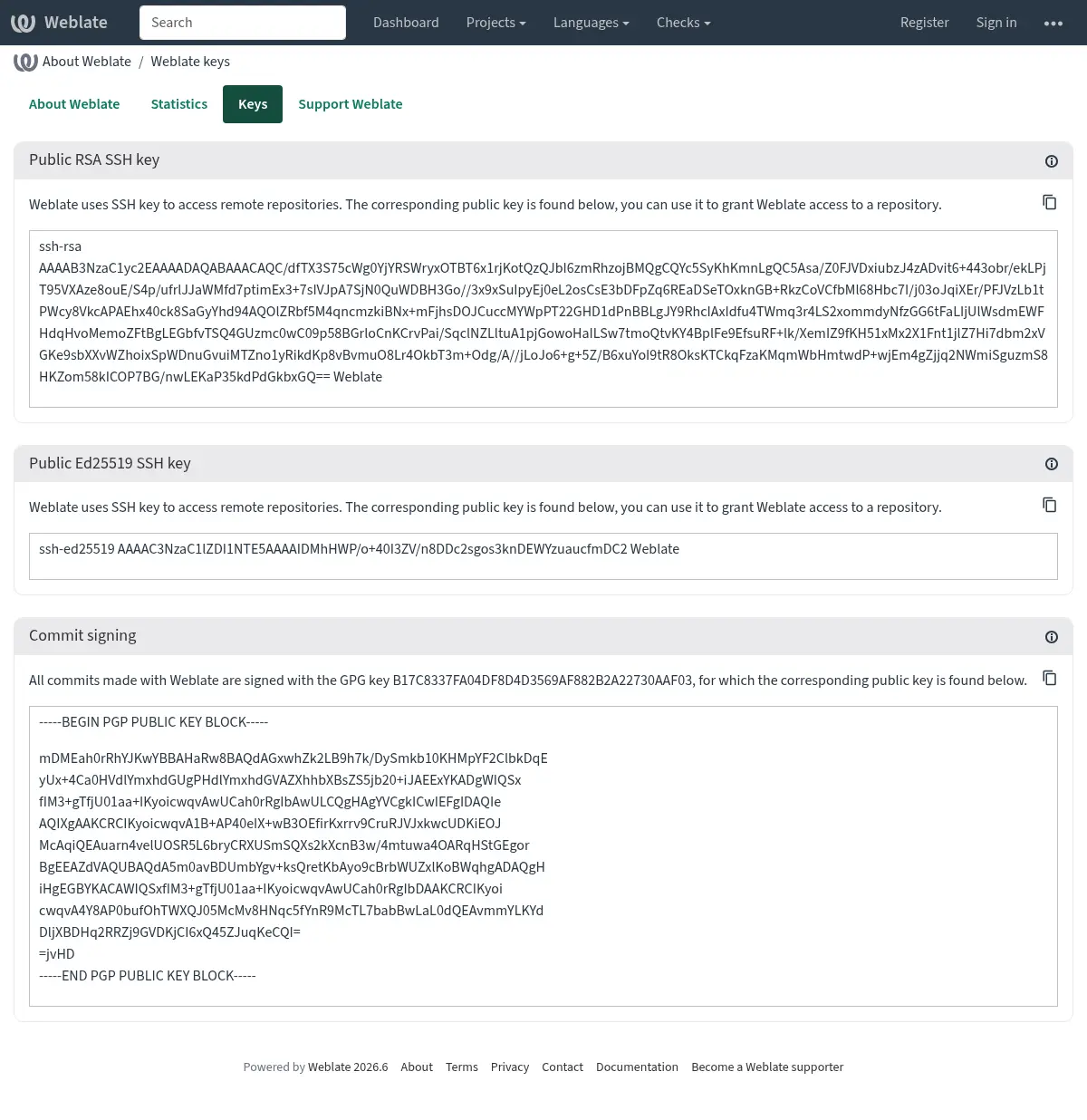
மாற்றாக நீங்கள் ஏற்கனவே உள்ள விசைகளை வலைபெயர்ப்பு இல் இறக்குமதி செய்யலாம், gpg ஐ செயல்படுத்தும்போது
HOME=$DATA_DIR/homeஎன்பதை அமைக்கவும்.
Hint
முக்கிய பொருள் நீண்ட காலத்திற்கு வலைபெயர்ப்பு மூலம் தற்காலிகமாக சேமிக்கப்படுகிறது. நீங்கள் வலைபெயர்ப்பு ஐ WEBLATE_GPG_IDENTITY உடன் ஒரு விசையை உருவாக்க அனுமதித்தால், ஏற்கனவே உள்ள விசையைப் பயன்படுத்த அதே அடையாளத்துடன் விசையை இறக்குமதி செய்தால், அத்தகைய மாற்றத்தின் விளைவைப் பார்க்க, redis தற்காலிக சேமிப்பை தூய்மை செய்ய பரிந்துரைக்கப்படுகிறது.
Note
பல ஓச்ட்களுக்கு இடையே DATA_DIR ஐப் பகிரும்போது, GnuPG கையொப்பமிடுதல் நம்பகத்தன்மையுடன் செயல்பட https://wiki.gnupg.org/NFS இல் உள்ள வழிமுறைகளைப் பின்பற்றவும்.
See also
வீதத்தைக் கட்டுப்படுத்துதல்
Changed in version 4.6: சூப்பர் யூசர்களில் கையொப்பமிடப்பட்ட விகிதத்தைக் கட்டுப்படுத்தும் விகிதம் இனி பொருந்தாது.
Several operations in Weblate are rate limited. Rate limits are evaluated
independently for each scope. At most RATELIMIT_ATTEMPTS attempts are
allowed within RATELIMIT_WINDOW seconds in one scope. That scope is
then blocked for RATELIMIT_LOCKOUT; Weblate does not turn this into a
sitewide temporary IP ban. Exceeding one scope, such as TRANSLATE or
SEARCH, does not by itself block unrelated scopes such as LOGIN or
SECOND_FACTOR. There are also settings specific to scopes, for example
RATELIMIT_CONTACT_ATTEMPTS or RATELIMIT_TRANSLATE_ATTEMPTS. The table
below is a full list of available scopes.
பின்வரும் செயல்பாடுகள் விகிதத்தைக் கட்டுப்படுத்துவதற்கு உட்பட்டவை:
பெயர் |
வாய்ப்பு |
அனுமதிக்கப்பட்ட முயற்சிகள் |
ராடலிமிட் சாளரம் |
கதவடைப்பு காலம் |
|---|---|---|---|---|
பதிவு |
|
5 |
300 |
600 |
நிர்வாகிகளுக்கு செய்தி அனுப்புகிறது |
|
2 |
300 |
600 |
உள்நுழைவில் கடவுச்சொல் ஏற்பு |
|
5 |
300 |
600 |
இரண்டாவது காரணி ஏற்பு |
|
5 |
300 |
600 |
தள அளவிலான தேடல் |
|
6 |
60 |
60 |
மொழிபெயர் |
|
30 |
60 |
600 |
சொற்களஞ்சியத்தில் சேர்க்கிறது |
|
30 |
60 |
600 |
புதிய மொழியில் மொழிபெயர்ப்பைத் தொடங்குதல் |
|
2 |
300 |
600 |
புதிய திட்டத்தை உருவாக்குதல் |
|
5 |
600 |
600 |
Connecting a GitHub account |
|
100 |
3600 |
600 |
Within each scope, the rate limiting is based on sessions when user is signed in and on IP address if not.
ஒரு பயனர் AUTH_LOCK_ATTEMPTS முறை உள்நுழையத் தவறினால், கடவுச்சொல் ஏற்பு அதன் கடவுச்சொல்லை மீட்டமைக்கும் செயல்முறை முடியும் வரை கணக்கில் முடக்கப்படும்.
அமைப்புப் பெயருடன் WEBLATE_ முன்னொட்டைச் சேர்ப்பதன் மூலம் கப்பல்துறை கண்டெய்னரிலும் அமைப்புகளைப் பயன்படுத்தலாம், எடுத்துக்காட்டாக RATELIMIT_ATTEMPTS WEBLATE_RATELIMIT_ATTEMPTS ஆகிறது.
பநிஇ ஆனது தனியான விகித வரம்பு அமைப்புகளைக் கொண்டுள்ளது, பார்க்கவும் பநிஇ வீதத்தைக் கட்டுப்படுத்துதல்.