பணியிடங்கள்
பணியிடங்கள் குழு தொடர்பான மொழிபெயர்ப்பு திட்டங்கள். அவர்கள் திட்டங்களுக்கு மேலே அமர்ந்து, திட்டப் பட்டியல்கள், பணியிட-நோக்கிய அணுகல் கட்டுப்பாடு மற்றும் பட்டியலிடல் மாட்யூல் இயக்கப்படும்போது பட்டியலிடல் விவரங்களுக்கு பகிரப்பட்ட இடத்தை வழங்குவார்கள்.
பணியிட உறுப்பினர் பணியிடத்தில் உள்ள திட்டங்களை மொழிபெயர்க்க அல்லது நிர்வகிக்க அணுகலை வழங்காது. திட்ட அணுகல் இன்னும் திட்ட அணுகல் கட்டுப்பாட்டு அமைப்புகள் மற்றும் திட்டக் குழுக்களால் கட்டுப்படுத்தப்படுகிறது, பார்க்கவும் திட்ட அணுகல் கட்டுப்பாடு.
பணியிடப் பக்கம் நீங்கள் அணுகக்கூடிய பணியிடத்தில் உள்ள திட்டங்களைப் பட்டியலிடுகிறது.
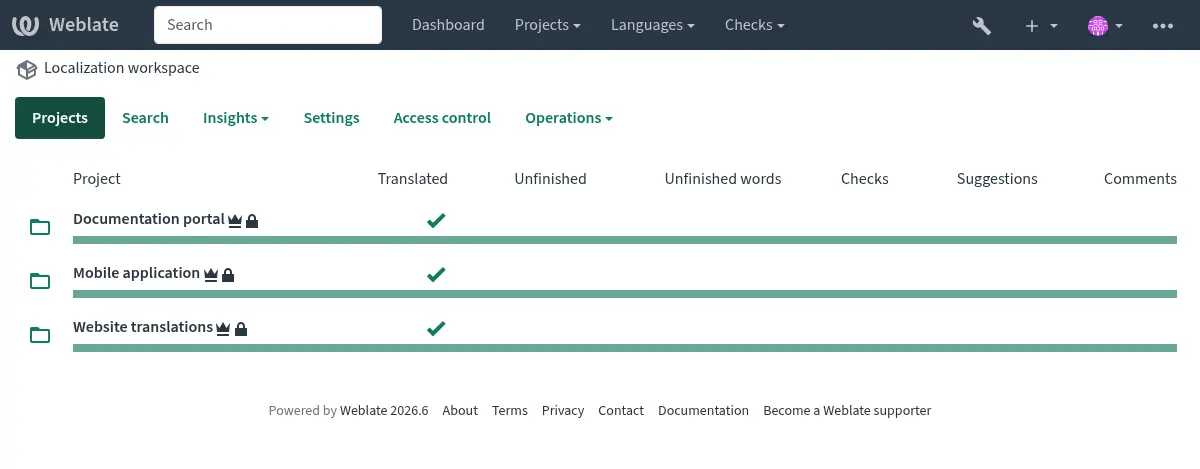
Signed-in users can also review grouped project and component findings on the workspace Diagnostics tab. See Project and workspace diagnostics overviews.
Signed-in users can open Projects ↓ My workspaces to list workspaces where they have an explicit workspace-team assignment. This list also includes workspaces containing a watched project when the workspace contains more than one project in total. Public project access or site-wide management access alone does not add workspaces to this list.
When at least two workspaces match these rules, a Workspaces menu appears in the global navigation. It shows up to ten workspaces ordered by name, with a My workspaces link to the full listing. Workspace navigation does not grant additional access to projects.
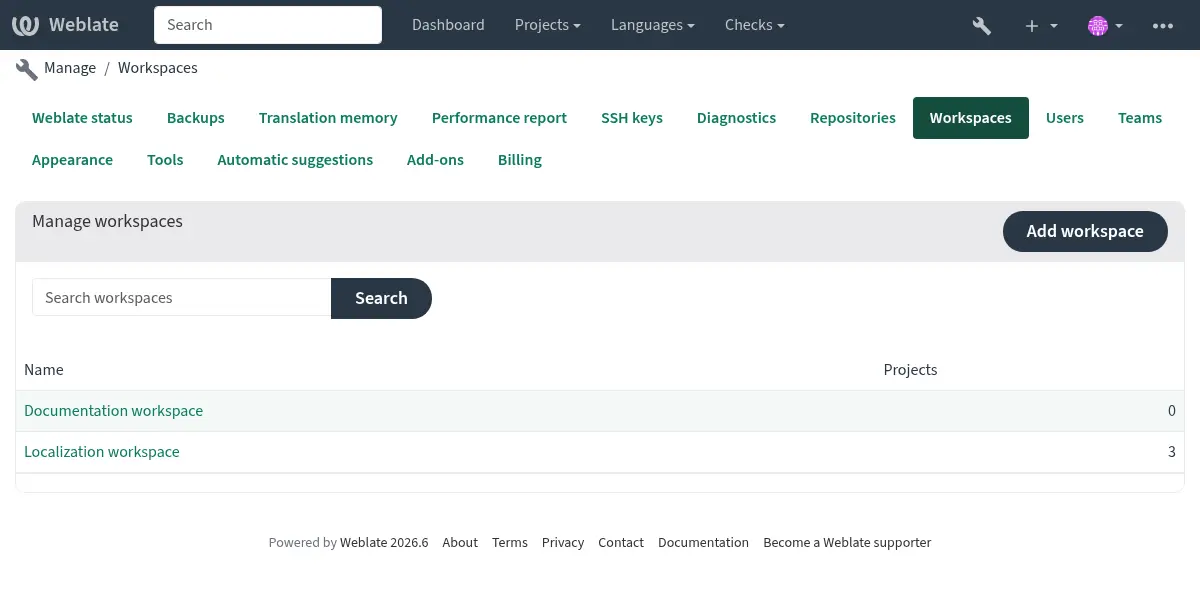
Site managers can list all workspaces in the management interface at Manage ↓ Workspaces.
Workspace statistics aggregate all owned and shared content, including projects and restricted components that you cannot access. Project listings and actions remain permission-filtered. See statistics access filtering.
The Languages tab lists language statistics across workspace projects. Select a language to open its translation overview, then use Translate, Zen, or a review status link to work across projects while keeping the workspace and language selected. Each translation uses its project's workflow and permissions.
As on project pages, language statistics and component listings include shared components. Workspace language search, translation, and review actions cover owned components only. Open a shared component's translation individually to work on it. Aggregate statistics retain the visibility rules described above; translation listings and actions remain permission-filtered.
The workspace Files menu downloads a ZIP archive of owned components that you can access and have permission to download. Workspace membership does not bypass project access control or component restrictions. The menu also provides Upload translation guidance. Uploading at workspace level is not supported; select a project and open an individual translation to upload a file.
Users who can edit translations in an accessible project can choose Operations ↓ Search and replace to replace text across permission-filtered owned project content in the workspace. The existing தேடி மாற்றவும் preview and confirmation workflow applies.
Workspace removal
Users with the Edit workspace settings permission can remove a workspace from Operations ↓ Organize or remove.
Only empty workspaces can be removed. Move or remove all projects in the workspace first. Workspaces associated with billing cannot be removed.
திட்ட உருவாக்கம் மற்றும் நகர்வுகள்
பணியிடத்துடன் அல்லது இல்லாமலேயே திட்டங்கள் உருவாக்கப்படலாம்:
Creating a project in a workspace requires the Add projects to workspace permission for that workspace.
பணியிடம் இல்லாமல் ஒரு திட்டத்தை உருவாக்க, தளம் முழுவதும் புதிய திட்டங்களைச் சேர் இசைவு தேவை.
வலைபெயர்ப்பு ரெச்ட் பநிஇ உடன் ஒரு திட்டத்தை உருவாக்கும்போது, workspace புலத்தில் பணியிட UUID ஐ அனுப்பவும்.
Existing projects can be moved between workspaces from the project
Organize tab or by changing the workspace field with the
வலைபெயர்ப்பு ரெச்ட் பநிஇ. Moving a project requires permission to edit the project and the
Edit workspace settings permission for the source and target
workspace. The target workspace also requires the
Add projects to workspace permission. Moving a project out of a
workspace also requires the site-wide Add new projects permission.
If the target workspace's billing plan permits only public content, the project must use Public access and have no restricted components. An API request may make a project public and move it in the same update, but restricted components must be made public separately. Superusers retain their exemption from this access restriction; billing validity and project-slot limits still apply.
Existing incompatible projects are not changed automatically. The Libre hosting checklist reports non-public projects and restricted components for administrator review.
பணியிட அமைப்புகள்
பணியிட அமைப்புகள் பணியிட அடையாளம் மற்றும் திட்டங்கள் மற்றும் கூறுகளால் பெறப்பட்ட இயல்புநிலைகளை வரையறுக்கின்றன.
பணியிடத்தின் பெயர்
பணியிட பட்டியல்கள் மற்றும் திட்ட அமைப்பில் பயன்படுத்தப்படும் வெர்போச் பணியிட பெயர்.
Translation propagation scope
Select where மொழிபெயர்ப்பு பரப்புதல் shares translations of matching strings:
Project (default): components within the same project.
Workspace: components across all projects in this workspace.
Matching component name within workspace: components with the same exact, case-sensitive display name across projects in this workspace. Component slugs and categories do not affect matching.
Projects without a workspace always use project-wide propagation. Components can still opt out using மொழிபெயர்ப்பு பரப்புதலை அனுமதிக்கவும். Propagation requires permission to edit each destination string and preserves translation authorship. Approved translations retain their state only when reviews are enabled at the destination and the initiating user has permission to review there. Otherwise, the text is propagated as translated, awaiting review where enabled. Changing the scope does not synchronize existing translations.
The சீரற்ற and மீண்டும் பயன்படுத்தப்பட்ட மொழிபெயர்ப்பு checks follow this scope. Cross-project check comparisons require both projects to use Public or Protected access control. Private and Custom projects compare strings only within their own project. Restricted components keep their existing visibility boundaries.
Use workspace translation memory
Whether projects in this workspace can use translation memory shared within the workspace. Individual projects also have to enable workspace translation memory.
Contribute to workspace translation memory
Whether projects in this workspace can contribute translations to the workspace translation memory. Individual projects also have to enable contribution.
Users with permission to edit the workspace can open Operations ↓ Translation memory to browse, download, delete, or rebuild automatically created workspace translation-memory entries. See பயனர் இடைமுகம்.
மொழிபெயர்ப்பு உரிமம்
இந்தப் பணியிடத்தில் உள்ள திட்டப்பணிகள் மற்றும் கூறுகளுக்கான இயல்புநிலை மொழிபெயர்ப்பு உரிமம்.
See also
பங்களிப்பாளர் உரிம ஒப்பந்தம்
இந்தப் பணியிடத்தில் உள்ள திட்டங்கள் மற்றும் கூறுகளுக்கான இயல்புநிலை பங்களிப்பாளர் உரிம ஒப்பந்தம். மார்க் பேரூர் உரை வடிவமைத்தல் அல்லது இணைப்புகளைச் செருகுவதற்குப் பயன்படுத்தப்படலாம்.
புதிய மொழிபெயர்ப்பைச் சேர்ப்பது
இந்தப் பணியிடத்தில் உள்ள திட்டங்களிலும் கூறுகளிலும் புதிய மொழிபெயர்ப்புகளை உருவாக்குவதற்கான கோரிக்கைகளுக்கான இயல்புநிலை நடத்தை.
மொழி குறியீடு நடை
இந்தப் பணியிடத்தில் உள்ள திட்டப்பணிகளிலும் கூறுகளிலும் வலைபெயர்ப்பு உருவாக்கிய மொழிபெயர்ப்புகளுக்கான இயல்புநிலை மொழிக் குறியீடு நடை.
See also
இரண்டாம் நிலை மொழி
இந்தப் பணியிடத்தில் உள்ள திட்டப்பணிகள் மற்றும் கூறுகளை மொழிபெயர்க்கும் போது, மூல மொழியுடன் சேர்ந்து காட்டுவதற்கு இயல்புநிலை இரண்டாம் நிலை மொழி.
மொழிபெயர்ப்பு கொடிகள்
பணியிட அளவிலான மொழிபெயர்ப்புக் கொடிகள். இவை மாற்றாக மரபுரிமையாகப் பெறுவதற்குப் பதிலாக, திட்டம், கூறு மற்றும் மொழிபெயர்ப்புக் கொடிகளுடன் ஒன்றிணைக்கப்படுகின்றன.
கோரிக்கை செய்திகளை உறுதிப்படுத்தவும், சேர், நீக்கு, ஒன்றிணைக்கவும், சேர், ஒன்றிணைக்கவும்
இந்தப் பணியிடத்தில் உள்ள திட்டப்பணிகள் மற்றும் கூறுகளுக்கான கோரிக்கை செய்தி டெம்ப்ளேட்டுகளை இயல்புநிலையாக உறுதிசெய்து ஒன்றிணைக்கவும். இந்த வார்ப்புருக்கள் கூறு செய்தி அமைப்புகளின் அதே மார்க்அப்பைப் பயன்படுத்துகின்றன.
உள்ளமைக்கப்பட்ட இயல்புநிலைகள் வழக்கமான கமிட்களைப் பின்பற்றுகின்றன மற்றும் கிடைக்கும் இடங்களில் வலைபெயர்ப்பு இணைப்புகளை உள்ளடக்கும். அந்தச் செய்திக்கான தற்போதைய நிறுவல் இயல்புநிலையை மீட்டெடுக்க, செய்தி எடிட்டருக்கு அடுத்துள்ள தள இயல்புநிலையை மீட்டமை என்பதைப் பயன்படுத்தவும்.
பரம்பரை அமைப்புகள்
அமைப்புகளின் பரம்பரையானது பொதுவான இயல்புநிலைகளை ஒருமுறை கட்டமைத்து குறைந்த நோக்கங்களில் மீண்டும் பயன்படுத்த அனுமதிக்கிறது:
பணியிடங்களில் உள்ள திட்டங்களுக்கான இயல்புநிலைகளை பணியிடங்கள் வரையறுக்கின்றன.
திட்டப்பணிகள் திட்டத்தில் உள்ள பிரிவுகள் மற்றும் கூறுகளுக்கான இயல்புநிலைகளை வரையறுக்கின்றன.
உள்ளமைக்கப்பட்ட வகைகள் மற்றும் பிரிவில் உள்ள கூறுகளுக்கான இயல்புநிலைகளை வகைகள் வரையறுக்கின்றன.
அந்த அமைப்பிற்கு பரம்பரை முடக்கப்பட்டாலன்றி, கூறுகள் அருகிலுள்ள பரம்பரை நோக்கத்திலிருந்து பயனுள்ள மதிப்பைப் பயன்படுத்துகின்றன.
This is available for translation license, contributor license agreement, adding new translations, language code style, secondary language, enforced checks, and commit message templates.
திட்டம், வகை மற்றும் கூறு அமைப்புகள் இந்த மதிப்புகளுக்கான தேர்வுப்பெட்டிகளை பணியிடத்திலிருந்து பெறு, திட்டத்திலிருந்து பெறு அல்லது வகையிலிருந்து பெறு தேர்வுப்பெட்டிகளை வெளிப்படுத்தும். பரம்பரை இயக்கப்படும் போது, பரம்பரை மதிப்பு அமைப்புகளின் படிவத்தில் காட்டப்படும்; பரம்பரையை முடக்கி, சேமிக்கப்பட்ட மேலெழுத மதிப்பைத் திருத்த சேமிக்கவும்.
மொழிபெயர்ப்புக் கொடிகள் வித்தியாசமாக கையாளப்படுகின்றன. பணியிடம், திட்டம், வகை, கூறு மற்றும் மொழிபெயர்ப்புக் கொடிகள் ஒன்றிணைக்கப்படுகின்றன, எனவே ஒவ்வொரு நிலையும் கீழ் நிலைகளை மாற்றாமல் கொடிகளைச் சேர்க்கலாம்.
ஒரு பணியிடத்தை உருவாக்கும்போது, இந்த இயல்புநிலைகள் தற்போதைய நிறுவல் இயல்புநிலையிலிருந்து நகலெடுக்கப்படும். நிறுவல் இயல்புநிலைகளில் பின்னர் மாற்றங்கள் ஏற்கனவே உள்ள பணியிடங்களை புதுப்பிக்காது.
பணியிடம்-குறைவான திட்டப்பணிகள் உருவாக்கப்படும்போது அவற்றின் சொந்த இயல்புநிலைகளை சேமித்து வைக்கின்றன, மேலும் பணியிடத்திற்கு மாற்றப்பட்டு, மரபுரிமையாக உள்ளமைக்கப்படாவிட்டால், பணியிடத்திலிருந்து மரபுரிமை பெறாது.
ஏற்கனவே உள்ள நிறுவல்களை மேம்படுத்தும் போது, Weblate பொருந்தக்கூடிய அமைப்புகளை ஒருங்கிணைக்கிறது: திட்டத்தில் உள்ள அனைத்து கூறுகளும் ஒரே மதிப்பைப் பயன்படுத்தினால், மதிப்பானது திட்டத்திற்கு நகர்த்தப்பட்டு அந்த கூறுகள் அதைப் பெறுகின்றன. அதே ஒருங்கிணைப்பு திட்டங்களிலிருந்து பணியிடங்களுக்குப் பயன்படுத்தப்படுகிறது. வகை அமைப்புகள் அவர்களின் பெற்றோரிடமிருந்து பெறுவதற்குத் தொடங்கப்படுகின்றன, மேலும் பொருந்தக்கூடிய வெளிப்படையான குழந்தை மேலெழுதுதல்கள் வகைக்கு ஒருங்கிணைக்கப்படலாம். வெவ்வேறு மதிப்புகள் கீழ் நோக்கத்தில் நேரடியாக கட்டமைக்கப்படும்.
See also
பணியிட அணுகல் கட்டுப்பாடு
பணியிடங்கள் பணியிடம்-நோக்கிய குழுக்களைக் கொண்டுள்ளன. இந்த குழுக்கள் பணியிட அளவிலான செயல்களை மட்டுமே கட்டுப்படுத்துகின்றன; அவர்கள் பணியிடத்தில் உள்ள திட்டங்களுக்கு மொழிபெயர்ப்பு அணுகலை வழங்குவதில்லை.
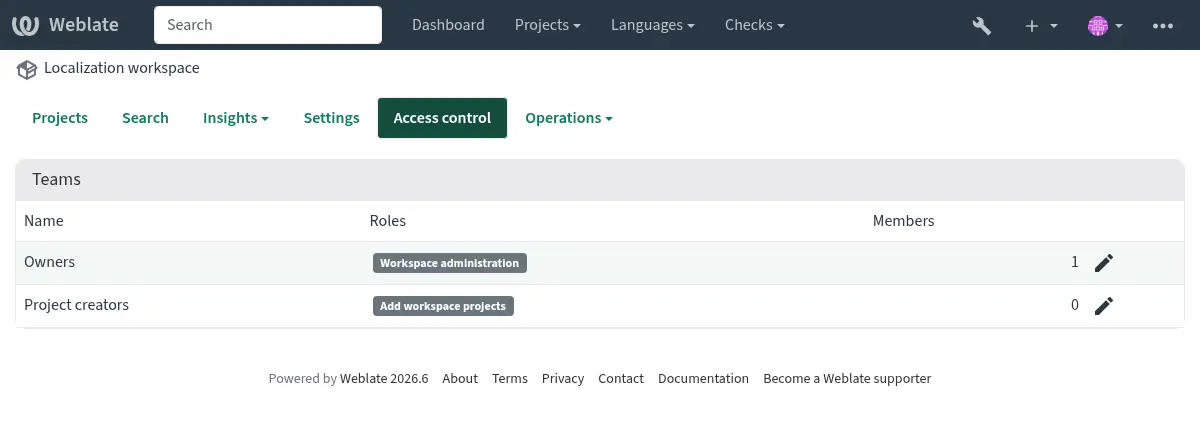
இயல்புநிலை பணியிட குழுக்கள்:
- உரிமையாளர்கள்
பணியிட அமைப்புகளைத் திருத்தலாம், பணியிடத்தில் திட்டப்பணிகளைச் சேர்க்கலாம், பணியிட அணுகலை நிர்வகிக்கலாம் மற்றும் பணியிடத்திற்கு ஒதுக்கப்பட்ட பட்டியலிடல் திட்டங்களைப் பார்க்கலாம் அல்லது செலுத்தலாம்.
- திட்ட படைப்பாளர்கள்
பணியிடத்தில் திட்டங்களைச் சேர்க்கலாம்.
பணியிடத்தில் குறைந்தபட்சம் ஒரு திட்டப்பணியை அணுகும்போது பயனர்கள் பணியிடப் பக்கத்தைப் பார்க்க முடியும். இது பட்டியலிடல் அணுகல் அல்லது கூடுதல் திட்டங்களைச் சேர்க்க இசைவு வழங்காது.
பட்டியலிடல்
பட்டியலிடல் இயக்கப்பட்டால், பணியிடத்திற்கு பட்டியலிடல் திட்டம் ஒதுக்கப்படும். அந்த பணியிடத்தில் உள்ள திட்டங்கள் பணியிட பட்டியலிடல் திட்டத்திற்கு எதிராக கணக்கிடப்படும்.
பணியிட அமைப்புகளைத் திருத்து இசைவு உள்ள பயனர்கள் பட்டியலிடல் திட்டத்தைப் பார்க்கலாம் மற்றும் செலுத்தலாம். இந்த பயனர்களுக்கு பட்டியலிடல் அறிவிப்பு மின்னஞ்சல்கள் அனுப்பப்படுகின்றன.
பட்டியலிடல் விருப்பமானது. பட்டியலிடல் தொகுதி நிறுவப்படாதபோது பணியிடங்கள் இன்னும் கிடைக்கும்.
பட்டியலிடல் உரிமையாளர்களிடமிருந்து மேம்படுத்துகிறது
Older Weblate versions stored billing owners directly on billing plans. These users are migrated to the workspace Owners team for the workspace covered by the billing plan.