Translation component diagnostics
Показує помилки у налаштуваннях Weblate або проєкту перекладу для будь-якого заданого складника перекладу. Також буде надано супровід щодо способу роботи зі знайденими вадами.
У поточній версії передбачено покриття таких проблем:
Дублювання початкових рядків у файлах перекладу
Дублювання мов у перекладах
Помилки при об’єднанні, оновленні або записуванні до сховища
Помилки обробки у файлах перекладів
Обмеження рахунків (див. Оплата)
Сховище містить забагато вихідних або пропущених внесків
Не вказано ліцензування
Помилки при запуску додатка (див. Додатки)
Unavailable AI evaluation services and recommendations to configure AI quality evaluation when an LLM service is available
Misconfigured monolingual or bilingual translation.
Зламаний Налаштовування складників
Некоректні адреси
Невикористані знімки вікон
Неоднозначний код мови
Невикористана нова база у параметрах складника
Дублювання маски файлів, використаних для пов’язаних складників
Налаштування репозиторію із суперечливими запитами на злиття
Компонент, схоже, не використовується (параметр налаштування:
UNUSED_ALERT_DAYS)Unused glossary languages
Disabled string management in local glossaries or glossaries containing terminology
Сповіщення оновлюються щодня або при пов’язаних змінах (наприклад, коли змінюється Налаштовування складників або коли оновлюється репозиторій).
Перевірку доступності веб-сайтів проектів можна вимкнути за допомогою параметра WEBSITE_ALERTS_ENABLED. У цьому випадку Weblate більше не буде створювати сповіщення про недоступні веб-сайти проектів.
Alerts are listed on each respective component page as Diagnostics.
Add-on error diagnostics link to the responsible installation’s Configuration page for users who can manage it, including add-ons inherited from a category, project, or site configuration. For AI quality evaluation, an unavailable service produces an error diagnostic; provider request failures remain in the add-on activity log.
Project and workspace diagnostics overviews
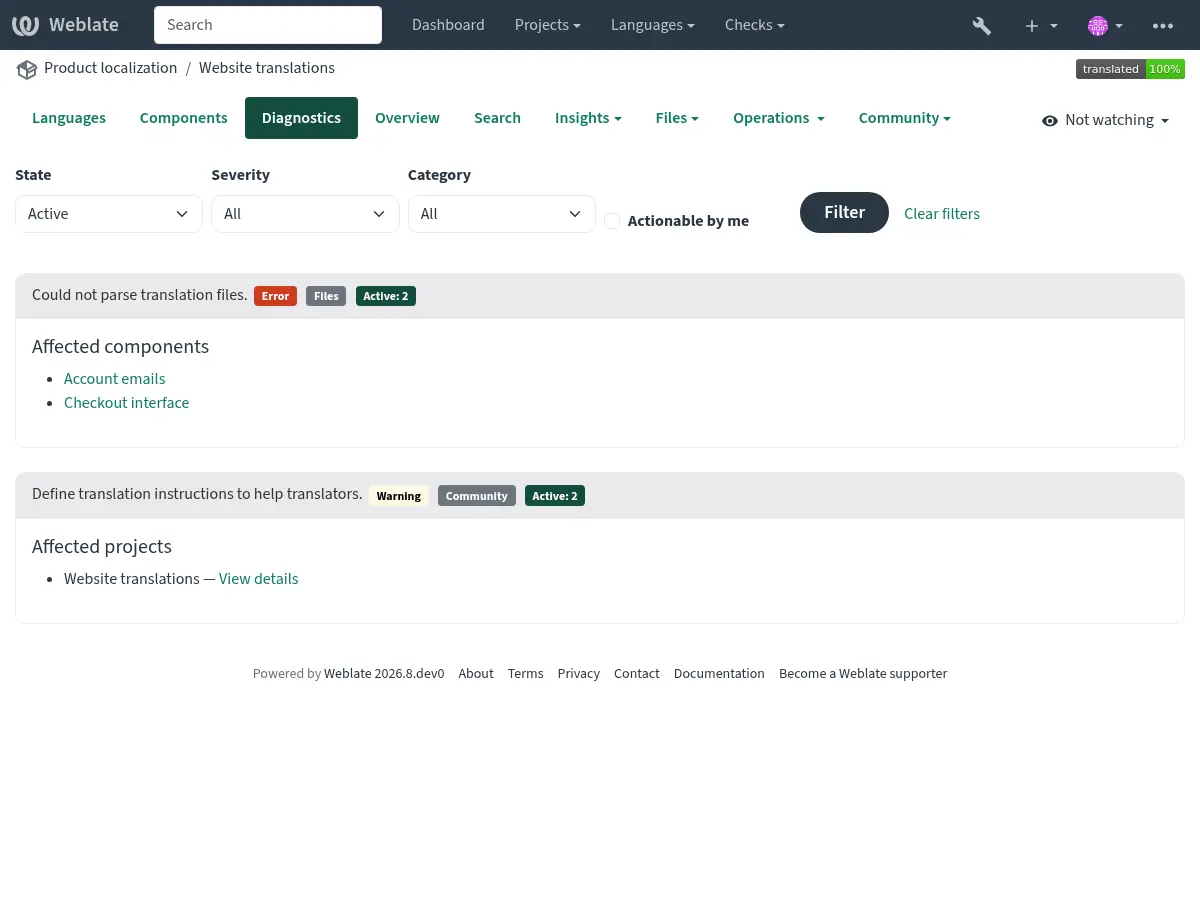
Signed-in users can open the Diagnostics tab on project and workspace pages. The overview is loaded when opened and groups alerts of the same type instead of repeating them for every component.
The project overview shows project-wide findings once and lists the components affected by component-specific findings:
The workspace overview groups project-wide findings by project and identifies components using both the project and component name:
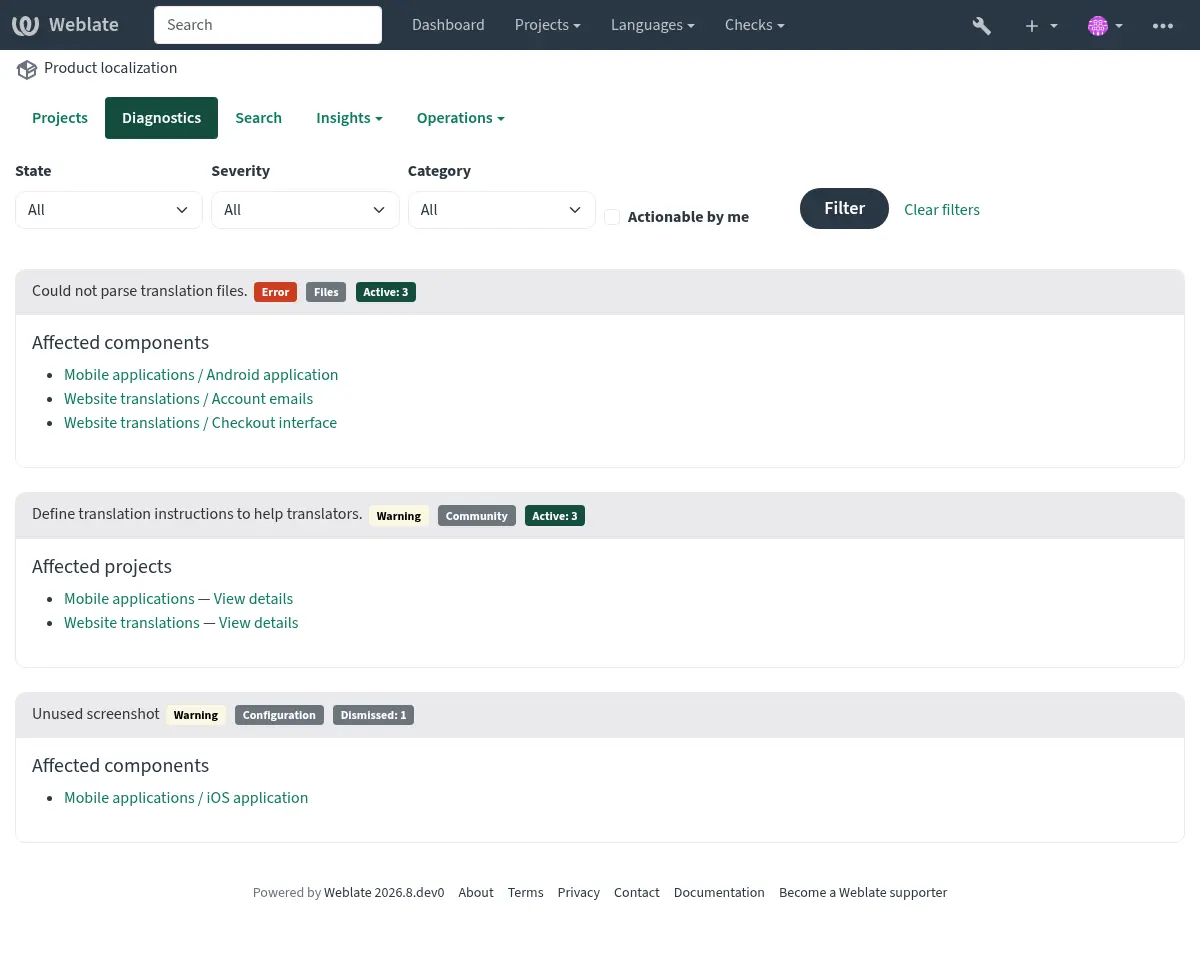
Each finding lists up to 20 affected projects or components. Additional affected objects are shown as a count. Follow a component link to see the complete diagnostic details or dismiss a diagnostic on the component page.
The summary can be filtered by active or dismissed state, severity, category, or whether the signed-in user can act on the diagnostic. Components shared into a project are listed only in the diagnostics of their owning project.
If it is missing, the component clears all current checks. Alerts disappear once the underlying condition has been resolved.
Information and warning alerts are used for guidance on improving community localization. They make the Diagnostics tab visible, but they do not indicate a component problem in listings.
Dismissal is available for selected diagnostics, regardless of severity. Maintainers can dismiss warnings about unused components and glossary languages when these are intentionally retained. Suspected monolingual or bilingual file-format misconfiguration can also be dismissed when the configuration is correct. Operational failures and required configuration must still be resolved.
Dismissed diagnostics record who dismissed them, when they were dismissed, and an optional reason. A dismissal is automatically reopened when the diagnostic details or the configuration relevant to that diagnostic changes. Dismissal and reopening are both recorded in the component change history.
Unused-component dismissals persist through daily checks and reopen if
UNUSED_ALERT_DAYS changes. Set this setting to 0 to disable the check
site-wide. If activity resolves the diagnostic, a later period of inactivity
can generate a new diagnostic. Unused glossary language dismissals reopen when
the affected languages change. File-format diagnostic dismissals reopen when
the relevant format, format parameters, base file, or source language changes.
Warning and error notifications are sent only to subscribed project maintainers who have permission to act on the diagnostic. Informational recommendations do not send unsolicited notifications.
Custom alerts can override
BaseAlert.get_dismissal_context(component, details) to include stable,
JSON-serializable configuration or diagnostic inputs. Changing the returned
context reopens a dismissed alert. Incidental values such as evaluation time
should not be included.
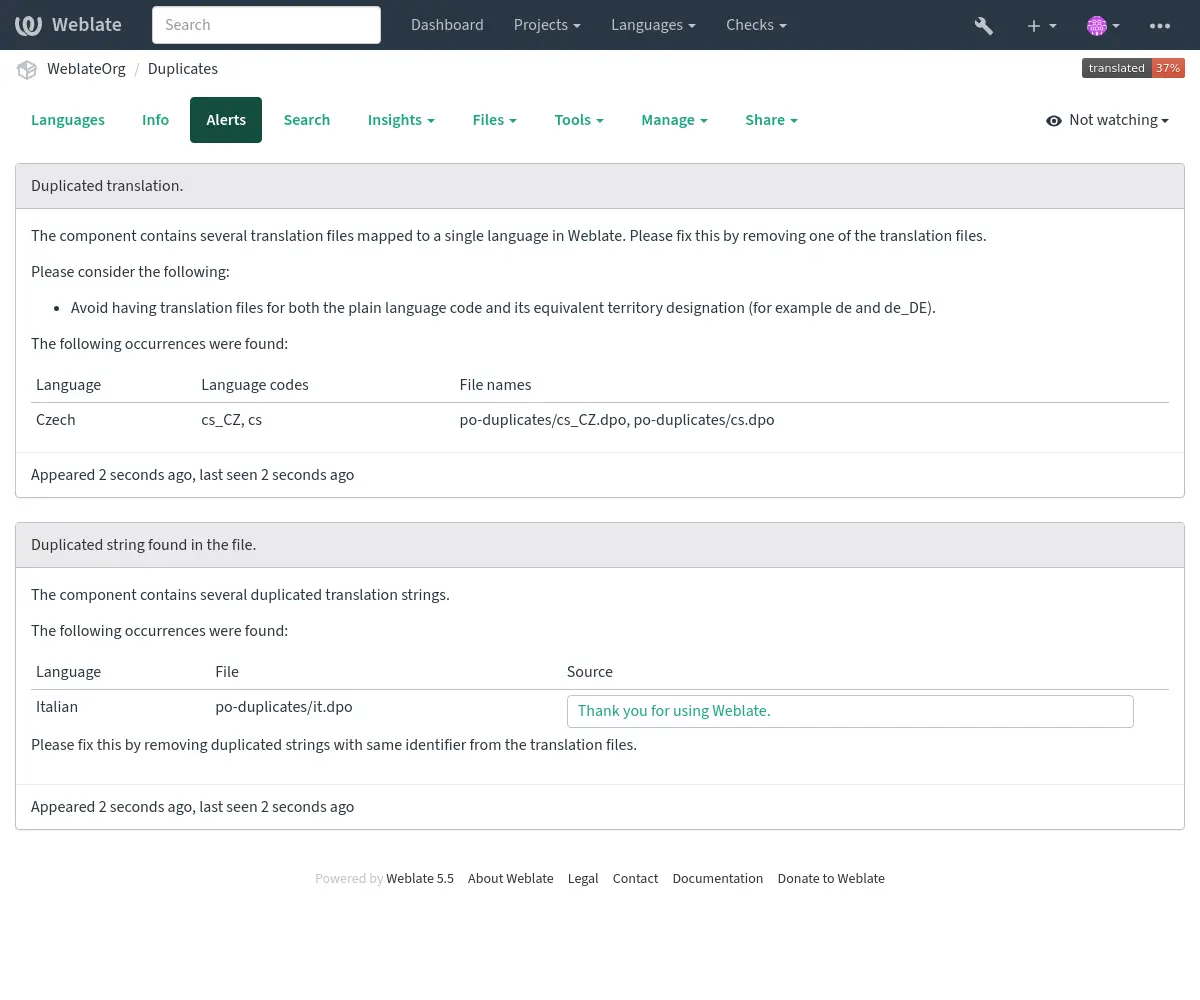
Складник із дублікатами рядків і мов виглядає ось так:
Проблеми з налаштуванням репозиторію
This alert is shown when multiple Git components are configured to push to the same repository and push branch without all of them pulling from that branch. This includes pull or merge request workflows, and direct pushes to a separate push branch. Such a setup can overwrite the shared branch.
Щоб вирішити цю проблему, налаштуйте для кожного компонента окрему Push branch або використовуйте спільний репозиторій для всіх компонентів, вказавши URL-адресу репозиторію у форматі weblate://project/component.
Дивись також