Додаткові модулі Weblate
Для вашої конфігурації доступні декілька додаткових модулів.
Засіб експортування Git
Надає вам доступ лише до читання підлеглого сховища Git за допомогою HTTP(S).
Установлення
Додайте
weblate.gitexportдо запису встановлених програм уsettings.py:INSTALLED_APPS += ("weblate.gitexport",)
Експортування наявних сховищ перенесенням вашої бази даних після встановлення:
weblate migrate
Підказка
Git exporter is turned on in our official Docker image. To turn it off, use:
WEBLATE_REMOVE_APPS=weblate.gitexport
Користування
Модуль автоматично підключається до Weblate та встановлює експортовану URL-адресу репозиторію в Налаштовування складників. Репозиторії доступні в частині /git/ URL-адреси Weblate, наприклад https://example.org/git/weblate/main/.
Сховища для загальнодоступних проєктів можна клонувати без розпізнавання:
git clone 'https://example.org/git/weblate/main/'
Доступ до перегляду репозиторіїв з обмеженим доступом (з Private access control або коли REQUIRE_LOGIN увімкнено) вимагає токена API, який можна отримати у вашому user profile:
git clone 'https://user:KEY@example.org/git/weblate/main/'
Примітка
Weblate serves the Git repository itself, but it does not serve Git LFS
objects. See Git LFS for supported behavior. Clone repositories using
Git LFS from the upstream repository and add Weblate as another remote. If
you only need Git-tracked files, you can clone from Weblate with
GIT_LFS_SKIP_SMUDGE=1 to skip downloading Git LFS objects.
Підказка
By default members of Users group and anonymous user have access to the repositories for public projects via Access repository and Power user roles.
Оплата
Це використовується на Hosted Weblate для визначення тарифних планів, створення рахунків та встановлення обмежень у користуванні.
Установлення
1. Add weblate.billing to installed apps in
settings.py:
INSTALLED_APPS += ("weblate.billing",)
Запустіть перенесення бази даних, щоб додатково встановити структури бази даних для модуля:
weblate migrate
Створення та призначення тарифного плану
Щоб активувати білінг, спочатку потрібно створити тарифний план. Перейдіть до розділу Адміністрування (представлений іконкою гайкового ключа) і відкрийте екран Інструменти. Звідти перейдіть до інтерфейсу адміністратора Django.
В інтерфейсі адміністратора Django знайдіть розділ BILLING і додайте тарифний план. Наприклад, ви можете додати тарифний план Free без вартості.
Якщо ви хочете призначити план виставлення рахунків для існуючого проекту, це також можна зробити в інтерфейсі адміністратора Django за допомогою опції Виставлення рахунків клієнтам.
Нарешті, в інтерфейсі адміністратора Django передбачена опція Рахунок для реєстрації платежів ваших клієнтів.
Користування
Після встановлення ви можете керувати виставленням рахунків в інтерфейсі адміністратора. Користувачі з увімкненим виставленням рахунків отримають нову вкладку Billing у своєму Профіль користувача.
Superusers can view the 20 most recent billing audit entries on the billing detail page. Select View all in the Audit log section to browse older entries using the pagination controls.
The billing module additionally allows users to create new projects and components without being superusers (see Додавання проєктів і складників перекладу). This is possible when following conditions are met:
Рахунок перебуває у налаштованих межах (будь-яке перевищення обмежень призведе до блокування створення проєктів і складників) із сплачено (якщо тарифний план не є нульовим)
The user has Add projects to workspace permission for the workspace covered by the billing plan.
Upon project creation user is able to choose which workspace should contain the project. Projects created in a workspace with billing count against the billing plan assigned to that workspace. Users with the Edit workspace settings permission can view and pay the billing plan; billing notification e-mails are sent to these users. See Оплата for details.
Юридичний модуль
Це використовується на Hosted Weblate для надання обов’язкових юридичних документів. Типово використовуються порожні документи. Ви маєте заповнити такі шаблони у документах:
legal/documents/tos.htmlДокумент щодо умов надання послуг
legal/documents/privacy.htmlДокумент щодо правил конфіденційності
legal/documents/summary.htmlКороткий огляд умов надання послуг та правил конфіденційності
legal/documents/contracts.htmlSubcontractor information
The legal module embeds these templates inside Weblate. Set LEGAL_URL
or PRIVACY_URL to use externally hosted documents. Configured URLs
take priority in the footer, sign-in pages, legal pages, and confirmation page.
The default terms and privacy templates link to the configured URL instead of
showing their placeholder text. Without a configured URL, Weblate links to a
visible internal legal page. When no terms link is available, the confirmation
page embeds legal/documents/tos.html.
On changing the terms of service or privacy policy, adjust
LEGAL_TOS_DATE when users should be forced to agree with the updated
documents.
Примітка
Юридичні документи щодо сервісу Hosted Weblate, який надає компанія Weblate s.r.o., доступні в цьому репозиторії Git: <https://github.com/WeblateOrg/wllegal/tree/main/wllegal/templates/legal/documents>.
The bundled terms of service and related legal documents are specific to services operated by Weblate s.r.o. They can serve as an implementation example, but should not be used as a basis for legal documents of other services.
Установлення
1. Add weblate.legal to installed apps in
settings.py:
INSTALLED_APPS += ("weblate.legal",)

# Optional:

# Social auth pipeline to confirm TOS upon registration/subsequent sign in
SOCIAL_AUTH_PIPELINE = list(SOCIAL_AUTH_PIPELINE)
SOCIAL_AUTH_PIPELINE.insert(
    SOCIAL_AUTH_PIPELINE.index("weblate.accounts.pipeline.second_factor") + 1,
    "weblate.legal.pipeline.tos_confirm",
)

# Middleware to enforce TOS confirmation of signed in users
MIDDLEWARE += [
    "weblate.legal.middleware.RequireTOSMiddleware",
]
Insert terms confirmation after two-factor authentication and before team synchronization so that logins awaiting terms acceptance do not change team memberships.
Запустіть перенесення бази даних, щоб додатково встановити структури бази даних для модуля:
weblate migrate
Provide legal document templates matching your service, as described in Customizing legal documents and styles.
Підказка
In Docker deployments, enable the legal module using
WEBLATE_LEGAL_INTEGRATION instead of editing
settings.py. Use tos-confirm to enable the legal module and
legal document confirmation enforcement, or wllegal to additionally
load the hosted legal document templates used by services operated by
Weblate s.r.o. These templates are not intended for general use. To provide
your own templates in Docker, place them in
/app/data/python/customize/templates/legal/documents, see
Заміна логотипа та інших статичних файлів.
Recreate the Docker container after changing environment variables, for example using docker compose up -d. Restarting an existing container does not apply changed environment values.
Користування
After installation and customization, the legal documents are shown in the Weblate UI.
The legal document templates are regular Django templates. Text is translated
only when you use Django translation tags such as {% translate %} or
{% blocktranslate %}; plain HTML text is shown as written.
Legal pages and the sign-in and registration overview provide terms_url and
privacy_url variables for linking to the terms of service and privacy
policy documents.
Customizing legal documents and styles
Provide your own legal documents by overriding these templates in a Створення модуля Python:
templates/legal/documents/tos.htmltemplates/legal/documents/privacy.htmltemplates/legal/documents/summary.htmltemplates/legal/documents/contracts.htmltemplates/legal/styles.htmlstatic/weblate_customization/legal.css
Place the customization app before weblate.legal and any other app
providing legal template overrides in INSTALLED_APPS so that
Django selects its templates. Only templates you provide are overridden; the
remaining legal templates continue to use the defaults from later apps.
The legal/styles.html template is included in the HTML head of every
legal page. Use it to load a stylesheet from your customization app:
{% load static %}

<link rel="stylesheet" href="{% static 'weblate_customization/legal.css' %}" />
Run weblate collectstatic --noinput after adding or changing the static
file.
In Docker deployments, place document templates in
/app/data/python/customize/templates/legal/documents,
styles.html in
/app/data/python/customize/templates/legal/styles.html, and the
stylesheet in /app/data/python/customize/static/legal.css. The
stylesheet template then uses {% static 'legal.css' %}. Restart the
container to apply the changes, see Заміна логотипа та інших статичних файлів.
By default, legal document wrappers use the tos CSS class. Weblate does not
attach any styling to this class; target it from your custom stylesheet, or set
LEGAL_DOCUMENT_CSS_CLASS to another class matching your document
markup. Set the setting to an empty string if no wrapper class is needed.
Use LEGAL_HIDDEN_DOCUMENTS to hide legal pages from the legal menu.
Hidden pages return a 404 response when requested directly. If terms or
privacy is hidden, its configured external URL remains available for links
elsewhere. Without an external URL, the link is omitted.
To use externally hosted legal documents with legal confirmation, set
LEGAL_URL and PRIVACY_URL. Hide the internal pages as well
if they should not appear in the legal menu. The confirmation page links to
the external documents and requires one agreement covering both. If privacy
is hidden and no PRIVACY_URL is set, the confirmation covers only
the terms of service.
Аватари
Аватари завантажуються і кешуються на боці сервера для зменшення витоку відомостей для сайтів, які їх типово обслуговують. Вбудовану підтримку для отримання аватарів з адрес електронної пошти, які для них налаштовано, можна вимкнути за допомогою ENABLE_AVATARS.
У поточній версії Weblate передбачено підтримку таких служб:
Дивись також
CDN локалізації
The CDN локалізації JavaScript and CDN файлів перекладу add-ons
write files to LOCALIZE_CDN_PATH; Weblate does not serve them.
Configure the web server or CDN serving LOCALIZE_CDN_URL as a
public, read-only static file host.
Treat every published CDN file as public. The add-on specific UUID in the URL is not an access-control mechanism. Do not enable CDN add-ons for components that contain private strings, unreleased product text, customer data, internal URLs, API examples, repository paths, translator comments, or file-format metadata that should not be exposed.
The CDN файлів перекладу add-on publishes raw translation files in formats supported by Weblate. Some formats can be interpreted by browsers or other clients as HTML, SVG, XML, JavaScript, YAML, or application-specific configuration. Serve the CDN from a dedicated domain that is separate from Weblate and from the application consuming the translations. Do not share authentication cookies with the CDN domain.
Recommended server configuration:
Serve only the directory configured by
LOCALIZE_CDN_PATH; do not expose Weblate repositories, backups, media, configuration, or the whole data directory.Disable directory listing.
Deny access to
.kotlin-sdk-stagingand all its contents. The Kotlin SDK add-on uses this directory for temporary preparation, not publication. Apply this restriction before enabling the add-on, including when a CDN copies files from the origin directory.Use HTTPS and make the CDN host read-only from the web server.
Send X-Content-Type-Options with
nosniff.Configure conservative MIME types. Serve unknown translation formats as text/plain or application/octet-stream; only serve
weblate.jsas JavaScript.For raw translation formats that are not intended to be rendered in a browser, consider adding Content-Disposition with
attachment.Configure
Access-Control-Allow-Originonly for sites that need browser access to the files.Set cache lifetimes that match your update expectations, and purge CDN caches when stale translations must disappear quickly.
The following nginx snippet serves only the configured CDN directory and applies conservative defaults for raw translation files:
#
# nginx configuration for the Weblate localization CDN
#
# You will want to change:
#
# - server_name to match the host configured in LOCALIZE_CDN_URL
# - root to match LOCALIZE_CDN_PATH
# - Access-Control-Allow-Origin to the sites that need browser access
# - TLS configuration if HTTPS is not terminated before nginx
#
server {
    listen 80;
    server_name cdn.example.com;

    # LOCALIZE_CDN_PATH
    root /home/weblate/data/l10n-cdn;

    autoindex off;
    disable_symlinks on;

    location = / {
        return 404;
    }

    # Kotlin SDK preparation files must never be served.
    location ^~ /.kotlin-sdk-staging {
        return 404;
    }

    # The JavaScript localization add-on publishes this loader.
    location ~ "^/[0-9a-f]{32}/weblate\.js$" {
        try_files $uri =404;

        types {
            application/javascript js;
        }
        default_type application/javascript;

        add_header X-Content-Type-Options nosniff always;
        # add_header Access-Control-Allow-Origin "https://www.example.com" always;

        expires 1h;
    }

    # Content-addressed Android artifacts never change at the same URL.
    location ~ "^/[0-9a-f]{32}/artifacts/[0-9a-f]{64}\\.arsc$" {
        try_files $uri =404;
        types { }
        default_type application/octet-stream;
        add_header X-Content-Type-Options nosniff always;
        add_header Content-Disposition "attachment" always;
        add_header Cache-Control "public, max-age=31536000, immutable";
        # add_header Access-Control-Allow-Origin "https://www.example.com" always;
    }

    # Other CDN files are translation files. Serve them conservatively so raw
    # formats are not interpreted as active browser content.
    # Manifest JSON files also use this one-hour cache policy.
    location / {
        try_files $uri =404;

        types {
        }
        default_type text/plain;

        add_header X-Content-Type-Options nosniff always;
        add_header Content-Disposition "attachment" always;
        # add_header Access-Control-Allow-Origin "https://www.example.com" always;

        expires 1h;
    }
}
Підписування внесків Git за допомогою GnuPG
Усі внески можна підписувати за допомогою ключа GnuPG екземпляра Weblate.
Увімкніть
WEBLATE_GPG_IDENTITY. (Weblate за потреби згенерує ключ GnuPG і використовуватиме його для підпису всіх комітів перекладу.)Для користування цією можливістю слід встановити GnuPG 2.1 або новішу версію.
Ключ зберігається у каталозі
DATA_DIR, а відкритий ключ буде показано на сторінці «Про Weblate»: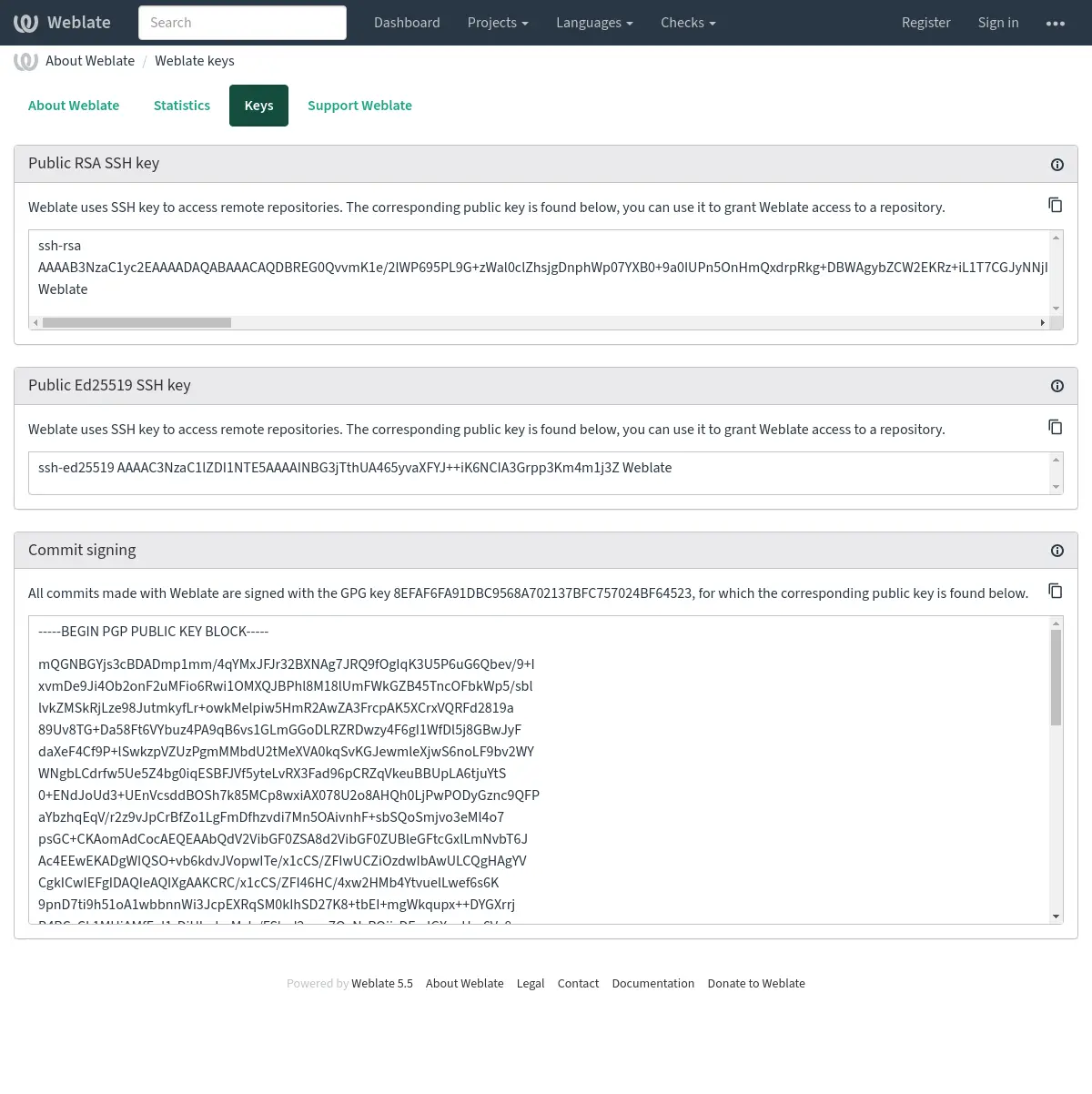
Крім того, ви також можете імпортувати існуючі ключі в Weblate, просто встановіть
HOME=$DATA_DIR/homeпід час виклику gpg.
Підказка
Дані ключів зберігаються у кеші Weblate протягом довгого часу. Якщо ви надасте Weblate змогу створити ключ з WEBLATE_GPG_IDENTITY, а потім імпортуєте ключ для того самого профілю для використання його як наявного ключа, рекомендуємо очистити кеш redis, щоб зміни набули чинності.
Примітка
При спільному використанні DATA_DIR на декількох хостах, будь ласка, дотримуйтесь інструкцій на https://wiki.gnupg.org/NFS, щоб забезпечити надійну роботу підпису GnuPG.
Дивись також
Обмеження частоти
Змінено в версії 4.6: Обмеження швидкості більше не поширюється на авторизованих суперкористувачів.
Several operations in Weblate are rate limited. Rate limits are evaluated
independently for each scope. At most RATELIMIT_ATTEMPTS attempts are
allowed within RATELIMIT_WINDOW seconds in one scope. That scope is
then blocked for RATELIMIT_LOCKOUT; Weblate does not turn this into a
sitewide temporary IP ban. Exceeding one scope, such as TRANSLATE or
SEARCH, does not by itself block unrelated scopes such as LOGIN or
SECOND_FACTOR. There are also settings specific to scopes, for example
RATELIMIT_CONTACT_ATTEMPTS or RATELIMIT_TRANSLATE_ATTEMPTS. The table
below is a full list of available scopes.
Обмеженню частоти підлягають такі дії:
Назва |
Область |
Дозволені спроби |
Вікно обмеження частоти |
Період блокування |
|---|---|---|---|---|
Реєстрація |
|
5 |
300 |
600 |
Надсилання повідомлення адміністраторам |
|
2 |
300 |
600 |
Аутентифікація за паролем під час входу |
|
5 |
300 |
600 |
Перевстановити пароль |
|
5 |
300 |
600 |
Двофакторна автентифікація |
|
5 |
300 |
600 |
Загальний пошук за сайтом |
|
6 |
60 |
60 |
Переклад |
|
30 |
60 |
600 |
Додавання до глосарія |
|
30 |
60 |
600 |
Започаткування перекладу новою мовою |
|
2 |
300 |
600 |
Створення нового проєкту |
|
5 |
600 |
600 |
Connecting a GitHub account |
|
100 |
3600 |
600 |
Loading component branches |
|
30 |
60 |
60 |
Rendering a Markdown preview |
|
60 |
60 |
60 |
Within each scope, the rate limiting is based on sessions when user is signed in and on IP address if not.
Strict enforcement across concurrent workers requires a cache backend with atomic increment and decrement operations. The standard Налаштувати кеш configuration using Valkey or Redis provides these operations.
For signed-in users, Weblate records the first rejected request during each active scope lockout in the Activity, including the scope and request path. Repeated rejections during the same lockout do not create additional audit-log entries.
Якщо користувач не зможе увійти до системи AUTH_LOCK_ATTEMPTS разів, на обліковому записі буде вимкнено розпізнавання за паролем, аж доки не буде виконано процедуру скидання пароля облікового запису.
Крім того, параметри може бути застосовано у контейнері Docker додаванням префікса WEBLATE_ до назви параметра. Приклад: RATELIMIT_ATTEMPTS слід замінити на WEBLATE_RATELIMIT_ATTEMPTS.
У програмному інтерфейсі є окремі параметри обмеження частоти, див. Обмеження частоти у програмному інтерфейсі.