存取控制
Weblate 提供精細的權限系統,可透過預先定義的角色為整個執行個體指派使用者權限,也可以針對所有內容或個別專案、元件、詞彙表等,為使用者指派一組或多組權限。
專案存取控制
備註
在Hosted Weblate 上使用免費 Libre 方案的專案都會被設定為 公開 的。如果您想限制對您專案的存取,可以切換到付費方案。
選擇不同的 存取控制 設定,即可限制使用者只能存取個別專案。可用選項如下:
- 公開
任何人都看得到。
任何通過身分驗證的使用者都可以貢獻。
所有人都可能可以存取 VCS 儲存庫。
開放原始碼專案,或是私密或已鎖定的 Weblate 執行個體,請選擇此選項。
- 保護
任何人都看得到。
只有指定的使用者可以貢獻。
只有指定的使用者可以存取 VCS 儲存庫。
如果想提高可見度,同時仍控制誰能參與貢獻,請選擇此選項。
- 私人
僅指定的使用者可見。
只有指定的使用者可以貢獻。
只有指定的使用者可以存取 VCS 儲存庫。
對於根本不應該公開曝光的專案選擇此選項。
- 自訂
僅指定的使用者可見。
只有指定的使用者可以貢獻。
只有指定的使用者可以存取 VCS 儲存庫。
在 Hosted Weblate 上不可用。
您必須使用 網站範圍存取控制 設定所有權限。
如果您想以一種特定的、精細自訂的通道定義存取,請在您自己的Weblate執行個體上選擇這個。
可以在每個專案的設定(操作 ↓ 設定)的 存取 分頁中變更 存取控制。
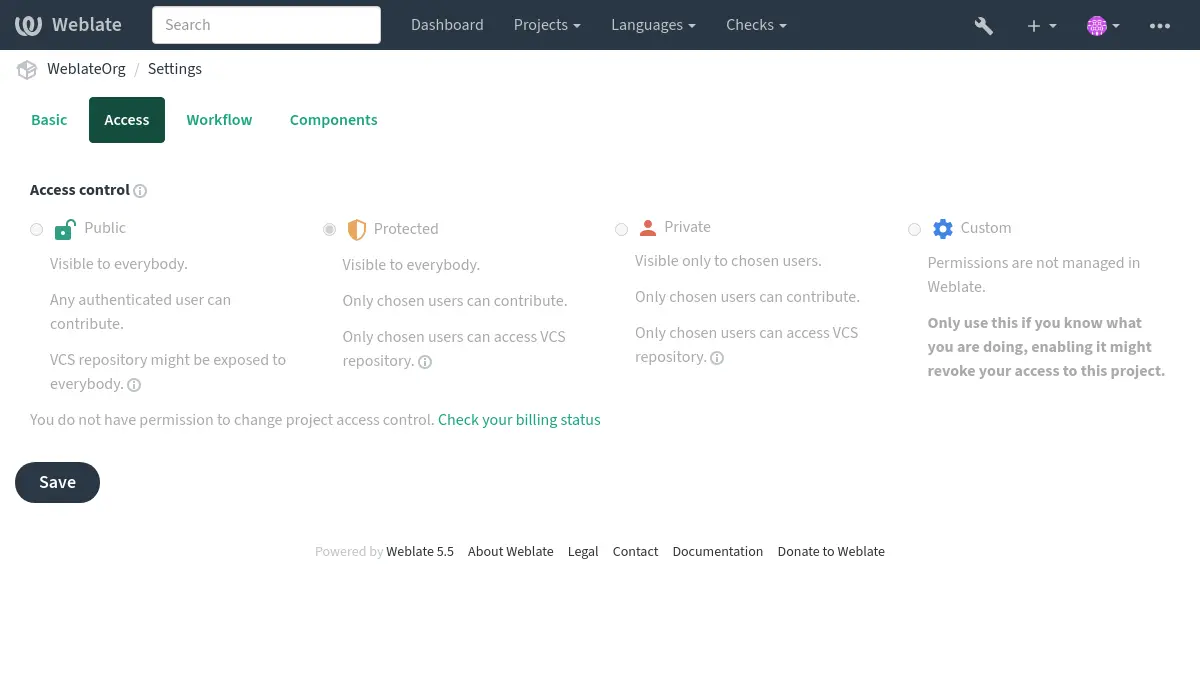
預設值也可透過設定 DEFAULT_ACCESS_CONTROL 變更。
備註
即使是 私密 專案,其統計資料仍會計入全站統計及語言摘要。這不會透露專案名稱或任何其他資訊。
備註
網站管理員可以使用 custom settings 來修改「公開」、「受保護」和「私有」專案中使用者可用的預設權限集。
也參考
工作空間存取控制
工作空間範圍的團隊說明請參閱 工作空間存取控制。
管理個別專案存取控制
對於 公開 、 保護 與 私人 專案:
授予使用者 管理專案存取權 權限(請參閱 特權清單),即可透過將其他使用者加入團隊,讓他們存取 公開、受保護 及 私密 專案(但不包括 自訂 專案)。
這些是 Weblate 提供的預設團隊;具有足夠權限的使用者可以新增或修改團隊:
- 管理
此專案的所有可用權限。
- 檢閱
在檢閱中批准翻譯。
只有啟用 審查工作流程 後才能使用。
只適用於 受保護 和 私密 專案:
- 翻譯
翻譯專案,並上傳離線完成的翻譯。
- 來源
編輯來源字串 (如果在 project settings 中允許的話 )及來源字串資訊。
- 語言
管理已翻譯的語言(新增或移除翻譯)。
- 詞彙表
管理詞彙表 (新增、移除和上傳條目)。
- 記憶
管理翻譯記憶。
- 螢幕擷圖
管理螢幕擷圖(新增或移除他們或與來源文字作關聯)。
- 自動翻譯
可以使用自動翻譯。
- VCS
管理 VCS 並存取匯出的儲存庫。
- 計費
存取帳單資訊與設定(請參閱 帳單 )。
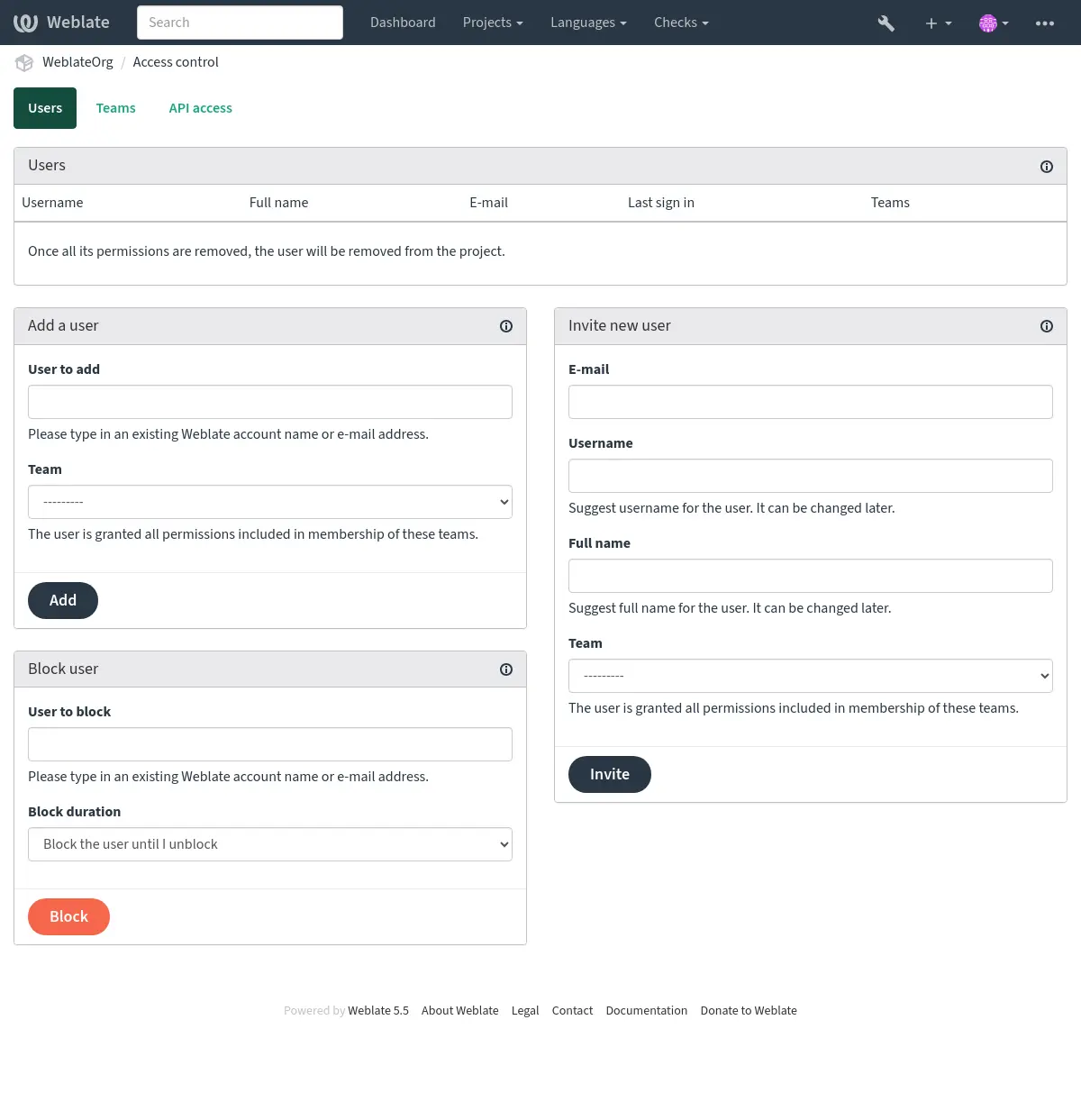
這些功能位於專案選單 操作 ↓ 使用者 下的 存取控制 頁面。
提示
您可以將團隊限制於特定語言或元件,並指派指定的存取角色(請參閱 特權清單)。
團隊管理員
在 4.15 版被加入.
每個團隊都可以有團隊管理員,管理員可在團隊內新增和移除使用者。
如果您想要建立自治團隊,此功能非常實用。
邀請新使用者
新增現有使用者將向他們傳送確認邀請。透過 REGISTRATION_OPEN,管理員還可以使用電子郵件邀請新使用者。受邀的使用者必須完成註冊程式才能存取該專案。
進行此操作不需要任何全站權限;只要具備專案範圍的存取管理權限即可(例如屬於 Administration 團隊)。
提示
如果受邀的使用者錯過了邀請的有效期,則必須建立新的邀請。
您也可以在 管理介面 的 使用者 分頁建立同類型的全站邀請。專案管理員及網站管理員還能貼上以空白分隔的電子郵件地址,一次邀請多名使用者。以同一批次建立的邀請都會使用選取的團隊;全站批次邀請也會套用選取的超級使用者旗標。
全站使用者管理由全域 user.edit 權限控制。這項受信任的管理權限不同於專案存取管理,可編輯整個執行個體中的使用者帳號,包括指派全站團隊及將超級使用者狀態授予受管理的帳號,甚至是操作者自己的帳號。
批次邀請會逐一處理。無效地址及已有待處理邀請的地址會略過,其餘有效邀請仍會建立並傳送。
在 5.0 版的變更: Weblate 現在不會自動建立帳號或將使用者新增至團隊。這只會在使用者確認後完成。
封鎖使用者
在 4.7 版被加入.
如果使用者在您的專案中行為不當,您可以阻止他們參與貢獻。封鎖相關權限後,使用者仍能查看專案,但無法參與貢獻。
清除使用者貢獻
封鎖垃圾訊息或濫用帳號時,專案管理員也可以清除該使用者在該專案中的既有貢獻。使用 操作 ↓ 使用者,封鎖使用者,並在封鎖表單中選取清除動作。對於已封鎖的使用者,請在已封鎖使用者清單中使用 清除使用者貢獻。
可用的清除動作如下:
還原使用者編輯 會還原該使用者最近且仍可編輯的翻譯。
拒絕使用者建議 會拒絕該使用者待處理的建議。
刪除使用者留言 會刪除該使用者的留言。
具備全站 user.edit 權限的網站管理員,也可以從 管理介面 的 使用者 分頁,跨所有專案執行相同的批次清除。開啟使用者的個人資料、選取 編輯 分頁,再使用 貢獻清除。
個別專案權限管理
You can set your projects to Protected or Private (see 專案存取控制), and manage users access per-project.
預設情況下,這可以防止 Weblate 授權 使用者 和 檢視者 提供 default teams 由於這些團隊所擁有的設定。這不會阻止您透過變更預設團隊,為預設團隊建立新的一個專案,或者為以下單一元件建立其他自訂設定,或者如 網站範圍存取控制 所描述。
其中一個透過 Weblate 使用者介面管理權限的主要好處是,您可以將其委派給其他使用者,而不需要給予他們超級使用者權限。為了這樣做,請將他們加入專案的 管理 團隊。
此專案範圍的委派與全站 user.edit 權限彼此獨立。專案 Administration 團隊的成員只能管理該專案的存取權;user.edit 則授予在 Weblate 使用者介面及 API 中管理全站使用者的權限,因此只能指派給完全受信任的網站管理員。
個別專案存取權杖
在 4.10 版被加入.
您可以在 API 存取 分頁定義專案範圍的存取權杖。API 權杖可以設定到期日,也能像使用者一樣透過團隊成員資格自訂權限。
網站範圍存取控制
備註
此功能在 Hosted Weblate 上不可用。
權限系統以角色及團隊為基礎:角色定義一組權限,團隊則將角色與使用者及翻譯關聯。詳細說明請參閱 使用者,角色,團隊與權限。
Weblate 存取控制系統最強大的功能可以在 管理介面 進行設定。您可以使用它來管理任何專案的權限。您不一定要將它切換到 自訂 存取控制 來使用它。但是您必須有超級使用者權限才能使用它。
如果您對實作的細節不感興趣,只是想建立一個基於預設值的足夠簡單的設定,或者不能存取整個 Weblate 安裝(如 Hosted Weblate),請參閱 管理個別專案存取控制 部分。
網站範圍權限管理
要一次管理整個執行個體的權限,請將使用者新增到合適的 default teams:
您應該使所有專案設定為 公開 (請參閱 專案存取控制 ),否則網站層級的權限將對 使用者 與 檢閱者 不會有任何影響。
您還可以賦予您所選擇的一些額外權限到預設群組。例如,您可能希望允許管理所有 使用者 的螢幕擷圖。
您也可以定義一些新的自訂團隊。如果您想繼續管理這些團隊的網站範圍內的權限,請選擇適當的 專案選擇 (如 所有專案 或 所有公開專案 )。
為語言、元件或專案自訂權限
您可以建立自己的專用團隊來管理不同物件(如語言,元件和專案)的權限。您不能透過新增一組自訂的團隊來撤銷任何來自全站設定的權限或某一團隊的權限,即使這些團隊只能授予額外的權限。
範例:
這種權限管理方式功能強大,但也可能相當繁瑣。只有授予其他使用者超級使用者狀態,才能將這項工作委派給他們。
使用者,角色,團隊與權限
身分驗證模型由幾個物件組成:
- 權限
Weblate 定義的個別權限。權限不能直接指派給使用者,只能透過角色指派。
- 角色
角色會定義一組權限,並可在多處重複使用。
- 使用者
一個使用者可隸屬於多個團隊。
- 群組
群組用身分驗證物件(專案、語言、元件和元件清單)連結角色和使用者。
備註
一個團隊可以沒有分配角色,在這種情況下,假設任何人能存取專案(見下文)。
專案瀏覽存取
使用者必須為團隊成員並團隊連結到專案或任何元件的成員。擁有成員身分就足夠了,瀏覽專案不需要特定的權限(這被用於預設的 檢視者 小組,見 團隊清單 )。
元件瀏覽存取
授予專案中一名使用者瀏覽權限意味著這名使用者可以存取任何瀏覽權限衍生自該專案的元件。開啟 受限制的存取 後,需要明確授予存取元件(或元件清單)的權限。
團隊範圍
團隊中各角色所指派權限的作用範圍,會依下列規則套用:
如果團隊指定任何 元件清單,所有在團隊已賦予到成員的權限也將賦權在團隊裡元件清單中的所有元件。若無額外指定的權限在所有的專案,這些元件在 元件 與 專案 會被忽略。
使用龐大的元件清單可能會對效能產生影響,請考慮透過專案提供存取權限。
如果團隊指定了任何 元件,則授予團隊成員的所有權限都會套用至附加到該團隊的全部元件;這些元件所屬的專案也會獲得不含額外權限的存取權。此時會忽略 專案 設定。
否則,如果團隊指定了任何 專案,無論是直接列出它們還是將 專案選擇 設定為類似 所有公開專案 的值,所有這些權限都套用於所有專案,這實際上授予了存取所有專案的相同權限 unrestricted components。
驗證使用者是否有權執行特定動作時,團隊 語言 所施加的限制會另行套用。也就是說,此限制只適用於直接與翻譯流程相關的動作,例如審查、儲存翻譯、新增建議等。
個別團隊成員資格可進一步將這些權限限制於選取的語言。將個別成員的語言限制留空,表示除團隊語言選項外不再施加其他限制。邀請新使用者加入專案團隊時,也可設定相同的語言限制。設定個別成員的語言限制後,該成員資格只會授予可針對其中一種語言評估的權限;該團隊的專案層級、元件層級及全域權限不會授予該成員。
提示
使用 語言選擇 或 專案選擇 來自動包括所有語言或專案。
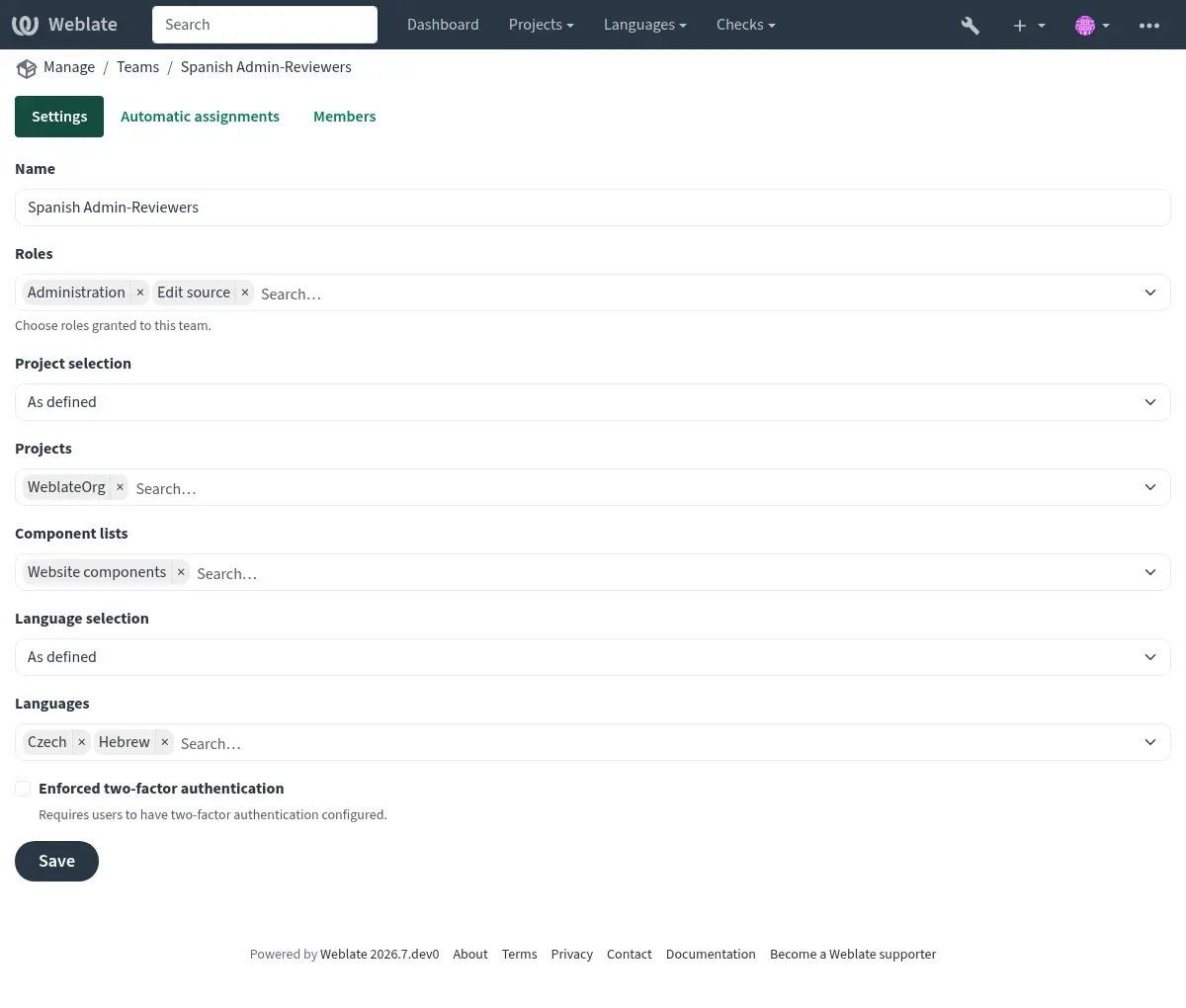
範例:
在下列團隊中,專案
foo含有foo/bar和foo/baz元件,並具備審查及管理權限:
群組 西班牙語管理審查員¶ 角色
審查字串、管理儲存庫
元件
foo/bar
語言
西班牙語
該團隊的成員將有這些權限(假設使用預設角色設定):
對整個專案
foo的一般(瀏覽)存取,包括其中的兩個元件:foo/bar和foo/baz。審查
foo/bar中的西班牙文翻譯字串(不包括其他位置)。管理整個
foo/bar儲存庫的版本控制系統,例如提交所有語言的譯者所做的待處理變更。
自動團隊分派
編輯 團隊 時,您可以指定 自動指派。這是一份正規表示式清單,會根據電子郵件地址,在建立帳號時自動將新使用者指派至團隊。只有建立帳號時才會執行這項指派。
該功能最常見的使用案例是將所有新使用者指派給某個預設團隊。此行為用於預設的 使用者 和 訪客 團隊(請參閱 團隊清單)。使用正規表達式 ^.*$ 來相符所有使用者。
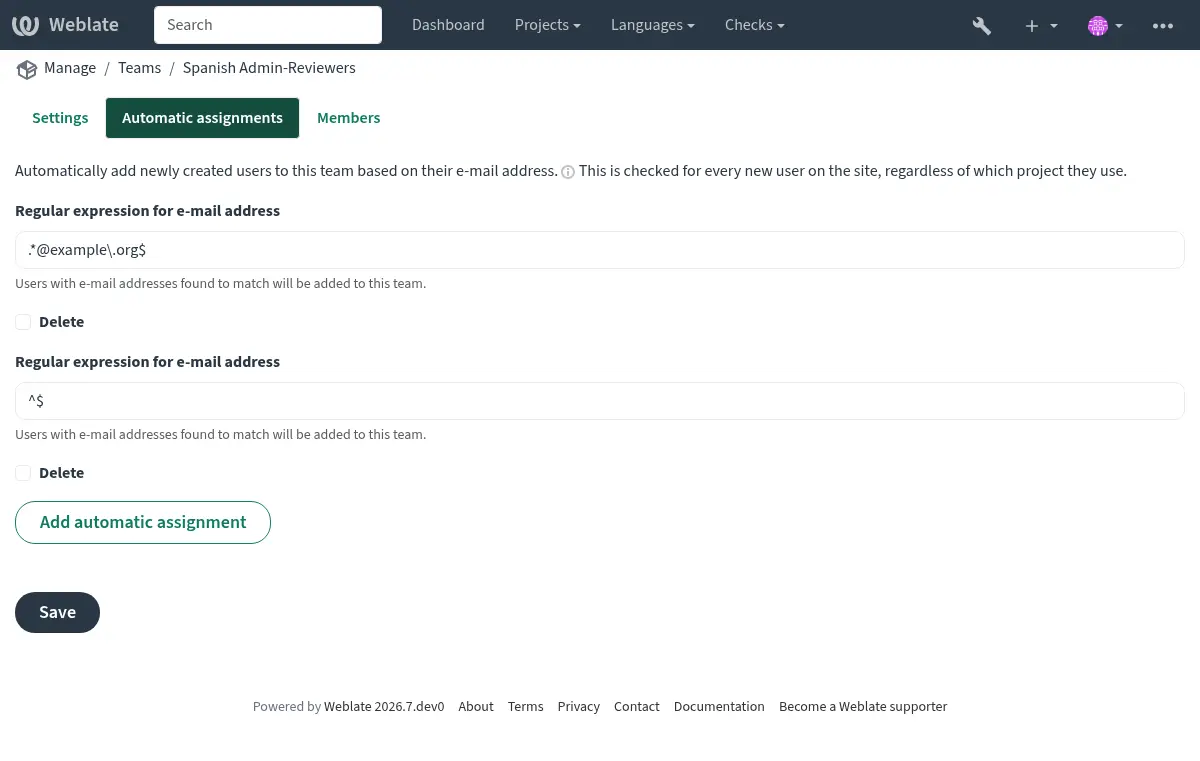
此選項的另一個用途,是預設授予公司員工額外權限。假設所有員工都使用公司網域的電子郵件地址,就能以 ^.*@mycompany.com 之類的表示式完成設定。
備註
從一個 Weblate 版本升級到另一個版本時,總是會重新建立對 使用者 和 檢視者 的使用者團隊指派。如果您想關閉它,將正規表達式設定為 ^$ (不比對任何內容)。
備註
透過使用者介面批次邀請會建立邀請。既有使用者仍須確認邀請,才會成為團隊成員。
預設團隊和角色
安裝後,將建立一組預設的團隊(請參閱 團隊清單)。
這些角色和團隊是在安裝時建立的。升級時,內建角色總是透過資料庫移轉以保持最新。您實際上無法變更它們,如果您想定義自己的權限集,請定義一個新角色。
特權清單
範圍 |
權限 |
內建角色 |
|---|---|---|
變更 |
下載變更 |
Administration |
評論 |
發佈評論 |
Administration |
編輯來源 |
||
超級使用者 |
||
翻譯協調者 |
||
檢閱字串 |
||
翻譯 |
||
刪除評論 |
Administration |
|
解決評論 |
Administration |
|
翻譯協調者 |
||
檢閱字串 |
||
元件 |
編輯元件設定 |
Administration |
鎖定元件,防止翻譯 |
Administration |
|
管理儲存庫 |
||
詞彙表 |
新增詞彙表條目 |
Administration |
管理詞彙表 |
||
超級使用者 |
||
翻譯協調者 |
||
增加詞彙表專有名詞 |
Administration |
|
管理詞彙表 |
||
翻譯協調者 |
||
編輯詞彙表條目 |
Administration |
|
管理詞彙表 |
||
超級使用者 |
||
翻譯協調者 |
||
刪除詞彙表條目 |
Administration |
|
管理詞彙表 |
||
超級使用者 |
||
翻譯協調者 |
||
上傳詞彙表條目 |
Administration |
|
管理詞彙表 |
||
超級使用者 |
||
翻譯協調者 |
||
自動建議 |
使用自動建議 |
Administration |
編輯來源 |
||
超級使用者 |
||
翻譯協調者 |
||
檢閱字串 |
||
翻譯 |
||
翻譯記憶 |
編輯翻譯記憶 |
Administration |
管理翻譯記憶 |
||
刪除翻譯記憶 |
Administration |
|
管理翻譯記憶 |
||
專案 |
編輯專案設定 |
Administration |
管理專案存取權 |
Administration |
|
報告 |
下載報表 |
Administration |
工作空間管理 |
||
螢幕擷圖 |
新增螢幕擷圖 |
Administration |
翻譯協調者 |
||
管理螢幕擷圖 |
||
編輯螢幕擷圖 |
Administration |
|
翻譯協調者 |
||
管理螢幕擷圖 |
||
刪除螢幕擷圖 |
Administration |
|
翻譯協調者 |
||
管理螢幕擷圖 |
||
來源字串 |
編輯額外字串資訊 |
Administration |
編輯來源 |
||
字串 |
新增新字串 |
Administration |
移除字串 |
Administration |
|
略過未通過檢查 |
Administration |
|
編輯來源 |
||
超級使用者 |
||
翻譯協調者 |
||
檢閱字串 |
||
翻譯 |
||
編輯字串 |
Administration |
|
編輯來源 |
||
超級使用者 |
||
翻譯協調者 |
||
檢閱字串 |
||
翻譯 |
||
檢閱字串 |
Administration |
|
翻譯協調者 |
||
檢閱字串 |
||
大量編輯字串 |
Administration |
|
批量編輯 |
||
當施行建議時編輯字串 |
Administration |
|
翻譯協調者 |
||
檢閱字串 |
||
編輯來源字串 |
Administration |
|
編輯來源 |
||
超級使用者 |
||
翻譯協調者 |
||
建議 |
接受建議 |
Administration |
編輯來源 |
||
超級使用者 |
||
翻譯協調者 |
||
檢閱字串 |
||
翻譯 |
||
新增建議 |
Administration |
|
編輯來源 |
||
Add suggestion |
||
超級使用者 |
||
翻譯協調者 |
||
檢閱字串 |
||
翻譯 |
||
刪除建議 |
Administration |
|
超級使用者 |
||
翻譯協調者 |
||
建議的投票 |
Administration |
|
編輯來源 |
||
超級使用者 |
||
翻譯協調者 |
||
檢閱字串 |
||
翻譯 |
||
翻譯 |
加入新語言的翻譯 |
Administration |
超級使用者 |
||
翻譯協調者 |
||
管理語言 |
||
執行自動翻譯 |
Administration |
|
自動翻譯 |
||
刪除既有的翻譯 |
Administration |
|
管理語言 |
||
下載翻譯檔案 |
Administration |
|
編輯來源 |
||
存取儲存庫 |
||
超級使用者 |
||
翻譯協調者 |
||
檢閱字串 |
||
翻譯 |
||
管理語言 |
||
加入多種新語言的翻譯 |
Administration |
|
管理語言 |
||
上傳 |
定義上傳翻譯的作者 |
Administration |
以上傳內容覆寫現在的翻譯 |
Administration |
|
編輯來源 |
||
超級使用者 |
||
翻譯協調者 |
||
檢閱字串 |
||
翻譯 |
||
上傳翻譯 |
Administration |
|
編輯來源 |
||
超級使用者 |
||
翻譯協調者 |
||
檢閱字串 |
||
翻譯 |
||
VCS |
存取內部儲存庫 |
Administration |
存取儲存庫 |
||
超級使用者 |
||
翻譯協調者 |
||
管理儲存庫 |
||
將變更提交到內部儲存庫 |
Administration |
|
管理儲存庫 |
||
從內部儲存庫推送變更 |
Administration |
|
管理儲存庫 |
||
重設內部儲存庫中的變更 |
Administration |
|
管理儲存庫 |
||
檢視上游儲存庫的位置 |
Administration |
|
存取儲存庫 |
||
超級使用者 |
||
翻譯協調者 |
||
管理儲存庫 |
||
更新內部儲存庫 |
Administration |
|
管理儲存庫 |
||
公告 |
發佈公告 |
Administration |
翻譯協調者 |
||
刪除公告 |
Administration |
|
翻譯協調者 |
||
工作空間 |
編輯工作空間設定 |
工作空間管理 |
新增專案至工作空間 |
工作空間管理 |
|
新增工作空間專案 |
||
管理工作空間存取權 |
工作空間管理 |
|
全網站範圍的特權 |
使用管理介面 |
|
管理網站設定 |
||
加入新的專案 |
新增新專案 |
|
新增新的工作空間 |
新增新專案 |
|
加入語言定義 |
||
管理語言定義 |
||
管理團隊 |
||
檢視團隊資訊 |
||
管理使用者 |
||
檢視使用者資訊 |
||
管理角色 |
||
檢視角色資訊 |
||
管理公告 |
||
管理翻譯記憶 |
||
管理機器翻譯 |
||
管理元件清單 |
||
管理付款 |
||
管理網站端的附加元件 |
備註
任何預設角色都不會獲得全站權限。這些權限強大,幾乎等同於超級使用者狀態,而且大多會影響 Weblate 安裝環境中的所有專案。
內建角色清單
管理 |
|
編輯來源 |
|
新增建議 |
|
存取儲存庫 |
|
管理詞彙表 |
|
超級使用者 |
|
翻譯協調員 |
|
檢閱字串 |
|
翻譯 |
|
管理語言 |
|
批量編輯 |
|
自動翻譯 |
|
管理翻譯記憶 |
|
管理螢幕擷圖 |
|
管理儲存庫 |
|
工作空間管理 |
|
新增工作空間專案 |
|
新增新專案 |
|
團隊清單
下列團隊會在安裝時(或執行 setupgroups 後)建立,您可以自由修改。不過,如果刪除這些團隊或重新命名,資料庫移轉時會重新建立它們。
- 訪客
定義未經身分驗證的使用者權限。
這個團隊只包括匿名使用者(請參閱
ANONYMOUS_USER_NAME)。從這個團隊移除角色,即可限制未經身分驗證使用者的權限。
預設角色: Add suggestion 、 Access repository
- 檢視者
這個角色可確保所有使用者都能看到公開專案。依預設,所有使用者都是這個團隊的成員。
依預設,自動團隊指派 會在新帳號加入時,使其成為這個團隊的成員。
預設角色:無
- 使用者
所有使用者的預設群組。
依預設,自動團隊指派 會在新帳號加入時,使其成為這個團隊的成員。
預設角色: 超級使用者
- 檢閱者
檢閱者群組(請參閱 翻譯工作流程 )。
預設角色: 檢閱字串
- 管理員
管理員專用群組。
預設角色: 管理權限
- 專案建立者
在 5.1 版被加入.
可以建立新專案的使用者。
預設角色:新增新專案
警告
請勿移除預先定義的 Weblate 團隊及使用者,否則可能導致預期外的問題。如果不需要這些團隊及使用者,只要移除其所有權限即可。
進階存取限制
如果您想以較不公開的方式使用 Weblate,例如只允許受邀的新使用者,可以設定成只有已知使用者能夠存取。請將 REGISTRATION_OPEN 設為 False 以禁止註冊新使用者,並將 REQUIRE_LOGIN 設為 True,要求登入後才能存取網站上的所有頁面。這就是鎖定 Weblate 執行個體的基本方式。
另外,變更 DEFAULT_ACCESS_CONTROL 為 100 會使所有新建立的專案變成私密專案,需要授予明確權限。
提示
您可以使用內建的 邀請新使用者 新增使用者。
使用者帳號過期
每個帳號都可以設定到期日。到期後,帳號會自動停用。這項功能用於 個別專案存取權杖,也可用於一般使用者。