檢查與修復
品質檢查有助於發現常見的翻譯錯誤,確保翻譯品質良好。如果出現誤報,則可以忽略這些檢查。關於佔位符、標記、標點符號和複數形式的實際翻譯指南,見 安全地翻譯特殊文字。
提交未通過檢查的翻譯後,將立刻向使用者顯示:
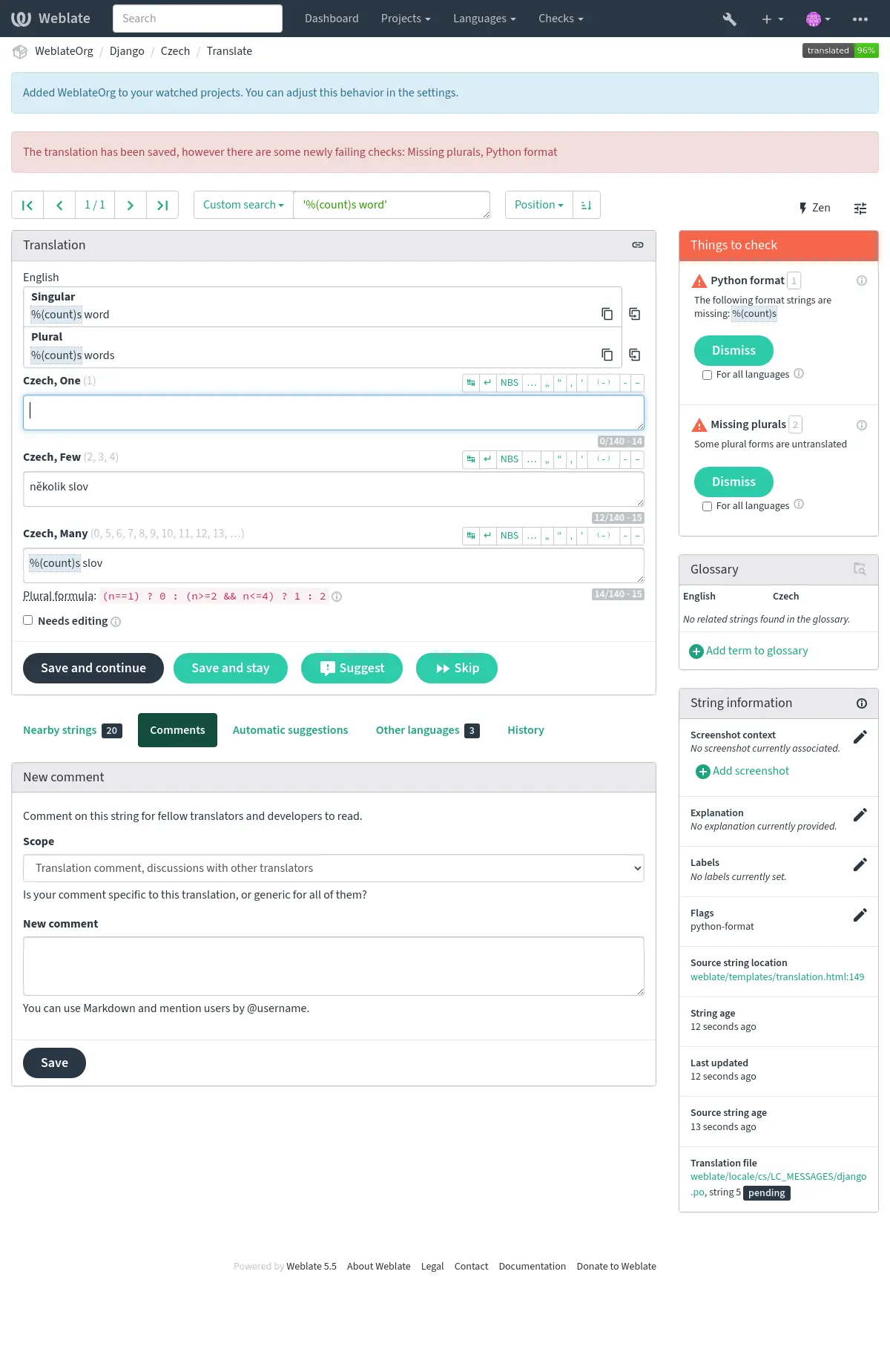
正在編輯的字串,其檢查結果會立即更新。與 翻譯不一致 及 譯文重複使用 相關的警告,則在背景更新,因此其他字串的警告與統計資料,可能暫時仍反映先前的譯文。
自動修正
除了 品質檢查 外,Weblate 還可以自動修復翻譯字串中的一些常見錯誤。謹慎使用它,不要使其增加翻譯錯誤。
也參考
拖尾省略號替換
- 類別名稱:
weblate.trans.autofixes.chars.ReplaceTrailingDotsWithEllipsis
用省略號 (…) 替換拖尾點 (...) 來保持和來源字串的一致。
零寬度空格移除
- 類別名稱:
weblate.trans.autofixes.chars.RemoveZeroSpace
譯文中通常不希望出現零寬空格。此修補會刪除它,除非來源字串中也存在零寬空格。
控制字元移除
- 類別名稱:
weblate.trans.autofixes.chars.RemoveControlChars
去掉控制字元,如果來源字串不包含的話。
天城文短豎線
- 類別名稱:
weblate.trans.autofixes.chars.DevanagariDanda
用天城體 danda 字元 (।) 替換孟加拉語中的句號。
標點符號間距
- 類別名稱:
weblate.trans.autofixes.chars.PunctuationSpacing
在 5.3 版被加入.
確保法語使用正確的標點符號空格。
可透過 ignore-punctuation-spacing 標記停用此修正(此標記同樣會停用 標點符號間距)。
不安全 HTML 清理
- 類別名稱:
weblate.trans.autofixes.html.BleachHTML
從標記為 safe-html 的字串中移除不安全的 HTML 標記。
也參考
修復首尾空白
- 類別名稱:
weblate.trans.autofixes.whitespace.SameBookendingWhitespace
使首尾空白和來源字串保持一致。可使用 ignore-begin-space 和 ignore-end-space 標記精確調整行為以跳過字串的處理部分。
品質檢查
Weblate 對字串進行了廣泛的品質檢查。以下部分將對它們進行更詳細的描述。還有針對特定語言的檢查。如果有錯誤報告,請將缺陷提交。
也參考
只有執行 AI 品質評估附加元件 時,才會以非同步方式填入 AI 品質檢查結果。每個類別都會彙整評估器的結果,包括嚴重程度與說明,並沿用其他檢查的篩選和忽略控制項。AI 評估只會依照已設定的觸發條件,在附加元件執行期間進行。一般品質檢查處理不會聯絡評估器或產生新的 AI 結果;只有來源或翻譯變更時,才會保留或移除現有結果。
翻譯檢查
在每次翻譯變更時執行,幫助翻譯人員保持高品質的翻譯。
鍵盤快速鍵
在 2026.7 版被加入.
- 摘要:
來源與翻譯的鍵盤快速鍵不一致。
- 範圍:
已翻譯好的字串
- 檢查類別:
weblate.checks.chars.AcceleratorKeyCheck- 檢查辨識碼:
accelerator- 觸發:
此檢查需要使用旗標啟用。
- 要啟用的旗標:
accelerator- 要忽略的旗標:
ignore-accelerator
快速鍵(也稱為助憶鍵)可讓使用者透過鍵盤觸發使用者介面動作。字串會以單一標點字元加以標記,通常是 & (Qt、Windows)、_ (GTK) 或 ~。一般可重複輸入標記字元來逸出,而此檢查會忽略這類字元。請使用 accelerator: 旗標啟用檢查並明確選取標記,例如 accelerator:&、accelerator:_ 或 accelerator:~。
此檢查會確認來源與翻譯包含相同數量的快速鍵,且翻譯不會包含超過 1 個快速鍵。
備註
Walter & Sons 之類的字串在翻譯後可能不含 & 符號,因而觸發誤判。請使用 ignore-accelerator 旗標略過該字串的檢查。
AI:準確度
- 摘要:
評估發現譯文改變了原意。
- 範圍:
已翻譯好的字串
- 檢查類別:
weblate.checks.ai.AIAccuracyCheck- 檢查辨識碼:
ai_accuracy- 觸發:
此檢查一律啟用,但可以使用旗標略過。
- 要忽略的旗標:
ignore-ai-accuracy
只有執行 AI 品質評估附加元件 時,才會填入此檢查結果。一般品質檢查處理不會觸發 AI 評估。
AI:流暢度
- 摘要:
評估發現語言品質有問題。
- 範圍:
已翻譯好的字串
- 檢查類別:
weblate.checks.ai.AIFluencyCheck- 檢查辨識碼:
ai_fluency- 觸發:
此檢查一律啟用,但可以使用旗標略過。
- 要忽略的旗標:
ignore-ai-fluency
只有執行 AI 品質評估附加元件 時,才會填入此檢查結果。一般品質檢查處理不會觸發 AI 評估。
AI:格式
- 摘要:
評估發現格式或佔位符問題。
- 範圍:
已翻譯好的字串
- 檢查類別:
weblate.checks.ai.AIFormattingCheck- 檢查辨識碼:
ai_formatting- 觸發:
此檢查一律啟用,但可以使用旗標略過。
- 要忽略的旗標:
ignore-ai-formatting
只有執行 AI 品質評估附加元件 時,才會填入此檢查結果。一般品質檢查處理不會觸發 AI 評估。
AI:風格
- 摘要:
評估發現風格或指示不符。
- 範圍:
已翻譯好的字串
- 檢查類別:
weblate.checks.ai.AIStyleCheck- 檢查辨識碼:
ai_style- 觸發:
此檢查一律啟用,但可以使用旗標略過。
- 要忽略的旗標:
ignore-ai-style
只有執行 AI 品質評估附加元件 時,才會填入此檢查結果。一般品質檢查處理不會觸發 AI 評估。
AI:術語
- 摘要:
評估發現術語使用不正確。
- 範圍:
已翻譯好的字串
- 檢查類別:
weblate.checks.ai.AITerminologyCheck- 檢查辨識碼:
ai_terminology- 觸發:
此檢查一律啟用,但可以使用旗標略過。
- 要忽略的旗標:
ignore-ai-terminology
只有執行 AI 品質評估附加元件 時,才會填入此檢查結果。一般品質檢查處理不會觸發 AI 評估。
AsciiDoc 標記
在 2026.8 版被加入.
- 摘要:
AsciiDoc 標記與來源不符。
- 範圍:
已翻譯好的字串
- 檢查類別:
weblate.checks.markup.AsciiDocMarkupCheck- 檢查辨識碼:
asciidoc-markup- 觸發:
此檢查需要使用旗標啟用。
- 會自動啟用此檢查的檔案格式:
- 要啟用的旗標:
asciidoc-text- 要忽略的旗標:
ignore-asciidoc-markup
此檢查會比較來源中找到的標記與翻譯中找到的標記,包含:
inline 與 block macros(例如
link:和image::)cross-references(
<<id>>)passthroughs(例如
+++...+++、$$...$$)
可翻譯 Macro attribute text 與 cross-reference labels;但 Macro 名稱、目標及參照識別碼在來源與翻譯中都必須保持相同。
BBCode 標記
在 5.10 版的變更: 此檢查不再依賴於不可靠的自動偵測,現在其需要使用 bbcode-text 旗標啟用。
- 摘要:
翻譯中的 BBCode 與來源不符。
- 範圍:
已翻譯好的字串
- 檢查類別:
weblate.checks.markup.BBCodeCheck- 檢查辨識碼:
bbcode- 觸發:
此檢查需要使用旗標啟用。
- 要啟用的旗標:
bbcode-text- 要忽略的旗標:
ignore-bbcode
BBCode 表示簡單的標記,例如以粗體或斜體突出顯示訊息的重要部分。
這項檢查會確認譯文中也有這些標記。它能辨識起始標籤上的參數、巢狀標籤,以及跨行的標記。
備註
目前偵測 BBCode 的方法非常簡單,因此此檢查可能會產生誤報。
連續重複單字
在 4.1 版被加入.
- 摘要:
文字在同一列中有兩個相同的單字。
- 範圍:
已翻譯好的字串
- 檢查類別:
weblate.checks.duplicate.DuplicateCheck- 檢查辨識碼:
duplicate- 觸發:
此檢查一律啟用,但可以使用旗標略過。
- 要忽略的旗標:
ignore-duplicate
檢查翻譯中是否沒有連續重複的字詞。這通常表示翻譯錯誤。
此檢查會略過阿薩姆語、孟加拉語、古吉拉特語、印地語、卡納達語、馬拉雅拉姆語、馬拉提語、尼泊爾語、奧里亞語、旁遮普語、信德語、僧伽羅語、坦米爾語、泰盧固語、道本語及烏爾都語(包括各自的語言變體),因為這些語言會以詞語重複表達語法意義。
提示
此檢查包括特定於語言的規則,以避免誤報。如果在您的情況下錯誤觸發,請告訴我們。請參閱 在 Weblate 中回報問題。
與詞彙表不同
在 4.5 版被加入.
- 摘要:
翻譯未遵循詞彙表定義的字詞。
- 範圍:
已翻譯好的字串
- 檢查類別:
weblate.checks.glossary.GlossaryCheck- 檢查辨識碼:
check_glossary- 觸發:
此檢查需要使用旗標啟用。
- 要啟用的旗標:
check-glossary- 要忽略的旗標:
ignore-check-glossary
必須使用標記 check-glossary 以開啟此檢查(請參閱 使用旗標自訂行為)。請在啟用它之前考慮以下事項:
它確實是精確的字串相符,預計詞彙表將包含所有變體中的術語。
根據詞彙表檢查每條字串的成本很高,它會減慢 Weblate 中涉及執行檢查(如匯入字串或翻譯)的任何操作。
它還使用 未變更的翻譯 中不可翻譯的詞彙表術語。
兩個空白
- 摘要:
翻譯含有兩個空格。
- 範圍:
已翻譯好的字串
- 檢查類別:
weblate.checks.chars.DoubleSpaceCheck- 檢查辨識碼:
double_space- 觸發:
此檢查一律啟用,但可以使用旗標略過。
- 要忽略的旗標:
ignore-double-space
檢查翻譯中是否存在雙空格,以避免其他與空格相關的檢查出現誤報。
當在來源中找到雙空格時,檢查為假,這意味著故意使用雙空格。
Fluent 部分
在 5.0 版被加入.
- 摘要:
Fluent 部分應配對。
- 範圍:
已翻譯好的字串
- 檢查類別:
weblate.checks.fluent.parts.FluentPartsCheck- 檢查辨識碼:
fluent-parts- 觸發:
此檢查需要使用旗標啟用。
- 會自動啟用此檢查的檔案格式:
- 要啟用的旗標:
fluent-parts- 要忽略的旗標:
ignore-fluent-parts
每條 Fluent 訊息可以有一個選用值(主文字內容)以及多個選用屬性,每個屬性是該訊息的“一部分”。Weblate 中所有這些部分出現在同一區塊內,使用類 Fluent 語法來指定屬性。例如:
This is the Message value
.title = This is the title attribute
.alt = This is the alt attribute
此檢查會確保:如果來源 Message 有值,翻譯後的 Message 也會有值;如果來源沒有值,翻譯也不會有值。此外,來源 Message 使用的屬性也必須全數出現在翻譯中,且不可新增其他屬性。
備註
此檢查不應用於 Fluent Terms,因 Terms 始終有一個值。此外,Term 屬性往往隨區域設定不同而不同(用於語法規則等),且預計不會出現在所有翻譯中。
也參考
Fluent 引用
在 5.0 版被加入.
- 摘要:
Fluent 引用應配對。
- 範圍:
已翻譯好的字串
- 檢查類別:
weblate.checks.fluent.references.FluentReferencesCheck- 檢查辨識碼:
fluent-references- 觸發:
此檢查需要使用旗標啟用。
- 會自動啟用此檢查的檔案格式:
- 要啟用的旗標:
fluent-references- 要忽略的旗標:
ignore-fluent-references
Fluent 訊息或 Term 可參考另一個訊息、術語、屬性或變數。例如:
Here is a { message }, a { message.attribute } a { -term } and a { $variable }.
Within a function { NUMBER($num, minimumFractionDigits: 2) }
一般而言,翻譯後的 Message 或 Term 應包含與來源相同的參照,但出現順序不一定要相同。因此,此檢查會確保翻譯的值使用與來源值相同的參照、出現次數相同,且沒有額外參照。對於 Message,也會檢查翻譯中每個 Attribute 所使用的參照,是否與來源中對應 Attribute 相同。
當原文或翻譯包含 Fluent Select Expressions 時,原文中每個可能的變體必須與翻譯中至少一個變體具有相同的參考而相符,反過來也是如此。
此外,如果某個變數參照同時出現在 Select Expression 的選擇器及其中一個變體內,則所有變體也可視為包含該參照。這是因為變體的鍵可能已使該參照在該變體中顯得多餘。例如:
{ $num ->
    [one] an apple
   *[other] { $num } apples
}
在這裡,出於此項檢查的目的,[one] 變體也會被認為包含 $num 參考。
不過,Select Expression 選擇器內的參照(在 Fluent 語法中只能是 Term Attribute 的變數)本身不會被視為必要參照,因為它不會構成終端使用者看到的實際字串內容,且 Select Expression 的有無可依語系而定。例如:
{ -term.starts-with-vowel ->
    [yes] an { -term }
   *[no] a { -term }
}
在這裡,對 -term.starts-with-vowel 的引用預計不會出現在翻譯中,但對 -term 的引用會出現。
Fluent 翻譯 inner HTML
在 5.0 版被加入.
- 摘要:
Fluent 目標應為配對的有效 inner HTML。
- 範圍:
已翻譯好的字串
- 檢查類別:
weblate.checks.fluent.inner_html.FluentTargetInnerHTMLCheck- 檢查辨識碼:
fluent-target-inner-html- 觸發:
此檢查需要使用旗標啟用。
- 會自動啟用此檢查的檔案格式:
- 要啟用的旗標:
fluent-target-inner-html- 要忽略的旗標:
ignore-fluent-target-inner-html
此檢查驗證一條訊息或術語的已翻譯值包含和原文值相同的 HTML 元素。
首先,如果來源值未通過 Fluent 來源內部 HTML 檢查,此檢查便不會執行任何動作。否則,翻譯後的值也會以相同條件進行檢查。
其次,翻譯值中找到的 HTML 元素會與來源值中的 HTML 元素比較。兩個元素只有在標籤名稱、屬性及屬性值完全相同,且所有上層元素也以相同方式相符時,才視為相符。此檢查會確保來源的每個元素都出現在翻譯的某個位置,出現的 次數 相同,且沒有新增其他元素。值中有多個元素時,它們在翻譯中不必以相同順序出現。
來源或翻譯包含 Fluent Select Expression 時,來源的每個可能變體都必須在翻譯中至少有一個變體含有相同的 HTML 元素,反之亦然。
Fluent 與 Fluent DOM 套件搭配使用時,此檢查會確保翻譯也包含來源中出現的必要 data-l10n-name 元素,或 <br> 之類允許的行內元素。
例如,以下原文:
Source message <img data-l10n-name="icon"/> with icon
會與以下內容相符:
Translated message <img data-l10n-name="icon"/> with icon
但不是:
Translated message <img data-l10n-name="new-val"/> with icon
也非
Translated message <br data-l10n-name="icon"/> with no icon
Fluent 翻譯語法
在 5.0 版被加入.
- 摘要:
翻譯中 Fluent 的語法有錯。
- 範圍:
已翻譯好的字串
- 檢查類別:
weblate.checks.fluent.syntax.FluentTargetSyntaxCheck- 檢查辨識碼:
fluent-target-syntax- 觸發:
此檢查需要使用旗標啟用。
- 會自動啟用此檢查的檔案格式:
- 要啟用的旗標:
fluent-target-syntax- 要忽略的旗標:
ignore-fluent-target-syntax
Weblate 中,Fluent 字串對參考和變數使用 Fluent 語法,該語法同樣用於更為複雜的功能,例如定義屬性和選擇器變體,包括複數。此檢查確保用於翻譯的語法對 Fluent 有效。
格式化字串
檢查來源與翻譯中的格式是否一致。在翻譯中遺漏格式字串通常會造成嚴重問題,因此翻譯的字串格式通常應與來源相符。
Weblate 支援檢查幾種語言的格式字串。僅當適當地標記了字串時(例如,C 格式為 c-format),才會自動啟用該檢查。 Gettext 會自動新增它,但是對於其他檔案格式,或者如果您的 PO 檔案不是由 xgettext 產生的,您可能必須手動新增它。
多數格式檢查允許單一數量的複數形式省略格式字串,讓譯者能為這些情況寫出較自然的字串(例如使用 One apple 而非 %d apple)。加入 strict-format 旗標即可關閉此行為。
可依字串自訂旗標(請參閱 來源字串的額外資訊),也可在 組件設定 中自訂。在組件層級定義較為簡單,但如果某個字串不會解讀為格式字串,只是碰巧使用了格式字串語法,就可能產生誤報。
提示
如果 Weblate 中不提供特定格式的檢查,則可以使用通用 佔位符號。
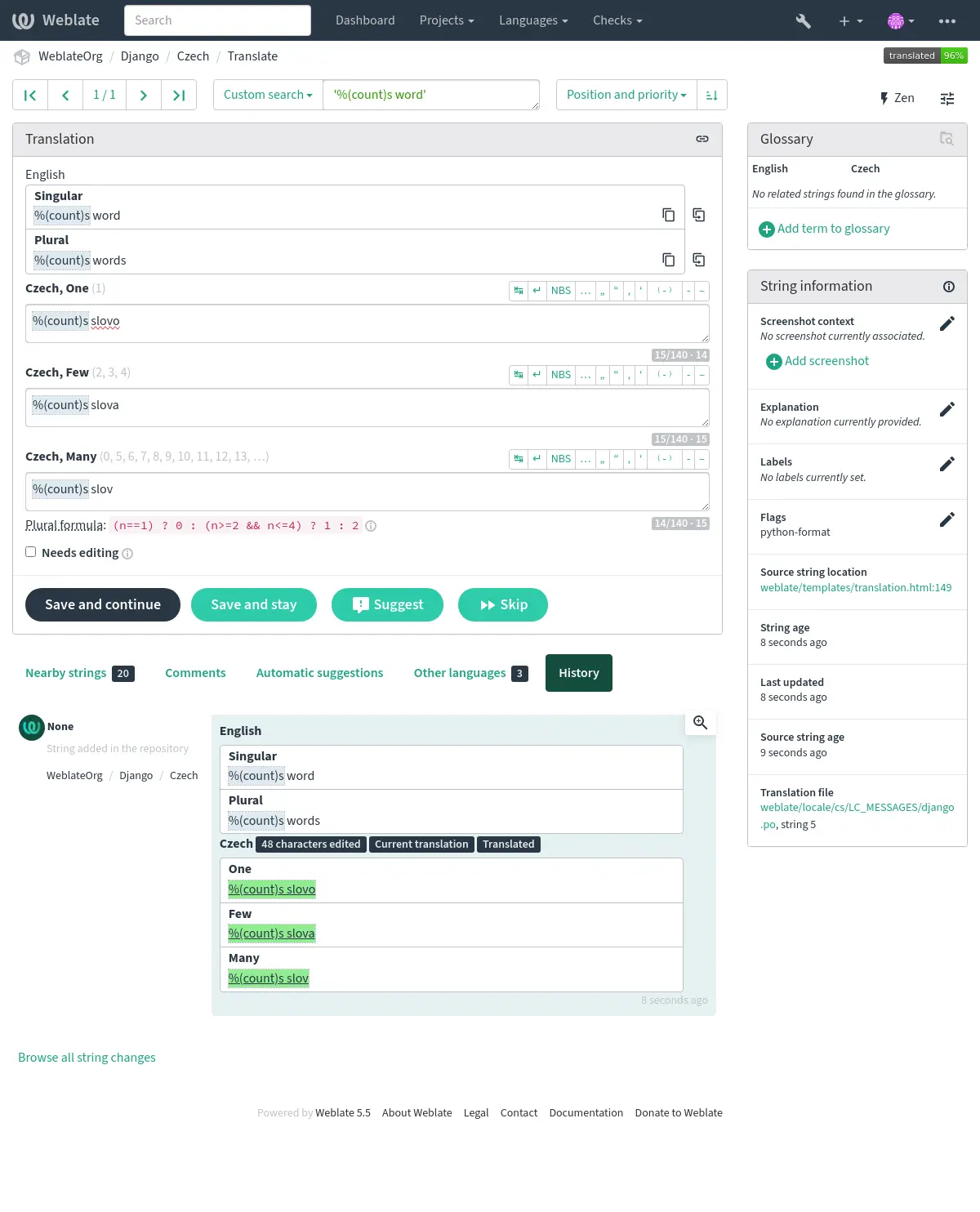
除了檢查,這也將醒目顯示格式化字串,方便將它們插入到已翻譯字串:
AngularJS 插值字串
- 摘要:
AngularJS 插值字串與來源不符。
- 範圍:
已翻譯好的字串
- 檢查類別:
weblate.checks.angularjs.AngularJSInterpolationCheck- 檢查辨識碼:
angularjs_format- 觸發:
此檢查需要使用旗標啟用。
- 要啟用的旗標:
angularjs-format- 要忽略的旗標:
ignore-angularjs-format
- 命名格式字串範例:
Your balance is {{amount}} {{ currency }}
也參考
Automattic 組件格式設定
- 摘要:
Automattic 組件的預留位置與來源不符。
- 範圍:
已翻譯好的字串
- 檢查類別:
weblate.checks.format.AutomatticComponentsCheck- 檢查辨識碼:
automattic_components_format- 觸發:
此檢查需要使用旗標啟用。
- 要啟用的旗標:
automattic-components-format- 要忽略的旗標:
ignore-automattic-components-format
- 簡易格式字串範例:
They bought {{strong}}apples{{/strong}}.
C 格式
- 摘要:
C 格式字串與來源不符。
- 範圍:
已翻譯好的字串
- 檢查類別:
weblate.checks.format.CFormatCheck- 檢查辨識碼:
c_format- 觸發:
此檢查需要使用旗標啟用。
- 要啟用的旗標:
c-format- 要忽略的旗標:
ignore-c-format
- 簡易格式字串範例:
There are %d apples- 位置格式字串範例:
Your balance is %1$d %2$s
也參考
C# 格式
- 摘要:
C# 格式字串與來源不符。
- 範圍:
已翻譯好的字串
- 檢查類別:
weblate.checks.format.CSharpFormatCheck- 檢查辨識碼:
c_sharp_format- 觸發:
此檢查需要使用旗標啟用。
- 會自動啟用此檢查的檔案格式:
- 要啟用的旗標:
c-sharp-format,csharp-format- 要忽略的旗標:
ignore-c-sharp-format
- 位置格式字串範例:
There are {0} apples
ECMAScript 範本字面值
- 摘要:
ECMAScript 範本字面值與來源不相符。
- 範圍:
已翻譯好的字串
- 檢查類別:
weblate.checks.format.ESTemplateLiteralsCheck- 檢查辨識碼:
es_format- 觸發:
此檢查需要使用旗標啟用。
- 會自動啟用此檢查的檔案格式:
- 要啟用的旗標:
es-format- 要忽略的旗標:
ignore-es-format
- 插值範例:
There are ${number} apples
i18next 插值
在 4.0 版被加入.
- 摘要:
i18next 插值與來源不符。
- 範圍:
已翻譯好的字串
- 檢查類別:
weblate.checks.format.I18NextInterpolationCheck- 檢查辨識碼:
i18next_interpolation- 觸發:
此檢查需要使用旗標啟用。
- 會自動啟用此檢查的檔案格式:
- 要啟用的旗標:
i18next-interpolation- 要忽略的旗標:
ignore-i18next-interpolation
- 插值範例:
There are {{number}} apples- 巢狀範例:
There are $t(number) apples
也參考
ICU MessageFormat
在 4.9 版被加入.
- 摘要:
ICU MessageFormat 字串有語法錯誤或是佔位符號不相符。
- 範圍:
已翻譯好的字串
- 檢查類別:
weblate.checks.icu.ICUMessageFormatCheck- 檢查辨識碼:
icu_message_format- 觸發:
此檢查需要使用旗標啟用。
- 會自動啟用此檢查的檔案格式:
- 要啟用的旗標:
icu-message-format- 要忽略的旗標:
ignore-icu-message-format
- 插值範例:
There {number, plural, one {is one apple} other {are # apples}}.
此檢查支援純 ICU MessageFormat 訊息以及帶有簡單 XML 標記的 ICU。您可以使用 icu-flags:* 設定此檢查的行為,方法是選擇支援 XML 或停用某些子檢查。例如,以下標記啟用 XML 支援,同時停用多個子訊息的驗證:
icu-message-format, icu-flags:xml:-plural_selectors
|
啟用對簡單 XML 標記的支援。預設情況下,XML 標記被鬆散地解析。如果雜散 |
|
啟用嚴格 XML 標籤支援。所有不屬於標籤的 |
|
停用編輯器中的預留位置語法著色。 |
|
不要要求子訊息含有 |
|
跳過檢查子訊息選擇器是否與原文相符。 |
|
略過預留位置類型是否與來源相符的檢查。 |
|
跳過檢查是否存在來源字串中不存在的佔位符。 |
|
略過來源字串中的預留位置是否在翻譯中遺漏的檢查。 |
此外,啟用 xml 但未啟用 strict-xml 時,可使用 icu-tag-prefix:PREFIX 旗標,要求所有 XML 標籤都以特定字串開頭。例如,下列旗標只會允許比對以 <x: 開頭的 XML 標籤:
icu-message-format, icu-flags:xml, icu-tag-prefix:"x:"
這將相符 <x:link>點選此處</x:link> 但不相符 <strong>這裡</strong> 。
Java 格式
- 摘要:
Java 格式字串與來源不符。
- 範圍:
已翻譯好的字串
- 檢查類別:
weblate.checks.format.JavaFormatCheck- 檢查辨識碼:
java_printf_format- 觸發:
此檢查需要使用旗標啟用。
- 會自動啟用此檢查的檔案格式:
- 要啟用的旗標:
java-printf-format- 要忽略的旗標:
ignore-java-printf-format
- 簡易格式字串範例:
There are %d apples- 位置格式字串範例:
Your balance is %1$d %2$s
在 4.14 版的變更: 這曾經由 java-format 標記切換,為了與 GNU gettext 保持一致而進行了變更。
Java MessageFormat
- 摘要:
Java MessageFormat 字串與來源不符。
- 範圍:
已翻譯好的字串
- 檢查類別:
weblate.checks.format.JavaMessageFormatCheck- 檢查辨識碼:
java_format- 觸發:
此檢查需要使用旗標啟用。
- 會自動啟用此檢查的檔案格式:
- 要啟用的旗標:
auto-java-messageformat,java-format- 自動旗標行為:
auto-java-messageformat:將文字視作有條件的 Java MessageFormat,只在原文包含 Java MessageFormat 佔位符時啟用 Java MessageFormat。- 要忽略的旗標:
ignore-java-format
- 位置格式字串範例:
There are {0} apples
在 4.14 版的變更: 這曾經由 java-messageformat 標記切換,為了與 GNU gettext 保持一致而進行了變更。
此檢查會驗證格式字串對 Java MessageFormat 類別而言是否有效。除了比對大括號中的格式字串,也會驗證單引號,因為單引號有特殊意義。每次輸入單引號時,都應寫成 ''。單引號未成對時會被視為引用的開頭,而且轉譯字串時不會顯示。
JavaScript 格式
- 摘要:
JavaScript 格式字串與來源不符。
- 範圍:
已翻譯好的字串
- 檢查類別:
weblate.checks.format.JavaScriptFormatCheck- 檢查辨識碼:
javascript_format- 觸發:
此檢查需要使用旗標啟用。
- 要啟用的旗標:
javascript-format- 要忽略的旗標:
ignore-javascript-format
- 簡易格式字串範例:
There are %d apples
也參考
Laravel 格式
- 摘要:
Laravel 格式字串與來源不符。
- 範圍:
已翻譯好的字串
- 檢查類別:
weblate.checks.format.LaravelFormatCheck- 檢查辨識碼:
laravel_format- 觸發:
此檢查需要使用旗標啟用。
- 會自動啟用此檢查的檔案格式:
- 要啟用的旗標:
laravel-format- 要忽略的旗標:
ignore-laravel-format
- 命名格式字串範例:
The :attribute must be :value
也參考
Lua 格式
- 摘要:
Lua 格式字串與來源不符。
- 範圍:
已翻譯好的字串
- 檢查類別:
weblate.checks.format.LuaFormatCheck- 檢查辨識碼:
lua_format- 觸發:
此檢查需要使用旗標啟用。
- 要啟用的旗標:
lua-format- 要忽略的旗標:
ignore-lua-format
- 簡易格式字串範例:
There are %d apples
Object Pascal 格式
- 摘要:
Object Pascal 格式字串與來源不符。
- 範圍:
已翻譯好的字串
- 檢查類別:
weblate.checks.format.ObjectPascalFormatCheck- 檢查辨識碼:
object_pascal_format- 觸發:
此檢查需要使用旗標啟用。
- 要啟用的旗標:
object-pascal-format- 要忽略的旗標:
ignore-object-pascal-format
- 簡易格式字串範例:
There are %d apples
Objective-C 格式
在 5.17 版被加入.
- 摘要:
Objective-C 格式字串與來源不符。
- 範圍:
已翻譯好的字串
- 檢查類別:
weblate.checks.format.ObjCFormatCheck- 檢查辨識碼:
objc_format- 觸發:
此檢查需要使用旗標啟用。
- 會自動啟用此檢查的檔案格式:
- 要啟用的旗標:
objc-format- 要忽略的旗標:
ignore-objc-format
百分比佔位符號
在 4.0 版被加入.
- 摘要:
百分比佔位符號與來源不符。
- 範圍:
已翻譯好的字串
- 檢查類別:
weblate.checks.format.PercentPlaceholdersCheck- 檢查辨識碼:
percent_placeholders- 觸發:
此檢查需要使用旗標啟用。
- 要啟用的旗標:
percent-placeholders- 要忽略的旗標:
ignore-percent-placeholders
- 簡易格式字串範例:
There are %number% apples
也參考
Perl 大括號格式
- 摘要:
Perl 大括號格式字串與來源不符。
- 範圍:
已翻譯好的字串
- 檢查類別:
weblate.checks.format.PerlBraceFormatCheck- 檢查辨識碼:
perl_brace_format- 觸發:
此檢查需要使用旗標啟用。
- 要啟用的旗標:
perl-brace-format- 要忽略的旗標:
ignore-perl-brace-format
- 命名格式字串範例:
There are {number} apples
Perl 格式
- 摘要:
Perl 格式字串與來源不符。
- 範圍:
已翻譯好的字串
- 檢查類別:
weblate.checks.format.PerlFormatCheck- 檢查辨識碼:
perl_format- 觸發:
此檢查需要使用旗標啟用。
- 要啟用的旗標:
perl-format- 要忽略的旗標:
ignore-perl-format
- 簡易格式字串範例:
There are %d apples- 位置格式字串範例:
Your balance is %1$d %2$s
PHP 格式
- 摘要:
PHP 格式字串與來源不符。
- 範圍:
已翻譯好的字串
- 檢查類別:
weblate.checks.format.PHPFormatCheck- 檢查辨識碼:
php_format- 觸發:
此檢查需要使用旗標啟用。
- 要啟用的旗標:
php-format- 要忽略的旗標:
ignore-php-format
- 簡易格式字串範例:
There are %d apples- 位置格式字串範例:
Your balance is %1$d %2$s
Python 大括號格式
- 摘要:
Python 大括號格式字串與來源不符。
- 範圍:
已翻譯好的字串
- 檢查類別:
weblate.checks.format.PythonBraceFormatCheck- 檢查辨識碼:
python_brace_format- 觸發:
此檢查需要使用旗標啟用。
- 要啟用的旗標:
python-brace-format- 要忽略的旗標:
ignore-python-brace-format
- 簡易格式字串:
There are {} apples- 命名格式字串範例:
Your balance is {amount} {currency}
Python 格式
- 摘要:
Python 格式字串與來源不符。
- 範圍:
已翻譯好的字串
- 檢查類別:
weblate.checks.format.PythonFormatCheck- 檢查辨識碼:
python_format- 觸發:
此檢查需要使用旗標啟用。
- 要啟用的旗標:
python-format- 要忽略的旗標:
ignore-python-format
- 簡易格式字串:
There are %d apples- 命名格式字串範例:
Your balance is %(amount)d %(currency)s
Qt 格式
- 摘要:
Qt 格式字串與來源不符。
- 範圍:
已翻譯好的字串
- 檢查類別:
weblate.checks.qt.QtFormatCheck- 檢查辨識碼:
qt_format- 觸發:
此檢查需要使用旗標啟用。
- 要啟用的旗標:
qt-format- 要忽略的旗標:
ignore-qt-format
- 位置格式字串範例:
There are %1 apples
Qt 複數格式
- 摘要:
Qt 複數格式字串與來源不符。
- 範圍:
已翻譯好的字串
- 檢查類別:
weblate.checks.qt.QtPluralCheck- 檢查辨識碼:
qt_plural_format- 觸發:
此檢查需要使用旗標啟用。
- 要啟用的旗標:
qt-plural-format- 要忽略的旗標:
ignore-qt-plural-format
- 複數格式字串範例:
There are %Ln apple(s)
也參考
Ruby 格式
- 摘要:
Ruby 格式字串與來源不符。
- 範圍:
已翻譯好的字串
- 檢查類別:
weblate.checks.ruby.RubyFormatCheck- 檢查辨識碼:
ruby_format- 觸發:
此檢查需要使用旗標啟用。
- 要啟用的旗標:
ruby-format- 要忽略的旗標:
ignore-ruby-format
- 簡易格式字串範例:
There are %d apples- 位置格式字串範例:
Your balance is %1$f %2$s- 命名格式字串範例:
Your balance is %+.2<amount>f %<currency>s- 命名範本字串:
Your balance is %{amount} %{currency}
Scheme 格式
- 摘要:
Scheme 格式字串與來源不符。
- 範圍:
已翻譯好的字串
- 檢查類別:
weblate.checks.format.SchemeFormatCheck- 檢查辨識碼:
scheme_format- 觸發:
此檢查需要使用旗標啟用。
- 要啟用的旗標:
scheme-format- 要忽略的旗標:
ignore-scheme-format
- 簡易格式字串範例:
There are ~d apples
Vue I18n 格式
- 摘要:
Vue I18n 格式與來源不符。
- 範圍:
已翻譯好的字串
- 檢查類別:
weblate.checks.format.VueFormattingCheck- 檢查辨識碼:
vue_format- 觸發:
此檢查需要使用旗標啟用。
- 要啟用的旗標:
vue-format- 要忽略的旗標:
ignore-vue-format
- 已命名格式:
There are {count} apples- Rails i18n 格式化:
There are %{count} apples- 已連結的語系訊息:
@:message.dio @:message.the_world!
已經翻譯過
- 摘要:
字串之前已經有翻譯過。
- 範圍:
所有字串
- 檢查類別:
weblate.checks.consistency.TranslatedCheck- 檢查辨識碼:
translated- 觸發:
此檢查一律啟用,但可以使用旗標略過。
- 要忽略的旗標:
ignore-translated
表示已經翻譯了一個字串。當翻譯在VCS中或否則遺失時,可能會發生這種情況。
不一致
- 摘要:
此專案中的這個字串有一種以上的翻譯,或是在某些組件未翻譯。
- 範圍:
所有字串
- 檢查類別:
weblate.checks.consistency.ConsistencyCheck- 檢查辨識碼:
inconsistent- 觸發:
此檢查一律啟用,但可以使用旗標略過。
- 要忽略的旗標:
ignore-inconsistent
Weblate檢查專案中所有翻譯中相同字串的翻譯,以幫助您保持一致的翻譯。
如果同一個專案內的相同字串有不同翻譯,就會無法通過此檢查,也可能導致顯示的檢查結果不一致。您可在 其他出現位置 分頁中找到此字串的其他翻譯。
此檢查應用於專案中所有開啟了 允許翻譯重用 的組件。
提示
基於效能考量,此檢查會限制比對結果數量,因此可能無法找到所有不一致之處。
備註
當某字串在一個組件中已翻譯,在另一個組件中卻未翻譯時,也會觸發此檢查。您可在 其他出現位置 分頁的每一列按下 使用此翻譯 按鈕,快速手動處理部分組件中尚未翻譯的字串。
您可以使用 自動翻譯 附加元件來自動翻譯從另一個組件中已翻譯字串到新新增而未翻譯的字串。
也參考
不一致的 reStructuredText
在 5.10 版被加入.
- 摘要:
翻譯訊息中的 reStructuredText 標記不一致。
- 範圍:
已翻譯好的字串
- 檢查類別:
weblate.checks.markup.RSTReferencesCheck- 檢查辨識碼:
rst-references- 觸發:
此檢查需要使用旗標啟用。
- 要啟用的旗標:
rst-text- 要忽略的旗標:
ignore-rst-references
reStructuredText 術語參照或其他標記和原文不相符,這些錯誤的典型原因是:
反引號不相符或遺漏。
參照周圍缺少空白或標點符號。reStructuredText 行內區塊必須以非文字字元分隔。
行內標記與反引號之間有空白。
沒有翻譯參考名。
使用引號而非反引號。
不相符的替換或腳註參考。
使用 Kashida letter
- 摘要:
不應該使用裝飾性的卡希達對齊字母。
- 範圍:
已翻譯好的字串
- 檢查類別:
weblate.checks.chars.KashidaCheck- 檢查辨識碼:
kashida- 觸發:
此檢查一律啟用,但可以使用旗標略過。
- 要忽略的旗標:
ignore-kashida
裝飾kashida字母不應該在翻譯中使用。這些也稱為TatWeel。
Markdown 連結
- 摘要:
Markdown 連結和來源不一致。
- 範圍:
已翻譯好的字串
- 檢查類別:
weblate.checks.markup.MarkdownLinkCheck- 檢查辨識碼:
md-link- 觸發:
此檢查需要使用旗標啟用。
- 會自動啟用此檢查的檔案格式:
- 要啟用的旗標:
md-text- 要忽略的旗標:
ignore-md-link
Markdown 連結和來源不一致。
連結標題會顯示給使用者,應保留並翻譯。標題未翻譯的檢查遵循 未變更的翻譯 的語言與內容例外規則。連結會依目標網址配對;已本地化的目標網址,則依出現順序配對。
也參考
Markdown 參照
- 摘要:
Markdown 連結引用和來源不一致。
- 範圍:
已翻譯好的字串
- 檢查類別:
weblate.checks.markup.MarkdownRefLinkCheck- 檢查辨識碼:
md-reflink- 觸發:
此檢查需要使用旗標啟用。
- 會自動啟用此檢查的檔案格式:
- 要啟用的旗標:
md-text- 要忽略的旗標:
ignore-md-reflink
Markdown 連結引用和來源不一致。
也參考
Markdown 語法
- 摘要:
Markdown 語法與來源不符。
- 範圍:
已翻譯好的字串
- 檢查類別:
weblate.checks.markup.MarkdownSyntaxCheck- 檢查辨識碼:
md-syntax- 觸發:
此檢查需要使用旗標啟用。
- 會自動啟用此檢查的檔案格式:
- 要啟用的旗標:
md-text- 要忽略的旗標:
ignore-md-syntax
Markdown 語法與來源不符
也參考
翻譯最大長度
- 摘要:
翻譯不該超過指定長度。
- 範圍:
已翻譯好的字串
- 檢查類別:
weblate.checks.chars.MaxLengthCheck- 檢查辨識碼:
max-length- 觸發:
此檢查需要使用旗標啟用。
- 要啟用的旗標:
max-length- 要忽略的旗標:
ignore-max-length
檢查譯文字數是否符合可用空間。此檢查只計算譯文中的字元數。
與其他檢查不同,此旗標應設為 key:value 配對,例如 max-length:100。
max-length 旗標也會針對來源字串觸發 來源字串長度。對於英文來源字串(包括英文變體),當來源字串使用超過設定長度的 85% 時,此檢查會發出警告,以為翻譯內容變長預留空間。對其他來源語言,則直接使用設定的 max-length。
提示
此檢查會計算字元數;若文字使用比例字型呈現,字元數可能不是最佳衡量方式。翻譯的最大長度 檢查則會確認文字的實際呈現結果。
replacements: 標誌可能也很有用,在檢查字串之前展開PLATEABLE。
當同時使用 xml-text 標誌時,長度計算會忽略 XML 標記。
最大行數
- 摘要:
翻譯不應超過指定行數。
- 範圍:
已翻譯好的字串
- 檢查類別:
weblate.checks.chars.MaxLinesCheck- 檢查辨識碼:
max-lines- 觸發:
此檢查需要使用旗標啟用。
- 要啟用的旗標:
max-lines- 要忽略的旗標:
ignore-max-lines
檢查翻譯是否超過設定的最大行數。這對目標為固定高度 UI 元素的翻譯很有用,例如需要特定可見行數的 displays、terminals 或受限 containers。
不同於其他檢查,flag 應設為 key:value 組合,例如 max-lines:3。
行數多於設定值的翻譯會觸發警告。行數依換行字元數量加一計算。
提示
此檢查計算顯示行(以 \n 分隔),不計算換行行數。若您的 UI 會自動換行,請改用 翻譯的最大長度。
翻譯的最大長度
- 摘要:
轉譯後的文字不應超過指定大小。
- 範圍:
來源字串及翻譯字串
- 檢查類別:
weblate.checks.render.MaxSizeCheck- 檢查辨識碼:
max-size- 觸發:
此檢查需要使用旗標啟用。
- 要啟用的旗標:
max-size- 要忽略的旗標:
ignore-max-size
來源或翻譯文字轉譯後不應超過指定尺寸。此檢查會轉譯文字,再判斷是否能置於指定邊界內。設定一行以上時,會套用文字自動換行。
此檢查需要一個或兩個引數 - 最大寬度和最大行數。如果未提供行數,則考慮一行文字。
您還可以透過 font-* 指令設定使用的字型(請參閱 使用旗標自訂行為),例如以下翻譯標誌說以 ubuntu 字型大小 22 呈現的文字應該適合兩行和 500 畫素:
max-size:500:2, font-family:ubuntu, font-size:22
提示
您可能希望在 組件設定 中設定 font-* 指令,以便為組件中的所有字串設定相同的字型。如果您需要為每條字串自訂它,您可以覆蓋每條字串的這些值。
replacements: 標誌可能也很有用,在檢查字串之前展開PLATEABLE。
當同時使用 xml-text 標誌時,長度計算會忽略 XML 標記。
不相符的 \n
- 摘要:
譯文中的
\\n字面值數量與來源字串不符。- 範圍:
已翻譯好的字串
- 檢查類別:
weblate.checks.chars.EscapedNewlineCountingCheck- 檢查辨識碼:
escaped_newline- 觸發:
此檢查一律啟用,但可以使用旗標略過。
- 要忽略的旗標:
ignore-escaped-newline
逸出換行符號通常對程式輸出的格式很重要。如果翻譯中 \n 字面值的數量與來源不同,就無法通過檢查。
冒號不相符
- 摘要:
翻譯沒有和來源一致以冒號結尾。
- 範圍:
已翻譯好的字串
- 檢查類別:
weblate.checks.chars.EndColonCheck- 檢查辨識碼:
end_colon- 觸發:
此檢查一律啟用,但可以使用旗標略過。
- 要忽略的旗標:
ignore-end-colon
檢查冒號在來源和翻譯之間複製冒號。還檢查了冒號的存在,以便他們不屬於哪種語言(漢語或日語)。
也參考
刪節號不相符
- 摘要:
翻譯沒有和來源一致以刪節號結尾。
- 範圍:
已翻譯好的字串
- 檢查類別:
weblate.checks.chars.EndEllipsisCheck- 檢查辨識碼:
end_ellipsis- 觸發:
此檢查一律啟用,但可以使用旗標略過。
- 要忽略的旗標:
ignore-end-ellipsis
檢查來源字串與翻譯的結尾是否同樣使用刪節號。這只會檢查真正的刪節號(…),而不是三個句點(...)。
省略號在列印時通常比三個句點更美觀,透過文字轉語音朗讀時也更自然。
也參考
驚嘆號不相符
- 摘要:
翻譯沒有和來源一致以驚嘆號結尾。
- 範圍:
已翻譯好的字串
- 檢查類別:
weblate.checks.chars.EndExclamationCheck- 檢查辨識碼:
end_exclamation- 觸發:
此檢查一律啟用,但可以使用旗標略過。
- 要忽略的旗標:
ignore-end-exclamation
檢查來源和翻譯之間複製的感嘆號。還檢查了感嘆號的存在,他們不屬於哪種語言(中國,日語,韓國,亞美尼亞,林欄,緬甸或NKO)。
也參考
句號不相符
- 摘要:
翻譯沒有和來源一致以句號結尾。
- 範圍:
已翻譯好的字串
- 檢查類別:
weblate.checks.chars.EndStopCheck- 檢查辨識碼:
end_stop- 觸發:
此檢查一律啟用,但可以使用旗標略過。
- 要忽略的旗標:
ignore-end-stop
檢查在來源和翻譯之間複製完整停止。檢查全部停止的存在,以便他們不屬於哪種語言(漢語,日語,Devanagari或Urdu)。
也參考
不相配的驚歎問號
- 摘要:
翻譯沒有和來源一致以驚歎問號結尾。
- 範圍:
已翻譯好的字串
- 檢查類別:
weblate.checks.chars.EndInterrobangCheck- 檢查辨識碼:
end_interrobang- 觸發:
此檢查一律啟用,但可以使用旗標略過。
- 要忽略的旗標:
ignore-end-interrobang
檢查來源與翻譯中的疑問驚嘆號是否一致,並允許將 "!?" 與 "?!" 互換。
也參考
問號不相符
- 摘要:
翻譯沒有和來源一致以問號結尾。
- 範圍:
已翻譯好的字串
- 檢查類別:
weblate.checks.chars.EndQuestionCheck- 檢查辨識碼:
end_question- 觸發:
此檢查一律啟用,但可以使用旗標略過。
- 要忽略的旗標:
ignore-end-question
檢查來源和翻譯之間複製的問號。還檢查了問號的存在,以便他們不屬於哪些語言(亞美尼亞、阿拉伯語、中文、韓語、日語、衣索比亞語、vai 或 coptic)。
也參考
分號不相符
- 摘要:
翻譯沒有和來源一致以分號結尾。
- 範圍:
已翻譯好的字串
- 檢查類別:
weblate.checks.chars.EndSemicolonCheck- 檢查辨識碼:
end_semicolon- 觸發:
此檢查一律啟用,但可以使用旗標略過。
- 要忽略的旗標:
ignore-end-semicolon
檢查來源與翻譯句尾的分號是否一致。
也參考
斷列符不相配
- 摘要:
翻譯中的換行數和來源不符。
- 範圍:
已翻譯好的字串
- 檢查類別:
weblate.checks.chars.NewLineCountCheck- 檢查辨識碼:
newline-count- 觸發:
此檢查一律啟用,但可以使用旗標略過。
- 要忽略的旗標:
ignore-newline-count
通常換行符號對於格式化程式輸出很重要。如果在翻譯中的新行數與來源不相配,則檢查失敗。
缺少複數
- 摘要:
有些複數未翻譯。
- 範圍:
已翻譯好的字串
- 檢查類別:
weblate.checks.consistency.PluralsCheck- 檢查辨識碼:
plurals- 觸發:
此檢查一律啟用,但可以使用旗標略過。
- 要忽略的旗標:
ignore-plurals
檢查來源字串的所有複數形式是否已翻譯。有關如何使用每個複數形式的詳細資訊,請參閱字串定義。
在某些情況下,未能填寫複數表格將導致多種形式使用時顯示任何內容。
多個大寫字母
在 5.16 版被加入.
- 摘要:
翻譯有多個大寫字母錯位的單字。
- 範圍:
已翻譯好的字串
- 檢查類別:
weblate.checks.chars.MultipleCapitalCheck- 檢查辨識碼:
multiple_capital- 觸發:
此檢查一律啟用,但可以使用旗標略過。
- 要忽略的旗標:
ignore-multiple-capital
檢查大小寫位置錯誤,方式是偵測原本應全為小寫或一般首字大寫的文字中,是否出現連續大寫字母(例如 HEllo 或 CAmelCase)。來源字串若已含有這類大寫格式,翻譯中也允許使用。
非標準的柏柏爾語字元
在 5.12 版被加入.
- 摘要:
請使用標準化的拉丁卡拜爾語字元(例如使用
ɣ而非希臘字母γ,以及ɛ而非ε)。- 範圍:
已翻譯好的字串
- 檢查類別:
weblate.checks.chars.KabyleCharactersCheck- 檢查辨識碼:
kabyle-characters- 觸發:
此檢查一律啟用,但可以使用旗標略過。
- 要忽略的旗標:
ignore-kabyle-characters
檢查卡比爾語翻譯使用正確的卡比爾字母,不使用類似的希臘字母,後者在卡比爾字元 Unicode 標準化前常被使用。
佔位符號
在 4.3 版的變更: 您可以使用正規表示式作為預留位置。
在 4.13 版的變更: 搭配 case-insensitive 旗標時,預留位置不會區分大小寫。
- 摘要:
翻譯缺少一些佔位符號。
- 範圍:
已翻譯好的字串
- 檢查類別:
weblate.checks.placeholders.PlaceholderCheck- 檢查辨識碼:
placeholders- 觸發:
此檢查需要使用旗標啟用。
- 要啟用的旗標:
placeholders- 要忽略的旗標:
ignore-placeholders
翻譯遺漏了某些預留位置。這些預留位置可能是從翻譯檔案擷取,或使用 placeholders 旗標手動定義;多個值可以冒號分隔,含有空格的字串可加上引號:
placeholders:$URL$:$TARGET$:"some long text"
如果您對佔位符號有一些語法,則可以使用正規表達式:
placeholders:r"%[^% ]%"
您還可以使用不區分大小寫的佔位符:
placeholders:$URL$:$TARGET$,case-insensitive
也參考
禁止的初始字元
在 5.9 版被加入.
- 摘要:
CSV 中字串以禁止的字元開頭。
- 範圍:
詞彙表字串
- 檢查類別:
weblate.checks.glossary.ProhibitedInitialCharacterCheck- 檢查辨識碼:
prohibited_initial_character- 觸發:
此檢查一律啟用,但可以使用旗標略過。
- 要忽略的旗標:
ignore-prohibited-initial-character
詞彙表經常以 CSV 共用,而許多應用程式會限制開頭可使用的字元,因為這些字元可能導致文字被當作運算式進行評估。這也會影響 自動建議中的詞彙表,因為許多服務使用 CSV 同步詞彙表,並會拒絕這類字串。
標點符號間距
在 5.10 版的變更: 此檢查也曾應用於布列塔尼語,但現在只限於法語。
- 摘要:
兩個標點符號前沒有不斷行空格。
- 範圍:
已翻譯好的字串
- 檢查類別:
weblate.checks.chars.PunctuationSpacingCheck- 檢查辨識碼:
punctuation_spacing- 觸發:
此檢查一律啟用,但可以使用旗標略過。
- 要忽略的旗標:
ignore-punctuation-spacing
檢查成雙標點符號(驚嘆號、問號、分號及冒號)前是否有不斷行空格。此規則只用於法文等少數語言,因為這些語言的排版規則要求成雙標點符號前加上空格。
正規表達式
在 5.10 版的變更: 擴充支援進階正規表示式,包括 Unicode 碼位屬性。
- 摘要:
翻譯不符合正規表達式。
- 範圍:
已翻譯好的字串
- 檢查類別:
weblate.checks.placeholders.RegexCheck- 檢查辨識碼:
regex- 觸發:
此檢查需要使用旗標啟用。
- 要啟用的旗標:
regex- 要忽略的旗標:
ignore-regex
譯文與正規表示式不相符。該表示式從翻譯檔案中提取或使用 regex 標誌手動定義:
regex:^foo|bar$
比對也支援 Unicode 碼位屬性,包括書寫系統及區塊:
regex:^[-_\p{L}\p{N}\p{sc=Deva}\p{sc=Thai}]{1,32}$
提示
使用 佔位符號 檢測字串中缺少的佔位符。
也參考
reStructuredText 語法錯誤
在 5.10 版被加入.
- 摘要:
翻譯中的 reStructuredText 語法錯誤。
- 範圍:
已翻譯好的字串
- 檢查類別:
weblate.checks.markup.RSTSyntaxCheck- 檢查辨識碼:
rst-syntax- 觸發:
此檢查需要使用旗標啟用。
- 要啟用的旗標:
rst-text- 要忽略的旗標:
ignore-rst-syntax
譯文中的 reStructuredText 語法錯誤。問題如下:
起始/結束標籤不相符。
參照周圍缺少空白或標點符號。reStructuredText 行內區塊必須以非文字字元分隔。
使用引號而非反引號。
重複使用的翻譯
在 4.18 版被加入.
- 摘要:
不同的字串使用相同翻譯。
- 範圍:
已翻譯好的字串
- 檢查類別:
weblate.checks.consistency.ReusedCheck- 檢查辨識碼:
reused- 觸發:
此檢查一律啟用,但可以使用旗標略過。
- 要忽略的旗標:
ignore-reused
如果不同來源字串使用了相同翻譯,此檢查就會失敗。這類翻譯可能是刻意為之,但也可能使使用者感到困惑。
安全的 MDX
在 2026.7 版被加入.
- 摘要:
翻譯中的 JSX 運算式與來源不符。
- 範圍:
已翻譯好的字串
- 檢查類別:
weblate.checks.mdx.SafeMDXCheck- 檢查辨識碼:
safe-mdx- 觸發:
此檢查需要使用旗標啟用。
- 會自動啟用此檢查的檔案格式:
- 要啟用的旗標:
safe-mdx- 要忽略的旗標:
ignore-safe-mdx
相同複數
- 摘要:
有些複數沒有以相同方式翻譯。
- 範圍:
已翻譯好的字串
- 檢查類別:
weblate.checks.consistency.SamePluralsCheck- 檢查辨識碼:
same-plurals- 觸發:
此檢查一律啟用,但可以使用旗標略過。
- 要忽略的旗標:
ignore-same-plurals
如果在翻譯中複製了一些複數,請檢查失敗。在大多數語言中他們必須不同。
開頭換行
- 摘要:
翻譯沒有和來源一致以換列符開頭。
- 範圍:
已翻譯好的字串
- 檢查類別:
weblate.checks.chars.BeginNewlineCheck- 檢查辨識碼:
begin_newline- 觸發:
此檢查一律啟用,但可以使用旗標略過。
- 要忽略的旗標:
ignore-begin-newline
換行通常是有意加入來源字串;遺漏或額外新增換行,都可能在實際使用翻譯文字時造成格式問題。
也參考
開頭空格
- 摘要:
翻譯沒有和來源一致以相同數目的空格開頭。
- 範圍:
已翻譯好的字串
- 檢查類別:
weblate.checks.chars.BeginSpaceCheck- 檢查辨識碼:
begin_space- 觸發:
此檢查一律啟用,但可以使用旗標略過。
- 要忽略的旗標:
ignore-begin-space
字串開頭的空間通常用於介面中的縮排,因此重要地保持。
後隨換行
- 摘要:
翻譯沒有和來源一致以換列結尾。
- 範圍:
已翻譯好的字串
- 檢查類別:
weblate.checks.chars.EndNewlineCheck- 檢查辨識碼:
end_newline- 觸發:
此檢查一律啟用,但可以使用旗標略過。
- 要忽略的旗標:
ignore-end-newline
換行通常是有意加入來源字串;遺漏或額外新增換行,都可能在實際使用翻譯文字時造成格式問題。
也參考
後隨空格
- 摘要:
翻譯沒有和來源一致以空格結尾。
- 範圍:
已翻譯好的字串
- 檢查類別:
weblate.checks.chars.EndSpaceCheck- 檢查辨識碼:
end_space- 觸發:
此檢查一律啟用,但可以使用旗標略過。
- 要忽略的旗標:
ignore-end-space
檢查後隨空格是否在來源和翻譯之間複製。
尾隨空間通常用於空閒鄰居元素,因此刪除它可能會破壞設定。
未變更的翻譯
- 摘要:
翻譯與來源文字相同。
- 範圍:
已翻譯好的字串
- 檢查類別:
weblate.checks.same.SameCheck- 檢查辨識碼:
same- 觸發:
此檢查一律啟用,但可以使用旗標略過。
- 要忽略的旗標:
ignore-same
當來源與對應翻譯完全相同,且至少一個複數形式相同時,就會發生這種情況。系統會忽略各語言中常見的某些字串,並移除各種標記,以減少誤報。
此檢查可以幫助尋找錯誤誤解的字串。
此檢查預設會排除內建字詞清單中的字詞。這些字詞經常不會被翻譯,因此能避免單字短字串在多種語言中都相同時產生誤報。在字串或組件中加入 strict-same 旗標,即可停用此清單。
在 4.17 版的變更: 使用 check-glossary 標誌(參閱 與詞彙表不同),不可翻譯的詞彙表術語被排除在檢查之外。
不安全的 HTML
- 摘要:
翻譯使用了不安全的 HTML 標示。
- 範圍:
已翻譯好的字串
- 檢查類別:
weblate.checks.markup.SafeHTMLCheck- 檢查辨識碼:
safe-html- 觸發:
此檢查需要使用旗標啟用。
- 會自動啟用此檢查的檔案格式:
HTML 檔案 、 Markdown 檔案 、 MDX 檔案 、 AsciiDoc 檔案
- 要啟用的旗標:
auto-safe-html,safe-html- 自動旗標行為:
auto-safe-html:將文字視作有條件的 HTML,只對純文字或包含標準 HTML 記號或有效自訂元素的來源字串啟用 不安全的 HTML。這對 MDX 等擴充套件的 Markdown 變體有用,在這些變體中尖括號語法可能不是 HTML。- 要忽略的旗標:
ignore-safe-html
翻譯使用不安全的HTML標記。必須使用 safe-html 標誌(參閱 使用旗標自訂行為)啟用此檢查。還有伴隨的AutoFixer,可以自動消毒標記。
提示
當同時使用 md-text 標誌時,也允許使用 Markdown 樣式連結。
也參考
HTML 檢查由 Ammonia 程式庫執行。
URL
- 摘要:
譯文未包含 URL。
- 範圍:
已翻譯好的字串
- 檢查類別:
weblate.checks.markup.URLCheck- 檢查辨識碼:
url- 觸發:
此檢查需要使用旗標啟用。
- 要啟用的旗標:
url- 要忽略的旗標:
ignore-url
譯文不包含 URL。僅當單元被標記為包含 URL 時才會觸發。在這種情況下,譯文必須是有效的 URL。
XML 標記
- 摘要:
翻譯中的 XML 標記與來源不符。
- 範圍:
已翻譯好的字串
- 檢查類別:
weblate.checks.markup.XMLTagsCheck- 檢查辨識碼:
xml-tags- 觸發:
此檢查一律啟用,但可以使用旗標略過。
- 要忽略的旗標:
ignore-xml-tags
這通常意味著產生的輸出看起來不同。在大多數情況下,這不是改變翻譯的所需結果,但偶爾就是。
檢查來源和翻譯之間是否複製XML標記。
該檢查對類 XML 字串自動開啟。某些情形下,您也許需要新增 xml-text 標記來強制開啟它。
備註
此檢查被 safe-html 標記停用,因為它完成的 HTML 清理可能會產生無效 XML 的 HTML 標記。
XML 語法
- 摘要:
翻譯標記為無效 XML。
- 範圍:
已翻譯好的字串
- 檢查類別:
weblate.checks.markup.XMLValidityCheck- 檢查辨識碼:
xml-invalid- 觸發:
此檢查一律啟用,但可以使用旗標略過。
- 要忽略的旗標:
ignore-xml-invalid
XML標記無效。
該檢查對類 XML 字串自動開啟。某些情形下,您也許需要新增 xml-text 標記來強制開啟它。
備註
此檢查被 safe-html 標記停用,因為它完成的 HTML 清理可能會產生無效 XML 的 HTML 標記。
零寬度空格
- 摘要:
翻譯中包含有額外的零寬度的空白字元。
- 範圍:
已翻譯好的字串
- 檢查類別:
weblate.checks.chars.ZeroWidthSpaceCheck- 檢查辨識碼:
zero-width-space- 觸發:
此檢查一律啟用,但可以使用旗標略過。
- 要忽略的旗標:
ignore-zero-width-space
零寬度空格 (<U+200B>) 字元用於在字詞中斷行(文字自動換行)。
由於它們通常被錯誤插入,因此在翻譯中存在後觸發此檢查。使用此字元時,某些程式可能會出現問題。
也參考
來源檢查
源檢查可以幫助開發人員提高來源字串的品質。
刪節號
- 摘要:
此字串使用三個句點
...,而不是刪節號字元…。- 範圍:
來源字串
- 檢查類別:
weblate.checks.source.EllipsisCheck- 檢查辨識碼:
ellipsis- 觸發:
此檢查一律啟用,但可以使用旗標略過。
- 要忽略的旗標:
ignore-ellipsis
當字串使用三個點時,這會失敗(...)時,它應該使用省略號字元(…)。
多數情況下,使用 Unicode 字元是更佳的方式,轉譯後的外觀較好,透過文字轉語音朗讀時也可能更自然。
也參考
Fluent 來源內部 HTML
在 5.0 版被加入.
- 摘要:
Fluent 來源應為有效的內部 HTML。
- 範圍:
來源字串
- 檢查類別:
weblate.checks.fluent.inner_html.FluentSourceInnerHTMLCheck- 檢查辨識碼:
fluent-source-inner-html- 觸發:
此檢查需要使用旗標啟用。
- 會自動啟用此檢查的檔案格式:
- 要啟用的旗標:
fluent-source-inner-html- 要忽略的旗標:
ignore-fluent-source-inner-html
Fluent 常用於 Message(或 Term)的值預期直接作為某個 HTML element 的 .innerHTML(而非 .textContent)使用的情境,例如使用 Fluent DOM package 時。
這項檢查旨在假設使用符合 HTML5 規範的剖析器時,預測值作為內部 HTML 會如何剖析,以找出字串內容可能出現部分「非預期」遺失的情況,同時避免對 不會 導致字串內容遺失的技術性剖析錯誤要求過嚴。
此檢查應用於 Fluent 訊息或術語的值,但不應用於它們的屬性。對於訊息而言,Fluent 屬性常常不過是 HTML 屬性值,因此可以是任何字串。對於術語來說,Fluent 屬性常常是只能在 Fluent Select Expressions 選擇器中提到的語言屬性。
一般而言,大多數 Fluent 值都不應包含任何 HTML 標記。因此,這項檢查不預期也不要求譯者與開發人員必須費心嚴格避免 任何 技術性 HTML5 剖析錯誤(更不用說 XHTML 剖析錯誤)。相反地,這項檢查只會在他們可能無意間開啟 HTML 標籤或插入字元參照時發出警告。
此外,對於刻意含有 HTML 標籤或字元參照的 Fluent 值,此檢查會驗證某些「良好實務」,例如開頭與結尾標籤必須相符、字元參照必須有效,以及屬性值必須加上引號。此外,雖然 HTML5 規格在技術上允許相當任何的標籤及屬性名稱,此檢查仍會將其限制在基本 ASCII 值,足以涵蓋標準 HTML5 元素標籤及屬性,同時允許 某些 自訂元素或屬性名稱。這也是為了確保使用者是有意使用 HTML。
範例:
值 |
警告? |
原因 |
|---|---|---|
|
是 |
|
|
否 |
|
|
是 |
缺少一個關閉標籤。 |
|
是 |
|
|
否 |
含有相符結尾標籤的自訂元素標籤。 |
|
否 |
|
|
否 |
|
|
是 |
屬性值未加上引號。 |
|
是 |
非 ASCII 標籤名稱。 |
|
是 |
|
|
否 |
此字元參考似乎是有意為之。 |
|
是 |
|
|
是 |
字元參考無效。 |
|
是 |
Fluent 變數可能會無意間成為標籤。 |
|
是 |
Fluent 變數可能會無意間成為字元參考。 |
備註
此檢查 不會 確保內嵌 HTML 安全或已清理,也不用於防範惡意竄改內嵌 HTML 的行為。此外,請記住 Fluent 變數及參照可能展開為任何字串,因此除非對它們進行逸出,否則可能展開為任何 HTML。唯一例外是 Fluent 參照前的 < 或 & 字元會觸發此檢查,因為即使展開值已逸出,仍可能導致非預期結果。
備註
Fluent DOM 套件還有可用標籤及屬性等其他限制,但此檢查不會強制執行這些限制。
Fluent 來源語法
在 5.0 版被加入.
- 摘要:
來源中 Fluent 的語法有錯。
- 範圍:
來源字串
- 檢查類別:
weblate.checks.fluent.syntax.FluentSourceSyntaxCheck- 檢查辨識碼:
fluent-source-syntax- 觸發:
此檢查需要使用旗標啟用。
- 會自動啟用此檢查的檔案格式:
- 要啟用的旗標:
fluent-source-syntax- 要忽略的旗標:
ignore-fluent-source-syntax
Weblate 中,Fluent 字串對參考和變數使用 Fluent 語法,該語法同樣用於更為複雜的功能,例如定義屬性和選擇器變體,包括複數。此檢查確保用於原文的語法對 Fluent 有效。
ICU MessageFormat 語法
在 4.9 版被加入.
- 摘要:
ICU MessageFormat 字串有語法錯誤。
- 範圍:
來源字串
- 檢查類別:
weblate.checks.icu.ICUSourceCheck- 檢查辨識碼:
icu_message_format_syntax- 觸發:
此檢查需要使用旗標啟用。
- 會自動啟用此檢查的檔案格式:
- 要啟用的旗標:
icu-message-format- 要忽略的旗標:
ignore-icu-message-format
長期未翻譯
在 4.1 版被加入.
- 摘要:
字串很久都沒有翻譯。
- 範圍:
來源字串
- 檢查類別:
weblate.checks.source.LongUntranslatedCheck- 檢查辨識碼:
long_untranslated- 觸發:
此檢查一律啟用,但可以使用旗標略過。
- 要忽略的旗標:
ignore-long-untranslated
某個字串長時間未被翻譯時,可能表示來源字串存在難以翻譯的問題。
多項未通過檢查
- 摘要:
多個語言的翻譯有未通過檢查的專案。
- 範圍:
來源字串
- 檢查類別:
weblate.checks.source.MultipleFailingCheck- 檢查辨識碼:
multiple_failures- 觸發:
此檢查一律啟用,但可以使用旗標略過。
- 要忽略的旗標:
ignore-multiple-failures
此字串的許多翻譯都沒有品質檢查。這通常是可以進行某些東西來改進來源字串的說明。
此檢查失敗通常可以在句子末尾的缺失完整停止遺失或類似的次要問題傾向於在翻譯中解決,而在來源字串中將其更好。
多個未命名變數
在 4.1 版被加入.
- 摘要:
此字串內含多個未命名的變數,致使翻譯者無法調整其順序。
- 範圍:
來源字串
- 檢查類別:
weblate.checks.format.MultipleUnnamedFormatsCheck- 檢查辨識碼:
unnamed_format- 觸發:
此檢查一律啟用,但可以使用旗標略過。
- 要忽略的旗標:
ignore-unnamed-format
此字串內含多個未命名的變數,致使翻譯者無法調整其順序。
考慮使用命名變數,而不是允許翻譯器重新排序。
來源字串長度
- 摘要:
來源字串接近或超過設定的翻譯最大長度。
- 範圍:
來源字串
- 檢查類別:
weblate.checks.source.SourceMaxLengthCheck- 檢查辨識碼:
source-max-length- 觸發:
此檢查一律啟用,但可以使用旗標略過。
- 要忽略的旗標:
ignore-source-max-length
翻譯通常需要比來源文字更多空間,尤其當來源語言為英文時。此檢查可協助維護者找出已接近設定 max-length 的來源字串,避免翻譯者為符合限制而被迫縮短或省略語意。
對於英文來源字串(包括英文變體),此檢查會回報長度超過設定 max-length 之 85% 的字串。對其他來源語言,則回報長度超過設定 max-length 的來源字串。
這能找出可能導致翻譯無法通過 翻譯最大長度 的來源字串,以及已不符合所宣告限制的來源字串。
未複數化
- 摘要:
該字串為複數,但沒有使用複數。
- 範圍:
來源字串
- 檢查類別:
weblate.checks.source.OptionalPluralCheck- 檢查辨識碼:
optional_plural- 觸發:
此檢查一律啟用,但可以使用旗標略過。
- 要忽略的旗標:
ignore-optional-plural
此字串是以複數方式使用,卻沒有使用複數形式。如果您的翻譯系統支援,應改用能處理複數的變體。
例如,在Python中用GetText可能是:
from gettext import ngettext

print(ngettext("Selected %d file", "Selected %d files", files) % files)
自動建議中的可置入項目
可置入項目檢查會揭露目前可置入項目的資訊,可用來說明自動建議引擎保留它們。各項服務對此的支援程度不一,許多情況下都無法強制完整保留可置入項目。
也參考