程式碼託管整合
Weblate 會在多個不同環節與程式碼託管網站整合,包括儲存庫存取、傳入通知,以及將翻譯推送回儲存庫。實際設定取決於您使用 Hosted Weblate 或自行執行 Weblate 執行個體,也取決於 Weblate 應直接推送,還是建立 Pull Request 或 Merge Request。
請將本頁作為依服務提供者分類的檢查清單。各設定頁面仍是設定語法的標準參考資料。
設定概覽
授予儲存庫權限給 Weblate。
對於 Hosted Weblate 上的 GitHub 儲存庫,請從 Weblate 的 連接 GitHub 帳號 流程使用 Hosted Weblate app。此 App 可讓 Hosted Weblate 存取儲存庫,不必邀請 Hosted Weblate 的 weblate 使用者。
對於其他 Hosted Weblate 儲存庫,以及 GitHub App 工作流程以外的直接 SSH 推送,請在可用處加入 Hosted Weblate 的 weblate 使用者;請參閱 從 Hosted Weblate 存取儲存庫。
對於自行託管的 Weblate,請建立專用的程式碼託管使用者,並使用 Weblate 的 SSH 金鑰或 HTTPS 權杖授予存取權;請參閱 存取程式碼託管網站上的儲存庫(GitHub、GitLab、Bitbucket、Azure DevOps 等)。
設定 原始碼儲存庫 所以 Weblate 可以複製儲存庫。
請設定傳入通知,讓 Weblate 在推送後盡快拉取變更。儲存庫 Webhook 或 App 必須指向相符的 Weblate Hook URL,而且專案必須啟用 啟用掛勾。
決定 Weblate 應如何將翻譯推送回儲存庫:
如果 Weblate 應推送至上游儲存庫中的分支,而非在支援的情況下使用 fork,可以選擇性設定 推送分支。
從 Weblate 推送變更
每個翻譯元件都可以設定推送 URL(請參閱 儲存庫推送 URL),設定後 Weblate 就能將變更推送到遠端儲存庫。也可以將 Weblate 設定為每次提交時自動推送變更;此功能預設啟用,請參閱 提交時一併推送。
如果不希望自動推送變更,可以在 儲存庫維護 下手動推送,或透過 API 使用 wlc push。
如果您不想由 Weblate 直接推送,我們支援 GitHub 拉取請求 、 GitLab 合併請求 、 Gitea 拉取請求 、 Pagure 合併請求 、 Azure DevOps 拉取請求 或 Gerrit 檢閱請求 檢閱。您可以透過在 元件設定 中選擇 GitHub 、 GitLab 、 Gitea 、 Gerrit 、 Azure DevOps 或 Pagure 作為 版本控制系統 來啟動它們。
整體而言,Git、Mercurial、GitHub、GitLab、Gitea、Pagure、Azure DevOps、Gerrit、Bitbucket Data Center 及 Bitbucket Cloud 提供下列選項:
所需設定 |
|||
|---|---|---|---|
不推送 |
空白 |
空白 |
|
直接推送 |
SSH URL |
空白 |
|
推送至單獨的分支 |
SSH URL |
分支名稱 |
|
不推送 |
空白 |
空白 |
|
直接推送 |
SSH URL |
空白 |
|
來自 fork 的 GitHub 拉取請求 |
空白 |
空白 |
|
來自分支的 GitHub 拉取請求 |
SSH URL [1] |
分支名稱 |
|
來自 fork 的 GitLab 合併請求 |
空白 |
空白 |
|
來自分支的 GitLab 合併請求 |
SSH URL [1] |
分支名稱 |
|
來自 fork 的 Gitea 合併請求 |
空白 |
空白 |
|
來自分支的 Gitea 合併請求 |
SSH URL [1] |
分支名稱 |
|
來自分叉的Pargue合併請求 |
空白 |
空白 |
|
來自分支的 Pagure合併請求 |
SSH URL [1] |
分支名稱 |
|
來自 fork 的 Azure DevOps 拉取請求 |
空白 |
空白 |
|
來自分支的 Azure DevOps 拉取請求 |
SSH URL [1] |
分支名稱 |
|
Gerrit 檢閱 |
SSH URL |
目標分支名稱 (選用) |
|
從 fork 建立 Bitbucket Data Center 拉取請求 |
空白 |
空白 |
|
來自分支的 Bitbucket 資料中心拉取請求 |
SSH URL [1] |
分支名稱 |
|
從 fork 建立 Bitbucket Cloud 拉取請求 |
空白 |
空白 |
|
來自分支的 Bitbucket Cloud 拉取請求 |
SSH URL [1] |
分支名稱 |
GitHub
GitHub 儲存庫存取
Hosted Weblate GitHub App
在 Hosted Weblate 上,建議的設定方式是從專案所在的 Weblate 工作空間連接 Hosted Weblate app。使用 連接 GitHub 帳號 流程,將 App 安裝到擁有儲存庫的 GitHub 使用者或組織、授予 App 對待翻譯儲存庫的存取權,再從已連接的 GitHub 帳號匯入元件。
以 App 為基礎的工作流程會使用 GitHub App 安裝項目存取權杖來複製儲存庫、推送翻譯分支、建立拉取請求,以及接收傳入通知。使用這個方式匯入元件時,不必邀請 Hosted Weblate 的 weblate GitHub 使用者,也不必另行設定儲存庫 Webhook。
只有在您刻意設定 GitHub App 工作流程以外的直接 SSH 推送時,才使用 Hosted Weblate 的 weblate GitHub 使用者;請參閱 從 Hosted Weblate 存取儲存庫。
使用個人存取權杖的 HTTPS
對單一私有儲存庫而言,若服務提供者支援 Git over HTTPS,使用存取權杖透過 HTTPS 存取通常是最簡單的設定方式。請在 原始碼儲存庫 中使用服務提供者要求的使用者名稱及權杖。
只有在 Weblate 應直接推送變更,或所選工作流程需要推送 URL 時,才設定 儲存庫推送 URL;請參閱 從 Weblate 推送變更。
權杖需要讀取權限才能 Clone,並需要寫入權限才能推送。可建立 Pull Request 或 Merge Request 的服務提供者專用 VCS 後端,可能需要另外提供 API 認證資訊。
要使用這種方式:
依照 建立供指令列使用的存取權杖 的說明建立個人存取權杖。
在您的儲存庫 URL 中包含權杖:
https://username:token@github.com/owner/repo.git。
這適合剛開始使用 Weblate 或只有單一儲存庫的情況。
使用專用使用者的 SSH
需要設定多個儲存庫時,請使用 SSH 存取,並為 Weblate 建立專用的程式碼代管使用者。將 Weblate 的 SSH 公開金鑰加入該使用者、授予其儲存庫存取權,並在 原始碼儲存庫 中使用 SSH URL,例如 git@example.com:group/project.git。
只有在 Weblate 應直接推送變更,或所選工作流程需要推送 URL 時,才設定 儲存庫推送 URL;請參閱 從 Weblate 推送變更。
這也能避開服務提供者對重複使用 SSH 金鑰的限制。部分程式碼代管網站只允許加入公開 SSH 金鑰 1 次,或只能將其加入單一使用者或部署金鑰項目。將 Weblate 的 SSH 金鑰保留在專用使用者上,便能授予該使用者多個儲存庫的存取權,而無須在多處重複使用金鑰。
這能避免將個人、專案或 API 存取權杖放入儲存庫 URL。使用服務提供者專用 VCS 後端建立 Pull Request 或 Merge Request 時,仍需提供服務提供者 API 認證資訊;這些認證資訊會與 Git 儲存庫 URL 分開設定。
對於 GitHub,請建立專用使用者(例如 weblate-bot),並為儲存庫使用 GitHub SSH URL,例如 git@github.com:owner/repo.git。
在 Hosted Weblate 上,只有在建議的 Hosted Weblate app 工作流程之外需要直接以 SSH 推送時,才使用這個 SSH 使用者工作流程。
備註
使用 GitHub 建立拉取請求時,推送分支 設定會影響行為:未設定時,專案會建立 fork,並透過該 fork 推送變更;設定後,變更會推送至上游儲存庫的指定分支。
GitHub 通知
Weblate 原生支援 GitHub。
如果使用 Hosted Weblate,請在 Weblate 的 連結 GitHub 帳號 流程中使用 Hosted Weblate App。這個 App 使用 GitHub App Webhook,因此不需在 GitHub 中另行設定 Webhook。從已連結 GitHub 帳號匯入的元件,也會使用該 App 存取儲存庫及建立拉取請求,無需邀請 Hosted Weblate 的 weblate GitHub 使用者。
Hosted Weblate legacy app 是為既有且僅使用 Webhook 的設定而保留。只有在需要舊版 App 將 GitHub 通知傳送至 Hosted Weblate 時才使用。
對於自行託管的 Weblate,請依照下方說明的應用程式內註冊流程註冊 GitHub App。Weblate 會產生 App 資訊清單、GitHub 會傳回憑證,而憑證會儲存在資料庫中,因此不需要在設定中另行組態。
從 Weblate 註冊 GitHub App
新增 GitHub App 最快的方法,是讓 Weblate 產生已預先填入正確權限、事件及 Webhook URL 的 GitHub App 資訊清單:
使用具備管理存取權的帳號登入 Weblate。
開啟 管理 → 程式碼託管連線 → 註冊 Weblate GitHub App。
填寫表單。GitHub 主機 預設為
github.com;如有需要,請將其變更為您的 GitHub Enterprise 主機名稱。將 組織 留空會在個人帳號下註冊 App;輸入組織代稱則會在該組織下註冊。按一下 繼續前往 GitHub,並在 GitHub 的 建立 GitHub App 頁面確認(仍可在該頁重新命名 App)。
GitHub 會重新導向回 Weblate;Weblate 會以暫時性程式碼交換 App ID、私密金鑰、Webhook 密碼及代稱,並將這些資料儲存至資料庫。之後即可立即使用 連接 GitHub 帳號 按鈕。
此資訊清單會要求 Weblate 所需的權限與事件訂閱(Contents 和 Pull requests 的讀寫權、Metadata 的唯讀權、Organization administration 的唯讀權、Workflows 的讀寫權,以及 Installation、Meta 和 Push 事件),並自動設定回呼 URL、設定 URL 及每個 App 的 webhook URL,因此不必手動設定 GitHub App。GitHub 預設會將 Installation 和 Installation repositories 事件傳送給所有 GitHub App。
GitHub 只會提供已登入的 GitHub 使用者可以安裝或要求安裝 App 的帳號。如果安裝流程中未顯示某個組織,請檢查使用者的組織角色,以及該組織對 GitHub App 的安裝限制。在 GitHub.com 上,公開 App 可以安裝到其他帳號;私人 App 只能安裝到擁有該 App 的帳號。
連線工作空間
已連接的 GitHub 帳號會綁定至 Weblate 工作空間。只要使用者對工作空間中的任一專案具備專案管理權限,就能在該工作空間連接 GitHub 帳號。連接後,工作空間中的每個專案都能從 GitHub App 安裝項目可存取的儲存庫匯入元件。對於組織帳號,Weblate 會驗證安裝時的 GitHub 使用者是否能管理該組織的安裝項目。
不在工作空間中的專案無法透過 GitHub App 連接 GitHub 帳號。
透過 GitHub App 流程匯入的元件會使用專用的 GitHub (透過 Weblate GitHub app) VCS 後端。元件設定使用者介面會將儲存庫 URL 保持為唯讀,避免 App 核發的憑證被重新導向至不相關的儲存庫。
應用程式 webhook URL
每個已註冊的 Weblate GitHub App 都有各自的 webhook URL,其中包含可唯一識別單一已註冊 App 的不透明權杖:
https://weblate.example.com/hooks/integrations/<webhook_token>/
如果不使用 GitHub App,請在儲存庫設定(Webhooks)中新增 Weblate Webhook,以在每次推送到 GitHub 儲存庫時收到通知,如下圖所示:
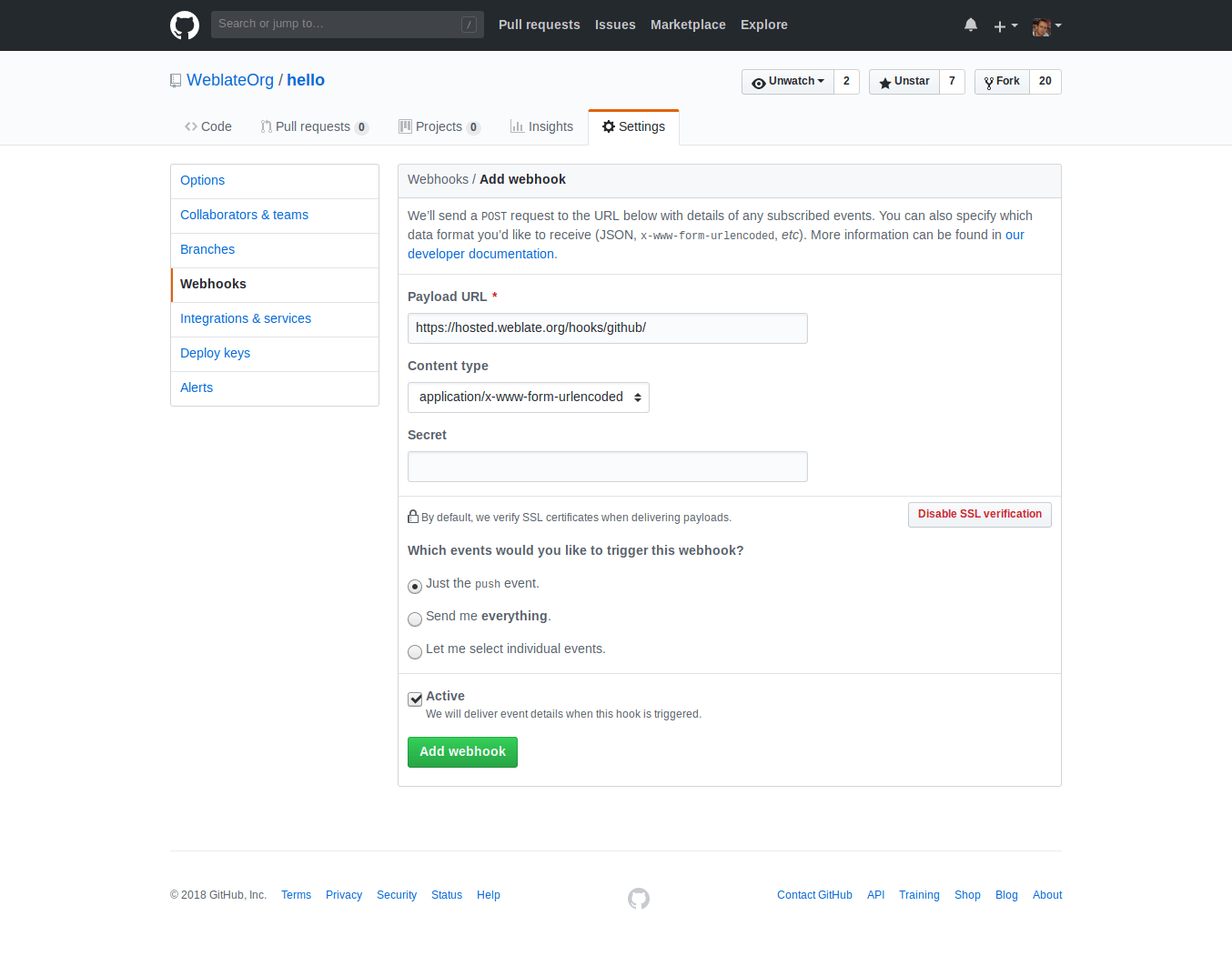
Payload URL 由附加 /hooks/github/ 的 Weblate URL 所組成。例如,Hosted Weblate 服務的 URL 為 https://hosted.weblate.org/hooks/github/.
其他值可保留預設設定。Weblate 可以處理兩種內容類型,而且只會處理 push 事件。
GitHub 拉取請求
這在 Git 頂部新增了一個薄層,使用 GitHub API 允許將翻譯變更作為拉取請求推送,而不是直接推送到儲存庫。
Git 將變更直接推送到儲存庫,而 GitHub 後端建立拉取請求。僅存取 Git 儲存庫不需要後者。
若要建立拉取請求,請選取 GitHub 作為 版本控制系統,並設定 GITHUB_CREDENTIALS。對於 GitHub.com,請使用 api.github.com 作為 API 主機。權杖必須允許 Weblate 讀寫儲存庫內容及建立拉取請求。如果 Weblate 應 fork 私人儲存庫,權杖可能也需要管理存取權。
GitLab
GitLab 儲存庫存取
使用個人或專案存取權杖的 HTTPS
對單一私有儲存庫而言,若服務提供者支援 Git over HTTPS,使用存取權杖透過 HTTPS 存取通常是最簡單的設定方式。請在 原始碼儲存庫 中使用服務提供者要求的使用者名稱及權杖。
只有在 Weblate 應直接推送變更,或所選工作流程需要推送 URL 時,才設定 儲存庫推送 URL;請參閱 從 Weblate 推送變更。
權杖需要讀取權限才能 Clone,並需要寫入權限才能推送。可建立 Pull Request 或 Merge Request 的服務提供者專用 VCS 後端,可能需要另外提供 API 認證資訊。
對 GitLab 而言,權杖需要 write_repository 作用範圍,才能將變更推送至儲存庫。專案存取權杖則需要 Developer 角色才能推送。
URL 需要包含使用者名稱。對個人存取權杖,它是實際使用者名稱:https://user:personal_access_token@gitlab.com/example/example.git;對專案存取權杖,可以是非空白值:https://example:project_access_token@gitlab.com/example/example.git 。
備註
不同的 GitLab 版本使用專案存取權杖的規則各異。非空白值是目前要求,但較老版本有不同預期(專案名、bot 使用者名稱)。如不確定請檢視相符您版本的 GitLab 文件。
使用專用使用者的 SSH
需要設定多個儲存庫時,請使用 SSH 存取,並為 Weblate 建立專用的程式碼代管使用者。將 Weblate 的 SSH 公開金鑰加入該使用者、授予其儲存庫存取權,並在 原始碼儲存庫 中使用 SSH URL,例如 git@example.com:group/project.git。
只有在 Weblate 應直接推送變更,或所選工作流程需要推送 URL 時,才設定 儲存庫推送 URL;請參閱 從 Weblate 推送變更。
這也能避開服務提供者對重複使用 SSH 金鑰的限制。部分程式碼代管網站只允許加入公開 SSH 金鑰 1 次,或只能將其加入單一使用者或部署金鑰項目。將 Weblate 的 SSH 金鑰保留在專用使用者上,便能授予該使用者多個儲存庫的存取權,而無須在多處重複使用金鑰。
這能避免將個人、專案或 API 存取權杖放入儲存庫 URL。使用服務提供者專用 VCS 後端建立 Pull Request 或 Merge Request 時,仍需提供服務提供者 API 認證資訊;這些認證資訊會與 Git 儲存庫 URL 分開設定。
對於 GitLab,請建立專用使用者並使用 GitLab SSH URL,例如 git@gitlab.com:group/project.git。
對於 GitLab 上的 Hosted Weblate 儲存庫,請加入 Hosted Weblate 的 weblate 使用者,並授予必要的儲存庫權限;請參閱 從 Hosted Weblate 存取儲存庫。
GitLab 通知
Weblate 支援 GitLab hooks,新增專案的 webhook,目的地為您的 Weblate 安裝上的 /hooks/gitlab/ URL,例如 https://hosted.weblate.org/hooks/gitlab/ 。
疑難排解
請查看 GitLab Webhook 請求歷程,確認 Webhook 是否已傳遞。
回應承載內容包含相符元件的資訊。
GitLab 合併請求
這使用 GitLab API 在 Git 上新增了一個薄層,以允許將翻譯變更作為合併請求推送,而不是直接推送到儲存庫。
不需要使用它來存取 Git 儲存庫,普通的 Git 工作方式相同,唯一的區別是如何處理推送到儲存庫。使用 Git 將變更直接推送到儲存庫,而 GitLab 後端建立合併請求。
要建立合併請求,請選擇 GitLab 作為 版本控制系統 並設定 GITLAB_CREDENTIALS。
推送分支 設定會影響 Weblate 在開啟合併請求前將變更推送至何處。如果未設定,系統會 fork 專案,並透過 fork 推送變更;如果已設定,變更會推送至上游儲存庫及選取的分支。
Gitea、Forgejo 與 Codeberg
Gitea、Forgejo 與 Codeberg 儲存庫存取
使用存取權杖的 HTTPS
對單一私有儲存庫而言,若服務提供者支援 Git over HTTPS,使用存取權杖透過 HTTPS 存取通常是最簡單的設定方式。請在 原始碼儲存庫 中使用服務提供者要求的使用者名稱及權杖。
只有在 Weblate 應直接推送變更,或所選工作流程需要推送 URL 時,才設定 儲存庫推送 URL;請參閱 從 Weblate 推送變更。
權杖需要讀取權限才能 Clone,並需要寫入權限才能推送。可建立 Pull Request 或 Merge Request 的服務提供者專用 VCS 後端,可能需要另外提供 API 認證資訊。
使用專用使用者的 SSH
需要設定多個儲存庫時,請使用 SSH 存取,並為 Weblate 建立專用的程式碼代管使用者。將 Weblate 的 SSH 公開金鑰加入該使用者、授予其儲存庫存取權,並在 原始碼儲存庫 中使用 SSH URL,例如 git@example.com:group/project.git。
只有在 Weblate 應直接推送變更,或所選工作流程需要推送 URL 時,才設定 儲存庫推送 URL;請參閱 從 Weblate 推送變更。
這也能避開服務提供者對重複使用 SSH 金鑰的限制。部分程式碼代管網站只允許加入公開 SSH 金鑰 1 次,或只能將其加入單一使用者或部署金鑰項目。將 Weblate 的 SSH 金鑰保留在專用使用者上,便能授予該使用者多個儲存庫的存取權,而無須在多處重複使用金鑰。
這能避免將個人、專案或 API 存取權杖放入儲存庫 URL。使用服務提供者專用 VCS 後端建立 Pull Request 或 Merge Request 時,仍需提供服務提供者 API 認證資訊;這些認證資訊會與 Git 儲存庫 URL 分開設定。
對於 Codeberg 上的 Hosted Weblate 儲存庫,請加入 Hosted Weblate 的 weblate 使用者,並授予必要的儲存庫權限;請參閱 從 Hosted Weblate 存取儲存庫。
Gitea 通知
Weblate 已經支援 Gitea webhooks,為 Push events 事件新增 Gitea Webhook,目的地為您的 Weblate 安裝上的 /hooks/gitea/ URL,例如 https://hosted.weblate.org/hooks/gitea/。這可以在 Settings 之下的 Webhooks 中完成。
Forgejo 通知
Weblate 支援 Forgejo Webhook。請在 Weblate 安裝環境中新增目的地為 /hooks/forgejo/ URL 的 Forgejo Webhook,並選擇 Push events 事件;例如 https://hosted.weblate.org/hooks/forgejo/。這項設定可在儲存庫 設定 下的 Webhooks 中完成。
Gitea 拉取請求
在 4.12 版被加入.
這使用 Gitea API 在 Git 上新增了一個薄層,以允許將翻譯變更作為拉取請求推送,而不是直接推送到儲存庫。
不需要使用它來存取 Git 儲存庫,普通的 Git 工作方式相同,唯一的區別是如何處理推送到儲存庫。使用 Git 將變更直接推送到儲存庫,而 Gitea 後端建立拉取請求。
要建立拉取請求,請選擇 Gitea 作為 版本控制系統 並設定 GITEA_CREDENTIALS。
Bitbucket
Bitbucket 儲存庫存取
使用存取權杖的 HTTPS
對單一私有儲存庫而言,若服務提供者支援 Git over HTTPS,使用存取權杖透過 HTTPS 存取通常是最簡單的設定方式。請在 原始碼儲存庫 中使用服務提供者要求的使用者名稱及權杖。
只有在 Weblate 應直接推送變更,或所選工作流程需要推送 URL 時,才設定 儲存庫推送 URL;請參閱 從 Weblate 推送變更。
權杖需要讀取權限才能 Clone,並需要寫入權限才能推送。可建立 Pull Request 或 Merge Request 的服務提供者專用 VCS 後端,可能需要另外提供 API 認證資訊。
使用專用使用者的 SSH
需要設定多個儲存庫時,請使用 SSH 存取,並為 Weblate 建立專用的程式碼代管使用者。將 Weblate 的 SSH 公開金鑰加入該使用者、授予其儲存庫存取權,並在 原始碼儲存庫 中使用 SSH URL,例如 git@example.com:group/project.git。
只有在 Weblate 應直接推送變更,或所選工作流程需要推送 URL 時,才設定 儲存庫推送 URL;請參閱 從 Weblate 推送變更。
這也能避開服務提供者對重複使用 SSH 金鑰的限制。部分程式碼代管網站只允許加入公開 SSH 金鑰 1 次,或只能將其加入單一使用者或部署金鑰項目。將 Weblate 的 SSH 金鑰保留在專用使用者上,便能授予該使用者多個儲存庫的存取權,而無須在多處重複使用金鑰。
這能避免將個人、專案或 API 存取權杖放入儲存庫 URL。使用服務提供者專用 VCS 後端建立 Pull Request 或 Merge Request 時,仍需提供服務提供者 API 認證資訊;這些認證資訊會與 Git 儲存庫 URL 分開設定。
對於 Bitbucket 上的 Hosted Weblate 儲存庫,請加入 Hosted Weblate 的 weblate 使用者,並授予必要的儲存庫權限;請參閱 從 Hosted Weblate 存取儲存庫。
Bitbucket 通知
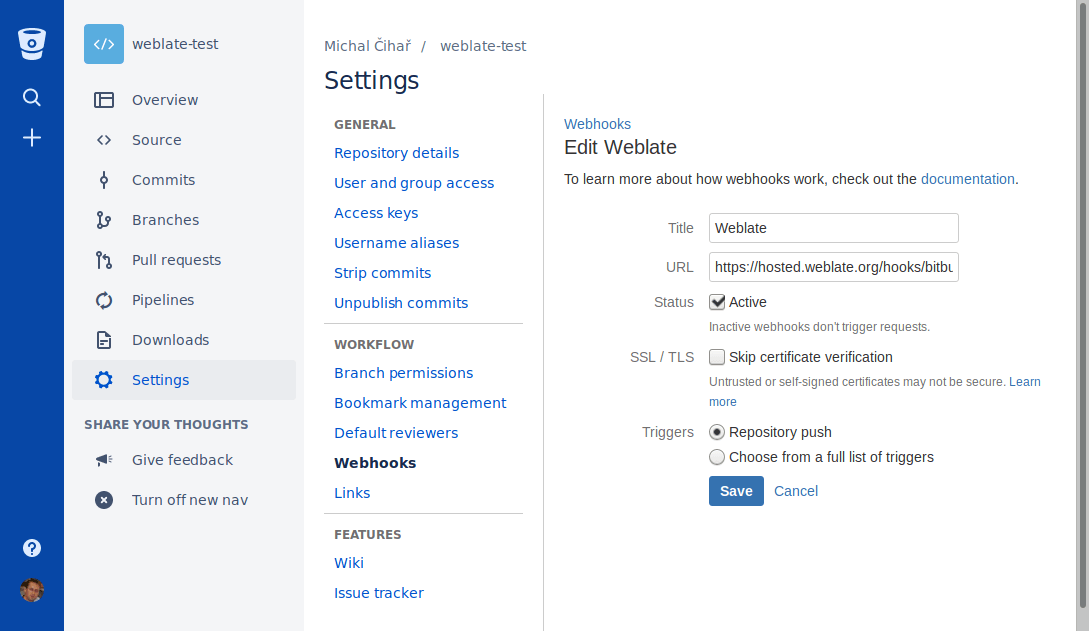
Weblate 支援 Bitbucket webhooks。新增儲存庫推送時觸發的 webhook,目的地為您的 Weblate 安裝上的 /hooks/bitbucket/,例如 https://hosted.weblate.org/hooks/bitbucket/。
Bitbucket 資料中心拉取請求
在 4.16 版被加入.
這使用 Bitbucket 資料中心 API 在 Git 上新增了一個薄層,以允許將翻譯變更作為拉取請求推送,而不是直接推送到儲存庫。
警告
這不支援 Bitbucket Cloud API。
不需要使用它來存取 Git 儲存庫,普通的 Git 工作方式相同,唯一的區別是如何處理推送到儲存庫。使用 Git 將變更直接推送到儲存庫,而 Bitbucket 資料中心 後端建立拉取請求。
若要建立拉取請求,請將 Bitbucket Data Center 選為 版本控制系統,並設定 BITBUCKETSERVER_CREDENTIALS。
Bitbucket Cloud 拉取請求
在 5.8 版被加入.
這使用 Bitbucket Cloud API 在 Git 上新增了一個薄層,以允許將翻譯變更作為拉取請求推送,而不是直接推送到儲存庫。
警告
這與 Bitbucket Data Center API 不同。
不需要使用它來存取 Git 儲存庫,普通的 Git 工作方式相同,唯一的區別是如何處理推送到儲存庫。使用 Git 將變更直接推送到儲存庫,而 Bitbucket Cloud 後端建立拉取請求。
要建立拉取請求,將 Bitbucket Cloud 選為 版本控制系統 並設定 BITBUCKETCLOUD_CREDENTIALS。
Azure DevOps
Azure Repos 儲存庫存取
使用存取權杖的 HTTPS
對單一私有儲存庫而言,若服務提供者支援 Git over HTTPS,使用存取權杖透過 HTTPS 存取通常是最簡單的設定方式。請在 原始碼儲存庫 中使用服務提供者要求的使用者名稱及權杖。
只有在 Weblate 應直接推送變更,或所選工作流程需要推送 URL 時,才設定 儲存庫推送 URL;請參閱 從 Weblate 推送變更。
權杖需要讀取權限才能 Clone,並需要寫入權限才能推送。可建立 Pull Request 或 Merge Request 的服務提供者專用 VCS 後端,可能需要另外提供 API 認證資訊。
對儲存庫使用 Azure Repos 顯示的 HTTPS 複製 URL。
使用專用使用者的 SSH
需要設定多個儲存庫時,請使用 SSH 存取,並為 Weblate 建立專用的程式碼代管使用者。將 Weblate 的 SSH 公開金鑰加入該使用者、授予其儲存庫存取權,並在 原始碼儲存庫 中使用 SSH URL,例如 git@example.com:group/project.git。
只有在 Weblate 應直接推送變更,或所選工作流程需要推送 URL 時,才設定 儲存庫推送 URL;請參閱 從 Weblate 推送變更。
這也能避開服務提供者對重複使用 SSH 金鑰的限制。部分程式碼代管網站只允許加入公開 SSH 金鑰 1 次,或只能將其加入單一使用者或部署金鑰項目。將 Weblate 的 SSH 金鑰保留在專用使用者上,便能授予該使用者多個儲存庫的存取權,而無須在多處重複使用金鑰。
這能避免將個人、專案或 API 存取權杖放入儲存庫 URL。使用服務提供者專用 VCS 後端建立 Pull Request 或 Merge Request 時,仍需提供服務提供者 API 認證資訊;這些認證資訊會與 Git 儲存庫 URL 分開設定。
對儲存庫使用 Azure Repos 顯示的 SSH URL。
Azure Repos 通知
Weblate 支援 Azure Repos Webhook。請為 Code pushed 事件新增 Webhook,並將目的地設為 Weblate 安裝環境中的 /hooks/azure/ URL,例如 https://hosted.weblate.org/hooks/azure/。您可以在 Project settings 下的 Service hooks 中完成這項設定。
Azure DevOps 拉取請求
這在 Git 頂部新增了一個薄層,使用 Azure DevOps API 允許將翻譯變更作為拉取請求推送,而不是直接推送到儲存庫。
Git 將變更直接推送到儲存庫,而 Azure DevOps 後端建立拉取請求。僅存取 Git 儲存庫不需要後者。
要建立拉取請求,請選擇 Azure DevOps 作為 版本控制系統 並設定 AZURE_DEVOPS_CREDENTIALS。
Pagure
Pagure 儲存庫存取
使用存取權杖的 HTTPS
對單一私有儲存庫而言,若服務提供者支援 Git over HTTPS,使用存取權杖透過 HTTPS 存取通常是最簡單的設定方式。請在 原始碼儲存庫 中使用服務提供者要求的使用者名稱及權杖。
只有在 Weblate 應直接推送變更,或所選工作流程需要推送 URL 時,才設定 儲存庫推送 URL;請參閱 從 Weblate 推送變更。
權杖需要讀取權限才能 Clone,並需要寫入權限才能推送。可建立 Pull Request 或 Merge Request 的服務提供者專用 VCS 後端,可能需要另外提供 API 認證資訊。
使用專用使用者的 SSH
需要設定多個儲存庫時,請使用 SSH 存取,並為 Weblate 建立專用的程式碼代管使用者。將 Weblate 的 SSH 公開金鑰加入該使用者、授予其儲存庫存取權,並在 原始碼儲存庫 中使用 SSH URL,例如 git@example.com:group/project.git。
只有在 Weblate 應直接推送變更,或所選工作流程需要推送 URL 時,才設定 儲存庫推送 URL;請參閱 從 Weblate 推送變更。
這也能避開服務提供者對重複使用 SSH 金鑰的限制。部分程式碼代管網站只允許加入公開 SSH 金鑰 1 次,或只能將其加入單一使用者或部署金鑰項目。將 Weblate 的 SSH 金鑰保留在專用使用者上,便能授予該使用者多個儲存庫的存取權,而無須在多處重複使用金鑰。
這能避免將個人、專案或 API 存取權杖放入儲存庫 URL。使用服務提供者專用 VCS 後端建立 Pull Request 或 Merge Request 時,仍需提供服務提供者 API 認證資訊;這些認證資訊會與 Git 儲存庫 URL 分開設定。
Pagure 通知
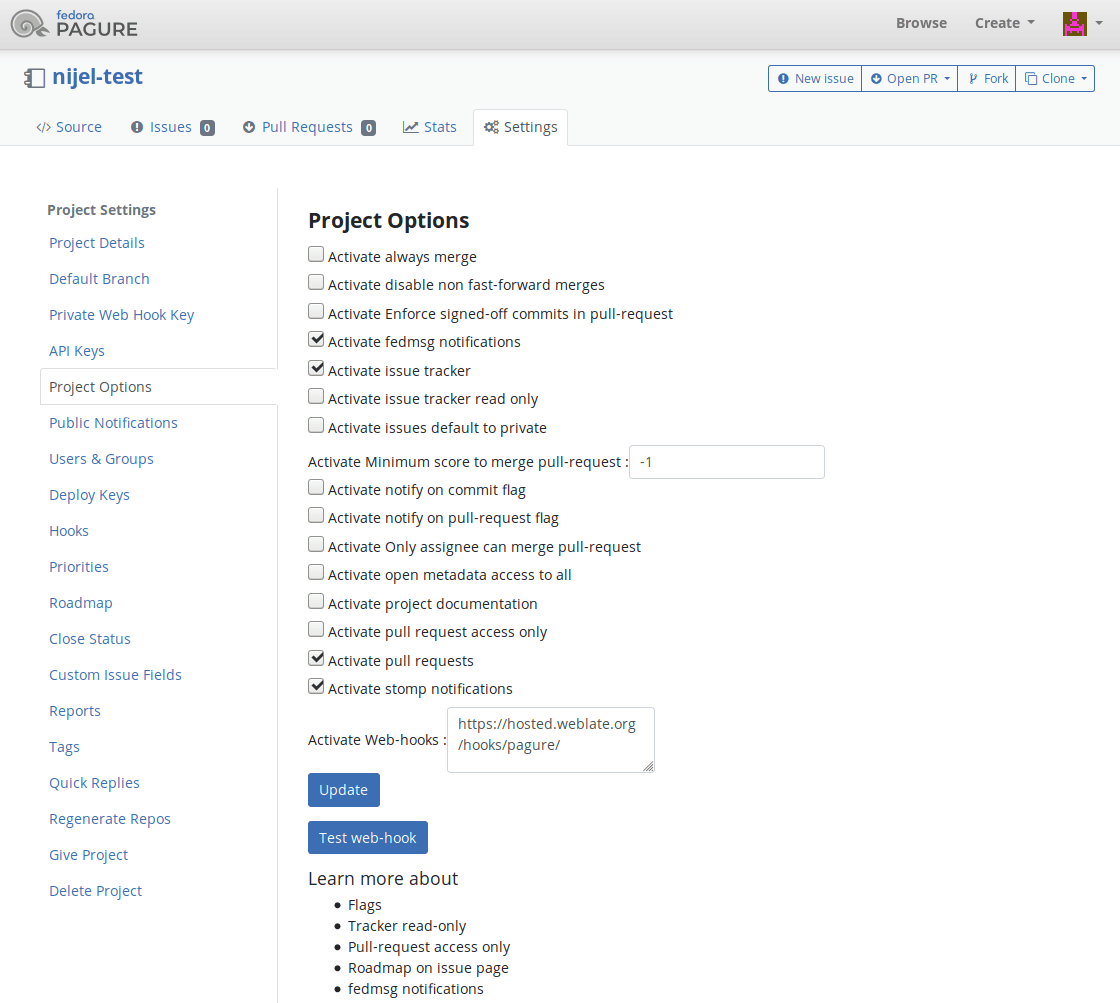
Weblate 已經支援 Pagure hooks。新增專案的 webhook,目的地為您的 Weblate 安裝上的 /hooks/pagure/(例如 https://hosted.weblate.org/hooks/pagure/)。這可以在 Project options 之下的 Activate Web-hooks 中完成:
Pagure 合併請求
在 4.3.2 版被加入.
這使用 Pagure API 在 Git 上新增了一個薄層,以允許將翻譯變更作為合併請求推送,而不是直接推送到儲存庫。
存取 Git 儲存庫時不需使用此後端,一般的 Git 運作方式相同,唯一差別是如何處理儲存庫推送。Git 會將變更直接推送至儲存庫,Pagure 後端則會建立合併請求。
要建立合併請求,請選擇 Pagure 作為 版本控制系統 並設定 PAGURE_CREDENTIALS。
其他工作流程
Gitee 儲存庫存取
使用存取權杖的 HTTPS
對單一私有儲存庫而言,若服務提供者支援 Git over HTTPS,使用存取權杖透過 HTTPS 存取通常是最簡單的設定方式。請在 原始碼儲存庫 中使用服務提供者要求的使用者名稱及權杖。
只有在 Weblate 應直接推送變更,或所選工作流程需要推送 URL 時,才設定 儲存庫推送 URL;請參閱 從 Weblate 推送變更。
權杖需要讀取權限才能 Clone,並需要寫入權限才能推送。可建立 Pull Request 或 Merge Request 的服務提供者專用 VCS 後端,可能需要另外提供 API 認證資訊。
使用專用使用者的 SSH
需要設定多個儲存庫時,請使用 SSH 存取,並為 Weblate 建立專用的程式碼代管使用者。將 Weblate 的 SSH 公開金鑰加入該使用者、授予其儲存庫存取權,並在 原始碼儲存庫 中使用 SSH URL,例如 git@example.com:group/project.git。
只有在 Weblate 應直接推送變更,或所選工作流程需要推送 URL 時,才設定 儲存庫推送 URL;請參閱 從 Weblate 推送變更。
這也能避開服務提供者對重複使用 SSH 金鑰的限制。部分程式碼代管網站只允許加入公開 SSH 金鑰 1 次,或只能將其加入單一使用者或部署金鑰項目。將 Weblate 的 SSH 金鑰保留在專用使用者上,便能授予該使用者多個儲存庫的存取權,而無須在多處重複使用金鑰。
這能避免將個人、專案或 API 存取權杖放入儲存庫 URL。使用服務提供者專用 VCS 後端建立 Pull Request 或 Merge Request 時,仍需提供服務提供者 API 認證資訊;這些認證資訊會與 Git 儲存庫 URL 分開設定。
Gitee 通知
Weblate 已經支援 Gitee webhooks。為 Push 事件新增 Webhook,目的地為您的 Weblate 安裝上的 /hooks/gitee/ URL,例如 https://hosted.weblate.org/hooks/gitee/。這可以在 Management 之下的 Webhooks 中完成。
Gerrit 檢閱請求
Gerrit 支援使用 git-review 工具在 Git 上新增一個薄層,以允許將翻譯變更作為 Gerrit 審查請求推送,而不是將它們直接推送到儲存庫。
選用的 推送分支 設定會選取 Gerrit 審查的目標分支。將其留空會使用 儲存庫分支。請使用簡短分支名稱(例如 main);Weblate 和 git-review 會自動將審查推送至 refs/for/<branch>。Gerrit 推送選項可以附加在任一設定的 % 後方,例如 main%topic=l10n。Gerrit 會將這些選項解讀為已設定的 Weblate Gerrit 帳號,並套用其本身的權限。
Gerrit 文件詳細說明建立此類儲存庫所需的設定。此後端沒有獨立的程式碼託管認證資訊設定。
Docker 憑證
對於 Docker 安裝,程式碼託管 API 認證資訊也可以透過環境變數提供,請參閱 程式碼託管網站認證資訊。