Căutare
Search query syntax
Advanced searches support boolean operations, parentheses, field-specific lookup, field operators, exact match, date values, and regular expressions. The available fields depend on what kind of object is being searched.
Operatori booleeni
You can combine lookups using AND, OR, NOT and parentheses to
form complex queries. Boolean operators are case-insensitive, so and,
And and AND are equivalent.
The NOT operator has higher precedence than the AND operator; the
AND operator has higher precedence than the OR operator. You can add
parenthesis to define a precedence of your own.
Omitting the operator will make the query behave like the AND operator was
used.
|
Parenthesized expression to clearly show the precedence. |
|
The |
|
Query using an implicit |
Operatori de teren
Puteți specifica operatori, intervale sau căutări parțiale pentru căutări de date sau numerice:
state:>=translatedStatul este
translatedsau mai bine (approbat).changed:[2019-03-01 to 2019-04-01]Changed between two given dates (inclusive).
position:[10 to 100]Strings with position between 10 and 100 (inclusive).
Searching for DATETIME fields
Timestamp searching supports multiple ways to specify the value. It supports wide range of ways to specify date and time.
ISO 8601 formatted like
2025-09-08T12:16:55.336146+00:00.English written date and time like
July 4, 2013 PST.English adverbs of time like
yesterday,last month, and2 days ago.
Whenever only the date is specified, it is always used as inclusive and covers that date. Specify the exact timestamp if you need to override this behavior.
Examples:
changed:>=2019-03-01Changed on 1st March 2019 and later (inclusive).
changed:>="2 weeks ago"Changed 2 weeks ago from the current date and time.
changed:>=yesterdayChanged starting yesterday.
changed:2019Changed in the year 2019.
changed:[2019-03-01 to 2019-04-01]Changed between two given dates (inclusive).
changed:[20_days_ago to yesterday]Changed between two relative dates (inclusive).
Operatori exacți
Puteți efectua o interogare cu potrivire exactă pe diferite câmpuri de șiruri de caractere folosind operatorul =. De exemplu, pentru a căuta toate șirurile sursă care se potrivesc exact cu hello world, utilizați: source:="hello world". Pentru căutarea expresiilor cu un singur cuvânt, puteți sări peste ghilimele. De exemplu, pentru a căuta toate șirurile sursă care se potrivesc cu hello, puteți utiliza source:=hello.
Expresii regulate
Oriunde este acceptat un text, puteți specifica și o expresie regulată ca r "regexp".
De exemplu, pentru a căuta toate șirurile sursă care conțin orice cifră între 2 și 5, utilizați source:r"[2-5]".
Sugestie
The regular expressions are evaluated by the database backend and might use different extensions, please consult the database documentation for more details:
Searching for strings
String search supports the shared query syntax above.
În cazul în care nu este definit niciun câmp, căutarea se face pe baza șirurilor sursă, țintă și context.
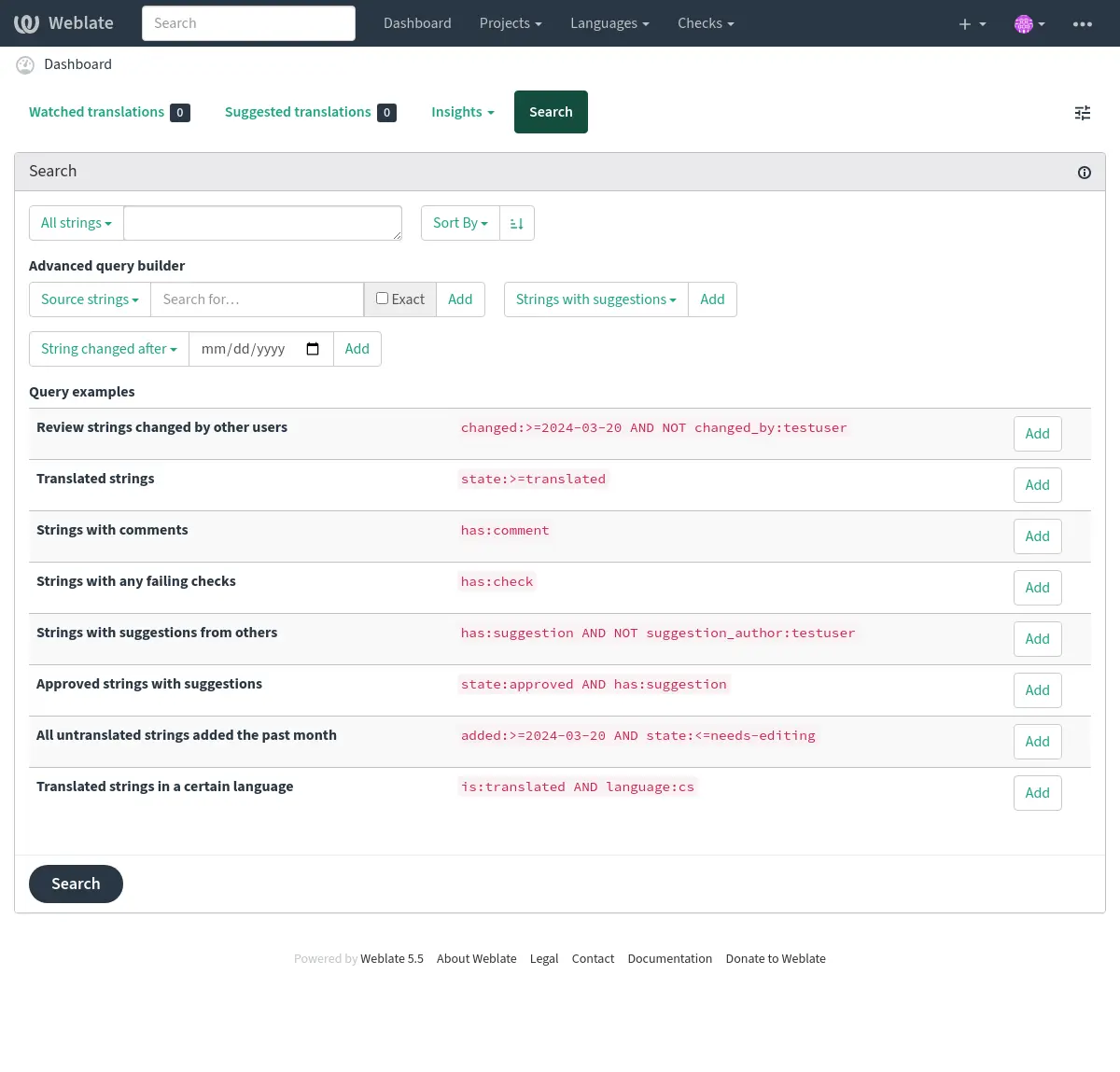
Căutare simplă
Any phrase typed into the search box is split into words. Strings containing all
of them are shown. To look for an exact phrase, put „the searchphrase” into
quotes (both single (') and double (") quotes will work): "this is a quoted
string" or 'another quoted string'.
Domenii
source:TEXTCăutare insensibilă la majuscule și minuscule a șirului sursă.
target:TEXTCăutare insensibilă la majuscule și minuscule a șirului țintă.
context:TEXTCăutare insensibilă la majuscule și minuscule a șirului contextual.
key:TEXTCăutare insensibilă la majuscule și minuscule a șirului de taste.
note:TEXTCăutare insensibilă la majuscule și minuscule în descrierea șirului sursă.
location:TEXTCăutare insensibilă la majuscule și minuscule a șirului de locație.
priority:NUMBERȘir de caractere prioritate.
id:NUMBERString unique identifier.
position:NUMBERString position in the translation file.
added:DATETIMETimestamp pentru momentul în care șirul a fost adăugat la Weblate.
state:TEXTSearch for string states (
approved,translated,needs-editing,needs-rewriting,needs-checking,empty,read-only).This field also supports Operatori de teren, so searching for completed strings can be performed as
state:>=translated, searching for strings needing translation asstate:<translated.source_state:TEXTSearch for source string states, see above for more info.
pending:BOOLEANȘir în așteptare pentru a fi trimis în VCS.
has:TEXTSearch for string having attributes -
plural,context,suggestion,comment,source-comment,check,dismissed-check,translation,variant,screenshot,flags,explanation,glossary,note,label,location.is:TEXTFilters string on a condition:
read-onlyorreadonlyRead-only strings, same as
state:read-only.approvedApproved strings, same as
state:approved.needs-editingorfuzzyNeeding editing/checking/rewriting strings, same as
state:needs-editing OR state:needs-rewriting OR state:needs-checking.translatedTranslated strings, same as
state:>translated.untranslatedUntranslated strings, same as
state:<translated.pendingPending strings not yet committed to the file (see Angajări leneșe).
automatically-translatedStrings that were translated automatically (see Traducere automată).
language:TEXTȘir de caractere limba țintă.
component:TEXTCăutarea insensibilă la majuscule și minuscule a slug-ului sau a numelui componentei, a se vedea Componenta slug și Nume componentă.
project:TEXTDenumirea proiectului, a se vedea Descriptor URL.
path:TEXTPath to the object to limit searching inside component, category, project, or translation.
changed_by:TEXTString was changed by author with given username. Use
changed_by:""to search for strings with at least one content change without a recorded author.changed:DATETIMEString content was changed on date, supports Operatori de teren and Searching for DATETIME fields.
change_time:DATETIMEString was changed on date, supports Operatori de teren and Searching for DATETIME fields.
Unlike
changedthis includes event which don’t change content and you can apply custom action filtering usingchange_action.change_action:TEXTFiltrează pe acțiunea de modificare, util împreună cu
change_time. Acceptă numele în limba engleză al acțiunii de modificare, fie citat și cu spații, fie minuscul și spațiile înlocuite cu o cratimă. A se vedea Căutarea de schimbări pentru exemple.When combining
changed_by,changed,change_time, andchange_actionfilters, the filters apply to the same change event.source_changed:DATETIMESource string was last changed on date, supports Operatori de teren and Searching for DATETIME fields.
last_changed:DATETIMEThe string was last changed on date, supports Operatori de teren and Searching for DATETIME fields.
check:TEXTȘirul are o verificare nereușită, a se vedea Verificări și reparații pentru identificatorii de verificare.
dismissed_check:TEXTȘirul a respins controlul respins, a se vedea Verificări și reparații pentru identificatorii de control.
comment:TEXTSearch in unresolved user comments on the string.
resolved_comment:TEXTCăutați în comentariile rezolvate.
comment_author:TEXTFiltrați după autorul comentariului.
source_comment:TEXTSearch in unresolved source string comments.
resolved_source_comment:TEXTSearch in resolved source string comments.
source_comment_author:TEXTFilter by source string comment author.
Source string comment filters match comments attached to the source string. When searching across languages, matching target strings sharing that source string can be included in the results.
suggestion:TEXTCăutați în sugestii.
suggestion_author:TEXTFiltrați după autorul sugestiei.
explanation:TEXTCăutați în explicații.
label:TEXTCăutați în etichete.
screenshot:TEXTCăutați în capturi de ecran.
labels_count:NUMBERFilter by count of labels
Căutarea de schimbări
Added in version 4.4.
Căutarea evenimentelor din istoric se poate face folosind operatorii change_action și change_time.
De exemplu, căutarea șirurilor marcate pentru editare în 2018 poate fi introdusă ca change_time:2018 AND change_action:marked-for-edit sau change_time:2018 AND change_action: "Marked for edit".
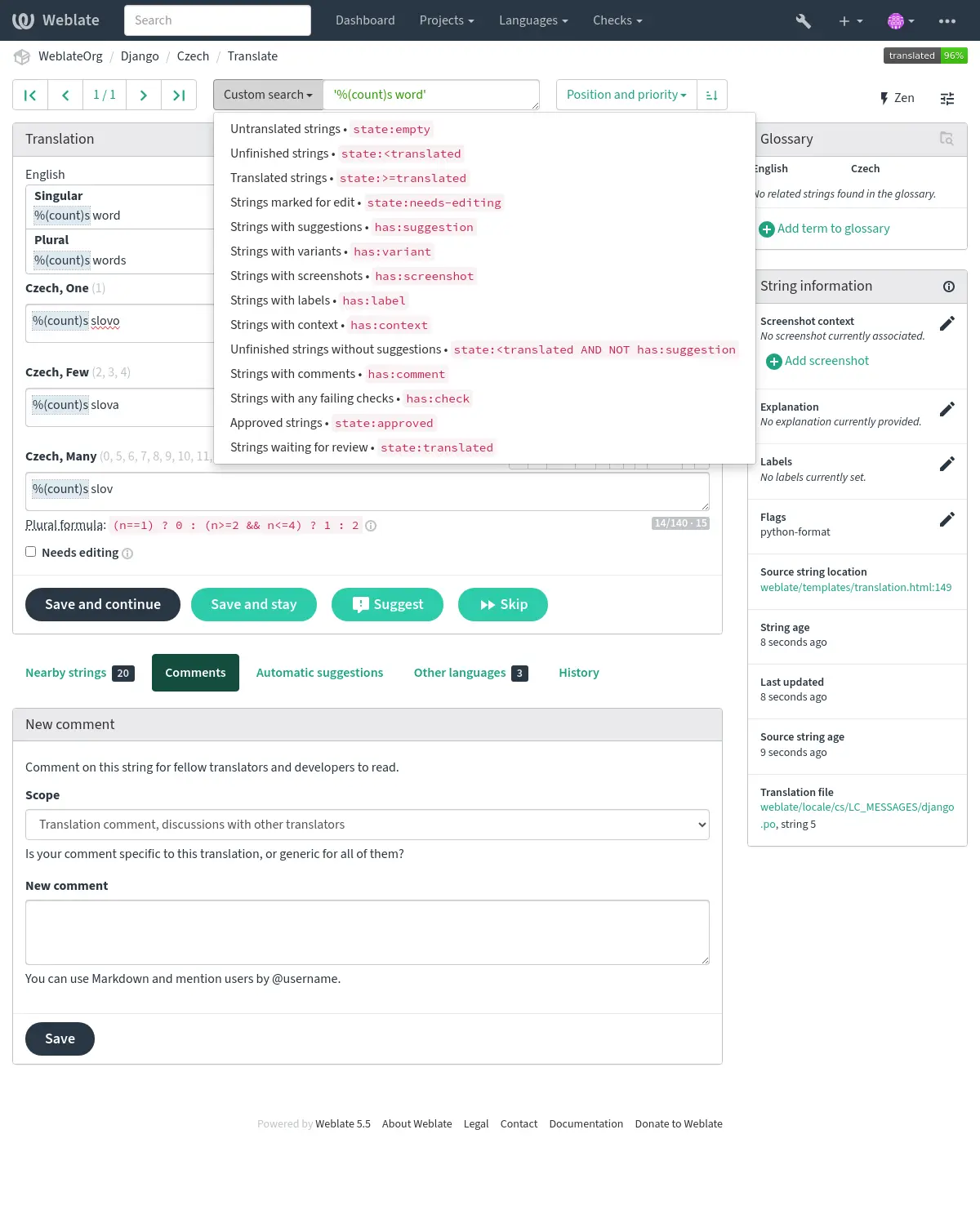
Interogări predefinite
Puteți selecta din interogările predefinite pe pagina de căutare, ceea ce vă permite să accesați rapid cele mai frecvente căutări:
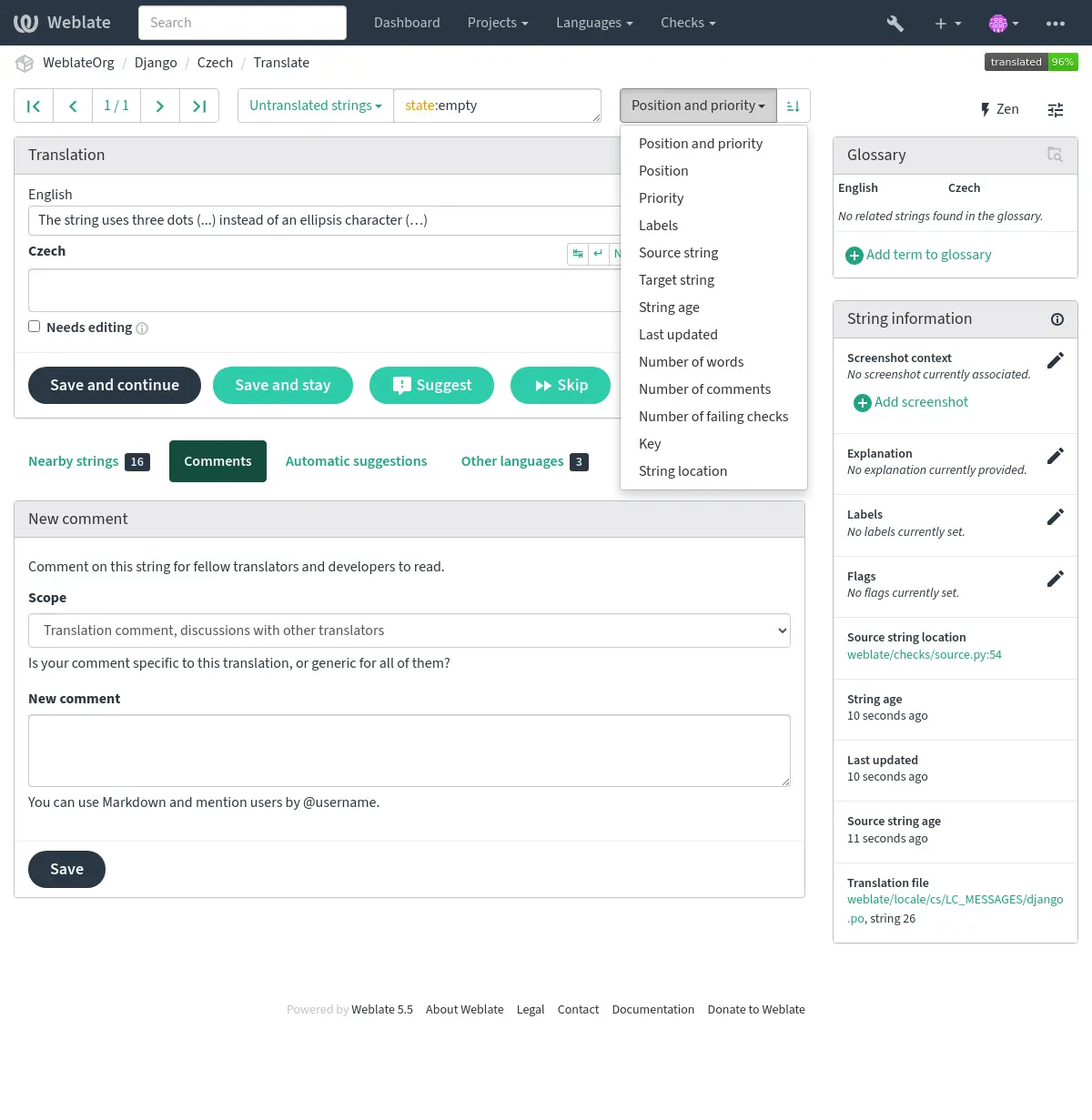
Ordonarea rezultatelor
Există multe opțiuni pentru a comanda șirurile în funcție de nevoile dumneavoastră:
Searching for screenshots
The screenshot listing in a component accepts advanced queries using boolean operations, parentheses, or field specific lookup.
When no field is defined, the lookup happens on the screenshot name. Use field-specific lookups to search repository paths, screenshot languages, or assigned source strings.
Screenshot fields
name:TEXTScreenshot name case-insensitive search.
path:TEXTRepository path to screenshot case-insensitive search.
repository:TEXTRepository path to screenshot case-insensitive search, same as
path:TEXT.language:TEXTScreenshot language code or language name case-insensitive search.
string:TEXTAssigned source string case-insensitive search.
context:TEXTAssigned source string context case-insensitive search.
location:TEXTAssigned source string location case-insensitive search.
id:NUMBERScreenshot unique identifier.
timestamp:DATETIMETimestamp for when the screenshot was added to Weblate.
strings:NUMBERNumber of assigned source strings.
has:TEXTSearch for screenshots having attributes:
stringScreenshot assigned to at least one source string.
repositoryScreenshot with a repository path.
pathScreenshot with a repository path, same as
repository.
Screenshot search examples
loginSearch for screenshots matching
loginin the screenshot name.name:loginSearch for screenshots with
loginin the screenshot name.language:csSearch for screenshots in languages matching
cs.string:"Save changes"Search for screenshots assigned to source strings matching
Save changes.has:stringSearch for screenshots assigned to at least one source string.
NOT has:stringSearch for screenshots not assigned to any source string.
repository:fastlaneSearch for screenshots with
fastlanein the repository path.strings:>2Search for screenshots assigned to more than two source strings.
has:repository AND NOT has:stringSearch for screenshots imported from the repository that still need source string assignment.
Screenshot search supports the same Operatori booleeni, Operatori de teren, Searching for DATETIME fields, exact match, and regular expression syntax as string search.
Searching for users
Added in version 4.18.
The user browsing has similar search abilities:
username:TEXTSearch in usernames.
full_name:TEXTSearch in full names.
language:TEXTUser configured translation language (see Limbi traduse).
joined:DATETIMEConținutul șirului a fost modificat la data, suportă Operatori de teren.
translates:TEXTUser has contributed to a given language.
You might want to limit contribution time by
change_time, for examplechange_time:>"90 days ago".contributes:TEXTUser has contributed to a given project or component.
You might want to limit contribution time by
change_time, for examplechange_time:>"90 days ago".change_time:DATETIMESame as in Searching for strings.
change_action:TEXTSame as in Searching for strings.
Additional lookups are available in the Interfața de gestionare:
is:botSearch for bots (used for project scoped tokens).
is:activeSearch for active users.
email:TEXTSearch by e-mail.
ip:TEXTSearch by audit log IP address.