Integrim kontrolli versioni
Weblate currently supports Git (with extended support for GitHub pull requests, GitLab merge requests, Gitea pull requests, Gerrit review requests, Subversion, Bitbucket Cloud pull requests, Bitbucket Data Center pull requests, and Azure DevOps pull requests) and Mercurial as version control back-ends.
For provider-specific setup steps that combine repository access, incoming notifications, and pushing translations back, see Code-hosting integrations.
Hyrje në depo
The VCS repository you want to use has to be accessible to Weblate. With a
publicly available repository you just need to enter the correct URL (for
example https://github.com/WeblateOrg/weblate.git), but for private
repositories or for push URLs the setup is more complex and requires
authentication.
Troubleshooting repository URLs
Weblate validates repository and push URLs before connecting. HTTPS and SSH
are permitted by default; instance administrators can adjust this using
VCS_ALLOW_SCHEMES.
Repository hostnames have to resolve from the Weblate server. When
VCS_RESTRICT_PRIVATE is enabled, Weblate also rejects destinations
which resolve to internal or otherwise non-public addresses. Use a publicly
reachable repository URL where possible. For an intentionally private
repository on a trusted network, ask the instance administrator to add its
hostname to VCS_ALLOW_HOSTS.
Git over HTTPS and SSH can bind connections to addresses approved during
validation. Backends which cannot do this safely, including Mercurial and
Subversion, require the trusted repository hostname in
VCS_ALLOW_HOSTS while private-address restrictions are enabled.
Configure the final repository URL directly when possible. Weblate can automatically accept a permanent HTTP redirect only when it stays on the same host and the target is successfully validated. Redirects to another host or protocol have to be configured manually.
Accessing repositories from Hosted Weblate
Shënim
This section applies only to Hosted Weblate (hosted.weblate.org). If you are running your own self-hosted Weblate instance, please see the next section instead.
For GitHub repositories on Hosted Weblate, use the Hosted Weblate app from Weblate’s Connect GitHub account flow whenever possible. The App grants repository access, receives incoming notifications, pushes translation branches, and creates pull requests without inviting the Hosted Weblate weblate user. See GitHub repository access for the full setup.
For direct SSH access outside the GitHub App workflow, and for Bitbucket,
Codeberg, and GitLab repositories, Hosted Weblate has a dedicated push user
(with the username weblate, e-mail hosted@weblate.org, and a
name or profile description Weblate push user).
Ndihmëz
There can be more Weblate users on the platforms, designated for other Weblate instances.
Searching by e-mail hosted@weblate.org is recommended to find the correct
user for Hosted Weblate.
You need to add this user as a collaborator and give it appropriate permissions to your repository (read-only is okay for cloning, write is required for pushing). Depending on the service and your organization’s settings, this happens immediately, or requires confirmation on the Weblate side.
The weblate user on GitHub accepts invitations automatically within five minutes when you intentionally use direct SSH access there. Manual processing might be needed on the other services, so please be patient.
For this direct SSH-user setup, once the weblate user is added to
your repository, you can configure Depo kodi burim and
URl push për depon using the SSH protocol, for example
git@example.com:group/project.git.
Accessing repositories on code-hosting sites (GitHub, GitLab, Bitbucket, Azure DevOps, …)
Shënim
This section applies to self-hosted Weblate instances. If you are using Hosted Weblate (hosted.weblate.org), see Accessing repositories from Hosted Weblate instead.
For self-hosted Weblate, a single private repository is often easiest to set up using an HTTPS repository URL with an access token, see Code-hosting integrations.
For multiple repositories, create a dedicated code-hosting user associated with a Weblate SSH key (see Kyç SSH Weblate-i). This way you associate Weblate SSH key with a single user, because platforms frequently enforce single use of an SSH key. Grant this user access to the repositories, and use SSH URLs to access them (see Depo SSH).
Depo SSH
One common method to access private repositories is based on SSH. Authorize the public Weblate SSH key (see Kyç SSH Weblate-i) to access the upstream repository this way.
Sinjalizim
On GitHub, each key can only be used once, see GitHub repository access and Accessing repositories from Hosted Weblate.
Weblate also stores the host key fingerprint upon first connection, and fails to connect to the host should it be changed later (see Verifying SSH host keys).
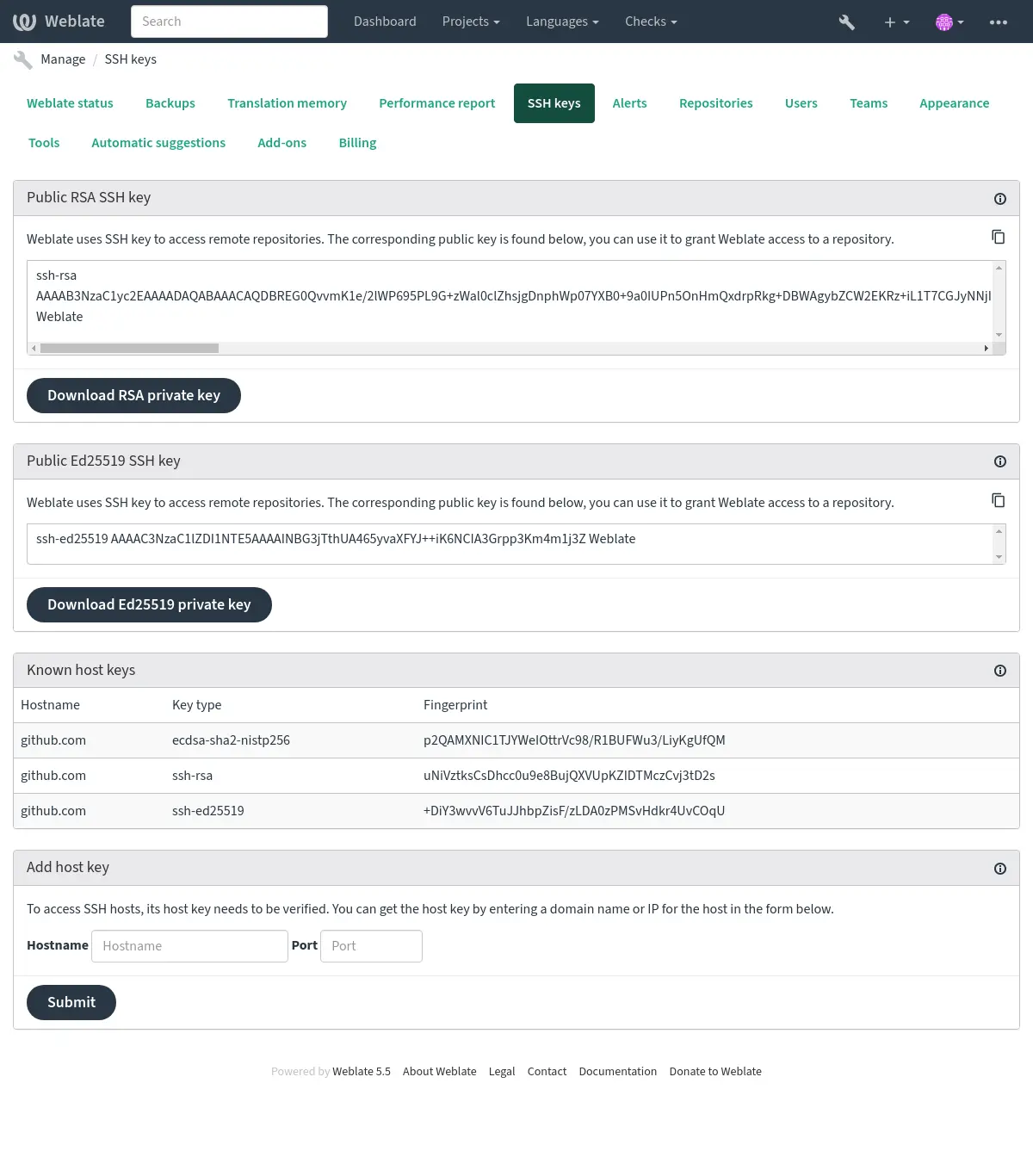
In case adjustment is needed, do so from the Weblate admin interface:
Kyç SSH Weblate-i
Ndryshuar në versionin 4.17: Weblate now generates both RSA and Ed25519 SSH keys. Using Ed25519 is recommended for new setups.
The Weblate public key is visible to all users browsing the About page.
Admins can generate or display the public key currently used by Weblate in the connection (from SSH keys) on the admin interface landing page.
Shënim
The corresponding private SSH key can not currently have a password, so ensure it is well protected.
Ndihmëz
Make a backup of the generated private Weblate SSH key.
Verifying SSH host keys
Weblate automatically stores the SSH host keys on first access and remembers them for further use.
When VCS_RESTRICT_PRIVATE is enabled, Weblate resolves and validates
the repository host before scanning its key and connects ssh-keyscan only
to the approved addresses. The stored key remains associated with the original
hostname.
For Git connections, Weblate also applies HostName and Port from
DATA_DIR/ssh/config before validating and pinning the effective
destination. SSH configuration and SSH_EXTRA_ARGS are trusted
administrator-controlled inputs. They can alter connection routing, and
SSH_EXTRA_ARGS can override Weblate’s address pinning;
administrators are responsible for their effects.
In case you want to verify the key fingerprint before connecting to the
repository, add the SSH host keys of the servers you are going to access in
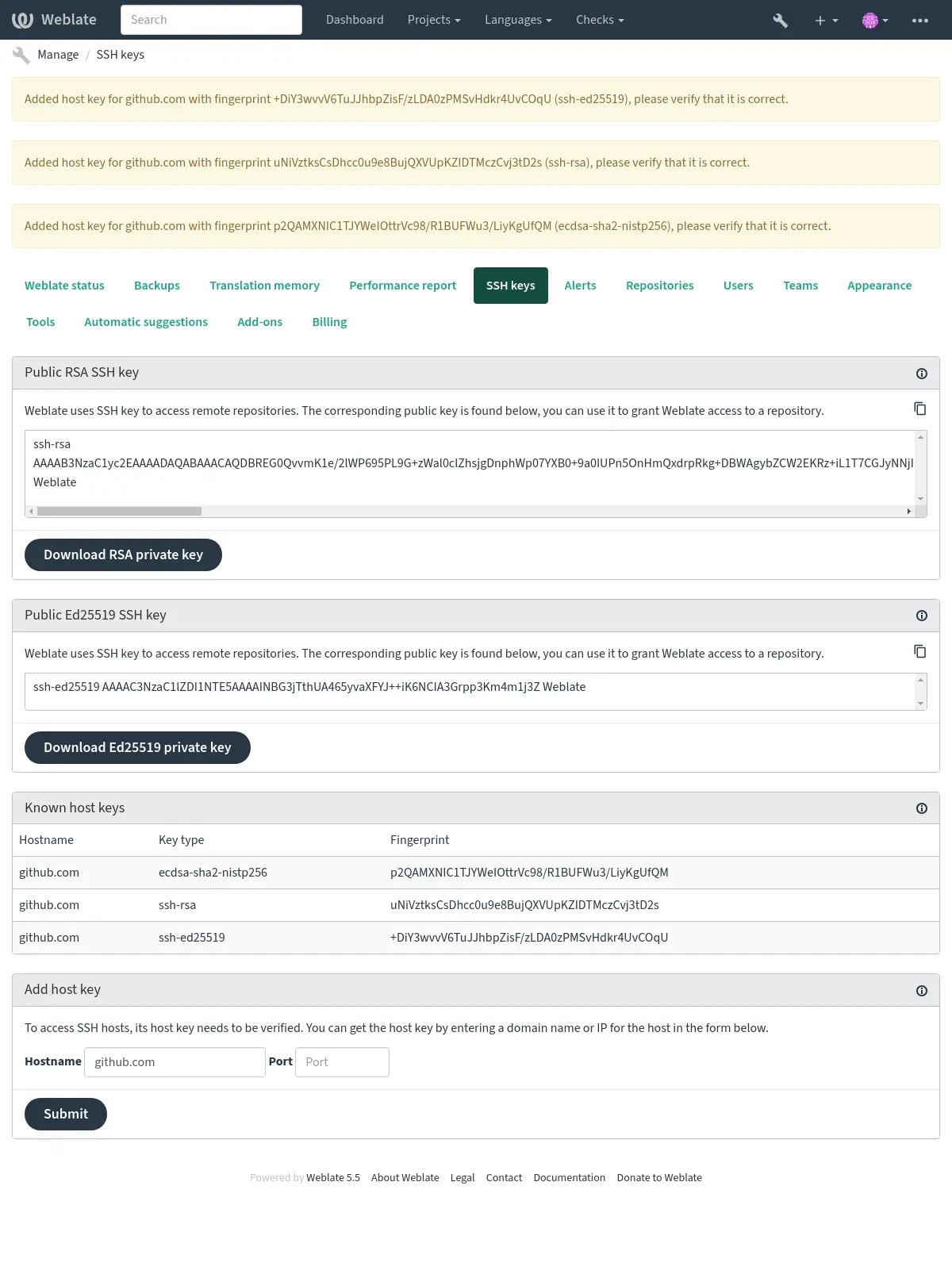
Add host key, from the same section of the admin interface. Enter
the hostname you are going to access (e.g. gitlab.com), and press
Submit. Verify its fingerprint matches the server you added.
The added keys with fingerprints are shown in the confirmation message:
Connecting to legacy SSH servers
Weblate suppresses the OpenSSH warning about connections without post-quantum key exchange so that it does not obscure repository errors. This does not change algorithm negotiation: post-quantum key exchange is still used when supported by both the client and server. Other SSH warnings remain enabled. Upgrade or configure the SSH server to support post-quantum key exchange to protect against «store now, decrypt later» attacks.
Recent OpenSSH releases (for example the one used in Weblate Docker container) disable RSA signatures using the SHA-1 hash algorithm by default. This change has been made as the SHA-1 hash algorithm is cryptographically broken, and it is possible to create chosen-prefix hash collisions for <USD$50K.
For most users, this change should be invisible and there is no need to replace ssh-rsa keys. OpenSSH has supported RFC8332 RSA/SHA-256/512 signatures since release 7.2 and existing ssh-rsa keys will automatically use the stronger algorithm where possible.
Incompatibility is more likely when connecting to older SSH implementations that have not been upgraded or have not closely tracked improvements in the SSH protocol. The SSH connection to such server will fail with:
no matching host key type found. Their offer: ssh-rsa
For these cases, it may be necessary to selectively re-enable RSA/SHA1 to allow
connection and/or user authentication via the HostkeyAlgorithms and
PubkeyAcceptedAlgorithms options. For example, the following stanza in
DATA_DIR/ssh/config will enable RSA/SHA1 for host and user
authentication for a single destination host:
Host legacy-host
   HostkeyAlgorithms +ssh-rsa
   PubkeyAcceptedAlgorithms +ssh-rsa
We recommend enabling RSA/SHA1 only as a stopgap measure until legacy implementations can be upgraded or reconfigured with another key type (such as ECDSA or Ed25519).
Depo GitHub
Detailed GitHub repository access is covered in GitHub repository access.
GitLab repositories
Detailed GitLab repository access is covered in GitLab repository access.
URL të brendshme Weblate
Share one repository setup between different components by referring to its
placement as weblate://project/component in other (linked) components. This
way linked components use the VCS repository configuration of the
main (referenced) component.
Sinjalizim
Removing main component also removes linked components.
Linked components share the complete repository checkout; the link does not isolate them to particular files or directories. Users allowed to administer a linked component can configure operations affecting files anywhere in the shared checkout. For example, they can change file masks, formats, and templates, or install and configure add-ons that read, generate, or modify repository files. Weblate can commit and push resulting changes using the main component’s repository configuration.
Only link components when the repository owner trusts the administrators of every linked component with the complete checkout. Use separate repositories when components require file-level isolation.
Weblate automatically adjusts the repository URL when creating a component if it finds a component with a matching repository setup. You can override this in the last step of the component configuration.
Arsye për të përdorur këtë:
Saves disk space on the server, the repository is stored just once.
Makes the updates faster, only one repository is updated.
There is just single exported repository with Weblate translations (see Git exporter).
Some add-ons can operate on multiple components sharing one repository, for example Kryej «squash» për depozitime Git.
Depo HTTPS
Shihni edhe
To access protected HTTPS repositories, include the username and password in the URL. Don’t worry, Weblate will strip this info when the URL is shown to users (if even allowed to see the repository URL at all).
For example the GitHub URL with authentication added might look like:
https://user:your_access_token@github.com/WeblateOrg/weblate.git.
In case you don’t provide credentials in the URL and the repository requires it, Git will fail with an error:
fatal: could not read Username for 'https://github.com': terminal prompts disabled
Ndryshuar në versionin 5.10.2: Weblate uses proactive authentication with Git 2.46.0 and newer when HTTP credentials are supplied.
This makes it possible to access Azure DevOps repositories and makes access to authenticated repositories faster.
Shënim
If your username or password contains special characters, those have to be
URL encoded, for example
https://user%40example.com:%24password%23@bitbucket.org/….
Përdorim ndërmjetësi
If you need to access Git repositories over HTTPS using a proxy server, configure the per-protocol environment variables described in Ndërmjetës HTTP.
Version control parameters
Shtuar në versionin 2026.9.
Version control parameters tune how a component interacts with its repository without having to choose a different version control system. They are configured per component in Version control parameters, and only the parameters applicable to the selected Sistem kontrolli versionesh are offered.
List of version control parameters
Parameter name |
Version control systems |
Label |
Help text |
|---|---|---|---|
create_merge_request |
|
Create merge requests |
Open a pull or merge request for the translation changes. When turned off, Weblate pushes to the translated branch directly, which requires write access to it. |
git_force_push |
|
Force push |
Overwrite the remote branch instead of refusing to push non-fast-forward changes. Only use this with a repository dedicated to translations, as it discards upstream commits which are not present in Weblate. |
merge_request_automerge |
|
Merge pull requests automatically |
Turn on GitHub auto-merge for pull requests created by Weblate, so that they are merged once the required checks pass. Pull requests with nothing to wait for are merged right away. |
merge_request_merge_method |
|
Metodë përzierjeje |
Method used when merging pull requests automatically. The repository has to allow it. Available choices:
|
Git
Ndihmëz
Weblate needs Git 2.46 or newer.
Shënim
Weblate validates permanent HTTP redirects which stay on the repository hostname and automatically stores the canonical repository URL. The change is recorded in the component history as repository maintenance. Redirects to another hostname have to be configured manually.
Shihni edhe
See Hyrje në depo for info on how to access different kinds of repositories.
Git LFS
Weblate does not support files tracked by Git LFS as translation files. It does not download or upload Git LFS objects. Git LFS smudging and pre-push uploads are disabled for Weblate-managed repositories, so LFS-tracked files remain pointer files. This behavior applies to every Git hosting provider.
A repository can use Git LFS for files that Weblate does not need to read or modify. The upstream repository remains the authoritative source for these LFS objects. Clone from upstream when you need the actual files rather than their pointers because repositories served by Weblate do not include LFS objects.
For the GitLab merge request workflow, Weblate disables Git LFS in its managed fork. This prevents GitLab from rejecting pointer-only translation branches when the upstream repository added LFS objects after the fork was created. Existing managed forks are reconfigured on their next push. This does not change the Git LFS configuration of the upstream project.
Git submodules
Weblate does not populate Git submodules when cloning repositories. It does not initialize or update submodules, and it does not recurse into submodule repositories during file discovery or translation updates. Files stored inside a submodule are therefore not available to file masks when Weblate is connected to the parent repository.
If translation files live in a submodule, add the submodule repository to Weblate as its own component instead of reaching it through the parent repository. Weblate can then clone, update, commit, and push to the repository that actually stores the translation files. The parent repository only records the submodule commit pointer, so updating that pointer has to happen outside Weblate, for example in your normal development workflow or CI.
Force pushing
Turn on the git_force_push version control parameter to
make Weblate always force push. This is intended only in the case of using a
separate repository for translations.
Sinjalizim
Use with caution, as this easily leads to lost commits in your upstream repository.
Ndryshuar në versionin 2026.9: This used to be a separate Git with force push version control
system. Existing components were migrated to Git with the git_force_push
parameter turned on.
Përshtatje formësimi Git
Weblate invokes all VCS commands with HOME=$DATA_DIR/home (see
DATA_DIR), therefore editing the user configuration needs to be done
in DATA_DIR/home/.git.
GitHub pull requests
Detailed GitHub pull request setup is covered in GitHub pull requests.
GitLab merge requests
Detailed GitLab merge request setup is covered in GitLab merge requests.
Gitea pull requests
Detailed Gitea pull request setup is covered in Gitea pull requests.
Bitbucket Data Center pull requests
Detailed Bitbucket Data Center pull request setup is covered in Bitbucket Data Center pull requests.
Bitbucket Cloud pull requests
Detailed Bitbucket Cloud pull request setup is covered in Bitbucket Cloud pull requests.
Pagure merge requests
Detailed Pagure merge request setup is covered in Pagure merge requests.
Gerrit
Detailed Gerrit review request setup is covered in Gerrit review requests.
Azure DevOps pull requests
Detailed Azure DevOps pull request setup is covered in Azure DevOps pull requests.
Mercurial
Mercurial is another VCS you can use directly in Weblate.
Shënim
It should work with any Mercurial version, but there are sometimes incompatible changes to the command-line interface which breaks Weblate integration.
Shihni edhe
See Hyrje në depo for info on how to access different kinds of repositories.
Subversion
Weblate uses git-svn to interact with subversion repositories. It is a Perl script that lets subversion be used by a Git client, enabling users to maintain a full clone of the internal repository and commit locally.
Shënim
Weblate tries to detect Subversion repository layout automatically - it supports both direct URLs for branch or repositories with standard layout (branches/, tags/ and trunk/). More info about this is to be found in the git-svn documentation. If your repository does not have a standard layout and you encounter errors, try including the branch name in the repository URL and leaving branch empty.
Kredenciale Subversion-i
Weblate expects you to have accepted the certificate up-front (and your
credentials if needed). It will look to insert them into the DATA_DIR
directory. Accept the certificate by using svn once with the $HOME
environment variable set to the DATA_DIR:
# Use DATA_DIR as configured in Weblate settings.py, it is /app/data in the Docker
HOME=${DATA_DIR}/home svn co https://svn.example.com/example
Shihni edhe
Kartela vendore
Ndihmëz
Underneath, this uses Git. It requires Git installed and allows you to switch to using Git natively with full history of your translations.
Weblate can also operate without a remote VCS. The initial translations are imported by uploading them. Later you can replace individual files by file upload, or add translation strings directly from Weblate (currently available only for monolingual translations).
In the background Weblate creates a Git repository for you and all changes are tracked in. In case you later decide to use a VCS to store the translations, you already have a repository within Weblate can base your integration on.