Sözlük
Each project can include one or more glossaries for storing terms and their preferred translations. Glossaries help keep translations consistent by showing matching terms in the translation editor.
Glossaries are regular translation components with special behavior. The source language stores the terms Weblate searches for in source strings. Each glossary translation stores the preferred term, forbidden term, or untranslatable entry for one target language.
Terms from the glossary containing words from the currently translated source string are displayed in the sidebar of the translation editor.
İpucu
Siz kullanıma almadığınız sürece kalite denetimlerinde sözlük terimleri kullanılmaz. Ayrıntılı bilgi almak için: Sözlük ile uyumlu değil.
How glossary matching works
When you translate a regular component, Weblate searches the source string for terms from the source language of the project glossaries. When a term matches, Weblate looks up the corresponding glossary entry for the language currently being translated and shows it in the editor.
This means glossary entries need to exist in the target glossary language to be shown while translating that target language. A source-language-only glossary can still store definitions and context, but it will not provide target-language matches for languages that do not have glossary entries.
If you want a term to be present in every glossary language, mark the source entry as Terminoloji. If the term should stay unchanged in every language, use Çevrilemez terimler; combine it with terminology only when you want Weblate to create and maintain entries for all glossary languages.
Sözlükleri yönetmek
4.5 sürümünde değişti: Sözlükler normal çeviri bileşenlerine dönüştürüldü. Böylece yorum yapmak, uzak bir depoda tutmak veya açıklama eklemek gibi tüm Weblate özellikleri kullanılabilir oldu.
Sözlük olarak kullanılsın özelliğini açarak herhangi bir bileşeni sözlük olarak kullanabilirsiniz. Bir proje için birden çok sözlük oluşturabilirsiniz.
Belirli bir projen için boş bir sözlük, projeyle birlikte kendiliğinden oluşturulur. Sözlükler, aynı projenin tüm bileşenleri arasında ve isteğe bağlı olarak ilgili sözlük bileşeninden Projelerde paylaşım ile diğer projelerle paylaşılır.
Sözlük bileşeni, Weblate üzerindeki renkli etiket eklenmiş diğer bileşenlere benzer:
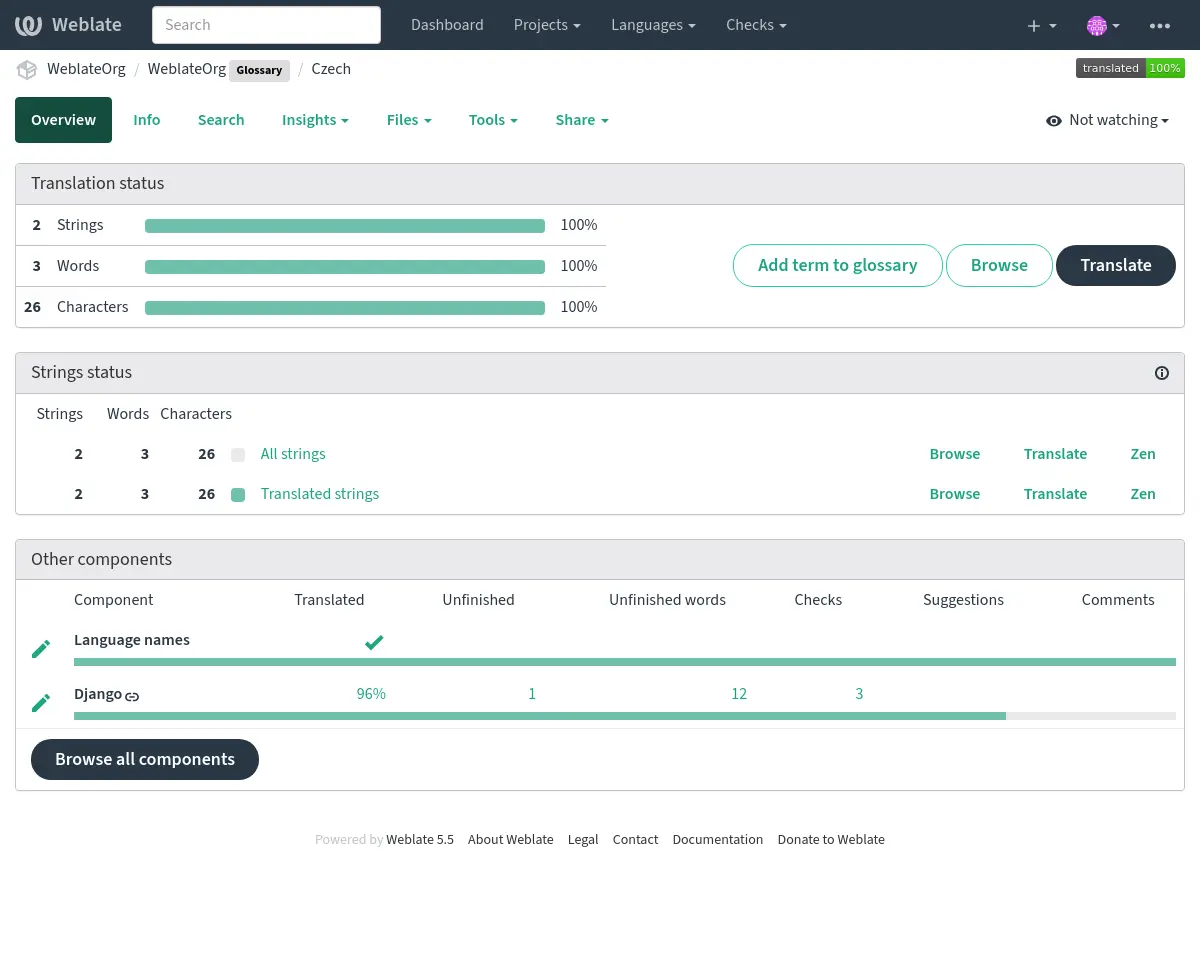
Tüm sözlük terimlerine göz atın:
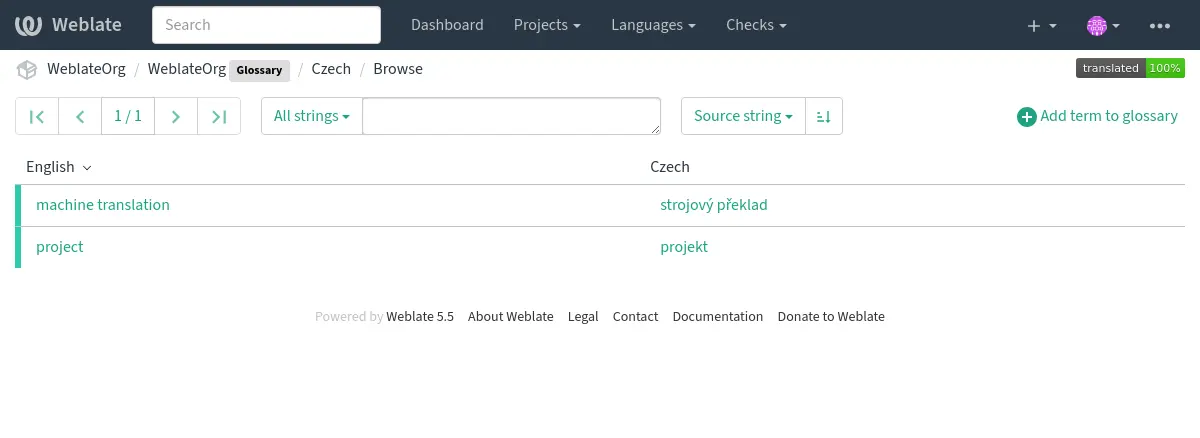
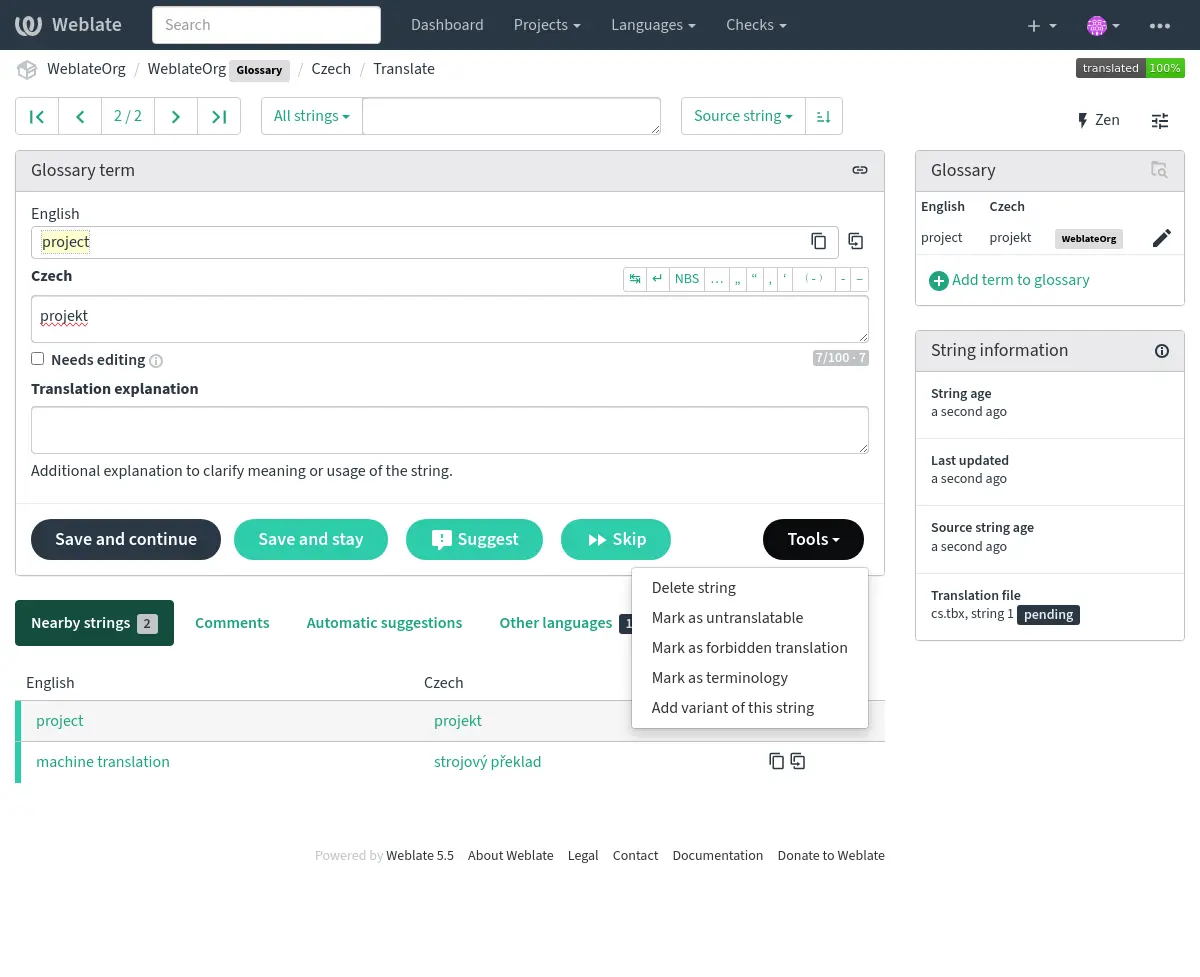
ya da bunları herhangi bir çeviri olarak düzenleyin.
Sözlük terimleri
Sözlük terimleri, normal dizgelerle aynı şekilde çevrilir. Her terim için Araçlar menüsünü kullanarak ek özellikleri değiştirebilirsiniz.
Ayrıca bakınız
Type |
Purpose |
|---|---|
Regular glossary term |
Preferred translation or explanation for a term in one or more languages. |
Source term Weblate keeps present in every glossary language so missing translations can be tracked and filled. |
|
Term that should stay unchanged or should not be translated. |
|
Translation that should not be used for the source term. |
|
Alternative wording, abbreviation, or shorter form grouped with another glossary term. |
Choosing glossary terms
Choose glossary terms for meaning and audience, not only for literal word shape. If a source term is ambiguous, add an explanation so translators know which meaning applies in the project.
Glossary entries are especially useful for brand names, acronyms, product features, technical terms, and newly coined or transliterated words. Use variants for abbreviations or shorter wording, mark important cross-language terms as Terminoloji, mark terms that should stay unchanged as Çevrilemez terimler, and mark misleading translations as Yasaklı çeviriler.
Çevrilemez terimler
Added in version 4.5.
Flagging certain glossary term translations read-only by bulk-editing,
typing in the flag, or by using Tools ↓
Mark this translation as untranslatable means they cannot be translated. Use this
for brand names, product names, domains, technology names, or other terms that
should not be changed in other languages. Such terms are visually highlighted
in the glossary sidebar.
To keep a term unchanged in every language, use Mark as untranslatable for all languages. If the current translation is already untranslatable, Make untranslatable apply to all languages moves that flag to the source. Forbidden translations are language-specific; terminology remains source-wide.
The read-only flag is enough when the glossary entry already exists in the
languages where it should be shown. Add the Terminoloji flag as
well only when Weblate should create and maintain the untranslatable entry in
every glossary language.
Ayrıca bakınız
Yasaklı çeviriler
Added in version 4.5.
Belirli sözlük terimi çevirilerini, toplu olarak düzenleyerek, imine yazarak ya da Araçlar ↓ Yasak çeviri olarak imle seçeneğini kullanarak yasaklı olarak imlemek, kullanılmayacakları anlamına gelir. Bu seçeneği, anlamı belirsiz ya da beklenmedik olan sözcükleri açıklığa kavuşturmak için kullanabilirsiniz.
Use forbidden entries for translations that should be avoided. Use regular glossary entries for preferred translations.
Ayrıca bakınız
Terminoloji
Added in version 4.5.
Flagging certain source-language glossary terms as terminology by
bulk-editing, typing in the flag, or by using Tools ↓
Mark as terminology for all languages adds entries for them to all languages in the
glossary. Use this for important terms that should be well thought out, and
retain a consistent meaning across all languages.
Enable Dizge yönetimi on the glossary component to synchronize terminology. When it is disabled, Weblate does not create missing language entries, even for terms marked as terminology.
Weblate shows a dismissible diagnostic when string management is disabled for a glossary with no remote repository, or for another glossary that contains terminology. Enable string management to add terms directly in Weblate and synchronize terminology, or dismiss the warning if you maintain the glossary files separately.
The terminology flag is ongoing state, not just a one-time action. While the flag remains on the source term, Weblate treats it as terminology and keeps an entry for it in every glossary language. If a language entry is removed, the next glossary synchronization creates it again.
terminoloji imini kaldırmak bu kendiliğinden bakımı durdurur, ancak daha önce oluşturulmuş kayıtları kaldırmaz veya başka bir şekilde geri döndürmez. Normal sözlük kayıtları olarak kalırlar.
A regular glossary term can also have translations in every language. The difference is that Weblate does not recreate missing language entries for a regular term after they are removed.
Ayrıca bakınız
Çeşitler
Çeşitler, dizgeleri birlikte gruplandırmak için genel bir yol sağlar. Tüm terim çeşitleri, çeviri sırasında sözlük kenar çubuğunda listelenir.
İpucu
Bir terim için kısaltmalar ya da daha kısa ifadeler eklemek için bunu kullanabilirsiniz.
Ayrıca bakınız
Sözlük içe aktarma
Normal çeviri bileşenlerine benzer şekilde, var olan sözlükleri Weblate üzerine yükleyebilirsiniz. CSV dosyaları veya TermBase eXchange biçimi gibi biçimler desteklenir ve yüklenebilir. Ayrıntılı bilgi almak için: Çevirileri yüklemek.
TBX files can include explanations, read-only metadata, and glossary flags; see TermBase eXchange biçimi for the exact metadata mapping.
Even though TBX can contain multiple languages, Weblate still maps component files to languages using the component file mask and language settings. For a TBX glossary component, keep the component source language as the source term language and name translation files for the target language they represent. Avoid naming a translation file with the same language as the component source language, because the source language already exists in Weblate and this can lead to duplicate language detection.
Ayrıca bakınız
Language files and synchronization
Glossary components follow the languages used by the regular components in the same project. When a language is added to a regular component, Weblate adds the missing glossary language as well so glossary matches can be shown for that language.
This automatic language synchronization is intentional. Filtering glossary language files with Dil süzgeci can reduce the number of managed files, but it also means Weblate has no glossary entries to show for filtered-out target languages.
Terminology entries are also synchronized. When a source glossary term is marked as terminology, Weblate creates missing entries in all glossary languages and recreates them if they are removed while the flag is still set.
Weblate can clean up stale glossary translations only for Weblate-managed glossaries, only when no regular component in the project still uses that language, and only when the stale glossary translation has no translated terms. If the stale glossary language still contains terms, Weblate keeps it and reports it as an unused glossary language.
Common setup patterns
- English-only explanatory glossary
Add source-language glossary terms with explanations. This works as a maintained term list, but it will not show target-language glossary matches unless you also create entries in the target glossary languages.
- Required terminology
Add terms in the source glossary language, mark them as Terminoloji, and let translators fill the created entries in each target language. Use explanations to document the intended meaning.
- Non-translatable terms
Mark terms as Çevrilemez terimler when they should stay unchanged. Add Terminoloji only when the term should be present in every glossary language for matching and review.
- Yasaklı çeviriler
Add the misleading translation as a Yasaklı çeviriler entry. Add the preferred wording as a separate regular glossary entry when translators should use a specific translation instead.
Kendiliğinden önerilerde sözlükleri kullanmak
Added in version 5.3.
Bazı kendiliğinden öneri hizmetleri çeviri sırasında sözlükleri kullanır. Bunların desteklenme durumunu görmek için lütfen Kendiliğinden öneriler bölümündeki ilgili belgelerine bakın.
Sözlük hizmete sunulmadan önce işlenir:
Duplicate source entries are skipped for services that require unique source terms. LLM-based services can receive duplicates with explanations to disambiguate them.
Tüm kontrol karakterleri ile baştaki ve sondaki boşluklar ayıklanır.
Yasaklı çeviriler atlandı.
Not
Birçok hizmet, sözlükleri sunucu tarafında tutar ve kaydedilebilecek sözlük sayısına sınırlama getirir. Depolama alanı biterse Weblate her zaman en eski sözlüğü siler.