アドオン
アドオンを使用すると、翻訳ワークフローの変更および自動化ができます。管理者は、各翻訳プロジェクトまたはコンポーネントの 操作 ↓ アドオン メニューからアドオンの追加と管理ができます。アドオンは、管理画面 からサイト全体にもインストールできます。
ヒント
また、API、DEFAULT_ADDONS または install_addon を使用してアドオンを設定できます。
手動トリガーに対応しているアドオンは、アドオン管理画面から、または API を使って実行できます。実行結果はアドオンの活動ログに記録されます。
Add-ons that expose a component API show its base URL on the add-on's API tab, alongside a link to the API root.
Add-ons are persistent administrative configuration. They run with their service identity in the scope where they are installed, rather than repeatedly using the permissions of the administrator who configured them. This ensures that equally authorized administrators see and save the same configuration, and that saving an unrelated change does not silently alter the add-on's input scope. Removing or disabling the configuring administrator does not disable the add-on.
Project and category add-ons therefore include compatible restricted components in that scope. A component add-on can use inputs outside its destination component when documented by that add-on. Automatic translation determines its source components as follows:
Direct automatic-translation actions use the acting user's component access.
A saved automatic-translation add-on uses its persistent administrative scope. Compatible components in the target project are eligible, including restricted components.
Components in another project are eligible when that project contributes to shared translation memory. This includes restricted components even though they do not create shared translation-memory entries; the add-on reads the explicitly selected component as an administrative input instead.
Restricted components remain filtered from ordinary listings and direct access. Grant add-on management permissions only to users trusted with the add-on's complete input and effect scope. See チームの範囲 and アクセス制限.
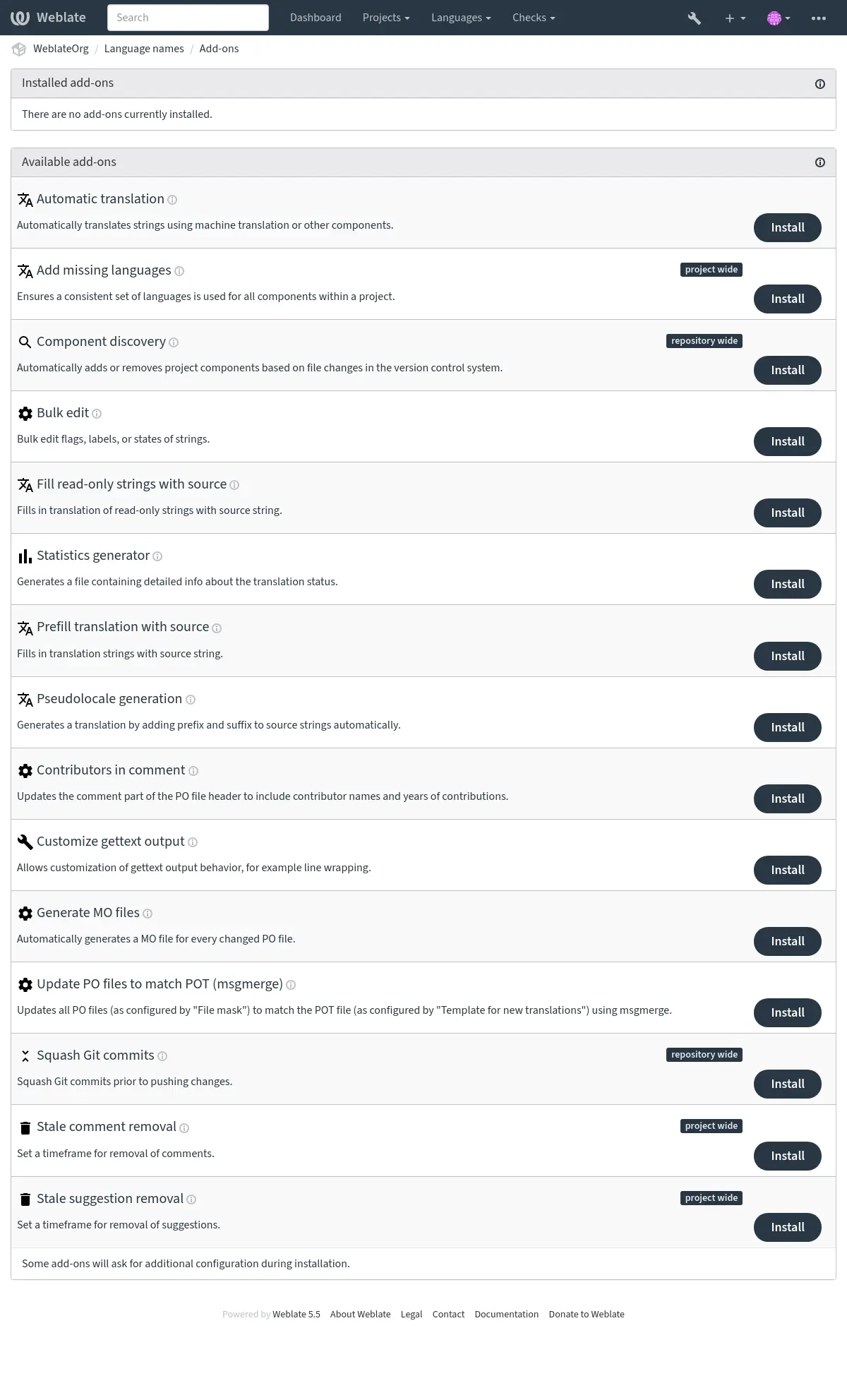
アドオンをトリガーするイベント
アドオンのインストール
アドオンのインストール時にトリガーされます。
コンポーネントの更新
次のようなコンポーネントに変更が発生するたびにトリガーされます:
リポジトリ内の文字列が変更されます。
文字列が追加されます。
新しい翻訳が追加されています。
毎日
毎日トリガーされますが、アドオンは通常 BACKGROUND_TASKS に応じて毎日の負荷をコンポーネント間で分割します。
変更イベント
変更イベントが作成された後にトリガーされます。
Manual trigger
Triggered when an add-on is run manually from add-on management or the API.
リポジトリ追加後
新しい翻訳が追加され、コミットされた直後にトリガーされます。
リポジトリのコミット後
変更がコミットされた直後にトリガーされます。
リポジトリのプッシュ後
リポジトリが上流にプッシュされた直後にトリガーされます。
Repository post-remove
Triggered just after a translation is removed.
リポジトリの更新後
上流リポジトリから新しい変更がプルされるたびにトリガーされます。
リポジトリのコミット前
変更がコミットされる直前にトリガーされます。
リポジトリの事前プッシュ
リポジトリが上流にプッシュされる直前にトリガーされます。
リポジトリ更新前
リポジトリの更新が試行される直前にトリガーされます。
ユニット保存後
文字列が保存された直後にトリガーされます。
ユニット同期後
文字列が VCS と同期された後にトリガーされます。
ユニットの事前作成
新しく作成された文字列が保存された直後にトリガーされます。
付属のアドオン
AI quality evaluation
- アドオン ID:
weblate.ai.quality- 設定:
- トリガー:
Evaluates existing translations using an LLM and records quality checks.
This add-on evaluates existing translations using an LLM service configured under 自動提案. It does not generate suggestions or change translations. Choose an Evaluation service from the configured LLM services; credentials and project overrides are reused.
The Query selects strings using the normal search syntax. By default, translated strings are selected. Source strings, read-only strings, and glossary entries are excluded. Each request includes all translation plural forms, source text, language information, string context, glossary terms, placeholders, and configured translation instructions. This data is sent to the selected provider.
Requests group strings from the same translation in file order, using the service's automatic translation batch size (currently 20 strings for built-in LLM services). All plural forms of a string stay together. Related strings share context, allowing the evaluator to check meaning and terminology across the batch. Batching reduces the number of provider requests for scheduled, manual, and change-triggered runs; it does not skip unchanged strings.
Evaluation frequency defaults to weekly. Daily and monthly schedules are also available; disabled turns off scheduled evaluation. Background processing must be enabled. A successful full run starts the next interval. Manual runs bypass the interval. Enable Evaluate translation changes or Evaluate repository updates to additionally evaluate after those events. Installation does not immediately contact the provider. Each run can incur provider costs, including reevaluation of unchanged translations.
Evaluation runs in background tasks, with results and failure counts recorded in the existing add-on activity log. Failed requests retain existing valid findings and are tried again only by a subsequent run. Evaluation shares the service's automatic translation cooldown: rate-limit responses activate it, and batches are skipped while it is active. More specific installations take precedence: component, nearest category, project, then site-wide.
Findings appear as standard checks for accuracy, fluency, terminology, style, and
formatting. Each finding includes a minor, major, or critical severity and an
explanation. Multiple findings in one category share a check, so ignoring that
check ignores the whole category for the string. Existing search filters and API
search work, for example check:ai_accuracy. Translation flags such as
ignore-ai-accuracy disable a category; ignore-all-checks disables all checks.
Changing the source or translation removes outdated findings. Results received after any source or translation in their batch changes are discarded for the whole batch. A failed or malformed response also leaves existing findings for the whole batch unchanged; other batches can still complete. Incomplete runs do not advance the scheduled evaluation date. Reevaluation of unchanged content preserves ignored categories, and a successful evaluation removes categories that no longer have findings. Removing or reconfiguring the add-on clears its findings. Evaluator metadata is internal and cannot be edited through the API; the add-on configuration uses the existing アドオン permissions and validation.
Automation
Added in version 2026.10.
- アドオン ID:
weblate.automation.automation- 設定:
workflowワークフロー
Enter an automation definition as YAML or JSON.
- トリガー:
コンポーネントの更新, 毎日, 変更イベント, Manual trigger, リポジトリのコミット後, リポジトリのプッシュ後, リポジトリの更新後
Runs ordered translation operations with conditions and branches.
Install this add-on on a component, category, project, or site. Inherited instances run separately for each component. Multiple instances can be installed. Configuring, previewing, and running an automation requires the usual add-on management permission. Saving its configuration does not execute it.
Enter YAML or JSON in Workflow. Use Preview without changes to validate it and inspect planned actions, then Run now for real execution. Results appear in the add-on activity log.
参考
Workflow definition for the script definition and reference.
Cookbook for complete examples.
Apply translation memory before machine translation for translation memory before machine translation.
自動翻訳
- アドオン ID:
weblate.autotranslate.autotranslate- 設定:
mode自動翻訳モード
設定できる値:¶ suggest提案として追加
translate翻訳として追加
fuzzy「要修正」として追加
approved承認済みの翻訳として追加
q検索文字列
すべての文字列を翻訳すると、既存の翻訳はすべて破棄されますのでご注意ください。
auto_source自動翻訳の参照先
設定できる値:¶ othersその他の翻訳コンポーネント
mt機械翻訳
componentコンポーネント
Enter a source component ID. With 30 or more eligible source components, a project/component path is also accepted. In that case, component and project operations also accept a component slug from the target project. Leave blank to use eligible components from each target component's project.
engines機械翻訳エンジン
thresholdスコアしきい値
- トリガー:
機械翻訳または他のコンポーネントを使用して文字列を自動的に翻訳します。
To control translation order, use the Automation add-on with a separate action for each pass. Follow the Apply translation memory before machine translation cookbook example to apply local translation memory first and send only the remaining strings to a machine translation service. Selecting multiple engines here uses 機械翻訳と翻訳メモリ サービスの優先順位; installation order of separate add-ons does not define an execution sequence.
JavaScript 現地語化 CDN
Added in version 4.2.
- アドオン ID:
weblate.cdn.cdnjs- 設定:
threshold翻訳率のしきい値
翻訳を有効と見なすために必要な翻訳済み文字列の割合。
css_selectorCSS セレクタ
翻訳可能な要素を検出する CSS セレクタ。
cookie_name言語 Cookie 名
言語設定を保存する Cookie の名前。
filesHTMLファイルから文字列を抽出
現在のリポジトリ内のファイル名のリスト、または翻訳可能な文字列を解析するリモート URL。
- トリガー:
アドオンのインストール, 毎日, リポジトリのコミット後, Repository post-remove, リポジトリの更新後
JavaScript または HTML の現地語化用に、翻訳をコンテンツ配信ネットワークに公開します。
静的な HTML ページを現地語化したり、JavaScript コードで翻訳を読み込むために使用できます。
HTML のページに挿入して、翻訳を可能にするコンポーネント専用の URL を生成します。詳細については、Weblate CDN を使用した HTML と JavaScript の翻訳 を確認してください。
注釈
このアドオンには、Weblate サーバー上で追加の設定が必要です。 LOCALIZE_CDN_PATH は生成されたファイルが書き込まれる場所(ファイルシステム上)を設定し、 LOCALIZE_CDN_URL はファイルが提供される場所(URL)を定義します。ファイルの提供は Weblate によって行われないため、外部で設定することが必要です(通常は CDN サービスを使用します)。
このアドオンは Hosted Weblate で設定され、https://weblate-cdn.com/ 経由でファイルを提供します。
翻訳ファイルの CDN
Added in version 2026.5.
- アドオン ID:
weblate.cdn.files- 設定:
このアドオンには設定はありません。
- トリガー:
アドオンのインストール, コンポーネントの更新, リポジトリのコミット後, Repository post-remove, リポジトリの更新後
翻訳ファイルをコンテンツ配信ネットワーク(CDN)に公開します。
Publishes translation files without converting them to another format. Files
are written below the add-on specific CDN directory and served from
LOCALIZE_CDN_URL/<add-on UUID>/. Single-file translations use the language
code and original file extension, for example cs.json or de.po.
Multi-file translations are served below the language code using paths relative
to the translation directory. Monolingual components include the source
language file, while bilingual components publish only target-language files.
See CDN の現地化 for secure serving guidance.
Kotlin SDK CDN
Added in version 2026.10.
- アドオン ID:
weblate.cdn.kotlin- 設定:
maximum_ageMaximum build age (days)
Retires builds this many days after their first registration. Re-registering a build does not extend its age.
maximum_versionsMaximum retained versions
Limits retained builds across all package names. A build is retired when either this limit or the maximum age is reached.
- トリガー:
アドオンのインストール, コンポーネントの更新, 毎日, リポジトリのコミット後, Repository post-remove, リポジトリの更新後
Publishes Android string and plural resources for registered Kotlin SDK builds.
警告
The Kotlin SDK is available as an alpha release. No compatibility is guaranteed until the final Kotlin SDK is released. Endpoints, build metadata, CDN manifests, and generated resource formats may change without backward compatibility.
Install Kotlin SDK CDN on an Android string-resource component to
publish translations for builds registered by the Kotlin SDK. Configure
LOCALIZE_CDN_URL and LOCALIZE_CDN_PATH first. CDN output is
public, including translations from private components. Manifests expose the
application package name and version code. ARSC files expose published resource
names and their submitted IDs alongside translated text. Do not treat the
uploaded resource mapping as confidential; enable publication only when this
disclosure is intended. Registration and status API access remains permission-controlled.
Copy the Gradle plugin configuration from the add-on configuration page. It
includes the Weblate server URL, public CDN URL, project slug, and component
path (with any category path URL-encoded). Replace the placeholder with a
project-scoped API token whose permissions allow editing the component. Project
administrators can create one in the project's API access tab; see
プロジェクトごとのアクセストークン.
Keep that token in the build environment, not in the application. The add-on's
API tab shows the API base URL; submit build metadata to its builds/
endpoint. See
Kotlin SDK builds for the request and response format.
For Gradle plugin and library setup, see Kotlin SDK for Android.
The add-on matches resource names and types from registered builds to current component translations. Strings, plurals, and Android styled text are supported. String arrays and resource references are not generated. Untranslated entries, read-only entries, and incomplete plural resources are omitted; applications retain their bundled values. Unsupported styling fails publication; the previous successful publication remains available.
Resource IDs must describe the final installed build. Uploading an identical mapping again is harmless; a different mapping for the same package and version is rejected. Old builds receive current translations by name, including after source text or formatting arguments change. Maintainers are responsible for compatibility with older application code.
Lifecycle settings
Maximum build age (days) defaults to 365 and accepts 1 through 730, measured from the first registration. Repeated uploads do not extend it.
Maximum retained versions defaults to 20 and accepts 1 through 100, counted across all package names. One additional unpublished replacement is allowed. New registrations can retire older unpublished replacements. Published builds are retired for this limit only after a replacement is published. Failed replacements preserve existing publications; maximum-age expiry still applies independently.
Either limit retires a build and immediately clears its metadata. Lightweight retired records are deleted on cleanup after 24 hours and successful manifest removal; their package/version identifiers can then be registered again. Failed or interrupted manifest removals are retried hourly. Until removal succeeds, the registration and its referenced artifacts are retained, and the files may remain publicly accessible. Resource mappings are immutable only while their registration records remain.
Each add-on permits at most 1000 registration records, including retired records. New registrations exceeding this limit return HTTP 409 until cleanup frees capacity; identical retries remain accepted. Metadata is bounded by the 5 MiB upload limit and maximum retained version count plus one replacement, without a separate byte quota. Limits are enforced during registration and scheduled cleanup.
Superseded artifacts are deleted on cleanup after a fixed 24-hour window. All artifact files, including superseded files and incomplete publication output, count towards hard limits of 5 GiB and 10000 files per add-on. The larger artifact allowance accommodates translated text and multiple locales; it does not guarantee capacity for every locale or build combination. Shared artifacts count only once. Publications exceeding either limit fail before writing new artifacts and preserve the previous manifest. Neither the window nor these limits are configurable. Limit manifest caching as described below.
Compilation stages one locale at a time on disk. A per-locale conservative encoded text and styling estimate exceeding 64 MiB fails publication.
Preparation additionally requires up to 5 GiB of temporary disk space per
publication job, separate from the published artifact allowance. Temporary
files contain staged ARSC output, shared by versions with identical resource mappings.
They are stored below LOCALIZE_CDN_PATH. Configure the server to
deny access to .kotlin-sdk-staging as described in
CDN の現地化 before enabling this add-on.
Manifest replacement follows the database commit. Failed or interrupted writes are retried by subsequent publication jobs, with artifacts for both the old and pending manifest protected until replacement succeeds.
Uninstalling the add-on attempts to remove its published files from the CDN origin immediately. Failed or interrupted removals are retried hourly; files may remain publicly accessible until cleanup succeeds. Removal does not revoke copies already cached or downloaded by clients.
Publication and cleanup run asynchronously after build registration, component updates, translation commits and removals, and during daily add-on processing. Failures appear in the add-on activity log and registration status. Previous successful publications remain available when replacement generation fails. If the component stops using the Android resource format, hourly maintenance retires its publications. The normal artifact retention window still applies.
CDN client contract
Each build has a stable manifest at
<CDN base>/<packageName>/<versionCode>/manifest.json. The version 1 manifest
contains schemaVersion, packageName, versionCode, and locales.
Locale keys are Weblate language codes. Each locale contains a relative url,
sha256, and byte size for its ARSC artifact. Resolve relative URLs against
the manifest URL. Artifact contents do not change after publication.
The manifest has a JSON Schema.
Configure the CDN origin to cache manifests for at most one hour (for example,
Cache-Control: public, max-age=3600), and artifact files with
Cache-Control: public, max-age=31536000, immutable. Artifact files may use
application/octet-stream. Configure these headers on the CDN server.
Translation updates and retirements can take up to one hour to reach clients.
Use Cache-Control: no-cache when immediate revalidation is preferred.
The fixed 24-hour artifact retention window exceeds the manifest cache lifetime.
The Kotlin SDK should validate artifact length and hash, cache successful downloads locally, and load them with Android's resources-loader API on API 30 or newer. A missing manifest, missing locale, or download failure must preserve bundled resources. Retired manifests return 404 at the origin; cached copies can remain usable until they expire. Hashes detect corrupted or mismatched content; authentication relies on HTTPS and the configured CDN.
空白文字列の削除
Added in version 4.4.
- アドオン ID:
weblate.cleanup.blank- 設定:
このアドオンには設定はありません。
- トリガー:
翻訳ファイルから翻訳されていない文字列を削除します。
翻訳ファイルに空の文字列を含ませたくない場合使用します(例: 翻訳ライブラリにおいて原文に戻すのではなく、空の文字列が不足していると表示させる場合)。
翻訳ファイルのクリーンアップ
- アドオン ID:
weblate.cleanup.generic- 設定:
このアドオンには設定はありません。
- トリガー:
すべての翻訳ファイルを、モノリンガル用の基礎となる翻訳ファイルと一致するように更新します。ほとんどのファイル形式で、基礎となる翻訳ファイルに存在しない、無効な翻訳キーは削除されます。
また、翻訳文字列以外の追加コンテンツを含む形式(HTML ファイル、Windows RC ファイル、OpenDocument 形式 など)の場合、クリーンアップにより翻訳ファイルが元のファイルに同期します。
For a one-time cleanup of a single translation file, use Cleanup unused in リポジトリのメンテナンス on that translation instead of installing the add-on.
不足している言語を追加
- アドオン ID:
weblate.consistency.languages- 設定:
このアドオンには設定はありません。
- トリガー:
プロジェクト内のすべてのコンポーネントで一貫した言語のセットが使用されるようにします。
注釈
他プロジェクトから共有されたコンポーネントは対象外です。
足りない言語は、24 時間ごとに 1 回、さらに新しい言語を Weblate に追加したときに確認します。
他のほとんどのアドオンとは異なり、このアドオンはプロジェクト全体に影響します。
ヒント
新しく追加した文字列を 自動翻訳 アドオンで翻訳します。
コンポーネントの検出
- アドオン ID:
weblate.discovery.discovery- 設定:
match翻訳ファイルを照合する正規表現
The regular expression must define a named group for component. Also define a named group for language when matching translation files. When the file mask is set, omit language and match the monolingual base or new base file instead.
file_formatファイル形式
name_templateコンポーネント名のカスタマイズ
Django テンプレート構文を使用してください。このテンプレートには {{ component }} を必ず含める必要があります。
base_file_templateモノリンガル用の、基礎となる翻訳ファイル名の設定
バイリンガル翻訳ファイルの場合は空のままにしてください。設定する場合、このテンプレートには {{ component }} を必ず含める必要があります。
new_base_template新しい翻訳用の、基礎となる翻訳ファイルの設定
新しい翻訳を作成するために使用するファイル名です。gettext を使用する場合は .pot ファイルを指定してください。このテンプレートには {{ component }} を必ず含める必要があります。
intermediate_template中間言語ファイル
中間翻訳ファイルのファイル名です。多くの場合、これは開発者が提供する翻訳ファイルで、実際の原文を生成する際に使用されます。このテンプレートには {{ component }} を必ず含めることが必要です。
filemask_templateDefine the file mask
Leave empty to match translation files directly. When set, discovery matches the monolingual base or new base file and uses this template as the file mask. Include a language wildcard and {{ component }}, for example locale//{{ component }}.po or docs/{{ component }}_.md.
language_regex言語フィルター
ファイル マスクのスキャン時に、翻訳ファイルをフィルター処理する正規表現。
copy_addonsアドオンを、メイン コンポーネントから新しく作成したコンポーネントにクローンする
remove存在しないファイルのコンポーネントの削除
- トリガー:
バージョン管理システムのファイル変更に基づいて、プロジェクトコンポーネントを自動的に追加または削除します。
The matching is done using regular expressions enabling complex configuration, but some knowledge is required to do so. Usually the regular expression to match translation files has to contain two named groups to match component and language. When creating components from a monolingual base or new base file, omit the language group and match that source file instead. All named groups in the regular expression can be used as variables in the template fields.
Discovery requirements
To discover a component successfully, the configuration has to do all of the following:
The regular expression must define a
componentnamed group. Matching translation files also requires alanguagenamed group.Template fields used to name or locate per-component files must include
{{ component }}, so the rendered value actually changes for each discovered component.For monolingual formats, the component must contain a file matching
base_file_templateand at least one translation file matchingmatch, unless you set the file mask (see below).
Discovering components without translation files
Set Define the file mask to discover components from a monolingual base or new base file alone, even when no translation files exist yet. In that mode:
Configure Regular expression to match translation files against to match the monolingual base or new base file, and omit the
languagegroup. Keep full control over thecomponentcapture, for examplelocale/(?P<component>[^/]+)\.potordocs/(?P<component>[^/_]+)\.md.Fill Define the file mask with a path that includes both a language wildcard and
{{ component }}, for examplelocale/*/{{ component }}.poordocs/{{ component }}_*.md.Keep using the other filename templates with any named groups from the match expression.
Worked example: news_<lang>.md
This is a common filename-based language variant layout:
docs/news_en.mddocs/news_cs.mddocs/guide_en.md
Use the Filename-based language variants preset for a starting point, then choose the matching file format and review the populated values.
- 正規表現:
(?:(?P<path>.*/))?(?P<component>.+?)_(?P<language>[A-Za-z]{2,3}(?:[_-][A-Za-z0-9]+)*)\.(?P<extension>[^/.]+)- コンポーネント名:
{{ component }}- Discovered file masks:
docs/news_*.mddocs/guide_*.md
In this example, {{ component }} resolves to the basename before the language
suffix, so docs/news_en.md, docs/news_pt_BR.md, and
docs/news_pt-BR.md all become the news component.
すべてのファイル名フィールドで Django テンプレートのマークアップを使用できます。例:
{{ component }}Component name parsed from the
componentmatch group{{ component|title }}先頭を大文字にしたコンポーネントファイル名
{{ path }}: {{ component }}正規表現からのカスタム一致グループ
保存 をクリックすると、一致するコンポーネントの確認画面を表示し、設定が実際のニーズに合っているか確認する方法:
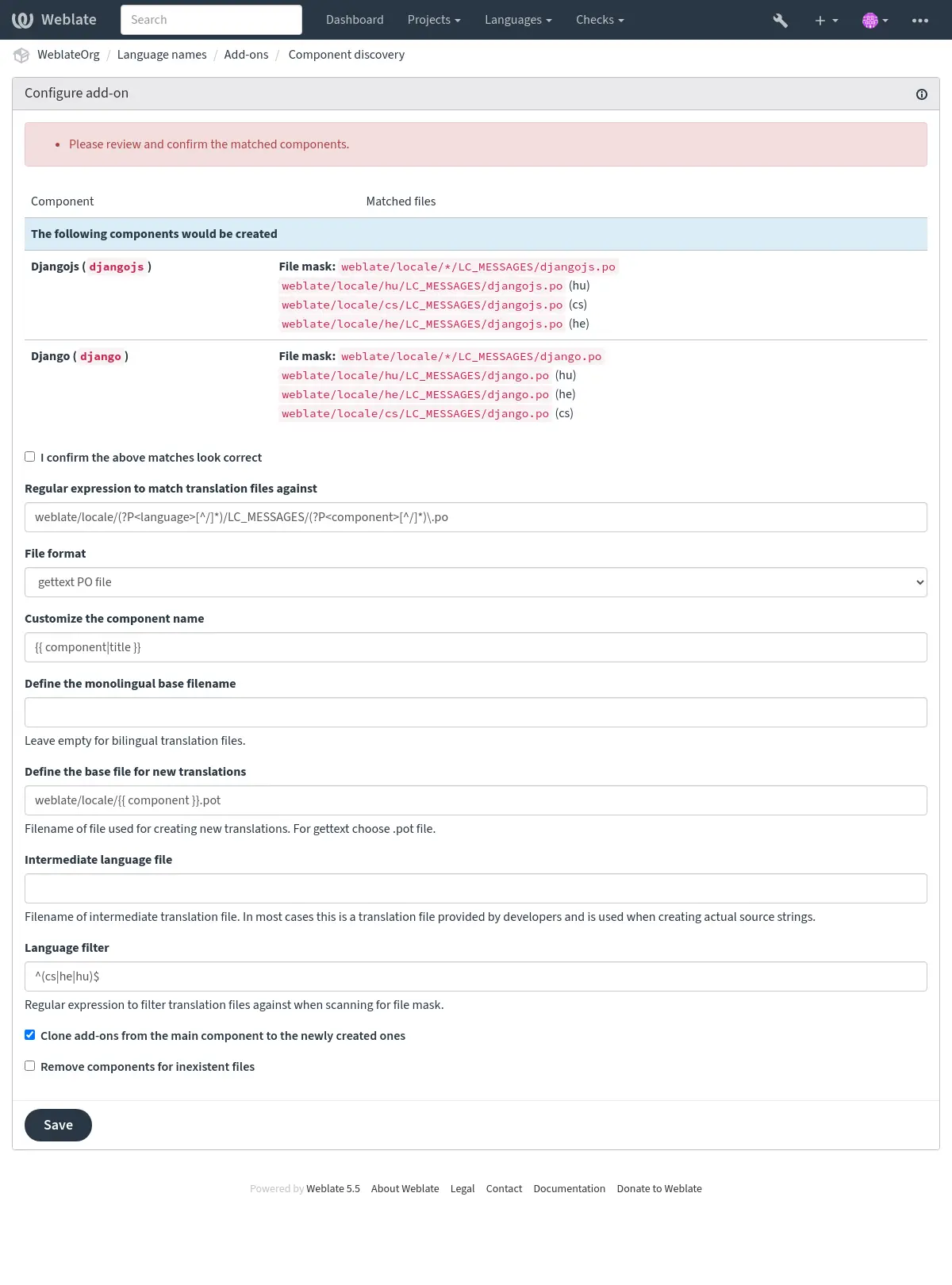
コンポーネント検出の例
The worked example above covers the most common filename-based variant layout. The following examples show other repository structures you can match.
言語ごとに 1 つのフォルダー
言語ごとに 1 つのフォルダがあり、その中に各コンポーネントの翻訳ファイルが含まれている場合。
- 正規表現:
(?P<language>[^/.]*)/(?P<component>[^/]*)\.po- 一致するファイル:
cs/application.pocs/website.pode/application.pode/website.po
Gettext 形式のロケールのレイアウト
gettext PO ファイルを保存する一般的な構造の場合。
- 正規表現:
locale/(?P<language>[^/.]*)/LC_MESSAGES/(?P<component>[^/]*)\.po- 一致するファイル:
locale/cs/LC_MESSAGES/application.polocale/cs/LC_MESSAGES/website.polocale/de/LC_MESSAGES/application.polocale/de/LC_MESSAGES/website.po
複雑なファイル名
コンポーネントと言語の両方がファイル名に入っている場合。
- 正規表現:
src/locale/(?P<component>[^/]*)\.(?P<language>[^/.]*)\.po- 一致するファイル:
src/locale/application.cs.posrc/locale/website.cs.posrc/locale/application.de.posrc/locale/website.de.po
言語コードの反復
言語がパスにもファイル名にも入っている場合。
- 正規表現:
locale/(?P<language>[^/.]*)/(?P<component>[^/]*)/(?P=language)\.po- 一致するファイル:
locale/cs/application/cs.polocale/cs/website/cs.polocale/de/application/de.polocale/de/website/de.po
Android 文字列の
複数のファイルに分割された Android リソース文字列。
- 正規表現:
res/values-(?P<language>[^/.]*)/strings-(?P<component>[^/]*)\.xml- 一致するファイル:
res/values-cs/strings-about.xmlres/values-cs/strings-help.xmlres/values-de/strings-about.xmlres/values-de/strings-help.xml
複数のパスの一致
Java プロパティの翻訳を備えたマルチモジュールの Maven プロジェクト。
- 正規表現:
(?P<originalHierarchy>.+/)(?P<component>[^/]*)/src/main/resources/ApplicationResources_(?P<language>[^/.]*)\.properties- コンポーネント名:
{{ originalHierarchy }}: {{ component }}- 一致するファイル:
parent/module1/submodule/src/main/resources/ApplicationResources_fr.propertiesparent/module1/submodule/src/main/resources/ApplicationResource_es.propertiesparent/module2/src/main/resources/ApplicationResource_de.propertiesparent/module2/src/main/resources/ApplicationResource_ro.properties
ヒント
コンポーネントを検出するアドオンは、Weblate の内部 URL を使用します。これは、複数のコンポーネント間で VCS 設定を共有するのに便利です。リンクされたコンポーネントは、各コンポーネントの ソースコードのリポジトリ フィールド(操作 ↓ 設定 ↓ バージョン管理システム の中)に weblate://project/main-component を入力して、設定したメイン コンポーネントのローカル リポジトリを使用します。これにより、設定およびシステム リソースの時間をも節約できます。
ヒント
新しいコンポーネントに、翻訳可能な言語の全セットが含まれていることを 不足している言語を追加 を使って確認してください。
Fedora メッセージング
Added in version 5.15.
- アドオン ID:
weblate.fedora_messaging.publish- 設定:
amqp_urlAMQP ブローカーのURL
接続先の AMQP ブローカーのURLです。
topic_prefixTopic prefix
Optional prefix to prepend to generated message topics.
publish_timeoutPublish timeout
How many seconds to wait for the broker delivery acknowledgement.
connection_attemptsConnection attempts
How many times to try connecting to the broker.
retry_delay再試行の遅延
How many seconds to wait between connection attempts.
ca_certCA証明書 バンドル (PEM)
Paste only PEM certificate blocks, each starting with "-----BEGIN CERTIFICATE-----" and ending with "-----END CERTIFICATE-----".
client_keyClient private key (PEM)
Paste a single unencrypted PEM private key block. Encrypted private keys are not supported.
client_certクライアント証明書 (PEM)
Paste only the PEM certificate block starting with "-----BEGIN CERTIFICATE-----"; do not paste the output from "openssl x509 -text".
event_filterトリガーになる変更イベント
Choose which change events should trigger this add-on. トリガーになる変更イベント
events選択した変更イベント
- トリガー:
Fedora Messaging 互換の AMQP Exchange に通知を送信します。
Fedora Messaging は AMQP ベースのパブリッシャーで、Weblate で発生するすべての変更に対応しています。これを使用して、Weblate で発生する変更に追加のサービスをフックします。
メッセージ トピック
All messages have topic
weblate.<action>.<project>.<category...>.<component>.<translation>.
When configured, topic_prefix is prepended to this topic using a single dot
separator, for example org.fedoraproject.weblate.project_backed_up.website.
The action is lowercase textual representation of action with underscores
instead of space, for example resource_updated; see 選択した変更イベント
for all action identifiers. The remaining parts match Weblate object path
segments.
For example, a project backup event for the website project uses
weblate.project_backed_up.website. A translation change in the website
project, frontend component, and Czech translation uses
weblate.translation_changed.website.frontend.cs. The same change in the
frontend component inside the parent and child categories uses
weblate.translation_changed.website.parent.child.frontend.cs.
メッセージ本文
本体は次のフィールドで構成されます(イベントに対して利用可能な場合):
change_id変更の数値 ID
action変更の詳細名。
timestampISO 形式のタイムスタンプ
target変更後の新しい値(例: 文字列の新しい翻訳)
old変更前の値(例: 文字列の以前の翻訳)
source原文。
url関連オブジェクトを表示するための絶対 URL。
author著者のユーザー名(たとえば、提案を承認する際にはユーザーとは異なる場合があります)
user操作ユーザー名
projectプロジェクト スラッグ
componentコンポーネント スラッグ
translation翻訳言語コード
メッセージ ヘッダー
ルーティングに利用できる追加のヘッダーが他にもあります:
action変更の詳細名。
projectプロジェクト スラッグ
componentコンポーネント スラッグ
メッセージ例
リポジトリのマージイベント:
{
  "id": 1,
  "action": "Merged repository",
  "timestamp": "2017-06-15T11:30:47.325000+00:00",
  "url": "http://example.com/projects/test/test/",
  "component": "test"
}
新規原文文字列イベント:
{
  "id": 2,
  "action": "New source string",
  "timestamp": "2017-06-15T11:30:47.372000+00:00",
  "url": "http://example.com/translate/test/test/cs/?checksum=6412684aaf018e8e",
  "component": "test",
  "translation": "cs",
  "source": ["Hello, world!\n"]
}
リソース更新イベント:
{
  "id": 6,
  "action": "Resource update",
  "timestamp": "2017-06-15T11:30:47.410000+00:00",
  "url": "http://example.com/projects/test/test/cs/",
  "project": "test",
  "component": "test",
  "translation": "cs"
}
{
  "id": 7,
  "action": "Resource update",
  "timestamp": "2017-06-15T11:30:47.510000+00:00",
  "url": "http://example.com/projects/test/test/de/",
  "project": "test",
  "component": "test",
  "translation": "de"
}
{
  "id": 8,
  "action": "Resource update",
  "timestamp": "2017-06-15T11:30:47.595000+00:00",
  "url": "http://example.com/projects/test/test/it/",
  "project": "test",
  "component": "test",
  "translation": "it"
}
プロジェクト削除イベント:
{
  "id": 9,
  "action": "Removed project",
  "timestamp": "2019-10-17T15:57:08.559420+00:00",
  "target": "test",
  "user": "testuser"
}
新しい貢献者イベント:
{
  "id": 11,
  "action": "New contributor",
  "timestamp": "2019-10-17T15:57:08.759960+00:00",
  "url": "http://example.com/translate/test/test/cs/?checksum=6412684aaf018e8e",
  "author": "testuser",
  "user": "testuser",
  "project": "test",
  "component": "test",
  "translation": "cs",
  "source": ["Hello, world!\n"]
}
新規翻訳イベント:
{
  "id": 12,
  "action": "New translation",
  "timestamp": "2019-10-17T15:57:08.772591+00:00",
  "url": "http://example.com/translate/test/test/cs/?checksum=6412684aaf018e8e",
  "target": ["Ahoj svete!\n"],
  "author": "testuser",
  "user": "testuser",
  "project": "test",
  "component": "test",
  "translation": "cs",
  "source": ["Hello, world!\n"]
}
一括編集
- アドオン ID:
weblate.flags.bulk- 設定:
q検索文字列
state翻訳状態の設定
設定できる値:¶ -1変更しない
10要修正
11要修正(要改稿)
12要修正(要確認)
20翻訳済み
30承認済み
add_flagsSource flags to add — all languages
remove_flagsSource flags to remove — all languages
add_translation_flagsTranslation flags to add — matching translations
Applies only to matching translations, excluding source strings.
remove_translation_flagsTranslation flags to remove — matching translations
Removes locally set flags. Inherited flags remain in effect.
add_labelsLabels to add — all languages
remove_labelsLabels to remove — all languages
- トリガー:
文字列のフラグ、ラベル、状態を一括編集します。
例:
検索クエリ |
|
|---|---|
追加するラベル |
recent |
検索クエリ |
|
|---|---|
追加する翻訳フラグ |
|
検索クエリ |
|
|---|---|
追加する翻訳フラグ |
|
未翻訳の翻訳文に "要改稿" フラグを付ける
- アドオン ID:
weblate.flags.same_edit- 設定:
このアドオンには設定はありません。
- トリガー:
VCS からインポートされた新しい翻訳可能な文字列が原文と同一のとき、Weblate は "要改稿" フラグを付けます。特に、未翻訳の文字列は原文で埋めるファイル形式では有用です。
参考
新しい原文に "要確認" フラグを付ける
- アドオン ID:
weblate.flags.source_edit- 設定:
このアドオンには設定はありません。
- トリガー:
新しい原文を VCS からインポートするときに、Weblate で "要確認" フラグを付けます。これにより、開発者が作成した原文を簡単に絞り込んで編集できます。
参考
新しい翻訳に "要改稿" フラグを付ける
- アドオン ID:
weblate.flags.target_edit- 設定:
このアドオンには設定はありません。
- トリガー:
新しい翻訳可能な文章を VCS からインポートするときに、Weblate で "要改稿" フラグを付けます。これにより、開発者が作成した翻訳文を簡単に絞り込んで編集できます。
参考
リポジトリから更新された翻訳文に "要改稿" フラグを付ける
- アドオン ID:
weblate.flags.target_repo_update- 設定:
このアドオンには設定はありません。
- トリガー:
VCS(バージョン管理システム)で文字列の翻訳文が変更されると、Weblate では "要改稿" フラグが付けられます。 翻訳ファイルを手動で更新したり、外部サービスで更新したりする場合に特に便利です.
参考
読み取り専用の文字列を原文で埋める
Added in version 4.18.
- アドオン ID:
weblate.generate.fill_read_only- 設定:
このアドオンには設定はありません。
- トリガー:
文字列が編集禁止の場合は、原文を翻訳に代入します。
統計データの生成
- アドオン ID:
weblate.generate.generate- 設定:
scopeOutput scope
設定できる値:¶ translationOne file per translation
componentOne file per component
filename生成ファイルの名前
template生成ファイルの内容
- トリガー:
アドオンのインストール, コンポーネントの更新, リポジトリ追加後, Repository post-remove, リポジトリのコミット前
翻訳状況の詳細情報ファイルを生成します。
Django テンプレートは、ファイル名とコンテンツの両方で使用できます。マークアップの詳細については、テンプレート用のマークアップ を確認してください。
例えば、各翻訳の概要ファイルの生成:
- 生成ファイルの名前
locale/{{ language_code }}.json- 内容
{
   "language": "{{ language_code }}",
   "strings": "{{ stats.all }}",
   "translated": "{{ stats.translated }}",
   "last_changed": "{{ stats.last_changed }}",
   "last_author": "{{ stats.last_author }}",
}
Component-wide output
Set Output scope to One file per component to maintain one locale list or statistics file for the entire component. The default, One file per translation, preserves existing configurations.
Component output is generated on installation and configuration changes. It is updated when translations are committed, languages are added or removed, and component files are reloaded. Language metadata changes are included on the next such update or when the add-on is reconfigured. Unchanged output does not create a new commit.
Both modes support component and project variables in filenames and content.
In component mode, the content additionally receives translations, ordered
by repository language code. Each item provides:
language_code: the language code used in the repository.language_name: the English language name.language_native_name: the name translated into its own language using Weblate's catalogs, with an English fallback when unavailable.language_direction:ltrorrtl.filenameandurl: the translation filename and Weblate URL.is_source: whether this is the component's source translation.stats: the same statistics available in translation mode.
The source translation is included. Templates can exclude it using
{% if not item.is_source %}. Statistics use Weblate's completion semantics.
Custom language names are retained; there is no external locale-data lookup.
For example, generate locales.json for a website:
[
{% for item in translations %}
  {
    "code": {{ item.language_code|json }},
    "file": {{ item.filename|json }},
    "name": {{ item.language_native_name|json }},
    "dir": {{ item.language_direction|json }}
  }{% if not forloop.last %},{% endif %}
{% endfor %}
]
Or generate languages.py for an application:
names = {
{% for item in translations %}
    {{ item.language_code|python }}: {{ item.language_native_name|python }},
{% endfor %}
}
completeness = {
{% for item in translations %}
    {{ item.language_code|python }}: {{ item.stats.translated_percent|python }},
{% endfor %}
}
The json and python filters serialize complete values, including string
quotes and escaping. Do not add quotes around their output. They also support
lists and dictionaries; {{ translations|json }} exports all available data.
Dates and times are serialized as ISO-formatted strings.
事前に原文を翻訳に代入
Added in version 4.11.
- アドオン ID:
weblate.generate.prefill- 設定:
このアドオンには設定はありません。
- トリガー:
初期値として原文を翻訳に代入する。
All untranslated strings in the component will be filled with the source string, and marked as needing edit. Use this when you can not have empty strings in the translation files. .. AUTOGENERATED START: weblate.generate.pseudolocale .. This section is automatically generated by ./manage.py list_addons. Do not edit manually.
疑似ロケールの生成
Added in version 4.5.
- アドオン ID:
weblate.generate.pseudolocale- 設定:
source原文
target翻訳先
この言語の翻訳は全て上書きされます
prefix先頭に追加する定型文
var_prefix先頭に追加する可変文言
suffix末尾に追加する定型文
var_suffix末尾に追加する可変文言
var_multiplier可変文言を繰り返す回数
原文の文字列の長さに応じて、可変文言を繰り返す回数。
include_readonly翻訳禁止の文字列を含める
- トリガー:
原文に接頭辞と接尾辞を自動的に追加して、翻訳を生成します。
疑似ロケールは、翻訳対象になっていない文字列を探すのに便利です。すべての翻訳可能な原文を変更したあと、アプリケーションを疑似ロケールで実行して、置き換えられていない文字列を簡単に見つけることができます。
また、現地語化したときにレイアウトが崩れるかもしれない文字列も発見できます。
可変部分を使用すると、原文の長さに基づいてテキストが拡張し、現地語化の後にユーザー インターフェイスに収まらないことがある文字列を探せます。可変文字列は、テキストの長さに係数を掛けた回数繰り返します。たとえば、可変文字列が _ で係数が 1 だと Hello world は、Hello world___________ になります。 — この文字列は、原文の文字ごとに 1 回繰り返します。
文字列の生成に使用されるパターン:
先頭に追加する固定文字列 先頭に追加する可変文字列 原文 末尾に追加する可変文字列 末尾に追加する固定文字列
ヒント
テストには実際の言語を使用できますが、 Weblate には専用の疑似ロケール( en_XA と ar_XB )が用意されています。
ヒント
このアドオンを使用して、既存の言語または類似の言語の新しい言語への翻訳を開始できます。コンポーネントに翻訳を追加したら、アドオンに従います。例: fr があり、fr_CA の翻訳を開始する場合、ソースに fr、ターゲットには fr_CA を設定し、接頭辞と接尾辞を空白にするだけです。
コピー後に作成した翻訳を Weblate に変更されないように、新しい翻訳が入力されたらアドオンをアンインストールしてください。
configure ファイルの ALL_LINGUAS 変数の更新
- アドオン ID:
weblate.gettext.configure- 設定:
このアドオンには設定はありません。
- トリガー:
翻訳が追加または削除された場合に、"configure"、"configure.in"、または "configure.ac" 内の ALL_LINGUAS 変数を更新します。
Updates the ALL_LINGUAS variable in configure, configure.in or any
configure.ac files, when a translation is added or removed.
gettext 出力のカスタマイズ
Removed in version 5.13: ファイル形式パラメータ に置き換えられました。
gettext テンプレートの更新(Django)
Added in version 5.17.
- アドオン ID:
weblate.gettext.django- 設定:
interval更新間隔
コンポーネントの更新時に、アドオンが POT ファイルを更新する間隔。
設定できる値:¶ daily毎日
weekly毎週
monthly毎月
normalize_headerPOT ヘッダーの正規化
gettext ヘッダーを更新し、POT 内のプレースホルダーのコメントを置き換えます。
location_modeソースの場所
Choose how extraction writes source locations to the POT file. Use this to keep locations in the template while omitting them from translated PO files.
設定できる値:¶ fileファイル形式設定の使用
keep位置をPOTファイルに抽出
omit位置を抽出しません
- トリガー:
Django の組み込みコマンドである makemessages を使用して、gettext テンプレート(POT ファイル)を更新します。
This add-on updates the template configured in 新しい翻訳のテンプレート. It is available for gettext PO components, and the component must define a template for new translations.
The selected update frequency applies to automatic runs after repository refreshes. Installing or reconfiguring the add-on runs it immediately, and manual runs from add-on management or the API also bypass the frequency schedule. After a successful update, Weblate commits the changed template and reloads source strings.
The template update does not update translation PO files by itself. Keep POT に合わせて PO ファイルを更新 (msgmerge) installed when translation files should follow template changes automatically. The install form for this add-on can install that add-on, but existing add-on settings do not show that installation option again.
Django requirements
This add-on requires xgettext and msguniq. It runs Weblate's internal extraction wrapper for Django messages instead of invoking a project's manage.py makemessages, so it does not load project Django settings or applications.
The template for new translations must use the django or djangojs
domain. Supported template names are django.pot, djangojs.pot,
django.po, and djangojs.po. Weblate infers the source directory
from the template path and skips repository locale directories while extracting.
LINGUAS ファイルの更新
- アドオン ID:
weblate.gettext.linguas- 設定:
このアドオンには設定はありません。
- トリガー:
翻訳者が追加または削除された場合、LINGUASファイルを更新します。
POT ファイルの更新(Meson)
Added in version 5.17.
- アドオン ID:
weblate.gettext.meson- 設定:
interval更新間隔
コンポーネントの更新時に、アドオンが POT ファイルを更新する間隔。
設定できる値:¶ daily毎日
weekly毎週
monthly毎月
normalize_headerPOT ヘッダーの正規化
gettext ヘッダーを更新し、POT 内のプレースホルダーのコメントを置き換えます。
location_modeソースの場所
Choose how extraction writes source locations to the POT file. Use this to keep locations in the template while omitting them from translated PO files.
設定できる値:¶ fileファイル形式設定の使用
keep位置をPOTファイルに抽出
omit位置を抽出しません
data_dirsITS data directories
Newline-separated repository-relative directories containing an its subdirectory, for example po for po/its. Earlier directories override later directories and bundled rules.
comment_modeコードコメント
xgettext がコメントを抽出しない、すべて抽出する、または特定のタグ付きコメントのみ抽出するかを選択します。
設定できる値:¶ offコメントを抽出しません
allすべてのコメントを抽出します
tagged指定したタグ付きのコメントを抽出します
comment_tagコメントタグ
タグ付きコメント モードで抽出する際に xgettext に渡すタグです。
checksxgettext 検査
抽出されたメッセージに対して有効にする追加の xgettext 検証です。
設定できる値:¶ ellipsis-unicodeellipsis-unicode
space-ellipsisspace-ellipsis
quote-unicodequote-unicode
bullet-unicodebullet-unicode
keywordAdditional keywords
Newline-separated extra keywords passed to xgettext using --keyword.
keyword_exclusiveUse keywords exclusively
When enabled, passes
--keywordwithout a value to xgettext before the additional keyword, disabling all default keywords so that only the keyword specified above is recognized.presetMeson プリセット
Meson の gettext 連携に対応した、組み込みの xgettext 引数プリセットです。GLib プリセットは、Meson の gettext ヘルパーが使用する keyword オプションや format-flag オプションを追加します。
設定できる値:¶ glibGLib
- トリガー:
Meson の gettext 規約に従って、gettext テンプレート(POT ファイル)を更新します。
This add-on updates the template configured in 新しい翻訳のテンプレート. It is available for gettext PO components, and the component must define a template for new translations.
The selected update frequency applies to automatic runs after repository refreshes. Installing or reconfiguring the add-on runs it immediately, and manual runs from add-on management or the API also bypass the frequency schedule. After a successful update, Weblate commits the changed template and reloads source strings.
The template update does not update translation PO files by itself. Keep POT に合わせて PO ファイルを更新 (msgmerge) installed when translation files should follow template changes automatically. The install form for this add-on can install that add-on, but existing add-on settings do not show that installation option again.
Meson requirements
This add-on requires xgettext; it does not invoke Meson. It follows
Meson gettext conventions by reading POTFILES or POTFILES.in
from the gettext directory and passing the GLib keyword and format-flag preset
to xgettext.
The gettext directory is the directory containing the template configured in
新しい翻訳のテンプレート. It must contain meson.build and
POTFILES or POTFILES.in. A Meson project meson.build
must be present in that directory or one of its parent directories. If both
POTFILES and POTFILES.in exist, POTFILES is used.
An adjacent POTFILES.skip excludes listed source files from extraction.
Configure this add-on from the existing Meson gettext setup. In most Meson
projects, the gettext directory is po/, the template is named after the
gettext domain, and po/meson.build calls Meson's gettext helper. Use the
same template path in 新しい翻訳のテンプレート, for example
po/example.pot, and keep POTFILES or POTFILES.in next to
that meson.build file.
Weblate does not read the source file list from meson.build. It uses
POTFILES or POTFILES.in, matching Meson's gettext convention.
When the Meson project uses a non-default gettext directory or domain, mirror
that layout in the component template path.
MO ファイルの生成
- アドオン ID:
weblate.gettext.mo- 設定:
path生成された MO ファイルのパス
指定しない場合は、PO ファイルの場所を使用します。
fuzzy要修正な文字列を含める
要修正(あいまい)な文字列は、通常、翻訳として使用できる状態ではありません。
- トリガー:
変更された PO ファイルごとに自動的に MO ファイルを生成します。
MO ファイルが生成される場所はカスタマイズでき、フィールドは テンプレート用のマークアップ を使用します。
注釈
翻訳が削除されると、その PO ファイルはリポジトリから削除されますが、このアドオンによって生成された MO ファイルは削除されません。 MO ファイルは、上流リポジトリから手動で削除してください。
POT に合わせて PO ファイルを更新 (msgmerge)
バージョン 5.13 で変更: Settings 設定は ファイル形式パラメータ に移動しました。
- アドオン ID:
weblate.gettext.msgmerge- 設定:
このアドオンには設定はありません。
- トリガー:
msgmerge を使用して、すべての PO ファイル(「ファイルマスク」の設定内容)を、POT ファイル(「新しい翻訳用テンプレート」の設定内容)と整合するように更新します。
このアドオンは、gettext の PO ファイルを扱う際に不可欠です。POT(テンプレート)ファイルに新しい文字列の追加や既存文字列の変更があった場合、リポジトリ内の POT ファイルが更新されると、このアドオンがすべての言語の PO ファイルに対して自動的に変更をマージし、次のことを保証します:
新しい翻訳対象文字列を、すべての言語に表示します
削除された文字列は廃止としてマークします
変更した文字列を査読(あいまい)が必要とマークします
Most msgmerge command-line options can be set up through file format parameters
configuration. Enable the po_remove_obsolete parameter to remove obsolete
#~ entries when PO files are saved.
POT ファイルの更新(Sphinx)
Added in version 5.17.
- アドオン ID:
weblate.gettext.sphinx- 設定:
interval更新間隔
コンポーネントの更新時に、アドオンが POT ファイルを更新する間隔。
設定できる値:¶ daily毎日
weekly毎週
monthly毎月
normalize_headerPOT ヘッダーの正規化
gettext ヘッダーを更新し、POT 内のプレースホルダーのコメントを置き換えます。
location_modeソースの場所
Choose how extraction writes source locations to the POT file. Use this to keep locations in the template while omitting them from translated PO files.
設定できる値:¶ fileファイル形式設定の使用
keep位置をPOTファイルに抽出
omit位置を抽出しません
filter_mode絞り込み
オプションで、Sphinx による抽出後、翻訳に不要な文字列を削除します。
設定できる値:¶ noneなし
weblate_docsWeblateのドキュメント
- トリガー:
Sphinx の gettext ビルダーをプロジェクト設定を読み込まずに実行し、gettext テンプレート(POT ファイル)を更新します。
This add-on updates the template configured in 新しい翻訳のテンプレート. It is available for gettext PO components, and the component must define a template for new translations.
The selected update frequency applies to automatic runs after repository refreshes. Installing or reconfiguring the add-on runs it immediately, and manual runs from add-on management or the API also bypass the frequency schedule. After a successful update, Weblate commits the changed template and reloads source strings.
The template update does not update translation PO files by itself. Keep POT に合わせて PO ファイルを更新 (msgmerge) installed when translation files should follow template changes automatically. The install form for this add-on can install that add-on, but existing add-on settings do not show that installation option again.
Sphinx requirements
This add-on requires sphinx-build, provided by the sphinx
installation extra. The template for new translations must be a .pot
file below a locales directory. The directory before locales is
used as the Sphinx source directory and must contain conf.py.
Extraction uses Weblate's bundled Sphinx configuration and does not load the project configuration. Weblate runs the Sphinx gettext builder, normalizes source references to paths relative to the source directory, and copies the generated template back to the configured template path.
POT ファイルの更新(xgettext)
Added in version 5.17.
- アドオン ID:
weblate.gettext.xgettext- 設定:
interval更新間隔
コンポーネントの更新時に、アドオンが POT ファイルを更新する間隔。
設定できる値:¶ daily毎日
weekly毎週
monthly毎月
normalize_headerPOT ヘッダーの正規化
gettext ヘッダーを更新し、POT 内のプレースホルダーのコメントを置き換えます。
location_modeソースの場所
Choose how extraction writes source locations to the POT file. Use this to keep locations in the template while omitting them from translated PO files.
設定できる値:¶ fileファイル形式設定の使用
keep位置をPOTファイルに抽出
omit位置を抽出しません
data_dirsITS data directories
Newline-separated repository-relative directories containing an its subdirectory, for example po for po/its. Earlier directories override later directories and bundled rules.
comment_modeコードコメント
xgettext がコメントを抽出しない、すべて抽出する、または特定のタグ付きコメントのみ抽出するかを選択します。
設定できる値:¶ offコメントを抽出しません
allすべてのコメントを抽出します
tagged指定したタグ付きのコメントを抽出します
comment_tagコメントタグ
タグ付きコメント モードで抽出する際に xgettext に渡すタグです。
checksxgettext 検査
抽出されたメッセージに対して有効にする追加の xgettext 検証です。
設定できる値:¶ ellipsis-unicodeellipsis-unicode
space-ellipsisspace-ellipsis
quote-unicodequote-unicode
bullet-unicodebullet-unicode
keywordAdditional keywords
Newline-separated extra keywords passed to xgettext using --keyword.
keyword_exclusiveUse keywords exclusively
When enabled, passes
--keywordwithout a value to xgettext before the additional keyword, disabling all default keywords so that only the keyword specified above is recognized.input_mode入力ソース
xgettext が原文ファイルを、glob パターンから読み込むか、POTFILES / POTFILES.in マニフェストから読み込むかを選択します。
設定できる値:¶ patterns原文ファイルのパターン
potfilesPOTFILES マニフェスト
languagexgettext の言語
xgettext に渡すプログラミング言語を指定します。例: Python、C言語など。空にすると、xgettext がファイル拡張子から言語を推測します。
source_patterns原文ファイルのパターン
xgettext で抽出するファイルを指定する、リポジトリ相対の glob パターンを改行区切りで入力します。
potfiles_pathPOTFILES のパス
POTFILES または POTFILES.in へのリポジトリ相対パスを指定します。エントリはリポジトリのルートを基準に決定します。マニフェストと同じ場所に POTFILES.skip が存在する場合、記載されたファイルは抽出対象から除外します。
- トリガー:
選択したソース ファイルに対して xgettext を実行し、gettext テンプレート(POT ファイル)を更新します。
This add-on updates the template configured in 新しい翻訳のテンプレート. It is available for gettext PO components, and the component must define a template for new translations.
The selected update frequency applies to automatic runs after repository refreshes. Installing or reconfiguring the add-on runs it immediately, and manual runs from add-on management or the API also bypass the frequency schedule. After a successful update, Weblate commits the changed template and reloads source strings.
The template update does not update translation PO files by itself. Keep POT に合わせて PO ファイルを更新 (msgmerge) installed when translation files should follow template changes automatically. The install form for this add-on can install that add-on, but existing add-on settings do not show that installation option again.
xgettext requirements
This add-on requires xgettext. Configure either source file patterns
or a POTFILES / POTFILES.in manifest. Source file patterns are
repository-relative glob patterns and only matching repository files are passed
to xgettext.
Entries in POTFILES or POTFILES.in are resolved relative to the
repository root. They must be relative paths, stay inside the repository, and
point to existing files. Blank lines and lines starting with # are ignored.
If a POTFILES.skip file exists next to the manifest, its entries are
excluded from extraction.
Automatic repository refresh runs are skipped unless the changed files match the configured source patterns, match files listed in the manifest, change a watched manifest, or change the add-on configuration.
Start from the build-system extraction setup when configuring this add-on.
Autotools projects usually keep gettext inputs in po/POTFILES.in and
options such as the gettext domain and xgettext flags in
po/Makevars or related Makefile.am files. Use manifest mode
with the same POTFILES.in when its entries are plain repository-relative
source paths, and copy relevant extraction behavior into the add-on settings,
for example the language, comment extraction, checks, and additional keyword.
For other build systems, use the source list or extraction command they already
run as the source of truth. CMake, custom Makefiles, npm scripts, or project
specific extraction scripts often call xgettext directly or generate
an intermediate file list. Configure source patterns for simple layouts, or use
manifest mode when the project maintains a plain file list. If a build-system
manifest contains transformations or prefixes that are not file paths, convert
it to plain repository-relative paths before using it as POTFILES.
Mixed source formats and ITS rules
Leave xgettext language blank to extract messages from different
formats into the same POT. Include all inputs in the source patterns or
POTFILES, for example:
common/messages.py
qt/application.desktop
qt/application.policy
data/application.metainfo.xml
Desktop entries use the native xgettext parser. Weblate bundles ITS rules for Polkit policies, AppStream/MetaInfo, GSettings, GTK Builder, and Shared MIME Info. These rules are included in the Weblate package, including Docker installations; no additional system packages are required for these formats. The POT ファイルの更新(Meson) add-on uses the same rules.
Extraction follows upstream gettext and ITS behavior. In particular, desktop
extraction includes keys such as Name, GenericName, and Comment;
Polkit rules select description and message elements without filtering
by gettext-domain. Use untranslated policy sources: upstream Polkit rules
also select elements carrying xml:lang.
For custom XML formats or overrides, configure ITS data directories.
Enter one repository-relative directory per line, in priority order. Each must
contain an its/ subdirectory with .loc locating rules and .its
extraction rules. For example, enter po for po/its/example.loc and
po/its/example.its, or . for its/ at the repository root.
In API add-on configuration, use a list: "data_dirs": ["po", "data"].
Earlier directories take precedence over later ones, followed by Weblate's
bundled rules and gettext's system rules. The directories are passed through
GETTEXTDATADIRS. Configure them explicitly even when using Meson; Weblate
does not read data_dirs from meson.build or inherit an administrator's
GETTEXTDATADIRS environment variable.
Rule directories and files must stay inside the repository and must not be
symbolic links. A locating rule's target must name an existing .its file
in the same directory. DTDs, entity declarations, and external rule references
are not supported. Weblate validates project-local rules before extraction and
reports invalid rules as add-on errors. Changes, additions, or deletions in the
configured its/ directories trigger extraction even when source files
have not changed.
参考
Git コミットのスカッシュ
- アドオン ID:
weblate.git.squash- 設定:
squashコミットのスカッシュ
設定できる値:¶ allすべてのコミットを 1 つに統合
language言語別
fileファイル別
author翻訳者別
author-languagePer author and language
append_trailersスカッシュしたコミット メッセージに翻訳者情報を追加する
トレーラ行とは、RFC 822 のメール ヘッダーに似た "Co-authored-by: …" のような行のことで、コミットメッセージの自由形式部分の末尾につきます。
commit_messageコミットメッセージ
このコミットメッセージは、スカッシュしたコミットのコミットメッセージを結合する代わりに使用されます。
- トリガー:
変更をプッシュする前に、Git コミットをスカッシュします。
ヒント
不要な競合を避けるために、Webhook や API を使用して上流の変更を自動的に受信するよう設定してください。参照: リポジトリの更新。
変更をプッシュする前に Git コミットの内容を簡略化するモードの種類:
すべてのコミットを 1 つに統合
言語別
ファイル別
翻訳者別
Per author and language
元々のコミット メッセージは保持されますが、翻訳者別 を選択するか、コミット メッセージに含めるようカスタマイズしない限り、翻訳者の情報は失われます。
元々のコミット メッセージは、オプションを使用すると独自のコミット メッセージに書き換えられます。
オプションを使用して、元のコミット メッセージからトレーラー(Co-authored-by: … のような行)を切り取り、スカッシュコミットのコミットメッセージの末尾に追加できます。これにより、共同翻訳者全員が、Co-authored-by: として、適切にクレジットされます。
JSON 出力形式のカスタマイズ
バージョン 5.12 で変更: Avoid spaces after separators オプションが追加されました。
Removed in version 5.13: ファイル形式パラメータ に置き換えられました。
リポジトリを上流にリセット
Added in version 5.17.
- アドオン ID:
weblate.hosted.reset- 設定:
このアドオンには設定はありません。
- トリガー:
毎晩、Weblate リポジトリ内のすべての変更を破棄します。
Java プロパティ ファイルの整形
- アドオン ID:
weblate.properties.sort- 設定:
case_sensitive大文字と小文字を区別したキーの並べ替えを有効にする
- トリガー:
Java プロパティ ファイルを整形およびソートします。
改行を Unix の改行コードに統一する。
Unicode エスケープ シーケンスを大文字に整形する(存在する場合)。
空白行とコメントを削除する。
文字列をキーでソートする。
重複する文字列を削除する。
古いコメントの削除
- アドオン ID:
weblate.removal.comments- 設定:
age保存日数
- トリガー:
コメントを削除するまでの期間を設定します。
これは、古くなった可能性のある古いコメントを削除する場合に便利です。コメントが古いからといって、その重要性が失われたわけではないので、注意して使用してください。
古い提案の削除
- アドオン ID:
weblate.removal.suggestions- 設定:
age保存日数
votes投票数のしきい値
削除のしきい値です。空欄の場合、投票数に関係なく提案を削除します。投票が無効になっている場合、この項目は効果がありません。
- トリガー:
提案を削除するまでの期間を設定します。
与えられた時間枠内に必要な賛成票を獲得できなかった提案への投票(参照: 相互評価)を削除するのに大変便利です。
RESX ファイルの更新
- アドオン ID:
weblate.resx.update- 設定:
このアドオンには設定はありません。
- トリガー:
すべての翻訳ファイルを、上流にあるモノリンガル用の基礎となる翻訳ファイルと整合するように更新します。使われない文字列は削除され、新しい文字列は原文をコピーして追加されます。
ヒント
古い翻訳キーのみを削除する場合は、翻訳ファイルのクリーンアップ を使用します。
Slack 用 Webhook
Added in version 5.12.
- アドオン ID:
weblate.webhook.slack- 設定:
webhook_urlウェブフック URL
event_filterトリガーになる変更イベント
Choose which change events should trigger this add-on. トリガーになる変更イベント
events選択した変更イベント
- トリガー:
選択したイベントに基づいて Slack チャンネルに通知を送信します。
警告
通知に HTML タグが表示されることがあります。問題は把握しており、まもなく修正できる見込みです。参照: https://github.com/WeblateOrg/weblate/issues/15056。
ヒント
Webhook URLを取得するには、Slack 着信 Webhook ドキュメント に記載されている手順に従ってください
Webhook
Added in version 5.11.
バージョン 5.15 で変更: シークレットの長さが仕様に準拠しているかどうかが検証されるようになりました。
- アドオン ID:
weblate.webhook.webhook- 設定:
webhook_urlウェブフック URL
secretWebhook シークレット
標準の Webhooks シークレットは、Base64 でエンコードされた文字列です。
event_filterトリガーになる変更イベント
Choose which change events should trigger this add-on. トリガーになる変更イベント
events選択した変更イベント
- トリガー:
Standard Webhooks 仕様に準拠して、選択したイベントに基づいて外部サービスに通知を送信します。
The request payload complies with the Weblate Messaging schema. The
action field uses the action name listed in 選択した変更イベント.
The OpenAPI description can also be found at /api/docs/.
Sample request body:
{
   "change_id": 99,
   "action": "Translation changed",
   "timestamp": "2019-08-24T14:15:22Z",
   "target": "Nazdar svete!",
   "old": "Nazdar!",
   "source": "Hello, world",
   "url": "/translate/project-slug/component-slug/cs/?checksum=46add148a53cab6f",
   "author": "author-username",
   "user": "user-username",
   "project": "project-slug",
   "component": "component-slug",
   "translation": "cs"
}
カテゴリを含むリクエスト本文の例:
{
   "change_id": 8910,
   "action": "Component renamed",
   "timestamp": "2025-06-11T07:15:09Z",
   "target": ["new-name"],
   "old": ["component-slug"],
   "url": "/projects/project-slug/parent-category/child-category/sub-category/component-slug/",
   "user": "testuser",
   "project": "project-slug",
   "component": "component-slug",
   "category": [
      "sub-category",
      "child-category",
      "parent-category"
   ]
}
リクエスト ヘッダーの例:
{
   "webhook-id": "7f1c5477f6275a69af7b83236c20cb1a",
   "webhook-timestamp": "1748505623.044281",
   "webhook-signature": "v1,Ceo5qEr07ixe2NLpvHk3FH9bwy/WavXrAFQ/9tdO6mc="
}
webhook-signature は、secret 文字列、リクエストペイロード、webhook-timestamp、webhook-id を用いて生成された HMAC 署名のスペース区切りリストです。これにより、Webhook リクエストの認証と整合性が保証されます。
提供される シークレット は、24 バイト(192 ビット)から 64 バイト(512 ビット)までの base64 エンコードされた文字列です。識別を容易にするため、whsec_ を接頭辞として付けることができます。
リクエストの検証には、standardwebhooks ライブラリの Webhook.verify メソッド、または「Standard Webhooks Specification」の実装を使用します。
The 自動翻訳 mode Add as approved translation creates approved strings when reviews are enabled for the target language. If the project settings or a language workflow override disable reviews, it creates translated strings instead. The configured mode is preserved, including for project-wide and site-wide add-ons whose targets have different review settings. Configuring this mode requires the usual add-on management permission; it does not require the configuring user to be a reviewer.
The コンポーネントの検出 add-on stops with an error if the repository scan exceeds 100,000 paths or matching translation files would require more than 1,000,000 path-to-mask comparisons. The comparison limit is checked using the number of repository paths multiplied by the number of file masks. These fixed limits bound resource consumption when repository content determines the masks. When either limit is exceeded, discovery does not create or remove components.
廃止されたアドオン
コメント内の貢献者情報
Removed in version 2026.10: Replaced by Contributor comments.
Existing installations of weblate.gettext.authors are migrated to the
gettext value of the po_contributor_comments file format parameter for
each affected PO component. This includes components covered by category-,
project-, and site-wide installations. New components default to disabled unless
their file format parameters are copied from another component.
Remove weblate.addons.gettext.GettextAuthorComments from custom
WEBLATE_ADDONS lists and weblate.gettext.authors entries from
DEFAULT_ADDONS. Configure Contributor comments instead.
XML 出力形式のカスタマイズ
Added in version 4.15.
Removed in version 5.13: ファイル形式パラメータ に置き換えられました。
YAML 出力形式のカスタマイズ
Removed in version 5.13: ファイル形式パラメータ に置き換えられました。
共通のアドオンパラメータ
機械翻訳エンジン
|
Alibaba |
|
Amazon Translate |
|
Anthropic |
|
Apertium APy |
|
Azure AI Translator |
|
Azure OpenAI |
|
Baidu |
|
CyrTranslit |
|
DeepL |
|
Glosbe |
|
Google Cloud Translation Advanced |
|
Google Cloud Translation Basic |
|
LTEngine |
|
LibreTranslate |
|
Mistral |
|
ModernMT |
|
MyMemory |
|
Netease Sight |
|
Ollama |
|
OpenAI |
|
SAP Translation Hub |
|
シストラン |
|
Weblate |
|
Weblate 翻訳メモリ |
|
Yandex |
|
Yandex v2 |
|
Youdao Zhiyun |
|
tmserver |
ファイル形式
|
Apple 拡張付き XLIFF 1.2 |
|
アプリ ストアのメタデータ ファイル |
|
ARB ファイル |
|
Android 文字列リソース |
|
AsciiDoc ファイル |
|
Advanced Substation Alpha 字幕ファイル |
|
Haiku の catkeys |
|
Compose Multiplatform リソース |
|
CSV ファイル |
|
複数値 CSV ファイル |
|
シンプルな CSV ファイル |
|
DokuWiki テキスト ファイル |
|
DTD ファイル |
|
Flat XML ファイル |
|
Fluent ファイル |
|
Format.JS JSON ファイル |
|
go-i18n v1 JSON ファイル |
|
go-i18n v2 JSON ファイル |
|
go-i18n TOML ファイル |
|
gotext JSON ファイル |
|
GWT プロパティ |
|
HTML ファイル |
|
i18next JSON v3 ファイル |
|
i18next JSON v4 ファイル |
|
IDML ファイル |
|
INI ファイル |
|
Inno Setup INI ファイル |
|
Joomla 言語ファイル |
|
JSON ファイル |
|
JSON ネスト構造ファイル |
|
Laravel PHP 文字列 |
|
Markdown ファイル |
|
MDX ファイル |
|
MediaWiki テキスト ファイル |
|
@draggable/i18n lang ファイル |
|
モバイル Kotlin リソース |
|
Nextcloud JSON ファイル |
|
OpenDocument ファイル |
|
PHP 文字列 |
|
gettext PO ファイル |
|
gettext PO ファイル(モノリンガル) |
|
gettext 拡張機能に対応した XLIFF 1.2 |
|
Java プロパティ |
|
RC ファイル |
|
RESJSON ファイル |
|
ResourceDictionary ファイル |
|
.NET リソース ファイル |
|
Ruby YAML ファイル |
|
SubRip 字幕ファイル |
|
Substation Alpha 字幕ファイル |
|
iOS の文字列 |
|
Stringsdict ファイル |
|
MicroDVD 字幕ファイル |
|
TermBase eXchange ファイル |
|
TOML ファイル |
|
Qt Linguist 翻訳ファイル (バージョン 2) |
|
Qt Linguist 翻訳ファイル (バージョン 1) |
|
プレーン テキスト ファイル |
|
WebExtension JSON ファイル |
|
WixLocalization ファイル |
|
XLIFF 1.2 翻訳ファイル |
|
XLIFF 2.0 翻訳ファイル |
|
Excel Open XML |
|
XWiki フルページ |
|
XWiki の Java プロパティ |
|
XWiki ページのプロパティ |
|
YAML ファイル |
トリガーになる変更イベント
|
Translation content events |
|
すべての変更イベント |
|
選択した変更イベント |
選択した変更イベント
The following change actions can appear in notification payloads. Fedora Messaging uses the identifier column in message topics, while webhook payloads use the name column in the action field.
ID |
Identifier |
名前 |
説明 |
|---|---|---|---|
|
|
リソース更新 |
A translation file was synchronized with its repository. |
|
|
翻訳完了 |
A language translation became fully translated after an individual edit. Automatic translation, uploads, and bulk edits do not emit this event. |
|
|
翻訳の変更 |
An existing translation was edited by a user. |
|
|
コメントの追加 |
A comment was added to a string. |
|
|
提案の追加 |
A translation suggestion was added. |
|
|
翻訳追加 |
A previously untranslated string was translated by a user. |
|
|
自動翻訳された文字列 |
A translation was added or changed by automatic translation. This is emitted instead of Translation added or Translation changed. |
|
|
提案の採用 |
A translation suggestion was accepted as the translation. |
|
|
翻訳を以前の状態に戻しました |
A translation was restored to an earlier value. |
|
|
翻訳のアップロード |
A translation was added or changed by a translation file upload. This is emitted instead of Translation added or Translation changed. |
|
|
原文追加 |
A source string was added outside repository or upload updates. |
|
|
コンポーネントのロック |
A component was locked for translation. |
|
|
コンポーネントのアンロック |
コンポーネントの翻訳をロック解除しました。 |
|
|
変更のコミット |
Pending component changes were committed. |
|
|
変更のプッシュ |
Repository changes were pushed upstream. |
|
|
リポジトリのリセット |
A repository was reset to its upstream state. |
|
|
リポジトリ統合 |
上流のリポジトリ変更がマージされました。 |
|
|
リポジトリのリベース |
Repository changes were rebased on upstream. |
|
|
リポジトリのマージに失敗 |
Merging upstream repository changes failed. |
|
|
リポジトリのリベースに失敗 |
Rebasing repository changes failed. |
|
|
解析に失敗 |
Weblate could not parse a translation file. |
|
|
翻訳の削除 |
A language translation was removed. |
|
|
提案の削除 |
A translation suggestion was removed. |
|
|
翻訳の置換 |
A translation was changed by a search-and-replace operation. This is emitted instead of Translation changed. |
|
|
リポジトリのプッシュに失敗 |
Pushing repository changes upstream failed. |
|
|
クリーンアップ処理での提案の削除 |
An obsolete translation suggestion was removed during cleanup. |
|
|
原文の変更 |
A source string was edited in Weblate. |
|
|
文字列追加 |
A new string was added in Weblate. |
|
|
状態の一括変更 |
The translation state of one or more strings was changed in bulk. |
|
|
アクセス制御の変更 |
Project or component visibility was changed. |
|
|
ユーザー追加 |
A user was granted access. |
|
|
ユーザー削除 |
A user's access was removed. |
|
|
翻訳の承認 |
A translation was approved during review. |
|
|
要修正としてマーク |
A translation was marked as needing editing. |
|
|
コンポーネント削除 |
A translation component was removed. |
|
|
プロジェクト削除 |
A translation project was removed. |
|
|
プロジェクト名変更 |
A translation project was renamed. |
|
|
コンポーネント名変更 |
A translation component was renamed. |
|
|
コンポーネントの移動 |
プロジェクト内でコンポーネントを移動しました。 |
|
|
貢献者加入 |
A user made their first contribution to a translation. |
|
|
お知らせ掲載 |
An announcement was posted. |
|
|
警告が発生しました |
A component alert was triggered. |
|
|
言語追加 |
A language translation was added. |
|
|
言語追加要求 |
A user requested a new language. |
|
|
プロジェクト作成 |
A translation project was created. |
|
|
コンポーネント作成 |
A translation component was created. |
|
|
ユーザー招待 |
A user was invited to a project. |
|
|
リポジトリ通知受信 |
Weblate received a repository notification from a code host. |
|
|
ファイルアップロードによる翻訳置き換え |
A translation file was replaced by an uploaded file. |
|
|
ライセンスの変更 |
Project or component license information changed. |
|
|
貢献者ライセンス同意書の変更 |
The contributor license agreement was changed. |
|
|
スクリーンショット追加 |
A screenshot was associated with a string. |
|
|
スクリーンショット アップロード |
A screenshot image was uploaded. |
|
|
リポジトリでの文字列の更新 |
A string was changed while synchronizing from the repository. |
|
|
アドオンのインストール |
An add-on was installed. |
|
|
アドオンの設定変更 |
An add-on's configuration was changed. |
|
|
アドオンのアンインストール |
An add-on was uninstalled. |
|
|
文字列削除 |
A string was removed from a translation. |
|
|
コメント削除 |
A string comment was removed. |
|
|
コメント解決 |
A string comment was marked as resolved. |
|
|
解説の更新 |
The explanation for a source string was updated. |
|
|
カテゴリー削除 |
A component category was removed. |
|
|
カテゴリー名変更 |
A component category was renamed. |
|
|
カテゴリー移動 |
A component category was moved. |
|
|
文字列の保存失敗 |
Weblate could not save a changed string. |
|
|
リポジトリに文字列の追加 |
A new string was found while synchronizing from the repository. |
|
|
アップロードでの文字列の更新 |
A string was changed while processing an uploaded file. |
|
|
アップロードでの文字列の追加 |
A new string was found while processing an uploaded file. |
|
|
原文アップロードによる翻訳更新 |
A translation was synchronized after uploading a source file. |
|
|
コンポーネント翻訳完了 |
All language translations in a component became fully translated after an individual edit. Automatic translation, uploads, and bulk edits do not emit this event. |
|
|
検査の強制を適用 |
A translation was marked as needing editing by an enforced check. |
|
|
変更の反映 |
A translation edit was propagated to another matching string. |
|
|
ファイルアップロード |
A file was uploaded to a translation. |
|
|
追加フラグの更新 |
Additional source-string flags were updated. |
|
|
ファイルをアップロードしました |
A font was uploaded. |
|
|
フォントを変更しました |
An uploaded font was changed. |
|
|
フォントを削除しました |
An uploaded font was removed. |
|
|
翻訳の強制同期 |
Translation files were forcibly synchronized with the repository. |
|
|
翻訳の強制再読込 |
Translation files were forcibly rescanned for changes. |
|
|
スクリーンショットが削除されました |
A screenshot was removed. |
|
|
ラベルが追加されました |
A label was added to a string. |
|
|
ラベルが削除されました |
A label was removed from a string. |
|
|
リポジトリのクリーンアップ |
The repository working tree was cleaned up. |
|
|
アップロードで追加された原文 |
A source string was added while processing an uploaded file. |
|
|
リポジトリで追加された原文 |
A source string was added while synchronizing from the repository. |
|
|
プロジェクトをバックアップしました |
A project backup was created. |
|
|
プロジェクトを復元しました |
A project was restored from a backup. |
|
|
コンポーネントを復元しました |
A component was restored from a backup. |
|
|
ユーザー編集を以前の状態に戻しました |
ユーザーによる選択済みの編集内容をすべて以前の状態に戻しました |
|
|
Project setting changed |
A project setting was changed. |
|
|
Component setting changed |
A component setting was changed. |
|
|
User access changed |
A user's access permissions were changed. |
|
|
Workspace created |
A workspace was created. |
|
|
Workspace setting changed |
A workspace setting was changed. |
|
|
Project moved |
A project was moved into or out of a workspace. |
|
|
Remote repository updated |
A remote repository update was completed. |
|
|
Remote repository update failed |
Updating a remote repository failed. |
|
|
Alert dismissed |
A component alert was dismissed. |
|
|
Alert reopened |
A component alert was reopened after its context changed. |
アドオン一覧のカスタマイズ
アドオンの一覧は WEBLATE_ADDONS で設定します。アドオンを追加するには、設定に絶対クラス名を含めるだけです。
アドオンの作成
独自のアドオンも作成できます。サブクラス weblate.addons.base.BaseAddon を作成してアドオンのメタデータを定義し、処理を行うコールバックを実装します。
参考
アドオンから実行するスクリプト
アドオンは、外部スクリプトを実行するためにも使用できます。以前は Weblate に統合されていましたが、現在はスクリプトをアドオンでラップするコードの記述が必要です。
# Copyright © Michal Čihař <michal@weblate.org>
#
# SPDX-License-Identifier: GPL-3.0-or-later

"""Example pre commit script."""

from __future__ import annotations

from typing import ClassVar

from django.utils.translation import gettext_lazy

from weblate.addons.events import AddonEvent
from weblate.addons.scripts import BaseScriptAddon


class ExamplePreAddon(BaseScriptAddon):
    # Event used to trigger the script
    events: ClassVar[set[AddonEvent]] = {
        AddonEvent.EVENT_PRE_COMMIT,
    }
    # Name of the addon, has to be unique
    name = "weblate.example.pre"
    # Verbose name and long description
    verbose = gettext_lazy("Execute script before commit")
    description = gettext_lazy("This add-on executes a script.")

    # Script to execute
    script = "/bin/true"
    # File to add in commit (for pre commit event)
    # does not have to be set
    add_file = "po/{{ language_code }}.po"
インストールの方法は 品質検査、アドオン、自動提案、自動修正のカスタマイズ を確認してください。
スクリプトは、指定したコンポーネントの VCS リポジトリのルートを、カレント ディレクトリとして実行されます。
さらに利用可能な環境変数:
- WL_VCS
使用中のバージョン管理システム。
- WL_REPO
上流リポジトリの URL。
- WL_PATH
VCS リポジトリへの絶対パス。
- WL_BRANCH
現在のコンポーネントに設定したリポジトリのブランチ。
- WL_FILEMASK
現在のコンポーネントのファイルマスク。
- WL_TEMPLATE
モノリンガル翻訳用のテンプレートのファイル名(空欄でも可)。
- WL_NEW_BASE
新しい翻訳の作成用のファイル名(空欄でも可)。
- WL_FILE_FORMAT
現在のコンポーネントで使用するファイル形式。
- WL_LANGUAGE
現在実行中の翻訳言語(コンポーネント レベルのフックでは使用できません)。
- WL_PREVIOUS_HEAD
更新前の HEAD(更新後のフックを実行した後にのみ利用可能)。
- WL_COMPONENT_SLUG
コンポーネント URL の設定時に使用するスラッグ。
- WL_PROJECT_SLUG
プロジェクト URL の設定時に使用するスラッグ。
- WL_COMPONENT_NAME
コンポーネント名。
- WL_PROJECT_NAME
プロジェクト名。
- WL_COMPONENT_URL
コンポーネント URL。
- WL_ENGAGE_URL
プロジェクト参加 URL。
参考
リポジトリを更新後の処理
VCS の上流ソースが変更されたときに翻訳ファイルを更新するために使用できます。これを実現するには、 Weblate は VCS にコミットされたファイルだけを確認するので、スクリプトの一部として変更をコミットすることが必要であることに注意してください。
Gulp による実行例:
#! /bin/sh
gulp --gulpfile gulp-i18n-extract.js
git commit -m 'Update source strings' src/languages/en.lang.json
翻訳のコミット前処理
コミット スクリプトを使用して、翻訳文をリポジトリにコミットする前に、翻訳文を自動的に変更します。
これには、唯一の引数として現在の翻訳のファイル名が渡されます。
アドオン活動ログの記録
アドオン活動ログは、アドオンの実行を記録し、アドオンの活動を追跡するために使用できます。
各エントリには、処理が保留中、成功、失敗、スキップのいずれであるかが記録されます。スキップされたエントリには、アドオンが実行されなかった理由(非対応のコンポーネント、関連する変更がない、設定されたスケジュールがまだ到来していない など)が含まれます。成功として記録されていても、アドオンが入力を確認した結果、変更すべき内容が何もなかったことを意味する場合があります。
スコープ全体を対象とし、コンポーネントを個別に処理するアドオンの場合、活動ログには各コンポーネントごとに個別のエントリが記録されます。
ログは、ADDON_ACTIVITY_LOG_EXPIRY を設定して、一定の時間経過後に削除できます。